
Understanding Adjustable Desk Brands for Remote Work
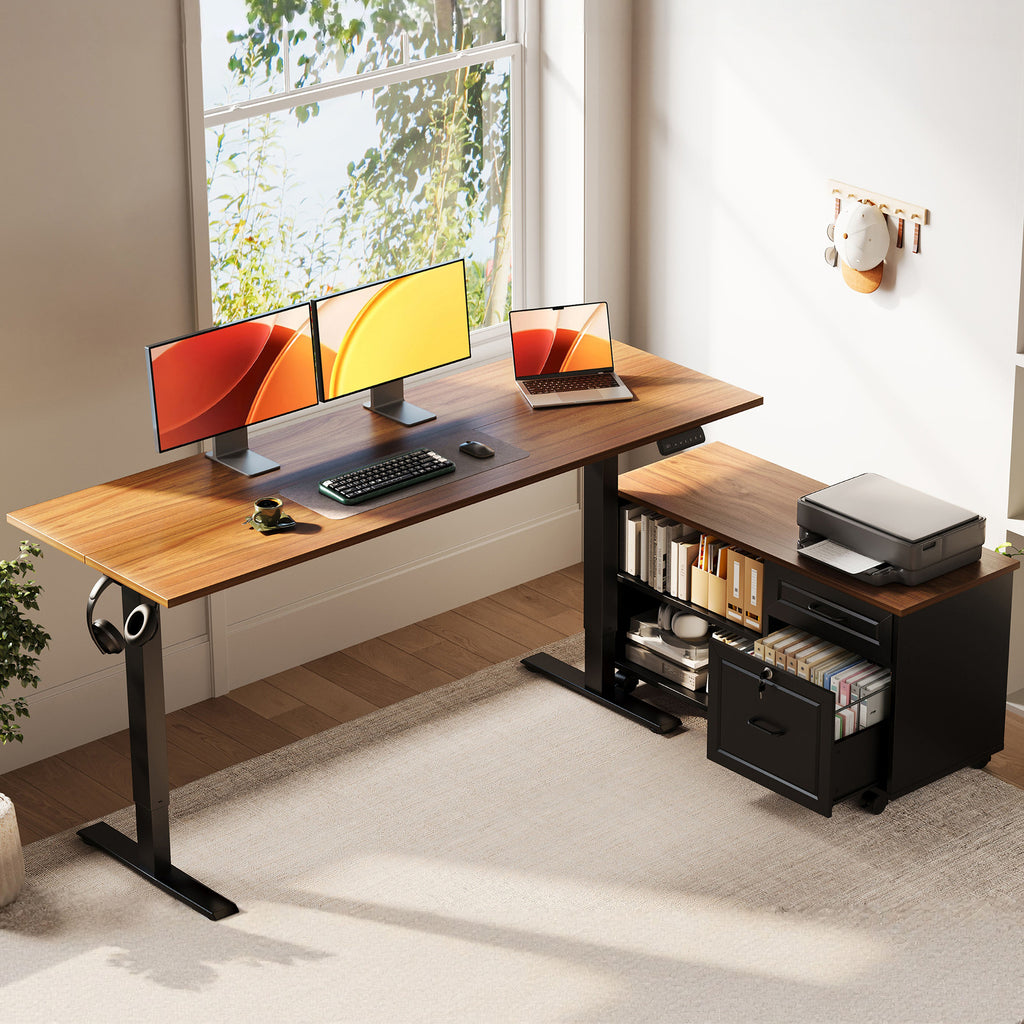
Remote work feels flexible until your desk starts creating small problems all day. Maybe the surface is too shallow for two monitors, the cables snag every time you raise the frame, or your paperwork keeps spilling into your keyboard area. Those little issues add up fast, and a bad desk choice can leave you with wasted floor space, more clutter, and a setup that never quite feels comfortable.
That is why remote workers usually compare more than motorized height alone when they look at adjustable desk brands. In the picks below, the shortlist is organized around real home-office needs such as layout, storage, ergonomics, and long-session usability. You will see where each brand tends to fit best, and where an integrated option like OffiGo can make more sense than a bare desk plus extra accessories.
Top adjustable desk brands worth comparing
1. OffiGo
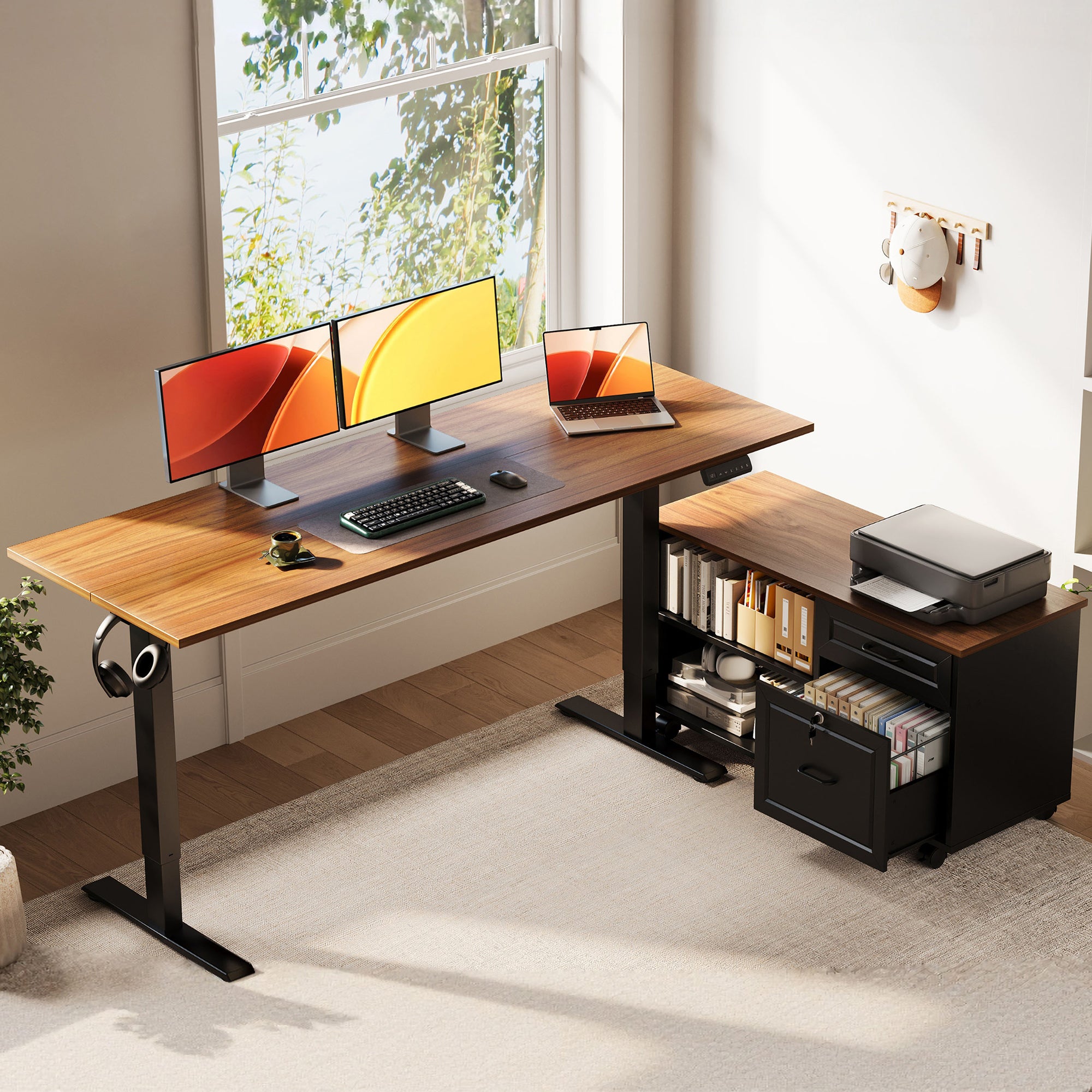
If your remote work setup includes paperwork, chargers, printers, and more than one task zone, OffiGo stands out because it treats the desk like the center of your workflow, not just a lifting frame. The brand focuses on electric standing desks with built-in utility, which is a strong fit for home offices where storage and cable control matter as much as posture.
Why it stands out
- OffiGo builds around integrated function, including drawers, file storage, keyboard trays, monitor risers, built-in outlets, and corner-friendly layouts.
- Its lineup clearly serves specific room types instead of forcing every buyer into one rectangular format.
- The brand is especially practical for remote workers who want fewer add-ons sitting around the room.
Best OffiGo fits
- The 55-inch L-shaped standing desk with movable file cabinet works well for document-heavy users who need storage close at hand.
- The 63-inch L-shaped electric standing desk with fabric drawers and built-in power outlets suits dual-monitor users who also want charging access and cable control.
- The 55-inch U-shaped electric standing desk with monitor stand and keyboard tray fits people who stay in one command-center style setup all day.
Key specs to check
- 55-inch L-shaped model: 28.4 to 47.2 inch height range, 55.1 x 23.6 inch desktop, plus a 39.4 x 15.8 x 18.7 inch movable filing cabinet.
- 63-inch L-shaped model: 29.9 to 46.1 inch height range, 47 x 21.2 inch main top, 31.5 x 15.8 inch side table, four fabric drawers, cable tray, built-in power, USB, and Type-C.
- 55-inch U-shaped model: about 28.4 to 46.5 inch height range, 55.1 x 29.1 inch footprint, 21.9 x 11.8 inch keyboard tray, monitor stand, built-in power and USB, plus LED lighting.
What to watch
- OffiGo’s integrated designs are best for people who want the desk to solve multiple workflow problems at once.
- If you prefer a very stripped-down aesthetic, some models may feel feature-heavy.
Shop: OffiGo adjustable standing desks
2. UPLIFT Desk
UPLIFT Desk remains a benchmark in the adjustable desk brands category because it gives you a large ecosystem to build around. If you care about picking frame types, desktop sizes, keyboard trays, monitor arms, file cabinets, and power accessories over time, this brand usually enters the conversation early.
Why it stands out
- UPLIFT is known for extensive accessory support and modular planning.
- Its government catalog highlights a long-running ergonomic office focus and a broad accessory range that includes keyboard trays, monitor arms, file cabinets, task lighting, and privacy solutions.
- The UPLIFT V2 Commercial desk in that catalog lists a 25.5 to 51.1 inch height range with a 1-inch desktop, which helps explain why taller and shorter users often keep it on their shortlist.
Best for
- Buyers who want to customize heavily over time.
- Users building a remote work desk in stages rather than buying an integrated system on day one.
- People who already know they want separate accessories and exact configuration control.
What to watch
- The flexibility is real, but many remote workers still need separate storage and cable pieces.
- Compared with OffiGo, UPLIFT often wins on accessory ecosystem depth, while OffiGo can feel simpler if you want built-in utility from the start.
3. FlexiSpot
FlexiSpot often appeals to practical upgraders who want a recognizable electric standing desk brand without overcomplicating the purchase. For someone moving from a fixed home office desk to a sit-stand setup, that straightforward path matters.
Why it stands out
- The brand covers mainstream sit-stand use cases well and is widely known in the category.
- Official FlexiSpot documentation for the E7 Pro frame shows a 25 to 50.6 inch height range, 43.3 to 74.8 inch adjustable width, and a 440 pound static load rating, which signals a performance-oriented frame platform.
- The same manual lists a 15-year warranty for the E7 series, which is one reason ergonomics-focused shoppers keep FlexiSpot in the mix.
Best for
- Buyers who want a familiar upgrade path into height-adjustable work.
- Users who care more about reliable movement than integrated furniture-style storage.
- Shoppers comparing common straight-desk options before moving into corner layouts.
What to watch
- FlexiSpot can be a practical generalist choice, but workflow-specific users may need extra accessories.
- If your main problem is clutter, side storage, or device charging, an integrated desk system may reduce add-on spending later.
4. Ergonofis
Ergonofis usually comes up when design quality matters almost as much as ergonomics. If your home office sits on camera during client calls, or you want your remote work desk to look like part of a refined interior, this brand has a clear appeal.
Why it stands out
- Ergonofis is strongly associated with design-forward solid wood desks and premium visual presentation.
- Its help center notes custom-sized standing desks for selected hardwood surfaces, which supports the brand’s premium, tailored positioning.
- The brand also states that some wobble can be expected at standing height, a refreshingly realistic note that adds credibility when comparing higher-end desks.
Best for
- Professionals building a polished office backdrop.
- Buyers who value finish, materials, and visual cohesion.
- Users willing to prioritize appearance and craftsmanship.
What to watch
- The aesthetic strength is real, but remote workers should still compare depth, cable handling, and storage.
- If your day includes printers, files, and charging stations, a cleaner-looking desk can still create workflow friction if the utility is too minimal.
5. Branch
Branch keeps the value conversation focused and easy to understand. Many remote workers mention it because the shopping process feels approachable, especially if you want a modern office look without diving into endless combinations.
Why it stands out
- Branch positions its Standing Desk around stability, broad height range, and simple decision-making.
- Its current product page lists a 26 to 52 inch lift range, 275 pound weight limit, four memory presets, low-decibel motors, and BIFMA commercial-use compliance.
- That makes it appealing for people who want a straightforward electric standing desk with clear specs.
Best for
- Buyers furnishing a home office quickly.
- Users who want a dependable middle-ground option.
- People who prefer a cleaner purchase path over deep modular planning.
What to watch
- Branch works well for many standard setups, but simpler desk plans can get tight once equipment starts spreading.
- Remote workers with corner rooms, paperwork, or multiple zones may outgrow a basic rectangle faster than expected.
6. iMovR
iMovR is often part of the conversation when the buyer starts with body fit rather than looks. That usually means height range, keyboard position, monitor placement, and stability matter more than visual style.
Why it stands out
- The brand has a strong ergonomics-first reputation in standing desk comparisons.
- It tends to attract shoppers who compare real usability details instead of just headline marketing.
- For shared desks, tall users, or shorter users, this fit-first mindset is often the smartest way to narrow adjustable desk brands.
Best for
- Ergonomics-led buyers.
- Shared home office setups.
- Users who need to verify usable height range before anything else.
What to watch
- Strong ergonomic positioning does not automatically solve layout or storage issues.
- If your room needs an L-shaped standing desk or a U-shaped standing desk to keep work zones separate, a straight desk brand may still leave gaps in your setup.
7. Vernalspace
Vernalspace deserves attention because some remote workers compare it when they want a newer-feeling alternative to legacy desk names. That can be useful if you are exploring feature bundles and trying to widen the shortlist before making a final call.
Why it stands out
- Emerging brands can package popular features in competitive ways.
- They often appeal to buyers comparing value, motorized adjustment, and general workspace features side by side.
- Vernalspace enters the conversation mainly as a practical comparison point rather than a default first pick.
Best for
- Shoppers building a wider shortlist.
- Buyers comparing newer brands against established options.
- Users who are still mapping out which features actually matter in daily use.
What to watch
- A good spec sheet is not enough if cable routing, storage, and desktop zoning are weak.
- Check whether the desk truly supports your monitor count, room footprint, and work duration before treating it as a final contender.
How to choose between adjustable desk brands
A good comparison starts with shape, not hype. Straight desks usually suit minimal setups, while an L-shaped standing desk makes more sense when you need one side for focused computer work and another for writing, printing, or admin tasks. A U-shaped standing desk works best when your desk acts like a cockpit and you want wraparound reach without adding side furniture.
According to OSHA, a desk should give you enough leg clearance, support proper placement of your keyboard and monitor, and reduce awkward postures. That is why height range alone is not enough. Surface depth, knee room, tray placement, and monitor distance all matter once the desk is actually in use.
Match the desk shape to your workflow map
- Choose a straight desk for a laptop-plus-monitor setup in a narrow room.
- Pick an L-shaped standing desk if you need split zones for calls, paperwork, or a second display.
- Consider a U-shaped standing desk if you stay planted at one workstation for long sessions and want gear within reach.
Check ergonomic fit before feature count
- Confirm the minimum and maximum desk height against your body size.
- Make sure the monitor can sit at least 20 inches away without pushing your keyboard into the edge of the desk.
- Leave enough space under the desk for your knees, especially if there are drawers or a cabinet.
Prioritize integrated function if clutter is your main problem
- Built-in drawers help remove chargers, notebooks, and cables from the work surface.
- Integrated outlets can reduce floor-level power strips.
- A cable tray matters more than it sounds if you raise and lower the desk many times each day.
Scenario guide for remote workers in USA
If you work in a small room, corner-friendly models usually give you more usable area than a wide rectangular desk. That is where OffiGo’s L-shaped products make practical sense, because they turn corner space into active workspace instead of dead floor area.
For dual-monitor setups, width and zoning matter more than almost anything else. The OffiGo 63-inch L-shaped model is a strong fit here because it combines a larger layout with drawers, a cable tray, and built-in power. By contrast, if your day involves multitasking across a primary screen, notes, and a charging station, the OffiGo 55-inch U-shaped model gives you a wraparound surface without demanding a huge executive office.
OSHA notes that keyboard placement should be considered together with the rest of the workstation, and that a keyboard tray can help when desk space is limited or armrests interfere with proper positioning. That is a useful reminder when comparing desks with or without trays, because the better choice depends on your chair height, monitor setup, and available surface depth.
Small troubleshooting section
Problem | Cause | Fix
| Problem | Likely cause | Fix |
|---|---|---|
| Desk feels awkward at standing height | Preset was saved before monitor and keyboard were positioned | Reset the memory height after your full setup is in place |
| Storage blocks leg comfort | Drawer or cabinet placement reduces knee clearance | Check seated knee space before buying integrated storage |
| Cables pull during movement | Not enough slack for full desk travel | Add extra cable slack and use a tray or clips |
| Keyboard feels too high | Desk height fits the monitor but not your arms | Recheck elbow angle and consider a keyboard tray |
OSHA’s workstation evaluation guidance says users should have opportunities to alternate between sitting and standing and vary tasks through the shift. That matters because even the best electric standing desk works poorly if you stay frozen in one posture all day. A good setup supports movement, but your presets, monitor height, and cable routing still need to be dialed in for that movement to feel easy.
Final takeaway for remote workers comparing standing desk brands
The best adjustable desk brands are not all solving the same problem. Some are strongest when you want deep customization, some lean into premium design, and others focus on straightforward sit-stand function. The smartest shortlist starts with your room shape, daily equipment load, and whether clutter is a minor annoyance or a constant drag on your workflow.
OffiGo has a clear point of view in this comparison because its products are built as desk systems, not just moving frames. If your remote work desk needs storage, charging, desktop zoning, and layout efficiency in one purchase, that approach is easy to justify. If you mainly want an open platform for accessories and future customization, brands like UPLIFT Desk or FlexiSpot may fit better.
Shop: OffiGo L-shaped standing desks
Shop: OffiGo U-shaped standing desks
FAQ
Which adjustable desk brand is best for remote workers with lots of equipment?
The best choice is usually a brand that offers built-in storage, charging access, and enough surface area for multiple work zones. If your setup includes dual monitors, paperwork, chargers, and a printer, integrated desk systems often work better than a simple rectangular frame. In practical terms, L-shaped and U-shaped options from OffiGo are easier to manage for gear-heavy workflows because they combine height adjustment with drawers, cabinets, or built-in power. Before buying, measure both your equipment footprint and your leg clearance so storage does not crowd your seated position.
Are L-shaped standing desks better than straight desks for home offices?
Yes, they are often better when your work naturally splits into two zones. An L-shaped standing desk lets you keep one side for your main screen and keyboard while using the other side for writing, calls, or documents. That setup is especially useful in corners, where a straight desk can waste floor space. However, if you only use a laptop and one monitor, a straight desk may still be the cleaner and simpler fit.
What matters more: desk aesthetics or built-in functionality?
Built-in functionality matters more if your desk has to support long work hours and real workflow demands. A beautiful desk still creates friction if it lacks enough depth, charging access, or storage for your daily tools. On the other hand, aesthetics do matter when your office appears on video calls or doubles as part of your living space. The best balance is a desk that meets your ergonomic needs first, then fits the look you want.
Is a U-shaped adjustable desk too large for most home offices?
No, not always, because size depends more on footprint design than on the label alone. A compact U-shaped standing desk around 55 inches wide can still fit a medium home office if it keeps your equipment consolidated and reduces the need for side furniture. It is most useful when you want a wraparound workflow with a monitor stand, keyboard tray, and charging points within reach. Still, you should map the room carefully and leave enough clearance for your chair movement and walking path.
How should remote workers compare standing desk brands without overspending?
Start by ranking your non-negotiables before you look at brand reputation. In most cases, those should be usable height range, desk shape, surface size, storage needs, and cable management. That helps you avoid paying extra for accessories or features that do not solve your actual work problems. A good rule is to compare total setup value, not just desk style, because a more integrated home office desk can reduce the need for separate drawers, power strips, and organizers.