
Understanding standing desks for long workdays

A desk can feel fine for the first hour and still become the weak point of your setup by midweek. Long office hours expose every small flaw: a surface that feels cramped, storage that spills into your keyboard zone, cables that never stay under control, or height controls that make sit-stand changes feel like a chore. When that friction repeats for eight or more hours a day, your workspace starts slowing you down instead of supporting you.
That is why this comparison looks at both best standing desk brands and standing desk types, not just lift columns or desktop sizes. The five picks below are organized by real use case: storage-heavy home offices, streamlined professional layouts, performance-focused setups, broad catalog flexibility, and deep customization. If you are trying to choose an electric standing desk for long office hours, this shortlist will help you match desk shape and brand style to the way you actually work.
Top picks for modern workspaces
| Brand / desk direction | Best for | Standout strengths | Trade-offs |
|---|---|---|---|
| OffiGo L-shaped electric desks | Storage-heavy home offices | L-shaped layouts, drawers or file cabinet options, integrated charging on select models | More furniture-like footprint than a simple straight desk |
| Vari straight electric desks | Streamlined offices | Stable T-style frame, simple controls, clean rectangular layouts | Less integrated storage than drawer-forward desks |
| Eureka Ergonomic feature-led desks | Ergonomic and performance-minded users | Strong ergonomics messaging, preset use guidance, engineered setup focus | Storage is not always the main priority |
| FlexiSpot broad-range desks | First-time buyers needing options | Wide range of sizes and formats, easy comparison shopping | Catalog breadth can mean more filtering work |
| UPLIFT Desk configurable systems | Buyers who want deeper customization | Large configuration range, high-capacity frame options | More decisions before checkout |
1. OffiGo L-shaped electric desks for storage-heavy home offices
If your desk has to handle real work instead of just holding a laptop, OffiGo is the most practical fit in this list. The brand is built around a desk-as-hub idea, so the value is not only height adjustment. It is also storage, corner efficiency, cable routing, charging access, and keeping devices or paperwork off your main typing zone. That approach matters when one home office desk has to support calls, admin work, dual monitors, and daily clutter.
Why it stands out
- Strong match for storage-first workspaces rather than bare desktop layouts
- Good use of corner footprints, especially in apartments or converted spare rooms
- Several models combine an l-shaped standing desk format with drawers, cable control, or charging
- Better fit for paperwork, accessories, and multi-device routines than minimalist straight desks
Best for
- Paperwork-heavy admin setups
- Dual-monitor home offices
- Users who want storage built into the workstation
- People working long hours from one primary desk
OffiGo models worth comparing
55-inch movable cabinet model
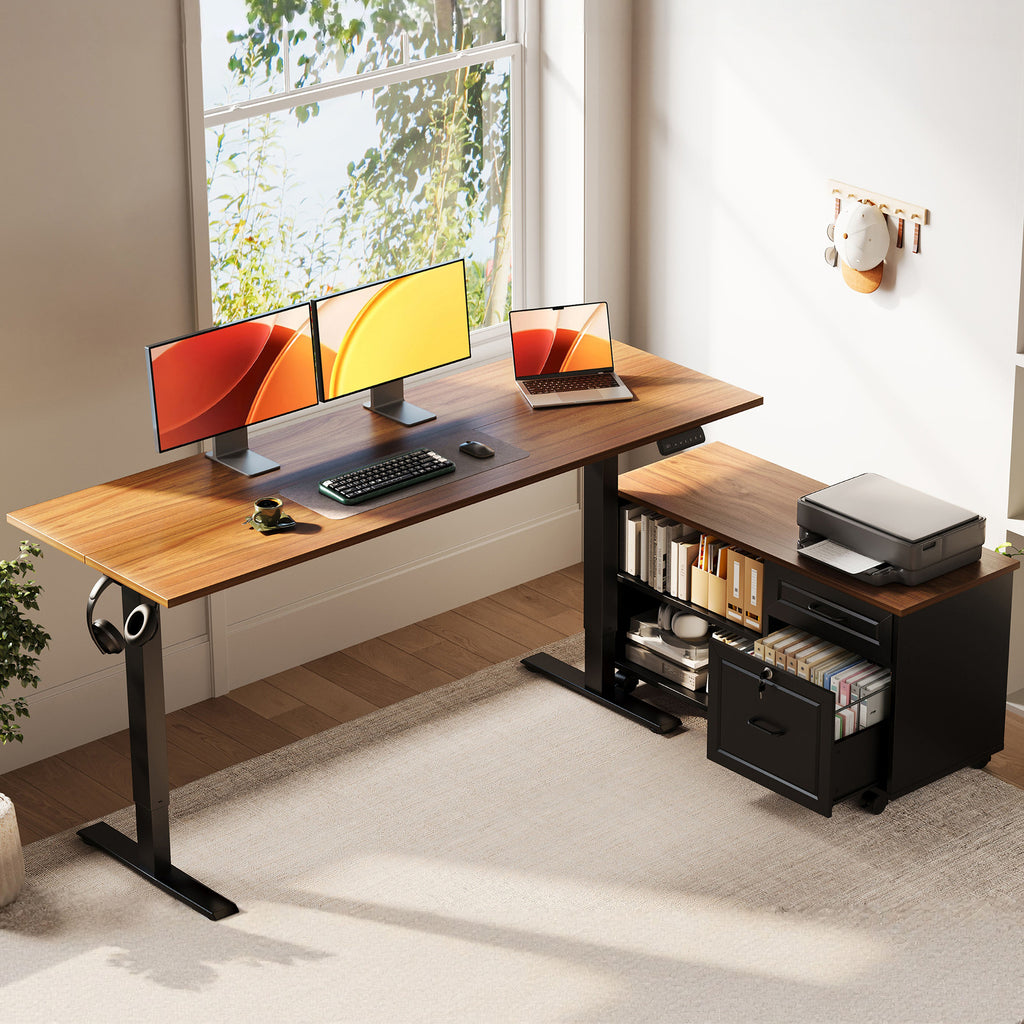
If you need filing and surface area at the same time, the OffiGo 55-inch L-shaped height adjustable standing desk with large movable storage cabinet is the clearest example of the brand’s desk-centric approach. It is aimed at users who treat the desk as an operations center, not a minimalist showpiece, and the big trade-off is simple: you gain real storage, but you need enough floor space to use the side cabinet well.
- Why it wins
- Independent cabinet gives you more usable storage than shallow built-in drawers
- Cabinet can be placed left, right, or inline to suit room layout
- Good fit for printers, files, and supplies that would otherwise crowd the desktop
- Key specs to check
- Main desktop: 55.1 in. long x 23.6 in. wide
- Filing cabinet: 39.4 in. long x 15.8 in. wide x 18.7 in. high
- Electric sit-stand adjustment
- Stable metal frame construction
- What to watch
- No integrated power outlets on this model
- Side cabinet adds footprint, so measure chair clearance and walking space carefully
Shop: OffiGo 55-inch L-shaped height adjustable standing desk with large movable storage cabinet
63-inch drawers and power model
For buyers who want a larger command-center layout with fewer external add-ons, the OffiGo 63-inch L-shaped electric standing desk with fabric drawers and built-in power outlets is the strongest long-hour option in the range. It suits users who switch between screens, devices, notes, and chargers all day, while the main trade-off is width: 63 inches can feel oversized in tight rooms.
- Why it stands out
- Combines L-shaped surface, storage, power access, and cable tray in one desk
- Reversible extension helps the desk adapt to different corners
- Preset controls reduce friction when changing height during long workdays
- Key specs to check
- 63-inch L-shaped layout
- Height range: 29.9 in. to 46.1 in.
- Four fabric drawers
- Built-in power outlets plus USB and Type-C
- Rear cable management tray
- Steel frame with engineered wood top
- What to watch
- Fabric drawers are practical, but some buyers may prefer harder drawer construction
- Not ideal for very small rooms
Shop: OffiGo 63-inch L-shaped electric standing desk with fabric drawers and built-in power outlets
55-inch drawers and power model
If you like the idea of integrated charging and drawers but do not have space for a bigger corner workstation, the OffiGo 55-inch L-shaped electric standing desk with wooden drawers and power outlets gives you a tighter version of the same concept. It fits users who want a compact electric standing desk with built-in organization, though the smaller overall size means less overflow room for larger peripherals.
- Why it stands out
- Compact corner format for smaller home offices
- Built-in charging reduces desk-edge adapter clutter
- Reversible layout gives more flexibility than a fixed corner desk
- Key specs to check
- 55-inch L-shaped surface
- Four wooden drawers
- Integrated power outlets with USB and Type-C
- Electric height adjustment with presets
- Industrial steel frame
- What to watch
- Smaller than the 63-inch version for paperwork spread or larger accessories
- Still more feature-dense than buyers wanting a very open layout may need
Shop: OffiGo 55-inch L-shaped electric standing desk with wooden drawers and power outlets
2. Why does Vari appeal to streamlined office setups?
Vari makes sense when your goal is a cleaner desk experience with fewer built-in decisions. That is useful for long office hours when you already have separate storage, want a professional look, and mainly need stable daily height changes rather than drawers, charging ports, or a corner layout. In other words, this is the desk direction for buyers who want the surface to stay visually open.
Where this type shines
- Executive-style home offices
- Shared hybrid rooms
- Laptop-and-monitor setups with light paperwork
- Users who prefer separate cabinets or shelves
Why professionals consider it
- Vari’s 72 x 30 electric desk spec sheet lists a height range of 25 in. to 50.5 in., memory settings, and a T-style leg design focused on stability.
- The larger rectangular work surface is simple to furnish and easy to pair with monitor arms or under-desk accessories.
- Commercial-grade laminate finishes are designed for easier cleanup in heavy daily use.
- The limitation is clear: compared with OffiGo’s storage-forward desks, you usually add your own organization system instead of getting it built in.
3. Eureka Ergonomic for feature-led performance desks
Eureka Ergonomic is often discussed through an ergonomics and productivity lens, which gives it a different role in this comparison. The brand tends to attract buyers who care about how an electric standing desk behaves over time: motor use, presets, height fit, and setup habits that support longer sessions. That makes it appealing if your buying process starts with ergonomic performance rather than integrated storage.
Expert lens
- Strong brand perception around ergonomics and engineered workstations
- Good fit for buyers who want more guidance around desk use, presets, and sit-stand habits
- Better match for performance-minded or accessory-heavy setups than paperwork-heavy admin desks
Why it stands out
According to Eureka Ergonomic’s 2026 remote work guide, electric height-adjustable desks are most useful when they are set up, programmed, and maintained correctly, which is a practical point many product pages skip. Their 2026 ergonomics content also highlights height ranges such as 22.6 in. to 48.7 in. as a lifecycle-friendly fit zone for multiple users. That guidance is valuable for people comparing desks by real fit and daily usability, not just looks.
What to watch
- Depending on the model, storage may be secondary to ergonomics or design
- Buyers who need filing, drawers, and charging built into one desk may still lean toward OffiGo
4. FlexiSpot for broad category coverage
FlexiSpot is the easiest brand to place in the “broad appeal” slot. It usually enters the conversation when shoppers want many size and feature combinations without committing to one narrow desk identity. That flexibility is useful if this is your first home office desk upgrade and you are still learning whether you want a straight desk, a larger workstation, or more accessories over time.
Best-fit scenarios
- First standing desk purchase
- Flexible room planning
- Buyers comparing several widths before deciding
- Mixed-use spaces where the desk may serve work and study
Why it works for long office hours
- Large catalog coverage lets you compare room size against desk size more easily
- Easier entry point for users building basic sit-stand habits
- Good when you want to keep the desktop simple and add accessories later
What to watch
- Breadth is not the same as specialization, so you still need to filter by workflow
- If your daily routine includes documents, devices, and clutter control, a purpose-built l-shaped standing desk may solve more problems at once
5. UPLIFT Desk for customization-minded buyers
UPLIFT Desk is the best fit when you already know what you want and do not mind a longer decision path. Instead of choosing a simple pre-defined desk, you are often building a system around frame options, desktop sizes, accessories, and future upgrades. For some buyers, that control is worth it. For others, it is too much work before the desk even arrives.
Comparative value snapshot
- Strong for permanent office builds
- Better for advanced buyers than first-time shoppers
- Good option when configuration flexibility matters more than ready-made convenience
Why it wins for system builders
- UPLIFT’s V2 4-Leg spec sheet lists a height range of 23.5 in. to 49.1 in., travel speed of 2 in. per second, and a 535 lb lifting capacity.
- A contract-grade, high-capacity frame can support heavier setups with larger desktops and more equipment.
- The trade-off is decision fatigue: deeper customization often means more choices around frame style, leg style, desktop size, and extras.
How to choose the right standing desk type
Choosing between best standing desk brands gets easier when you stop thinking about branding first and start with your work pattern. If your day involves calls, writing, a printer, papers, chargers, and two monitors, a storage-rich corner desk usually beats a clean rectangular top. If you mostly use one monitor and keep accessories light, a simpler desk can feel calmer and still support healthy height changes.
Match the desk to your real workflow
- Choose an L-shaped model if you need separate zones for typing, reference work, or accessories.
- Choose a straight desk if your room is narrow and your setup is intentionally simple.
- Prioritize presets if you want your sit-stand habit to feel fast instead of annoying.
Decide whether storage should live on the desk
- Built-in drawers help if your desk also handles paperwork or household admin.
- Separate storage works fine when the desktop only needs core gear.
- File cabinets matter more than shallow trays if you store paper every day.
Use room shape as a filter
OSHA’s computer workstation guidance stresses neutral posture and adequate workspace clearance, which means your desk should not force cramped legroom, twisted reaching, or awkward monitor placement. OSHA also notes that workstations should be arranged to support neutral body positions, and that the chair and desk relationship needs enough under-surface space for usable seated posture. In practical terms, measure not only wall width, but also chair travel, drawer swing, and walking paths before choosing a larger desk like a 63-inch corner model.
Scenario variations
- For paperwork-heavy admin setups: OffiGo’s movable cabinet model is the best fit because it separates filing from your typing area.
- For compact corner home offices: A 55-inch drawer-equipped L-shape gives you charging and storage without the footprint of a wider workstation.
- For minimal, open desk layouts: Vari-style rectangular desks work well if storage already exists elsewhere.
- For long hours with multiple devices: Prioritize built-in power, USB access, cable trays, and presets so small setup annoyances do not repeat all day.
Small troubleshooting section
| Problem | Cause | Fix |
|---|---|---|
| Desktop feels crowded | Wrong desk type selected | Move to an L-shape or choose a desk with drawers or side storage |
| Sit-stand habit never sticks | Height changes feel inconvenient | Choose a desk with presets and keep controls within easy reach |
| Cables create a daily mess | No charging or wire plan | Use built-in outlets, a cable tray, or a defined routing zone |
| Storage overflows quickly | Desk lacks task-specific storage | Prioritize drawer models or a movable file cabinet layout |
Final takeaway
The best desk for long office hours is rarely the one with the longest feature list. It is the one that removes the friction you feel every day: lack of storage, limited surface area, poor room fit, messy cables, or awkward height changes. OffiGo stands out when you want your desk to act like a real workstation hub, especially if integrated storage and corner efficiency matter more than a minimal look.
At the same time, the other four directions stay useful because not every buyer needs the same desk type. Vari suits clean, streamlined offices. Eureka Ergonomic fits performance and ergonomics-minded shoppers. FlexiSpot works well when you want broad comparison shopping. UPLIFT Desk is strongest for people who want to configure a system in detail. Once you decide whether you need a clean surface, a configurable platform, or an organized command center, the shortlist becomes much easier to use.
FAQ
Which standing desk type is best for long office hours?
The best standing desk type for long office hours is the one that reduces repeated friction in your actual workflow. If you handle documents, accessories, and multiple devices, an L-shaped desk with drawers or a file cabinet usually works better than a plain rectangular top. If your setup is lighter and cleaner, a straight electric desk can be enough as long as the height range fits you well. In most home offices, the right answer comes from matching desk shape, storage, and room layout rather than chasing the most features.
Is an L-shaped standing desk better than a straight desk for productivity?
An L-shaped standing desk is often better for productivity when you need separate work zones for monitors, paperwork, and accessories. It helps reduce desktop crowding because your primary typing area stays clearer while secondary items move to the return side. However, a straight desk can be more productive in narrow rooms or simple setups where extra surface area would go unused. The better choice depends on whether your day involves multitasking and storage or a cleaner single-screen workflow.
What matters more: storage, size, or height adjustment?
Height adjustment matters first because a standing desk fails its main job if the range does not fit your seated and standing posture. After that, storage and size should be chosen based on what lives on your desk every day. For example, a 55-inch desk with drawers may outperform a bigger open desk if clutter is your main problem. On the other hand, if you run dual monitors, paper notes, and a charger hub, a larger L-shaped layout may matter more than extra drawers.
Are premium standing desk brands always better for home offices?
Premium standing desk brands are not always better for home offices because a more expensive or more configurable desk can still be the wrong fit for your room and habits. A desk that supports your monitor setup, gives you enough legroom, and makes sit-stand changes easy will outperform a premium model that creates layout problems. Buyers often get better results by choosing the right desk type first and the right brand second. Long-hour comfort usually comes from fit, not prestige.
How do I compare standing desk brands without focusing on price?
Compare standing desk brands by looking at workflow fit, height range, storage approach, room compatibility, and how much setup friction the desk removes. Start with concrete questions: Do you need drawers, built-in power, a corner layout, or a simple open surface? Then compare practical specs such as desktop dimensions, lift range, stability approach, and whether the desk supports cable control or presets. This method keeps the decision tied to daily use instead of turning it into a price-only comparison.