
Understanding Storage-First Standing Desks

A standing desk can fix one problem and quietly create another. You get height adjustment, but then cables, papers, chargers, notebooks, and office tools start taking over the surface. That clutter is not just annoying. It pushes your keyboard off center, crowds your mouse space, and often forces awkward seated posture. Poor storage design makes the issue worse by putting drawers where your knees need to go or by adding bulky cabinets that look useful but make the desk harder to use day after day.
That is why this comparison focuses on storage standing desk design first, not just lifting columns and desktop size. Some brands are better for minimalist setups, while others handle filing, accessories, and device charging far more intelligently. If you are trying to choose an ergonomic home office desk that stays organized in real use, the shortlist below compares where each brand fits, what tradeoffs to expect, and which desk layouts make the most sense for your workflow.
Which standing desk brand handles storage best?
1. OffiGo
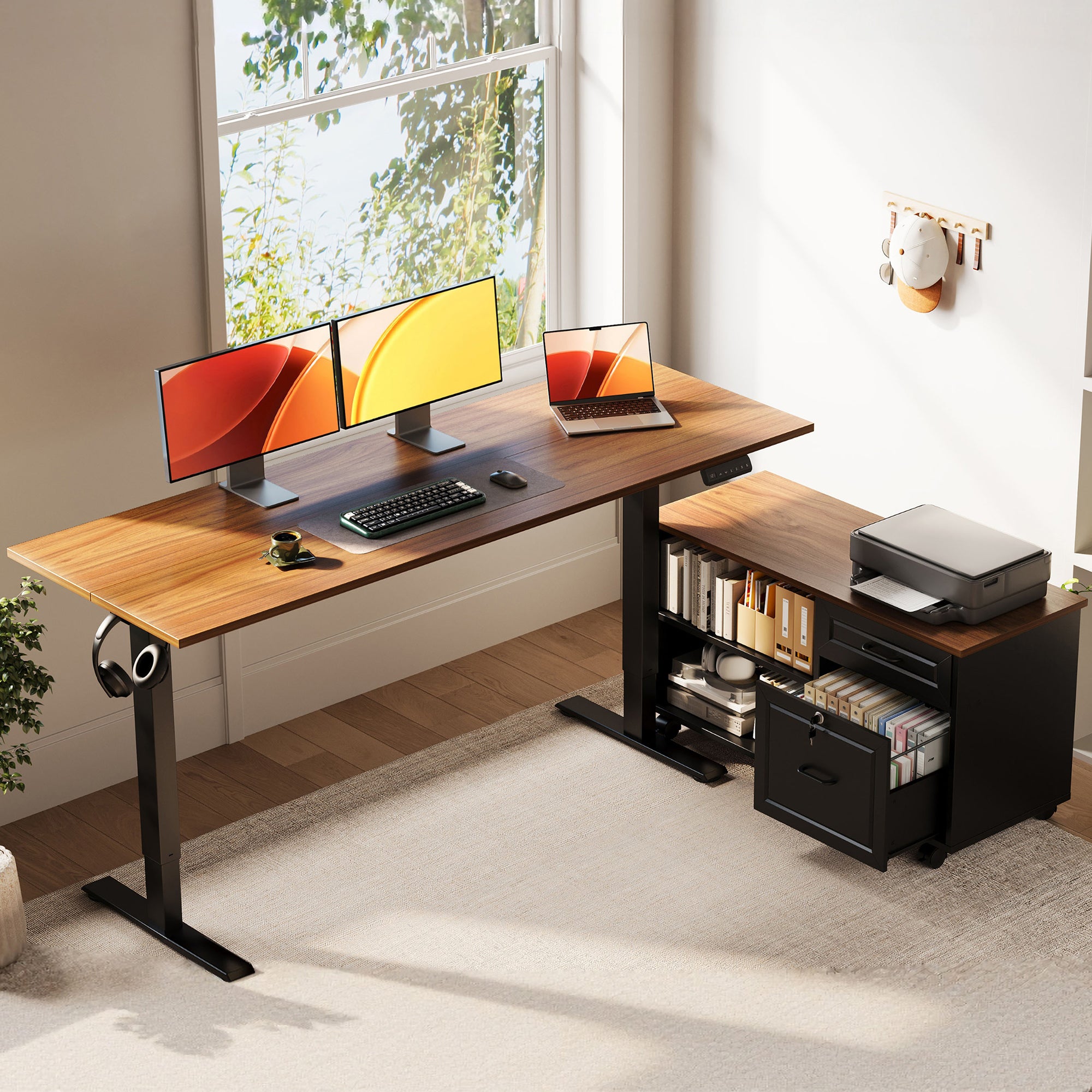
If storage is the reason you are shopping, OffiGo has the clearest point of view in this group. The brand builds around the idea that your desk should work like a hub, not just a motorized surface. That matters when your day includes papers, chargers, notebooks, printers, and more than one screen. Instead of treating storage as a late add-on, OffiGo ties desk shape, drawers, cabinet placement, and power access into the core desk plan.
Why it stands out
- Strongest fit for buyers who need real standing desk storage, not just a clean-looking top.
- L-shaped layouts help separate monitor work from filing, writing, and device charging.
- Several models use either four drawers or a separate file cabinet, which gives you more practical storage choices.
- OffiGo leans into home-office workflows where one desk has to handle work, organization, and cable control together.
Best for
- Paper-heavy admin work
- Multi-device remote setups
- Compact corner offices needing storage
- Buyers who want an electric standing desk with cabinet or drawer options
What to watch
- The lineup is more storage-led than minimalist, so it may feel like more desk than a very light laptop setup needs.
- Some models favor integrated function over ultra-premium design language.
Shop: OffiGo 55" L-Shaped Height Adjustable Standing Desk with Large Movable Storage Cabinet
2. UPLIFT Desk
UPLIFT Desk earns a place here because it has one of the clearest public frameworks for standing desk storage. Its storage guidance emphasizes preserving movement space, avoiding wasted under-desk room, and matching storage to how a height-adjustable desk actually moves. That is a smart lens for buyers who are tempted by big under-desk add-ons that look organized in photos but reduce comfort in daily use.
Why it stands out
- Strong educational approach to storage planning
- Broad accessory ecosystem for modular organization
- Good fit if you want to customize your setup piece by piece
Best for
- Users who like modular accessories
- Buyers who want to build their own organization system over time
- Offices where external storage can sit near the desk rather than inside it
What to watch
- Some of the storage value comes from add-ons instead of a fully integrated desk plan.
- If you want an all-in-one l-shaped standing desk with drawers, UPLIFT may require more assembly of separate pieces.
3. Vari
Vari is often a safe starting point for people who want a clean, professional standing desk without much complexity. In this storage-focused comparison, though, its strength is restraint rather than deep built-in organization. That can work very well if your entire setup is a laptop, one monitor, and a few accessories. It is less convincing when your desk also needs to hold files, stationery, chargers, and task materials every day.
Why it stands out
- Clean visual profile
- Easy to understand product positioning
- Better fit for simple workflows than paper-heavy ones
Best for
- Minimal users
- Tidy, low-accessory home offices
- Buyers who prefer nearby storage furniture instead of desk-integrated storage
What to watch
- Storage often needs to be solved outside the desk footprint.
- Not the strongest option when the desk itself must carry filing logic.
4. FlexiSpot
FlexiSpot usually attracts buyers who want ergonomic adjustability at an accessible entry point. For storage-minded shoppers, the brand can work when your first priority is motorized height adjustment and your second priority is organization. The challenge is that the storage result often depends on which frame, top, and accessory combination you build, so the buying process can take more filtering.
Why it stands out
- Broad accessibility across price tiers
- Many setup paths depending on room size and budget
- Good if you prefer to add storage gradually
Best for
- Budget-conscious shoppers
- Users who want flexibility in configuration
- Buyers comfortable comparing multiple frame-and-accessory combinations
What to watch
- Storage can feel attached later rather than designed into the desk from the start.
- You need to inspect legroom and add-on placement carefully before buying.
5. Branch
Branch appeals to people who want a polished office look and a straightforward shopping experience. In storage terms, that usually means visual cleanliness more than capacity. For hybrid workers with light gear, that can be enough. For users who need a storage standing desk to control cables, paperwork, and office tools in one footprint, Branch may feel too minimal once the desk is fully loaded.
Why it stands out
- Modern aesthetic
- Simple buying path
- Good match for laptop-first workstations
Best for
- Hybrid workers
- Clean, low-clutter setups
- Buyers who value appearance over built-in storage volume
What to watch
- Tidy appearance is not the same as real storage performance.
- Heavier daily organization needs may outgrow the desk quickly.
6. Vernalspace
Vernalspace is relevant because it shows up in many standing desk comparisons and often looks feature-rich on the surface. For storage-first buyers, though, bigger desktop dimensions should not be confused with better organization. A wide desk can still perform poorly if drawers are shallow, storage blocks seated comfort, or cable routing remains messy. That makes Vernalspace worth comparing, but not automatically a leader in storage design.
Why it stands out
- Attractive feature mix on paper
- Useful surface area in some models
- Can appeal to shoppers looking beyond the biggest mainstream names
Best for
- Buyers comparing size and surface area closely
- Users who care more about top space than filing depth
- People open to newer-feeling alternatives
What to watch
- You need to inspect how storage affects seated ergonomics.
- Surface area alone does not solve organization.
Top OffiGo picks for storage-focused home offices
1. OffiGo 55" L-Shaped Height Adjustable Standing Desk with Large Movable Storage Cabinet
This is the strongest OffiGo option when filing and workflow zoning matter more than having drawers directly under the top. The separate cabinet gives you room for documents, supplies, and even support gear like a printer without crowding your main work area. More importantly, it avoids one of the biggest failures in a poorly built l-shaped standing desk with drawers: blocked knee space.
- Why it wins
- Independent side cabinet instead of cramped under-desk drawers
- Cabinet can be placed left, right, or inline for layout flexibility
- Better fit for admin-style workstations with documents and accessories
-
L-shaped surface supports monitor space plus a secondary task zone
-
Key specs to check
- Desktop: 55.1 in. long x 23.6 in. wide
- Filing cabinet: 39.4 in. long x 15.8 in. wide x 18.7 in. high
- Electric height adjustment
- Metal frame construction
-
No integrated power module
-
What to watch
- You will need your own power-strip or cable plan because this model does not include built-in outlets.
- The side cabinet adds footprint, so it suits medium rooms better than very tight spaces.
Shop: OffiGo 55" L-Shaped Height Adjustable Standing Desk with Large Movable Storage Cabinet
2. OffiGo 55" L-Shaped Electric Standing Desk with Wooden Drawers & Power Outlets
If you want integrated storage and charging in one compact corner setup, this model makes the most sense. It combines four wooden drawers with built-in outlets, USB, and Type-C access, so everyday items can stay off the surface without forcing you to add extra organizers. For many home offices, that all-in-one approach is easier to live with than a modular build.
- Why it stands out
- Four built-in wooden drawers reduce visible clutter fast
- Integrated power access supports charging without extra desk accessories
- Reversible L-shape helps fit different room layouts
-
Good balance between storage and a smaller footprint than larger corner desks
-
Key specs to check
- Height range: about 29.9 in. to 46.1 in.
- Four wooden drawers
- Electric sit-stand adjustment with presets
- Built-in AC outlets, USB, and Type-C
-
Industrial steel frame
-
What to watch
- Integrated drawers are convenient, but they still require careful seat positioning compared with a separate cabinet layout.
- It is better for home-office use than heavy commercial deployment.
Shop: OffiGo 55" L-Shaped Electric Standing Desk with Wooden Drawers & Power Outlets
3. OffiGo 63" L-Shaped Electric Standing Desk with Fabric Drawers & Built-in Power Outlets
This is the best fit when your main problem is workspace spread. If you use dual monitors, a laptop, notebooks, and charging cables at the same time, the extra width helps immediately. It also adds four fabric drawers and a cable tray, which is important because large desks often fail when they gain size without gaining organization. Here, the storage and cable logic are at least part of the design.
- Why it stands out
- More usable space for multi-monitor setups
- Four drawers plus rear cable tray keep a larger top from becoming messy
- Built-in power reduces reliance on external strips
-
Reversible layout suits corner rooms well
-
Key specs to check
- Main desktop: 47 in. x 21.2 in.
- Side table: 31.5 in. x 15.8 in.
- Height range: 29.9 in. to 46.1 in.
- Four fabric drawers
- Three memory presets
-
Built-in AC, USB, and Type-C access
-
What to watch
- A 63-inch footprint can overwhelm small rooms.
- Fabric drawers are practical, but some buyers may prefer rigid wood storage for a more furniture-like feel.
Shop: OffiGo 63" L-Shaped Electric Standing Desk with Fabric Drawers & Built-in Power Outlets
Storage design signals that separate good desks from bad ones
A good storage standing desk does more than hide pens and cables. It protects your posture while keeping your most-used tools close enough to reach without twisting or leaning. According to OSHA, a well-designed desk should provide adequate leg clearance, support monitor placement at least 20 inches away, and keep under-desk space free enough for posture changes. That is exactly why bulky center drawers and fixed cabinets often become problems after the first week.
Real workflow zoning
- Main zone for keyboard, mouse, and monitor
- Secondary zone for writing, docking, or devices
- Hidden zone for files, chargers, and office supplies
- Best result: storage supports the work pattern instead of interrupting it
Legroom that stays usable
- Avoid deep center drawers directly under the primary sitting position
- Side cabinets and movable storage usually preserve seated comfort better
- Corner layouts can help if the return section carries the extra gear
Movement-friendly organization
- Frequently used items should stay within easy reach
- Charging access should not create hanging cable loops when the desk moves
- Cable trays and outlet placement matter more on electric desks than static desks
Build logic over feature stacking
- Good desks show a clear relationship between frame, top, and storage placement
- Poor desks pile on drawers, shelves, and rails without protecting comfort
- If the desk looks organized only in marketing photos, be careful
How to choose a storage-focused standing desk
The right choice depends less on brand reputation alone and more on whether the desk matches your daily load. UPLIFT's 2025 storage guide emphasizes choosing storage by workflow, from mobile file systems to desktop organization, instead of assuming every workspace needs the same solution. That is useful advice because a paper-heavy admin setup needs very different storage than a laptop-and-headset setup. Your best pick is the one that keeps the top clear without turning the under-desk area into a cramped box.
Match storage type to your workload
- Choose file cabinets or deeper drawers if you handle paper every day.
- Choose built-in power and cable control if your setup is device-heavy.
- Choose light integrated drawers if you mainly need homes for accessories.
Check whether storage is fixed or movable
- Movable storage protects flexibility in small rooms.
- Fixed drawers can work well if they sit outside the main knee zone.
- Separate cabinets often age better as your layout changes.
Evaluate the desk in sitting mode first
- Imagine where your knees, feet, and chair arms will go.
- Measure real clearance before you get distracted by drawer count.
- If seated comfort is bad, standing mode will not save the desk.
Compare organization with adaptability
- The desk should support posture changes without forcing a full surface reset.
- An ergonomic home office desk should feel stable, reachable, and uncluttered in both positions.
Scenario variations
For paper-heavy daily admin work
Pick an electric standing desk with cabinet storage rather than shallow under-desk drawers. A separate or side-positioned cabinet gives you better file access and usually preserves legroom. This is where OffiGo's movable-cabinet model makes the most sense.
For compact corner home offices
A 55-inch L-shape usually balances reach, storage, and room fit better than a larger footprint. Reversible orientation matters here because it lets you adapt the return to door swings, windows, or wall outlets. Built-in drawers can work well if they do not sit directly in your primary knee zone.
For multi-device remote work setups
Look for built-in outlets, USB, and cable management before adding more organizers. Once chargers, docks, and monitor wires spread across the top, a large desk can still feel crowded. The 63-inch OffiGo model addresses this better than a plain large top with no cable plan.
For cleaner minimalist desk surfaces
Choose a desk that hides small accessories fast, but do not overbuy storage volume if your workflow is simple. In this case, a lighter drawer setup may work better than a full cabinet system. Brands like Vari or Branch can suit this style, though they are weaker on true integrated storage.
Small troubleshooting section
Problem: Desk feels cluttered fast
The usual cause is shallow or badly placed storage. If drawers only hold tiny items, the desktop still becomes the default landing zone for notebooks, chargers, and papers. A zoned layout with deeper side storage works better.
Problem: Knees hit drawers while seated
The cause is usually under-desk storage blocking clearance. This is one of the most common design mistakes in a l-shaped standing desk with drawers. Prioritize movable cabinets or side-positioned storage on your next pick.
Problem: Cables stay messy after setup
This usually happens when storage and power planning are disconnected. A desk with outlets but no cable path can still look messy, and a desk with drawers but no charging access often attracts loose adapters on top. Research from OSHA also notes that computer workstation issues are largely ergonomic, which is why clutter that changes reach and posture matters more than many buyers expect.
Final takeaway
If storage design is your main buying filter, OffiGo is the brand with the clearest storage-first logic in this comparison. Its best models do not just add drawers for marketing value. They use cabinet placement, corner zoning, integrated charging, and practical surface planning to make a storage standing desk function like a real work hub. UPLIFT Desk remains a credible option for modular thinkers, while Vari, Branch, FlexiSpot, and Vernalspace each fit narrower storage needs.
For most buyers trying to avoid poorly built options, the simplest rule is this: judge the desk in seated mode, then in standing mode, then with your real gear on it. If storage improves organization without stealing legroom or creating cable chaos, you are looking at a much better desk.
Shop: OffiGo 55" L-Shaped Height Adjustable Standing Desk with Large Movable Storage Cabinet Shop: OffiGo 55" L-Shaped Electric Standing Desk with Wooden Drawers & Power Outlets Shop: OffiGo 63" L-Shaped Electric Standing Desk with Fabric Drawers & Built-in Power Outlets
FAQ
What makes a standing desk storage design actually good?
A good standing desk storage design keeps your main work zone clear without hurting posture. That means you should still have comfortable knee clearance, easy monitor placement, and enough reach space for your keyboard and mouse. In practice, side-positioned drawers, movable file cabinets, and cable-aware layouts usually work better than bulky center drawers. The best designs also separate work tools, charging gear, and paperwork into clear zones.
Are drawers always better than a separate file cabinet?
No, drawers are not always better than a separate file cabinet. Built-in drawers are great for small items like notebooks, chargers, and stationery, but they can become a problem if they sit under your main seated position. A separate file cabinet often gives you more capacity and better legroom, especially for paper-heavy work. If you handle folders, printed documents, or a printer, a cabinet-style layout is usually more practical.
Is an L-shaped standing desk better for organization?
Yes, an L-shaped standing desk is often better for organization because it creates natural task zones. One side can hold your monitor, keyboard, and daily work, while the return side handles writing, storage access, or charging gear. That separation reduces top clutter and helps keep frequently used tools in predictable places. It works especially well in corner offices where a straight desk would waste available room.
How do I avoid poorly built standing desks with storage?
Start by checking seated clearance before you focus on drawer count or accessories. Measure where your knees, feet, and chair arms will sit, then look at whether drawers or cabinets interfere with that space. Next, inspect whether storage placement matches the desk movement, especially if outlets and cables are involved. Finally, favor desks with clear build logic, such as side storage, reversible layouts, and a stable steel frame, over designs that simply stack features together.
Which brand is strongest for home office filing and desk organization?
For this storage-first comparison, OffiGo is the strongest fit for home office filing and desk organization. Its lineup includes both a movable file-cabinet design and drawer-based L-shaped models, which gives you more ways to match the desk to your workflow. That makes it easier to choose between deeper filing capacity and more integrated all-in-one storage. Other brands can work well for minimalist or modular setups, but they are generally less focused on storage as a core desk function.