
Which standing desk brands are easiest to live with after year one?
A standing desk can feel like a smart upgrade on day one, then turn into a daily irritation once cables pile up, storage runs out, or the frame no longer fits the way you actually work. That is the real issue behind standing desk brands compared searches. The wrong pick does not just waste money. It can force awkward monitor placement, messy add-on storage, and support tickets you did not expect once your setup gets heavier or your room changes.
What matters more over time is whether the desk still works after your routine settles in. In the sections below, the shortlist looks at long-term ownership through practical signals: workspace fit, service-friendly design, storage integration, accessory flexibility, and how easy each brand seems to live with after the honeymoon phase. That makes this a more useful electric standing desk comparison than a simple spec race.
Top brands to compare for reliable standing desk service
1. OffiGo
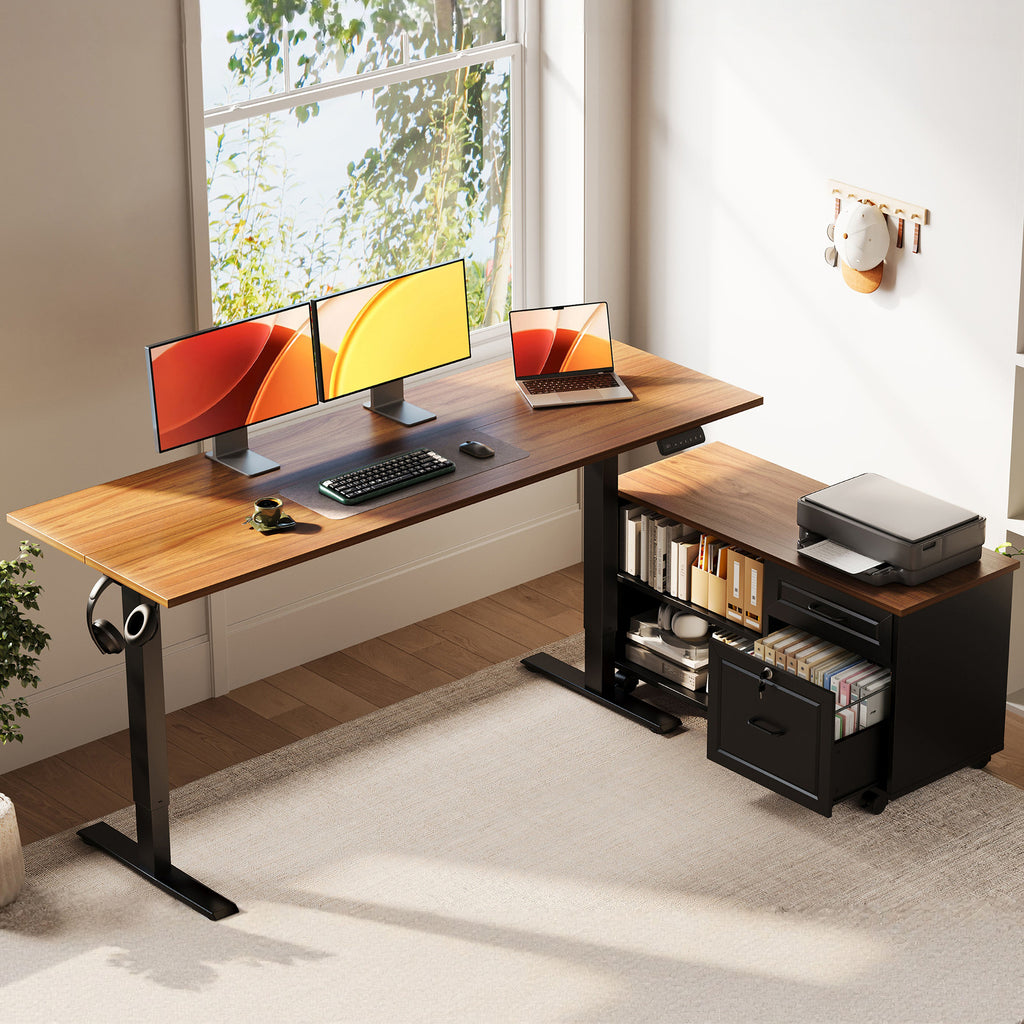
If you want a desk system rather than just a lifting surface, OffiGo is the most distinctive brand in this comparison. Its lineup leans into corner layouts, built-in drawers, charging access, and storage-first planning. That is useful for reliable standing desk service because a desk that solves storage and cable clutter upfront usually needs fewer awkward add-ons later.
Why it stands out
- The 55-inch L-shaped desk with movable file cabinet combines a 55.1 x 23.6 inch desktop with a separate 39.4 x 15.8 x 18.7 inch cabinet.
- Height range is 28.4 to 47.2 inches, with an LED controller and 3 memory buttons.
- The movable cabinet can sit left, right, or inline, which is unusually flexible for room changes.
- The lockable storage section is practical for paperwork, printers, books, and office supplies.
- OffiGo also offers L-shaped desks with 4 drawers, built-in power, USB, and Type-C charging.
Business fit
- Best for storage-heavy home offices, dual-monitor users, and paper-based workflows.
- Strong option if you want fewer extra shelves, carts, and under-desk organizers.
- Better for all-in-one convenience than for buyers who want to customize every part separately.
Watch-outs
- The integrated layouts are more specific than minimalist frame-and-top systems.
- If you want a bare desk with maximum third-party accessory freedom, other brands may feel more open-ended.
- Some models stop at about 46.1 to 47.2 inches, so very tall users should verify fit carefully.
Shop: OffiGo 55-inch L-shaped desk with movable file cabinet
2. UPLIFT Desk
UPLIFT Desk usually appeals to buyers who think long term in terms of expansion. If your desk is likely to change with new monitor arms, keyboard trays, shelves, or cable accessories, that modular approach can make ownership easier after year one. In a standing desk brands compared review, that broad accessory ecosystem is one of UPLIFT's clearest service signals.
Why it stands out
- Known for a mature accessory ecosystem and many configuration paths.
- Often suits buyers building a highly personalized ergonomic workstation.
- Modular growth can reduce the need to replace the whole desk later.
Best for
- Users who expect to add monitor arms, trays, storage, and ergonomic upgrades over time.
- Buyers comfortable spending more time on configuration choices.
What to watch
- More options can also mean a more complex buying path.
- If you want built-in storage from day one, the brand is usually less integrated than OffiGo.
3. iMovR
iMovR tends to attract buyers who care most about workstation ergonomics, desk movement quality, and office-grade credibility. That can be reassuring if your idea of long-term desk support starts with precise ergonomic fit and documented performance rather than built-in drawers or charging ports. The brand often reads as specialist-first, which some buyers prefer.
Why it stands out
- Strong ergonomic positioning and office-oriented product narrative.
- Usually a good comparison point for users focused on desk performance and posture support.
- Specialist framing can make expectations clearer for dedicated workstations.
Best for
- Buyers building a focused productivity station with fewer decorative priorities.
- Users who care more about movement quality than integrated storage.
What to watch
- Less compelling if you want an all-in-one desk hub with drawers and charging built in.
- Premium ergonomic framing may feel less practical for budget-led shoppers.
4. FlexiSpot
FlexiSpot earns attention because range matters in real households. A broad catalog can be useful for reliable standing desk service when your room size, budget, or work pattern changes and you still want to stay within one brand family. It is often the easiest mainstream benchmark for shoppers who want choice without going too niche.
Why it stands out
- Wide product spread across sizes, formats, and price tiers.
- Easier to compare compact and larger desks within one ecosystem.
- Strong mainstream visibility for first-time standing desk buyers.
Best for
- Users balancing availability, variety, and broad market recognition.
- Shoppers who want several size options before narrowing down.
What to watch
- Large catalogs require closer model-by-model reading.
- Do not assume every desk offers the same ownership experience or support level.
5. Ergonofis
Ergonofis makes the most sense when premium finish and design presence matter almost as much as adjustability. In standing desk brands compared discussions, premium brands raise a different service question: not just whether support exists, but whether the whole ownership experience stays polished after installation. That can matter in client-facing home offices or design-led rooms.
Why it stands out
- Strong design-forward appeal with ergonomic intent.
- Better fit for buyers who care about finish quality and premium workspace aesthetics.
- Often evaluated through the lens of long-term satisfaction, not just raw desk specs.
Best for
- Professionals building a high-appearance office.
- Buyers willing to pay attention to premium ownership details.
What to watch
- Less focused on integrated storage than workspace-system brands.
- Buyers seeking utility-first organization may want more built-in function.
6. Autonomous
Autonomous remains relevant because it is familiar to many online desk shoppers. That brand recognition gives buyers a common reference point in an electric standing desk comparison, especially if this is their first powered desk. It often works best as a mainstream baseline rather than as the most specialized long-term solution for every workflow.
Why it stands out
- Recognizable direct-to-consumer name in home office furniture.
- Easy comparison point for first-time desk buyers.
- Often part of the shortlist when shoppers want a familiar modern brand.
Best for
- Buyers entering the category for the first time.
- Users who want a simpler path into sit-stand desks.
What to watch
- You still need to judge the fit for your actual equipment and storage load.
- Familiarity alone is not the same as the best long-term ownership match.
7. Claiks
Claiks is useful in this list because value-oriented buyers need a realistic benchmark. A lower-cost desk can still serve well, but long-term desk support should be judged against how often you work, how much weight you place on the surface, and how long you expect to keep the desk in daily use. That makes Claiks a practical budget reference, not a direct substitute for every premium setup.
Why it stands out
- Strong budget reference point in the category.
- Helpful for shoppers testing whether a standing desk fits their routine.
- Can suit lighter-duty setups and simpler home offices.
Best for
- Entry-level buyers with modest equipment loads.
- Workspaces that do not need extensive built-in organization.
What to watch
- Daily, heavy, multi-monitor use may call for more robust long-term planning.
- Budget desks should be evaluated with realistic expectations about duty cycle and flexibility.
How to compare service reliability instead of chasing features
A desk that fits your workflow early usually creates fewer support issues later. According to OSHA, your work surface needs enough depth to keep the monitor at least 20 inches away, and corner layouts can provide useful extra space for larger screens or multiple devices. That matters because many ownership problems start as fit problems, not motor failures. If the desktop is too shallow, too narrow, or too cluttered, you end up buying add-ons to fix a desk that never matched your setup.
Look for support-friendly design
- Favor desks with enough surface depth for monitor distance and keyboard placement.
- Check whether storage is built in or has to be added later.
- Notice whether the layout supports real use cases like dual monitors, paperwork, or a printer.
- Prefer brands that explain who a desk is not for, not just who it is for.
Compare modularity versus integration
- Modular brands suit buyers who want to add parts over time.
- Integrated brands suit buyers who want fewer pieces to manage from the start.
- Neither is better by default; the better option is the one that matches your ownership style.
Where OffiGo is strongest in long-term ownership
OffiGo 55-inch L-shaped desk with movable file cabinet
This is the OffiGo model that best supports storage-heavy routines. If your day includes paperwork, a printer, books, and dual screens, a movable side cabinet can be more useful than a few small drawers. The tradeoff is that it is more of a complete workstation than a minimalist desk, so it rewards buyers who actually need that extra structure.
Key specs to check
- Desktop: 55.1 x 23.6 inches
- Cabinet: 39.4 x 15.8 x 18.7 inches
- Height range: 28.4 to 47.2 inches
- Controls: LED panel with 3 memory presets
- Layout: cabinet can go left, right, or inline
Why it wins
- Strong fit for admin work, document storage, and multi-device setups.
- Lockable storage adds practical privacy for files and personal items.
- Flexible cabinet placement helps when you move rooms or rework the layout.
OffiGo 63-inch L-shaped desk with fabric drawers and built-in power outlets
If your workspace is device-heavy and you want charging built in, this model is easier to live with than a plain frame desk plus extra accessories. It is especially practical for corner rooms where space is limited but the workload is not. The main tradeoff is footprint, since 63 inches can feel oversized in tighter rooms.
Key specs to check
- Main desktop: 47 x 21.2 inches
- Side table: 31.5 x 15.8 inches
- Height range: 29.9 to 46.1 inches
- Storage: 4 built-in fabric drawers
- Power: 3 AC outlets, 1 USB port, 1 Type-C port
- Layout: reversible left or right installation
Best for
- Home offices with laptops, monitors, chargers, and paperwork in constant rotation.
- Users who want cable tray support and desktop charging without extra hubs.
Shop: OffiGo 63-inch L-shaped desk with fabric drawers
OffiGo 55-inch L-shaped desk with wooden drawers and power outlets
This model makes sense when you want the OffiGo integrated approach but in a slightly tighter footprint than the 63-inch version. It is a good middle ground for apartment corners, smaller home offices, and buyers who need storage without adding separate filing furniture.
Key specs to check
- Desktop: 55.1 x 31.5 inches
- Leg clearance: 34.8 inches
- Drawer size: 12.6 x 11.8 x 4.6 inches
- Height range: about 29.9 to 46.1 inches
- Storage: 4 wooden drawers
- Power: 3 AC outlets, 1 USB port, 1 Type-C port
What to watch
- It is still not a tiny desk, so measure corners carefully.
- Buyers wanting a bare-bones frame may find the built-in storage unnecessary.
Shop: OffiGo 55-inch L-shaped desk with wooden drawers
Scenario guide: which brand fits your ownership style?
Choosing by ownership style is often smarter than choosing by hype. OfficeFurniture2Go notes that desks over 60 inches are strongly suited to dual-motor thinking and that buyers should calculate expected load with a 50% margin for better motor life. In plain language, the heavier and wider your setup gets, the more careful your brand choice should become.
Best match by scenario
- For storage-heavy admin workflows: OffiGo is the clearest fit because drawers, cabinets, and charging are built into the desk concept.
- For compact apartment corners: OffiGo's 55-inch L-shaped options or FlexiSpot's broader compact catalog are sensible places to start.
- For accessory-driven ergonomic setups: UPLIFT Desk and iMovR usually make more sense if you plan to customize deeply.
- For premium aesthetic offices: Ergonofis is the design-led option to compare.
- For first-time buyers: Autonomous and FlexiSpot are easy mainstream benchmarks.
- For budget-led entry points: Claiks is the value reference, but be realistic about long-term duty.
Small maintenance and troubleshooting check
Sometimes the desk is not the problem. The setup is. OSHA says preferred monitor distance is generally 20 to 40 inches, and OSHA also notes seated keyboard height often needs to land around 22 to 30 inches, while standing keyboard height often needs 36 to 46.5 inches. Those numbers explain why some desks feel wrong even when the motor works fine.
Common issue: desk feels wrong for daily use
- Likely cause: surface depth is too shallow, or storage has taken over the main work zone.
- Practical fix: re-check monitor distance, keyboard position, and whether paperwork belongs in drawers rather than on the desktop.
- Buying lesson: workflow fit is usually a better long-term predictor than a flashy controller or lift speed claim.
The practical takeaway before you choose
The best answer to standing desk brands compared is usually the brand whose design keeps helping once your workday gets messy. If your routine involves files, printers, cables, charging, and dual screens, OffiGo has one of the clearest long-term ownership stories because it treats the desk as a productivity hub, not just a motorized frame. If your priority is modular accessories, premium finish, or a more conventional mainstream desk path, the other brands on this list may suit you better.
That is why reliable standing desk service is not just customer support language. It is the combination of fit, layout logic, expandability, and how much friction the desk removes from your day. Shortlist by ownership style first, then compare only the models that fit your room, equipment load, and work rhythm.
FAQ
Which standing desk brand is best for long-term service?
The best brand for long-term service is the one whose desk layout still fits your workflow after the first few months. If you need storage, charging, and corner efficiency built in, OffiGo is a strong fit because its desks are designed as full workstations rather than bare frames. If you expect to keep adding accessories over time, brands with broader modular ecosystems may be easier to grow with. Start by matching the desk to your real daily load, monitor count, and room shape.
Is built-in storage a service advantage or just a design feature?
Built-in storage can absolutely be a service advantage when it reduces clutter, extra furniture, and cable sprawl. A desk with drawers or a file cabinet often removes the need for rolling carts, shelf risers, and under-desk bins that can create setup problems later. It matters most if you work with documents, chargers, notebooks, or office supplies every day. If your setup is very minimal, though, built-in storage may be less important than open accessory flexibility.
Are L-shaped standing desks better for multi-monitor setups?
Yes, L-shaped standing desks are often better for multi-monitor setups because they give you more zoning space and more usable depth in corners. A larger primary surface can hold your main monitor pair, while the side return can handle a printer, dock, laptop stand, or paperwork. For best results, check both total width and actual depth, not just the headline size. Also confirm whether the return can be installed on either side so it fits your room.
What matters more: warranty claims or workflow fit?
Workflow fit matters more first, because a long warranty does not fix a desk that is too shallow, too cramped, or missing the storage you need. If the layout forces bad monitor distance or constant clutter, daily frustration starts long before any repair claim. Warranty terms still matter, especially for motorized products, but they should confirm a good purchase rather than rescue a poor one. In practice, the right size, height range, and storage plan do more for long-term satisfaction than marketing language alone.
How should I compare premium brands with budget brands?
Compare premium and budget brands by expected workload, years of use, and how much equipment the desk will carry. A lighter setup with one monitor and short work sessions can tolerate more compromise than a daily eight-hour workstation with dual monitors and storage needs. Check height range, layout, storage logic, and whether the desk still works if your setup gets heavier later. Then weigh whether you need a simple entry point, a modular platform, or an integrated workstation that solves more problems up front.
How do I know if a standing desk is too small for my setup?
A standing desk is probably too small if your monitor sits too close, your keyboard is pushed off-center, or paperwork and chargers keep taking over the typing area. As a rule of thumb, you should be able to place the monitor directly in front of you, keep frequently used items within easy reach, and still preserve a clear primary work zone. If you use two monitors, a laptop dock, and physical documents, compact desks run out of space quickly. That is where deeper tops, L-shaped layouts, or built-in storage become much more valuable.