
Introduction
You buy a standing desk to stop the daily clutter spiral, then week two hits: nowhere to put notebooks, chargers, and adapters, and your desktop turns into a junk shelf again. Pick the wrong setup and you pay twice, once in return hassle and again in lost focus from wobble, cable mess, and awkward knee space.
This shortlist helps you match Electric Standing Desks with storage that actually gets used, plus the comfort details that keep you switching positions long-term. I will start with five brands people commonly compare, then walk through how to choose drawers, ports, and shapes (including L-Shaped Standing Desks) so your Home Office Design feels settled instead of temporary.
5 brands that do storage right
1. OffiGo
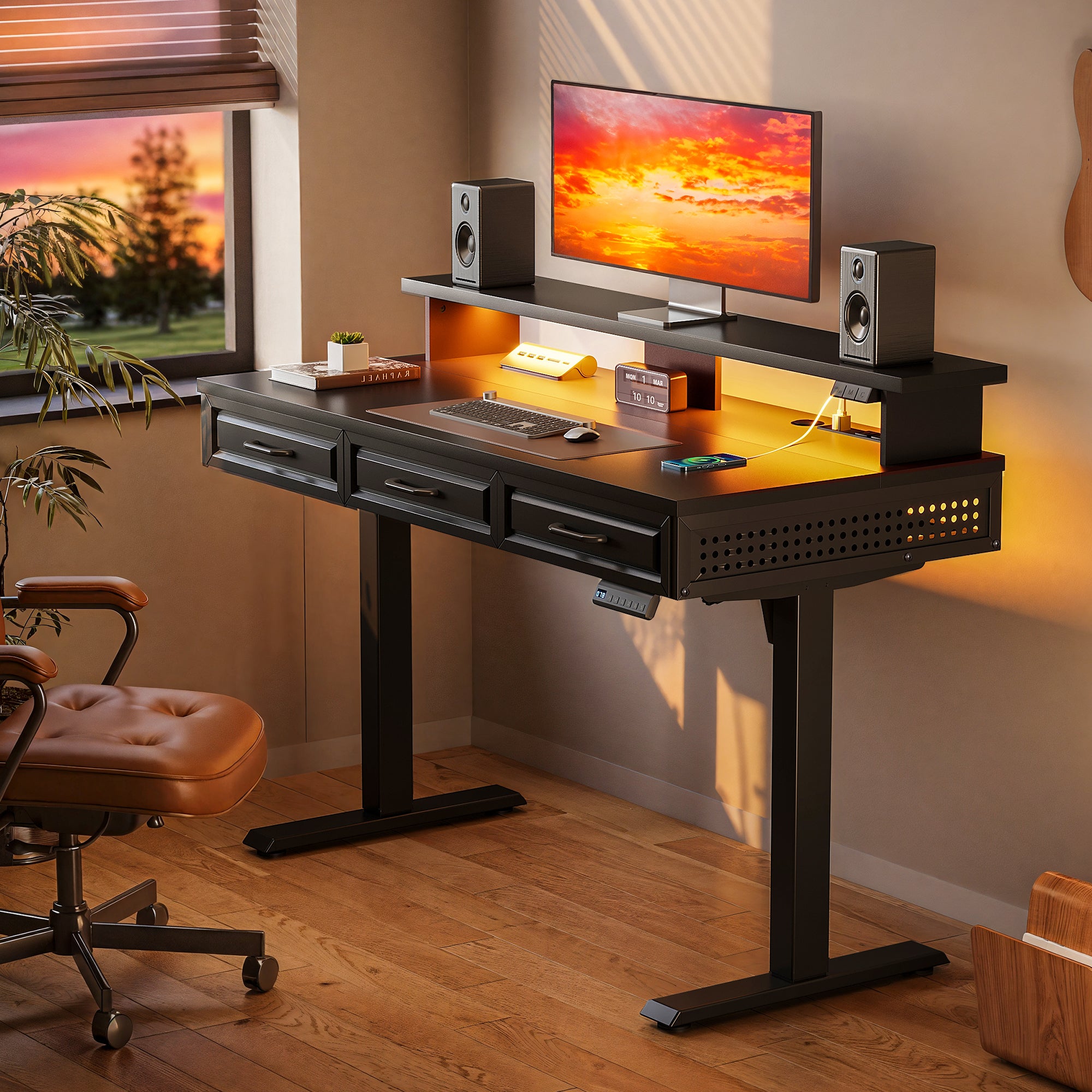
If you want Under-Desk Storage without turning your room into a set of mismatched add-ons, OffiGo focuses on storage-forward Height Adjustable Tables that try to keep the whole setup simple: drawers where you reach, power where you charge, and surfaces sized for real home layouts.
- Best for: storage-first home office setups that need a clean reset between work blocks
- Storage approach: built-in drawers and shelf-style organization (instead of separate pedestals)
- Comfort angle: monitor shelf and keyboard tray options so your wrists and neck stay neutral
- Practical power: integrated outlets and USB on select desks, including USB-C Charging Ports on the L-shaped model below
OffiGo brand proof points
- 48" Electric Standing Desk: 3 wooden drawers, monitor shelf, height range 29.9 to 46.1 inches, 3 memory presets, built-in power hub, cable tray, 154 lb capacity
- 63" L-Shaped Electric Standing Desk: 4 fabric drawers, reversible side table, height range 29.9 to 46.1 inches, integrated power with AC, USB, and Type-C, rear cable tray
- 55" U-Shaped Electric Standing Desk: height range 28.3 to 46.5 inches, monitor stand, slide-out keyboard tray, integrated outlets and USB, workspace layout built for multitasking
Why it stands out: OffiGo leans into an integrated, one-and-done home office build, which matters when your biggest problem is not desk height, it is daily reset time. When drawers, a monitor shelf, and power are already planned into the surface, you are less likely to add wobbly side carts later or run cables across walkways.
2. HUANUO
HUANUO is a common pick when you want basic standing-desk functionality and plan to solve storage with a drawer unit or a simple built-in drawer. It can work well for Compact Office Furniture setups where you want a clean top and minimal footprint.
- Best for: tight budgets and straightforward sit-stand routines
- Storage approach: mix of built-in drawers and separate drawer cabinets (depends on model)
- Comfort angle: pairs well with monitor risers and Ergonomic Office Chairs because the desk itself tends to be simple
- Watch-outs: confirm stability at full standing height if you use a heavy monitor arm
3. FlexiSpot
FlexiSpot is often chosen by buyers who want lots of frame and desktop options, then add storage in a modular way. If you like to tweak your Home Office Design over time, that ecosystem approach can be a real advantage.
- Best for: customization, frame upgrades, and accessory compatibility
- Storage approach: accessories plus some models with small drawers
- Comfort angle: wider height ranges and larger desktops can fit taller users and multi-monitor setups
- Watch-outs: not every configuration includes built-in storage or integrated charging, so read listings carefully
4. Eureka Ergonomic
Eureka Ergonomic tends to blend statement looks with workstation features. Many buyers land here when they want the desk to look like furniture, not equipment, while still getting drawers and charging features on some lines.
- Best for: hybrid work and creator rooms that need style plus function
- Storage approach: built-in drawers on select models, often paired with a monitor riser
- Comfort angle: desks are frequently designed around multi-monitor use
- Watch-outs: integrated power placement and cable routing matter more as features increase
5. Bush Business Furniture
Bush Business Furniture is a reasonable direction when you need cabinet-level storage for paper-heavy workflows and you want your standing desk to feel like traditional office furniture. This is often more about storage capacity and office presence than minimalism.
- Best for: document storage, filing needs, and classic office layouts
- Storage approach: file cabinet and pedestal-style storage paired with a height-adjustable surface
- Comfort angle: works well when paired with a supportive chair and monitor arm to dial in ergonomics
- Watch-outs: these footprints can be deeper and heavier, so measure room flow first
How to pick storage and comfort without regret
If you are buying Electric Standing Desks mainly for health but ignoring storage, you often end up standing less because your surface feels chaotic. A 2024 systematic review reported work-time sitting reductions that varied by follow-up, including about 73 minutes per day at 9 weeks and about 48 minutes per day at 12 months in intervention groups versus controls, which is a good reminder that consistency comes from comfort and practicality, not motivation alone (PubMed).
Storage reality check: drawers or cabinets?
Drawers are best when you need fast reset and you store small, frequent-use items. Cabinets are better when you store bulk, paper, or devices you rarely touch.
- Choose drawers if you regularly stash: chargers, pens, notebooks, meds, small tools
- Choose cabinet-style storage if you regularly stash: reams of paper, printers, files, boxed peripherals
- Knee-space test: measure how close you sit, then avoid deep center drawers that force your legs back
Stability at standing height: what matters?
If you use a monitor arm, stability matters more than most listings admit. Wobble is not just annoying; it makes you stop using standing mode.
- Wider feet and thicker columns usually help stability
- Cross-support designs can reduce front-to-back shake
- Heavier tops and loaded drawers can change stability feel at max height
Power and ports: do you need USB-C?
If your daily friction is charging a laptop or tablet at the desk, USB-C Charging Ports can reduce brick-and-adapter clutter. If you already rely on a docking station, you might care more about cable routing and where the power hub exits the desk.
- USB-C is most useful for: laptop power, tablet charging, modern phone charging
- Plan outlet placement before assembly so cables do not cross your leg path
- Treat built-in power as a convenience layer, not a replacement for surge protection
Fit and ergonomics: comfort is sizing
Your desk shape should match your workflow zones first, then your room second. L-Shaped Standing Desks shine when you need a second surface for writing, reference material, or a printer, but they can pinch walkways.
- Height check: at sitting and standing, aim for elbows near 90 degrees while typing
- Monitor height: top third of the screen near eye level reduces neck flexion
- Chair matters: even the best desk fails without a stable, supportive seat, so budget for Ergonomic Office Chairs if yours is forcing slouching
Practical tips (quick wins)
- Measure knee clearance with the storage installed, not just the desktop size
- Map your cable paths before tightening bolts, especially if you have built-in power
- Keep one drawer as a dedicated "reset drawer" for end-of-day cleanup
Common mistakes to avoid
- Buying a huge surface for a narrow room and losing walking space
- Choosing drawers you never open because they are placed too far back
- Overloading the desktop with power strips instead of using one planned power route
Quick comparison for storage and comfort
| Brand | Storage approach | Best for | Power/ports | Shape options |
|---|---|---|---|---|
| OffiGo | Built-in drawers, shelf | One-and-done setups | AC, USB, Type-C select | L-shaped, U-shaped, executive |
| HUANUO | Mix built-in, add-ons | Budget-friendly storage | Varies by model | Mostly straight |
| FlexiSpot | Accessories plus drawers | Custom builds and upgrades | Varies; some USB | Straight, some corner |
| Eureka Ergonomic | Built-in drawers select | Style plus function | Varies; some charging | Straight, L-shaped |
| Bush Business Furniture | Cabinet-heavy storage | Paper-heavy workflows | Usually external power | Traditional footprints |
Conclusion
The simplest way to decide is to start with your clutter type, not your desk color. If you reset your workspace every day, choose drawers and reachable shelves; if you manage paper and peripherals, choose deeper cabinet-style storage. Then pick the shape that matches your zones: straight for narrow rooms, L-shaped for two-surface workflows, and U-shaped when you want wraparound reach.
If you want an integrated storage-first approach, OffiGo is a clean starting point because the drawers, shelves, and charging features are designed to work together instead of being bolted on later.
FAQ
How do I know if built-in storage will reduce knee space?
Built-in storage reduces knee space when drawer boxes sit directly under the front edge where your legs naturally tuck in. Measure from the front edge to the start of the drawer housing, then compare it to how close you sit when typing, usually 2 to 6 inches from the edge. If you use an Ergonomic Office Chair with strong lumbar support, you will often sit closer, which makes deep center drawers feel cramped. Side-offset drawers or smaller drawer modules usually preserve better leg comfort.
What is the difference between fabric drawers and wooden drawers?
Fabric drawers are typically lighter, quieter, and more forgiving if you overstuff them with cables or soft items. Wooden drawers feel more furniture-like and usually handle heavier, rigid items better, but they add weight and can reduce under-desk clearance depending on design. Fabric storage can also be easier to remove and reinsert if you want a quick clean-out. The right choice depends on whether you store mostly small accessories or heavier office supplies.
Do I really need USB-C charging ports on a standing desk?
You need USB-C Charging Ports if you charge a USB-C laptop, tablet, or phone at your desk every day and you want fewer bricks on the floor. A USB-C port is most helpful when it is placed where a cable can route cleanly to the back edge without crossing your mouse area. If you already use a docking station, built-in USB-C matters less than having a clean cable channel and enough outlet access. In that case, prioritize cable management space and a stable power setup.
Are L-shaped standing desks always better for home offices?
L-Shaped Standing Desks are better when you need two distinct zones, like a main typing surface plus a side surface for writing, gear, or reference materials. They also help keep your primary work area clear, which reduces posture creep over long sessions. The downside is planning: corners, walkways, and monitor placement take more thought, and the desk can dominate small rooms. If your room is narrow, a straight desk with real Under-Desk Storage can feel more comfortable day to day.
How should I set a standing desk height for comfort?
Set sitting height so your forearms are roughly parallel to the floor and your elbows sit near a 90-degree bend while typing. Set standing height to the same elbow position, and avoid shrugging your shoulders to reach the keyboard. Keep your monitor so your gaze lands slightly downward, not sharply down, which usually means the top third of the screen near eye level. Small, frequent adjustments tend to feel better than long standing blocks.
What should I pair with a standing desk if my back gets tired?
Pair your desk with a chair you can sit in comfortably for long sessions, because the goal is switching positions, not replacing sitting entirely. Add a standing mat if you stand for more than 20 to 40 minutes at a time, and use a small footrest to change hip angle and reduce fatigue. Keep frequently used items within easy reach so you are not leaning forward and loading your low back. If fatigue persists, shorten standing intervals and focus on more frequent sit-stand transitions.