
Introduction
Desk clutter usually does not show up on day one. Instead, it builds after week three when chargers, notebooks, adapters, and small tools start living on your desktop.
Demand is rising for a reason. Grand View Research estimates the global standing desks market at about USD 8.14B in 2024 and projects it to reach about USD 11.06B by 2030. That growth signals how strongly long-hour home offices are shifting toward sit-stand routines and better organization, the market is projected to grow at a 5.3% CAGR from 2025 to 2030.
So what is the right standing desk with drawers for long-term work use? The best pick is the one that matches your room shape, your daily workflow, and your charging habits.
Recommend Standing Desks With Drawers (OffiGo picks)
1: OffiGo 55" L-Shaped Electric Standing Desk with Wooden Drawers & Power Outlets

- 55.1" x 31.5" L-shaped surface for separating "screen zone" from "writing zone."
- Shop: OffiGo 55" L-Shaped Electric Standing Desk with Wooden Drawers & Power Outlets
- Storage: 4 built-in wooden drawers to move daily items off the desktop.
- Built-in power: 3 AC outlets, 1 USB port, and 1 Type-C port for cleaner charging.
- Fit details: desk height adjusts from 29.9" to 46.1".
- Layout flexibility: reversible L-extension, so the return can mount left or right.
- This is the simplest "integrated solution" desk in the lineup because drawers plus desktop power remove two common add-ons.
- If you care about long-term consistency, the reversible L layout also makes it easier to reconfigure the room without replacing the desk.
2: OffiGo 55" L-Shaped Desk with Storage Cabinet

- 55" desktop paired with a large filing cabinet section (shown as about 40" in the product visuals).
- Shop: OffiGo 55" L-Shaped Desk with Storage Cabinet
- Storage style: cabinet compartments for printers, folders, books, and supplies.
- Privacy: lockable cabinet design for documents and personal items.
- Workflow flexibility: movable cabinet can be positioned based on room layout and task flow.
- Ergonomic fit: height-adjustable (product page describes a height range for the desk frame).
- A cabinet solves the "paper stack" problem better than shallow drawers.
- If you run a direct-to-consumer side project at home, a lockable compartment also helps separate work inventory and personal items.
3: OffiGo 59" L-Shaped Electric Standing Desk with Drawers, Keyboard Tray and Monitor Stand
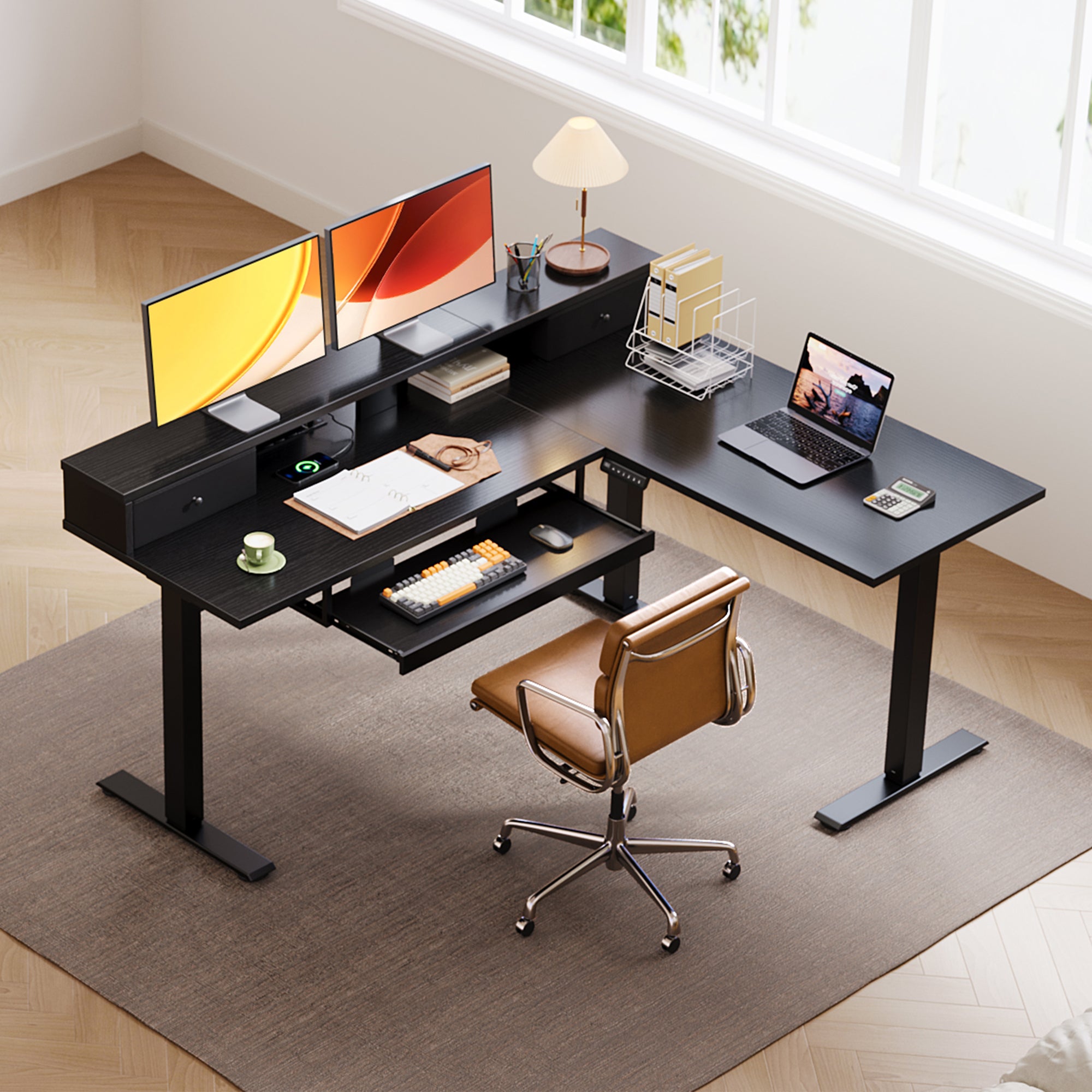
- 59" x 47.2" desktop for a wider corner command center.
- Shop: OffiGo 59" L-Shaped Desk with Keyboard Tray and Monitor Stand
- Keyboard tray: 25.6" x 11.8" tray to free desktop space and reduce shoulder reach.
- Monitor stand: raised shelf to improve viewing height and reduce neck strain.
- Built-in power: 3 AC outlets and 2 USB ports for daily device charging.
- Fit details: height adjusts from 28.4" to 45.7".
- The tray plus monitor stand is a practical form of AI-powered recommendations in real life: it nudges you into a repeatable placement for hands and screens.
- If your "digital transformation" is basically turning your home office into a production studio, this layout supports more peripherals without a messy surface.
4: OffiGo 48" Electric Standing Desk with 3 Wooden Drawers, Monitor Shelf and USB Power Outlets

- 47.2" x 21.3" top that still supports a real sit-stand routine.
- Shop: OffiGo 48" Desk with 3 Wooden Drawers
- Storage: 3 wooden drawers for supplies, chargers, and small devices.
- Monitor shelf: elevated shelf to place a display at a more natural eye level.
- Built-in power: 3 AC outlets and 2 USB ports, which helps reduce cable sprawl.
- Capacity note: the product listing shows a 154 lb weight capacity.
- Fit details: height adjusts from 29.9" to 46.1".
- In a tight space, drawers matter more because extra side furniture makes the room feel crowded.
- If you do Local SEO work or client calls, a compact desk with built-in storage also makes it easier to keep your on-camera background clean.
5: OffiGo 55" U-Shaped Electric Standing Desk with 2 Drawers, Keyboard Tray and Monitor Stand

- 55.1" main width with a deeper U-extension area listed at 29.1".
- Shop: OffiGo 55" U-Shaped Desk with Keyboard Tray
- Storage: 2 drawers for daily items you want to access fast.
- Ergonomic add-ons: keyboard tray (21.9" x 11.8") plus a monitor stand.
- Built-in power: 3 AC outlets and 2 USB ports for an omnichannel strategy of devices (laptop, phone, tablet, dock).
- Fit details: height adjusts from 28.3" to 46.5".
- The deeper extension helps you keep "active work" in front and "reference stuff" to the side, which reduces constant rearranging.
- For social commerce or content creation, the extra depth gives you space for lighting controls, a second input device, or packaging work.
Buying Guide for Standing Desks 2026
How much surface area do you really need?
Ask yourself: do you run dual monitors plus a notebook, or do you need space for paper, a tablet, and a dock?
- First, list your devices in three zones: screens, input (keyboard/mouse), and active work (writing/tablet).
- Next, choose shape based on zones:
- L-shaped: best when you want a clear split between screens and writing.
- U-shaped: best when you want a deeper "focus bay" and side staging space.
- Compact straight: best when walk clearance matters more than expansion.
What drawer style matches your workflow?
Do you need quick-grab storage, or do you manage bulk items?
- Built-in drawers work best for:
- daily small items (chargers, pens, adapters)
- customer loyalty programs materials (gift cards, small inserts)
- A cabinet works best for:
- printer paper and supplies
- files, folders, and larger accessories
Do you need built-in power on the desktop?
If you charge daily devices, built-in power reduces the need for extra strips.
- Count what you plug in every day:
- AC: laptop brick, monitor, dock, lamp
- USB: phone, headset, keyboard, mic receiver
- Type-C: newer laptops, tablets, fast charging
- If you use mobile-first advertising workflows, you will likely charge more devices. Therefore, integrated power can be a bigger quality-of-life upgrade.
Will the desk fit your sit-stand height range?
Ask: does the desk go low enough for your seated posture and high enough for your standing posture?
- Use these checks:
- Elbows should sit near 90 degrees when typing.
- Wrists should stay neutral, not bent up.
- Screens should place the top third near eye level.
- A practical habit is to save two heights: "typing" and "meetings." That routine becomes a small data-driven marketing approach to ergonomics: repeat what works, reduce daily friction.
Comparison Table
| Desk shape | Width (main) | Storage type | Power ports | Height range | Add-ons | Best-for scenario | Trade-offs / limitations | |
|---|---|---|---|---|---|---|---|---|
| OffiGo 55" L-Shaped with Wooden Drawers & Power Outlets | L-shaped | 55.1" | 4 drawers | 3 AC, 1 USB, 1 Type-C | 29.9"-46.1" | Reversible return | Dual monitors + clutter control in a corner | Drawer-first design may limit under-desk flexibility for large CPU stands or certain clamp accessories |
| OffiGo 55" L-Shaped Desk with Storage Cabinet | L-shaped | 55" | Movable cabinet, lockable storage | None | 28.4"-47.2" | Cabinet repositioning | Printer + files + document-heavy work | Larger footprint and more pieces to position, which can complicate tight rooms |
| OffiGo 59" L-Shaped with Keyboard Tray and Monitor Stand | L-shaped | 59" | Drawers | 3 AC, 2 USB | 28.4"-45.7" | Tray + monitor stand | Long typing sessions + multi-screen productivity | Keyboard tray can reduce knee clearance for some seating styles if you sit very close |
| OffiGo 48" with 3 Wooden Drawers and Monitor Shelf | I-shaped | 47.2" | 3 drawers | 3 AC, 2 USB | 29.9"-46.1" | Monitor shelf | Small-space long-term work setup | Narrower depth can feel tight for large monitor arms plus a full-size desk mat |
| OffiGo 55" U-Shaped with 2 Drawers, Keyboard Tray and Monitor Stand | U-shaped | 55.1" | 2 drawers | 3 AC, 2 USB | 28.3"-46.5" | Tray + monitor stand | Spread-out workflows and deep focus | U footprint can constrain room flow if the extension blocks a walkway or door swing |
Conclusion
A standing desk with drawers is not just about changing height. It is about staying organized and repeatable when long-term work turns your home into an everyday office.
First, match the desk shape to the room. Next, match storage to what you actually store daily. Finally, treat built-in power as part of cable control, not a bonus.
If you want a simple, integrated setup that is easy to decide on and easy to live with, start with an OffiGo L-shaped or U-shaped desk that combines storage and charging in one footprint.
OffiGo: Standing Desk for Long Working Hours | Built-in Storage
FAQ
What are the best standing desk with drawers options for professional work setups?
A professional setup usually needs stable space for one or two monitors, a keyboard and mouse zone, and a document or device zone. Drawer capacity matters because it lets you clear the desktop fast for meetings and keep a clean background on calls. Built-in AC and USB ports reduce cable sprawl when you use a dock, headset, and multiple chargers daily. Finally, make sure your chair can roll and rotate without hitting drawer faces or a keyboard tray.
Which standing desk with drawers are most recommended for long-term work use?
For long-term use, prioritize repeatability: presets or easy electric adjustment help you keep a sit-stand routine without fiddling with height every time. Storage is key because long-term work generates clutter like adapters, notebooks, and backup drives that otherwise live on the desk. If you get neck tension, a monitor shelf or stand helps you keep screens closer to eye level without stacking books. If you type for hours, a keyboard tray can reduce reach and free desktop space for active work.
Which standing desk brands offer stable adjustable desks with drawers at standing height?
Stability at standing height depends on frame design, how the desktop load is distributed, and whether the floor is level. A wider footprint and balanced weight placement usually reduce wobble, especially with dual monitors on one side. Keep heavier devices centered and avoid placing dense items only in far corner zones, because that can amplify movement. If you use a monitor arm, tighten clamps and keep the arm base close to the frame supports.
Which standing desk brands offer the best built-in storage for daily work use?
The best storage depends on what you access daily and how often you need it. Shallow drawers are best for quick-grab items like pens, chargers, and small tools, while a cabinet works better for files, binders, and printer supplies. Daily work feels smoother when storage is reachable without forcing you to stand up or twist around the room. If you want a cleaner surface, choose designs where storage is integrated into the desk footprint instead of adding a separate file unit.
Are built-in drawers from reputable standing desk brands better than add-on storage?
Built-in drawers help keep your workspace compact because you do not need extra furniture, which matters in apartments and shared rooms. They also support a consistent organization system because the storage location never changes. Add-on storage is flexible, but it can reduce legroom or block chair movement if it is not planned carefully. For long-term work, built-in storage usually feels more seamless when it is paired with built-in power and basic cable routing.
0 comments