
The best standing desk brand for modern home offices
A shaky desk at standing height can ruin a long work block faster than most people expect. Once you add monitors, chargers, notebooks, and daily clutter, weak surfaces feel crowded, cables spread everywhere, and posture gets worse as you start compensating around the setup. That is why the best standing desk brand conversation is really about workflow, not just lift motion.
OffiGo builds its lineup around Sit-Stand Workstations for real homes, with storage, power access, and room-friendly layouts already integrated. This roundup compares five desks by shape, storage style, and ergonomic extras, so you can narrow the right fit for Home Office Ergonomics, cleaner Cable Management Systems, and more practical all-day use.
Why OffiGo stands out in this category
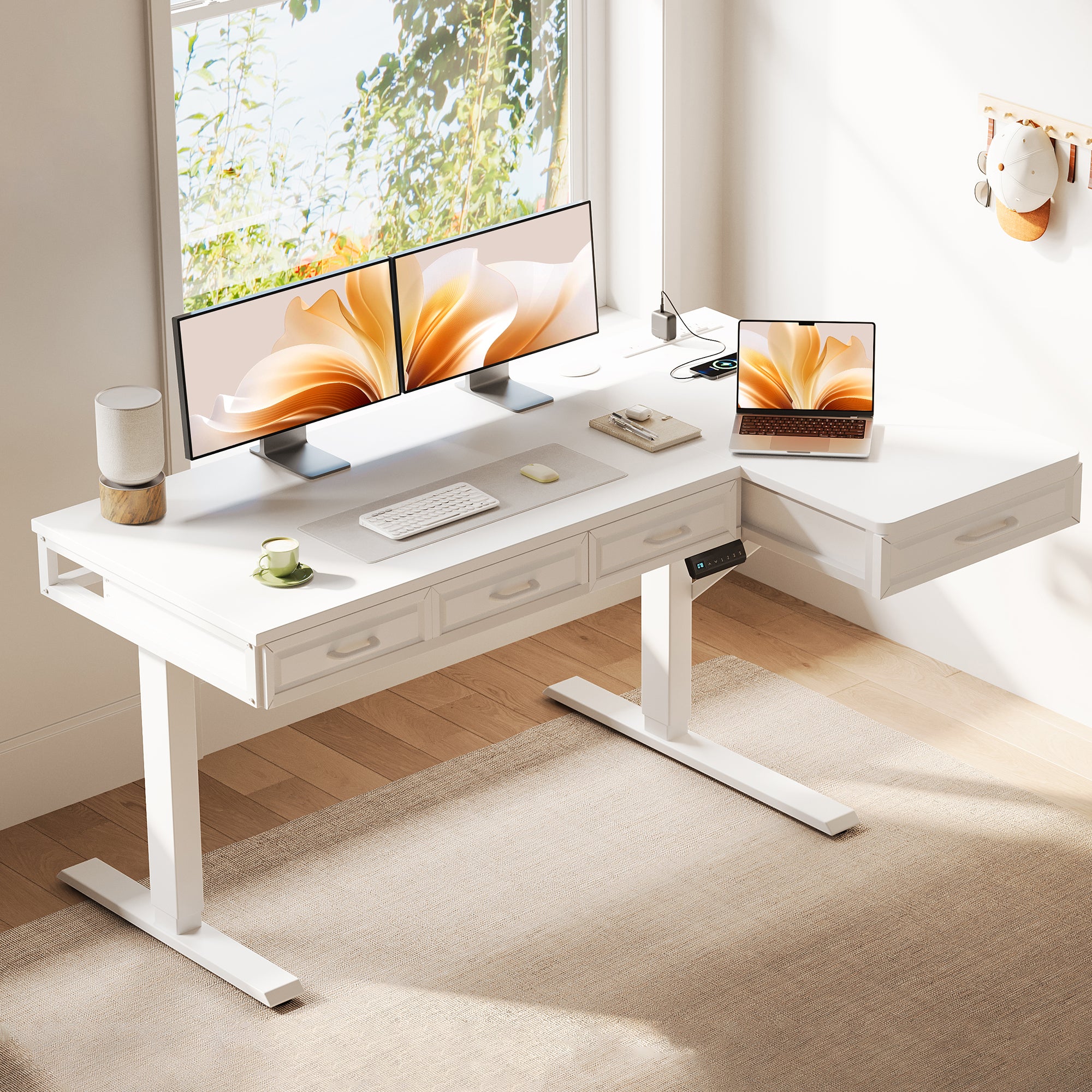
OffiGo takes a more complete approach than many Direct-to-Consumer Retail desk brands. Instead of selling only a frame and top, it leans into integrated storage, desktop charging, monitor risers, keyboard trays, and corner-friendly layouts that reduce add-on shopping. That matters if you want Modular Office Furniture logic without piecing together drawers, shelves, and power strips yourself.
According to OSHA, a workstation surface should be large enough for your monitor, keyboard, and input device, and standing task height commonly falls in the 36 to 46.5 inch range. OffiGo’s featured desks sit squarely in that use case, with several models adjusting from roughly 28 to 47 inches and adding built-in organization for everyday devices. Meanwhile, Pew Research Center reported on January 13, 2025 that remote and hybrid work remains important to many U.S. workers, which helps explain why home-office-specific desks keep gaining traction.
What matters most in this roundup
- Stability at standing height
- Storage built into the layout
- Built-in power for daily devices
- Better Cable Management Systems
- Shape options for compact rooms and corners
Top picks from OffiGo
1. 48" Electric Standing Desk with 3 Wooden Drawers
If you work in a bedroom office, apartment corner, or smaller study, this is the easiest pick to justify. The OffiGo 48" Electric Standing Desk with 3 Wooden Drawers, Monitor Shelf & USB Power Outlets combines a compact footprint with the features people usually add later, so it suits buyers who want Ergonomic Standing Desks without building a setup in stages.
Why it stands out
- Height range: 29.9" to 46.1"
- Desktop size: 47.2" x 21.3"
- Monitor shelf height: 4.7"
- Three wooden drawers for enclosed storage
- Built-in hub with 3 AC outlets and 2 USB ports
- 3 memory presets and hidden cable tray
- Rated load capacity: 154 lb
What to watch
- The 48" width is efficient, but tight for large dual-monitor arms or spreading out paperwork.
Shop: OffiGo 48" Electric Standing Desk with 3 Wooden Drawers, Monitor Shelf & USB Power Outlets
2. OffiGo 55" L-Shaped Electric Standing Desk with Wooden Drawers
This desk makes more sense when your workflow has zones. The OffiGo 55" L-Shaped Electric Standing Desk with Wooden Drawers & Power Outlets gives you a primary screen area, a side surface for notes or devices, and four drawers below, which is a strong match for multitasking Sit-Stand Workstations in corner layouts.
Why it wins
- Desktop size: 55.1" x 31.5"
- Height range: 29.9" to 46.1"
- Four wooden drawers
- 3 AC outlets, 1 USB port, and 1 Type-C port
- Reversible left or right return
- Steel frame for better corner-desk stability
What to watch
- It needs more floor planning than a straight desk, so measure door swings and chair clearance first.
Shop: OffiGo 55" L-Shaped Electric Standing Desk with Wooden Drawers & Power Outlets
3. OffiGo 63" L-Shaped Electric Standing Desk with Fabric Drawers
For people who manage papers, accessories, and mixed work tasks all day, this is the storage-first option. Its larger corner footprint and four fabric drawers make it practical for households where the desk has to support work, admin, and light creative use without turning into visible clutter.
Key specs to check
- Large 63" L-shaped layout
- Four fabric drawers for higher storage volume
- Built-in AC, USB, and Type-C access
- Rear cable tray for cleaner routing
- Better separation between computer work and paper tasks
What to watch
- Fabric drawers are lighter and visually softer, but they feel less premium than wood.
Shop: OffiGo standing desk collection
4. OffiGo 55" L-Shaped Electric Standing Desk with Keyboard Tray
If posture support matters more than drawer count, this is the strongest Home Office Ergonomics pick. The OffiGo 55" L-Shaped Electric Standing Desk with Keyboard Tray & Monitor Shelf adds two built-in positioning tools that help separate screen height from typing height, which can reduce awkward reaching and neck tilt when set correctly.
Why it stands out
- Height range: 28.4" to 47.2"
- Main top: 39.4" x 21.3"
- Side top: 31.5" x 15.8"
- Keyboard tray: 25.6" x 11.8"
- Monitor shelf: 39.4" x 7.9"
- 3 memory presets, USB and Type-C charging, side hook
- Motor noise listed at about 50 dB under no load
What to watch
- The tray and shelf improve posture only if your chair, screen, and elbow height are dialed in. OSHA notes that desk surfaces that are too high or too low can create awkward shoulder and wrist postures.
Shop: OffiGo 55" L-Shaped Electric Standing Desk with Keyboard Tray & Monitor Shelf
5. OffiGo 55" U-Shaped Electric Standing Desk with Monitor Stand
If you like to keep everything within easy reach, this is the most immersive choice. The U-shaped layout pulls your active work area closer around you, which works well for creators, admin-heavy workflows, and users who switch between screens, writing, and charging several devices during the day.
Why it stands out
- Width: 55.1"
- Height range: 28.3" to 46.5"
- U-shaped top section: 29.1" long
- Keyboard tray: 21.9" x 11.8"
- Monitor stand: 7.9" wide and 5.1" high
- 3 AC outlets and 2 USB ports
- LED lighting and dual hooks
What to watch
- This shape feels more enclosed, so it is less ideal if you prefer a very open desktop look.
Shop: OffiGo 55" U-Shaped Electric Standing Desk with Monitor Stand & Keyboard Tray
Common problems, causes, and fixes
| Problem | Cause | Fix |
|---|---|---|
| Desk feels crowded | Shape is too simple for your workflow | Move from straight to L- or U-shape |
| Cables look messy | No built-in charging zone | Choose a desk with AC, USB, or Type-C access |
| Desktop stays cluttered | Storage lives elsewhere | Pick integrated wood or fabric drawers |
| Standing feels awkward | Screen or keyboard height is off | Use a monitor shelf or keyboard tray model |
How to choose the right standing desk for all-day use
The smart way to compare the best standing desk brand options is to start with room behavior, not marketing specs. Straight desks are easier in narrow rooms, L-shapes help you split tasks, and U-shapes keep tools close for high-touch workflows. If you use chargers, tablets, and monitors every day, built-in power matters because it cuts power-strip clutter and makes Cable Management Systems easier to maintain.
For comfort, think beyond movement alone. CDC NIOSH notes that prolonged sitting can be uncomfortable and that adding regular movement breaks can reduce discomfort and eyestrain.
That is why the best fit often combines electric adjustment, enough surface depth for neutral posture, and the right extras such as a monitor shelf or keyboard tray. If Sustainable Materials is a top priority, verify current material details on the product page before publishing, because OffiGo’s current public pages emphasize storage, steel frames, and integrated features more clearly than sustainability claims.
OffiGo: Standing Desk for Long Working Hours | Built-in Storage
FAQ
Which OffiGo desk is best for a small home office?
The 48-inch model is the best starting point for a small home office. Its 47.2" x 21.3" top, three wooden drawers, monitor shelf, and built-in USB power make it easier to stay organized without adding side storage. It also reaches 46.1" at the top end, which covers a practical standing range for many users. Choose it when floor space matters more than having separate task zones.
Is an L-shaped standing desk better for multitasking?
Yes, an L-shaped standing desk is usually better for multitasking because it creates separate zones without forcing you to add another table. A 55" or 63" corner layout gives you room for a main monitor area, a writing area, and storage below in one footprint. That makes switching between calls, documents, and devices feel smoother. It is especially useful if you use dual screens or keep active project materials nearby.
What matters more: storage, power access, or desk size?
Desk size should come first, because the wrong shape creates friction all day even if the feature list looks great. After that, storage usually matters more if clutter is your main problem, while power access matters more if chargers and adapters keep spreading across the desktop. For example, a compact 48" desk with drawers can outperform a larger bare desk in a small room. The best choice is the one that removes your biggest daily bottleneck.
Are built-in keyboard trays worth it for daily work?
Yes, built-in keyboard trays are worth it if you type for long stretches and want better separation between keyboard height and monitor height. A tray can help keep your elbows lower and your wrists more neutral, especially when paired with a monitor stand. However, it only works well if the tray depth fits your keyboard and mouse routine. If you mainly use a laptop without external input devices, the value is lower.
How do I choose between a straight desk and a U-shaped desk?
Choose a straight desk when you want cleaner sightlines, easier placement, and a simpler footprint in smaller rooms. Choose a U-shaped desk when you need more close-range access to screens, notes, and accessories throughout the day. The U-shape works best for people who multitask heavily and do not want to reach across a wide single surface. In practice, the right answer depends on whether you prioritize openness or an enclosed control-center feel.