
Introduction
You lose focus fast when pens, chargers, notebooks, and cables keep fighting for the same small patch of desk. Buy the wrong adjustable desk with smart storage, and the problem gets worse: cramped legroom, messy cords, awkward monitor placement, and a setup that still needs extra furniture. That mistake costs space, comfort, and money every single workday.
This guide helps you avoid that trap by walking through seven practical buying steps for Ergonomic Standing Desks that actually fit your room and your workflow. You will learn how to measure correctly, match the top size to your gear, check real sit-stand range, compare built-in storage, and judge Cable Management Systems without guesswork. Then you can narrow the field to models that make sense for real home use, including integrated OffiGo layouts built for organized Sit-Stand Workstations.
How to Choose an Adjustable Desk with Smart Storage
Step 1: Measure your room before you compare desks
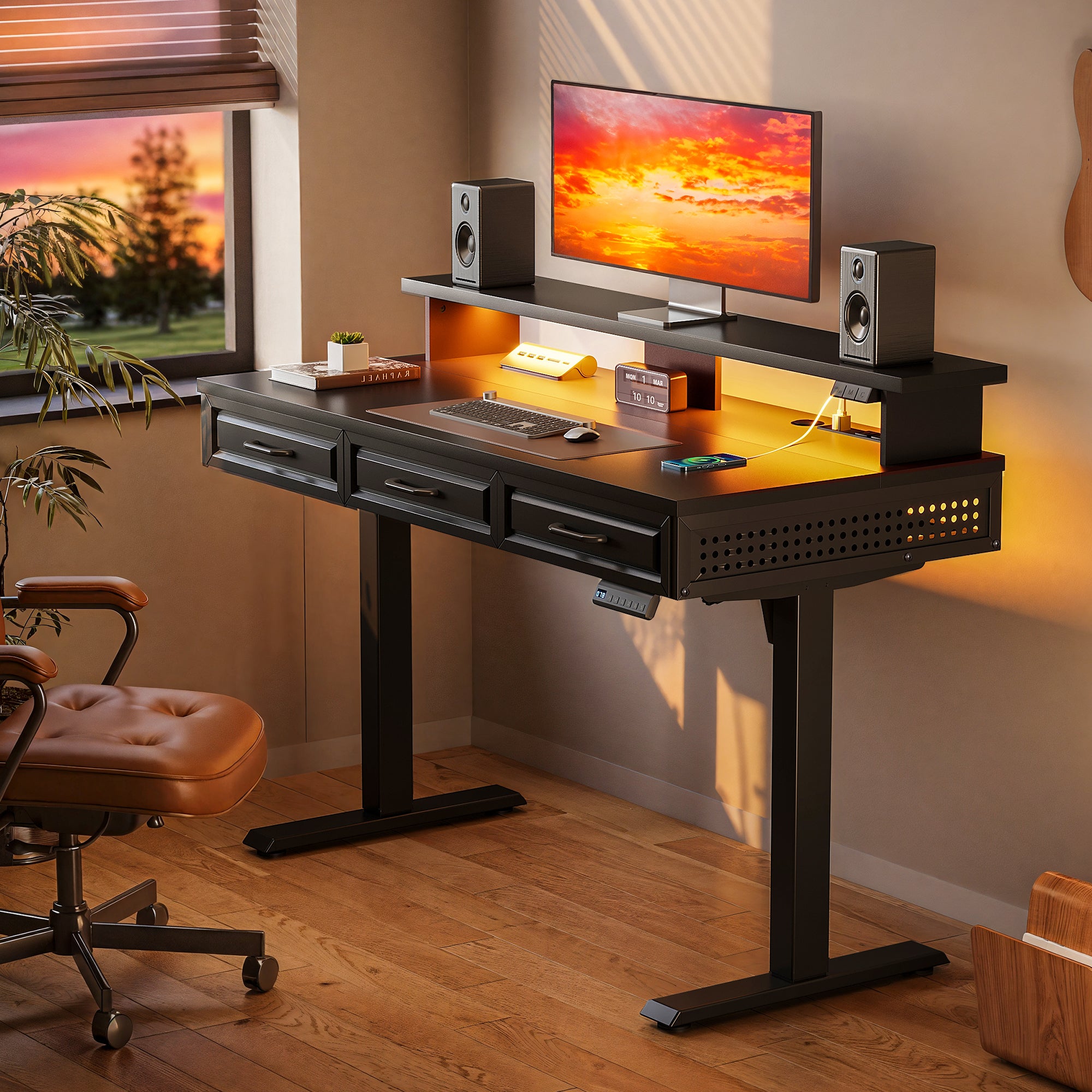
Start with the room, not the product page. Measure wall width, usable depth, outlet position, door swing, and the path the chair takes when you roll back. This single step prevents the most common buying mistake: choosing a desk by looks, then discovering the desktop blocks drawers, clips a bed frame, or leaves no standing clearance. For small rooms, sketch the footprint on paper and leave at least 30 inches behind the chair so you can move without feeling boxed in.
For compact spaces, OffiGo's 48" Electric Standing Desk with 3 Wooden Drawers, Monitor Shelf & USB Power Outlets gives you a tighter footprint while still adding storage, a full monitor shelf, and built-in power. The product page lists a 29.9" to 46.1" height range, 3 memory presets, and a 154 lb load capacity, which is useful when you need a compact desk that still supports daily work hardware. This is where Home Office Ergonomics starts: with fit, not marketing claims.
Product Page: OffiGo 48" Electric Standing Desk with 3 Wooden Drawers, Monitor Shelf & USB Power Outlets
Step 2: Match desk size to the way you actually work
Do this next: list every item that must stay on the desk during a normal work block. Include monitors, laptop stand, keyboard, mouse area, notebook, mic, charger, lamp, and any paper zone. If your desk has to support both computer work and handwriting, you need more than a narrow top with a good motor. A clean buying decision comes from matching width and depth to task flow, not only to room size.
If you run dual screens or separate work zones, a wider layout matters more than a few extra features. OffiGo's 71" Executive Electric Standing Desk uses a 71" by 27.6" desktop with a 1.38" thick top, which gives you enough depth for safer screen distance and enough width for larger setups. That matters because crowded layouts force your shoulders inward and push accessories into awkward reach zones. In broader buying trends, Hyper-personalization and Predictive Demand Analytics have pushed brands to offer more targeted workstation formats, but your best filter is still simple: choose the size that protects your daily reach, screen placement, and writing area.
Product Page: OffiGo 71" Executive Electric Standing Desk with Built-in Power Outlets & 1.38" Thick Desktop
Step 3: Prioritize a real height range, not just electric movement
Check the height numbers before anything else. A motorized desk is only useful if the seated and standing positions both fit your body. Your elbows should rest near 90 degrees when typing, and your screen should sit high enough that you do not drop your head forward. The OSHA workstation purchasing guide emphasizes adjustable work surfaces and proper keyboard, monitor, and arm positioning because poor fit quickly turns into shoulder, wrist, and neck strain.
This is where Ergonomic Standing Desks separate into good and bad choices. OffiGo models in this lineup cover useful ranges for home users: the 48" desk and 55" L-shaped drawer model list about 29.9" to 46.1", while the 71" executive desk reaches 29.1" to 48". That wider upper range helps taller users stand with less shoulder lift. Look for memory presets too. They matter because the easier your transitions are, the more likely you are to use the desk as intended instead of leaving it in one position for weeks.
Step 4: Choose storage that is built into the desk structure
Do not assume storage is just a bonus. Built-in storage changes how your desk works every day because it decides where cables, pens, chargers, and paperwork live when you are not using them. If storage sits inside the desk footprint, you can reduce clutter without adding a file cabinet or rolling cart that steals floor space. This is especially helpful in apartments, shared rooms, and mixed-use home offices where the desk must look clean after work hours.
OffiGo leans into this integrated approach. The 55" L-Shaped Electric Standing Desk with Wooden Drawers & Power Outlets includes four wooden drawers and a reversible return, so you can choose left or right orientation to match the room. The 63" L-shaped fabric-drawer model also adds four drawers plus a rear cable tray, making it useful when you want more storage without a second organizer. This is a practical example of Modular Office Furniture thinking: instead of buying separate pieces one by one, you start with a desk that already carries storage inside the main structure.
Product Page: OffiGo 55" L-Shaped Electric Standing Desk with Wooden Drawers & Power Outlets
Step 5: Inspect cable routing and built-in power before you buy
Messy cables ruin good desks. They eat usable space, collect dust, and make sit-stand movement more annoying than it should be. So before you buy, check for three things: a clear cable route under the top, enough charging access on the desk itself, and a layout that does not force cords to hang in front of drawers or knees. Strong Cable Management Systems are not decorative. They are part of how the desk stays workable over months of charging, moving, and rearranging gear.
OffiGo adds practical power integration across several models. The 63" L-shaped desk lists 3 AC outlets, 1 USB port, and 1 Type-C port, along with a rear cable tray. The 71" executive desk adds 3 AC outlets, 2 USB ports, and 2 Type-C ports, plus cable management and a side hook. For a home office, that means fewer adapters on the floor and fewer visible wires crossing the desktop. In a market shaped by Direct-to-Consumer Retail and Omnichannel Customer Experience, integrated power has become one of the clearest ways brands can simplify setup for buyers who want one-box function instead of piecing together add-ons.
Product Page: OffiGo 63" L-Shaped Electric Standing Desk with Fabric Drawers & Built-in Power Outlets
Step 6: Check frame stability, load support, and daily-use details
Lock this down before you get distracted by finishes. A desk can have storage and power, but if it wobbles at standing height, you will notice it every time you type. Read for steel frame construction, crossbeam support, stated load rating, and hints about stability at full extension. If your setup includes dual monitors, speakers, or a heavier desktop layout, this step matters even more because a weak frame makes every movement feel less controlled.
OffiGo's 71" Executive Electric Standing Desk is the clearest example here. Its product page calls out a reinforced dual crossbeam steel frame, heavy-duty legs, a 154 lb load capacity, and a 1.38" thick top. That combination is useful when you need a broad desk that still feels planted during long sessions. For smaller users, the 48" model also lists a 154 lb capacity in a compact format. If Sustainable Materials matter to you, verify exactly what the top is made from and how it fits your goals; many home-office buyers now want durability, repairable layouts, and lower-waste buying decisions rather than trend-based replacements.
Step 7: Buy for real home use, not a perfect showroom photo
Finish with the daily-life test. Ask yourself where the printer goes, where paperwork lands, whether the desk has to share a room with a bed or sofa, and whether you need quiet adjustment during calls. The best adjustable desk with smart storage is the one that works at 8 a.m., 2 p.m., and 9 p.m., not just in a staged product image. This is why integrated layouts often beat stripped-down desks once real gear enters the room.
OffiGo's scene-driven product lineup is strongest when you need a complete home-office setup without extra guesswork. The 59" L-Shaped Electric Standing Desk with Drawers, Keyboard Tray & Monitor Stand is a good example: it combines a 28.4" to 45.7" height range, 3 memory presets, a monitor shelf, a pull-out keyboard tray, two fabric drawers, and built-in power with USB ports. That is useful for users who want one purchase to solve posture, storage, and desktop crowding together. The CDC notes that replacing prolonged sitting with movement and reducing static posture supports better health, so choose a desk that makes changing position easy enough to become routine.
Product Page: OffiGo 59" L-Shaped Electric Standing Desk with Drawers, Keyboard Tray & Monitor Stand
Before You Start
Required Tools & Materials
- Tape measure for wall width and depth
- Simple room sketch with door swing
- Device list and monitor count
- Chair seat height measurement
- Outlet map and cable list
- Notes on daily tasks and storage needs
- Printer or accessory dimensions if used
- Standing and seated elbow height notes
Safety Considerations
- Keep monitors at a comfortable depth to reduce neck reach.
- Leave clear floor space so the chair rolls back safely.
- Avoid static standing for long blocks without movement.
- Check that cables have enough slack for full desk travel.
- Do not overload the top beyond the stated capacity.
A smart buying decision is also a safer one. When you map devices and cable paths before ordering, you reduce tugging, tripping, and unstable loading later. For Sit-Stand Workstations, the goal is not to stand all day. The goal is to alternate positions without strain, keep the screen in a usable zone, and avoid layouts that force twisted shoulders or blocked knees.
Troubleshooting
| Problem | Cause | Solution |
|---|---|---|
| Desk feels crowded | Top too small | Increase width and depth |
| Cables stay messy | No routing path | Choose built-in tray |
| Standing feels tiring | Static posture too long | Rotate positions often |
| Drawers block movement | Storage poorly placed | Check knee clearance |
| Corner desk overwhelms room | Footprint too large | Use reversible layout |
Use the table as a buying filter, not just a fix list. If your current setup already suffers from one of these issues, choose the next desk specifically to remove that failure point. For example, if cables always end up on the floor, do not settle for a clean-looking top without routing underneath. If the desk feels cramped after adding a second screen, move up in width before chasing accessory upgrades.
Conclusion
Choose function before visual extras. The right adjustable desk with smart storage should fit your room, support your body, hold your gear, and keep clutter from spreading across the workday. If you compare height range, storage layout, Cable Management Systems, and stability together, you will make a much better decision than if you shop by appearance alone.
OffiGo's lineup stands out when you want integrated solutions rather than isolated features. That makes sense for modern home offices where storage, power access, and clean setup matter just as much as the lifting column.
FAQ
Is a standing desk with storage better for small rooms?
Yes, if the storage is built into the same footprint as the desk. Drawers or a side storage section can replace an extra organizer, which saves floor space and keeps the room cleaner. The key is checking knee clearance, chair movement, and total depth before you buy. In a small room, compact integrated storage usually works better than adding separate furniture later.
What storage features matter most on an adjustable desk?
Prioritize drawers, hidden cable areas, and useful upper surfaces such as a monitor shelf when they match your workflow. Drawers help control small items that usually spread across the top, while concealed cable routing keeps the desk easier to clean and easier to raise. If you handle paper often, deeper drawer storage matters more than decorative shelving. If your setup is mostly digital, power access and cable control may matter more than extra compartments.
How much desktop space do I need?
Start with your monitor count, keyboard position, and any writing or note-taking zone you use every day. A single-screen setup can work on a smaller desk, but dual monitors, speakers, and notebooks usually need a wider surface and better depth. As a simple rule, leave enough space so your mouse arm moves freely and your screens are not pushed too close to your face. When in doubt, choose the size that protects your posture and workflow instead of the size that only barely fits the gear.
Are built-in power ports worth it?
Yes, if you charge multiple devices or switch equipment often during the day. Built-in AC, USB, and Type-C ports reduce the need for extra power strips and shorten the visible cable runs across the desk. That makes a bigger difference on sit-stand desks because cables have to move cleanly as the height changes. The feature is most valuable when it works together with a tray or routing path rather than as a standalone port cluster.
How do I know if the height range fits me?
Check whether the desk supports both your seated elbow height and your standing elbow height. When typing, your forearms should rest close to level, and your shoulders should stay relaxed rather than lifted. A wider adjustment range usually fits more users and more chair setups, especially in shared workspaces. Memory presets also help because they let you return to correct heights quickly instead of guessing each time.
What should I avoid when buying an adjustable desk?
Avoid buying only by appearance, motor claims, or a single spec line. A desk can look impressive online and still fail in daily use if the top is too small, the storage blocks your legs, or the cable routing is poor. You should also avoid underestimating room fit, especially with L-shaped models that need better planning around walls and chair paths. The best desk is the one that solves your real work habits, not the one with the flashiest feature list.