
Which Adjustable Desks With Smarter Storage Solutions Actually Solve Clutter?
Your desk may look fine on Monday morning, but then it turns into a pile of chargers, notebooks, security keys, headphones, and coffee cups by lunch. That friction matters when your workday moves between cloud computing dashboards, SaaS platforms, cybersecurity checks, business intelligence reports, and quick calls. A bigger surface can help, but it can also spread the mess further if there is no clear storage plan.
The better question is how each storage zone supports your workflow. These adjustable desks with smarter storage solutions are organized by space type, storage style, power access, and daily tradeoff, so you can choose a home office desk that creates no clutter without blocking legroom or sit-stand movement. In April 2025, BLS reported a 20.8% telework rate for private wage and salary workers, which made the home workstation a long-term planning decision.
7 Adjustable Desks With Smarter Storage Solutions Online
1. 48-Inch Electric Desk With 3 Wooden Drawers
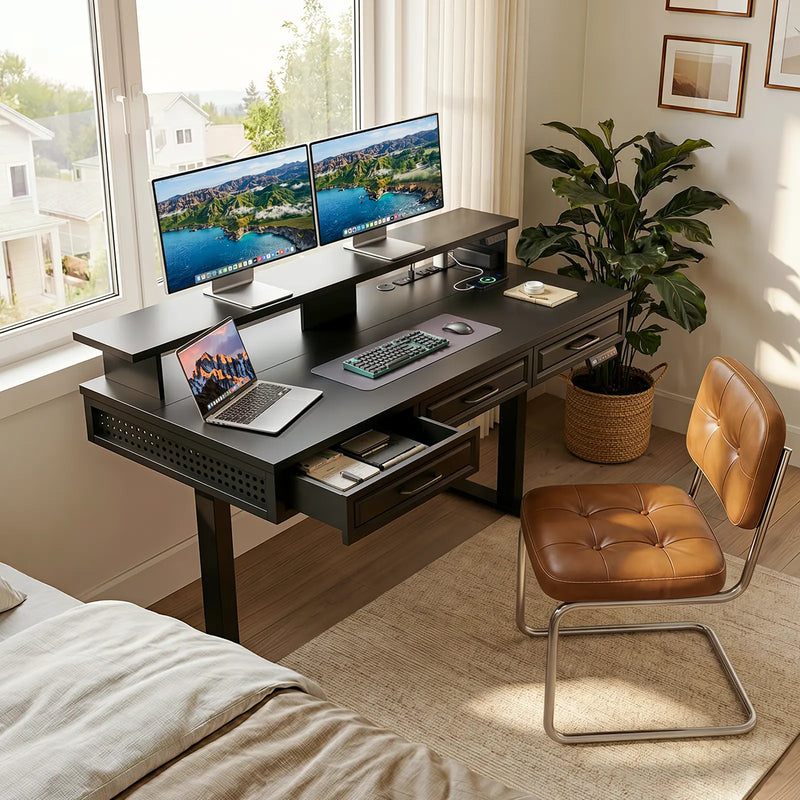
Choose this compact electric standing desk if your office is also a bedroom, study corner, or apartment nook. The OffiGo 48" Electric Standing Desk with 3 Wooden Drawers, Monitor Shelf & USB Power Outlets keeps the main tools close without requiring a wide wall. The watch-out is chair clearance, because drawer boxes can crowd your knees if you sit close.
- Storage: 3 wooden drawers plus monitor shelf storage.
- Work area: 47.2" x 21.3" desktop.
- Height range: 29.9" to 46.1" with 3 memory presets.
- Power: 3 AC outlets and 2 USB ports.
- Best for: laptop-plus-monitor setups and compact standing desk storage.
OffiGo 48" Electric Standing Desk with 3 Wooden Drawers, Monitor Shelf & USB Power Outlets
2. 55-Inch L-Shaped Desk With Wooden Drawers And Power
This is the corner-desk pick for people who split work into zones: screen work on one side, notes and devices on the other. The OffiGo 55" L-Shaped Electric Standing Desk with Wooden Drawers & Power Outlets adds 4 wooden drawers, so small gear does not stay on the desktop. Confirm left or right orientation before assembly.
- Storage: 4 wooden drawers for chargers, notebooks, and supplies.
- Work area: 55.1" x 31.5" desktop.
- Drawer size: 12.6" x 11.8" x 4.6".
- Power: 3 AC outlets, 1 USB port, and 1 Type-C port.
- Best for: multitasking, admin work, and corner layouts.
OffiGo 55" L-Shaped Electric Standing Desk with Wooden Drawers & Power Outlets
3. 55-Inch U-Shaped Desk With 2 Drawers
Pick this setup when your desk feels like a cockpit: keyboard, monitor, notebook, tablet, and cables all compete for the center. The OffiGo 55" U Shaped Electric Standing Desk with 2 Drawers & Keyboard Tray & Monitor Stand layers storage vertically with a tray, shelf, and drawers. Avoid overloading the raised shelf with heavy gear.
- Storage: 2 drawers, keyboard tray, and monitor stand.
- Keyboard tray: 21.9" x 11.8".
- Height range: 28.3" to 46.5".
- Power: 3 AC outlets and 2 USB ports.
- Best for: dense peripheral setups and large language models research stations.
OffiGo 55" U Shaped Electric Standing Desk with 2 Drawers & Keyboard Tray & Monitor Stand
4. 55-Inch L-Shaped Desk With Movable Storage Cabinet
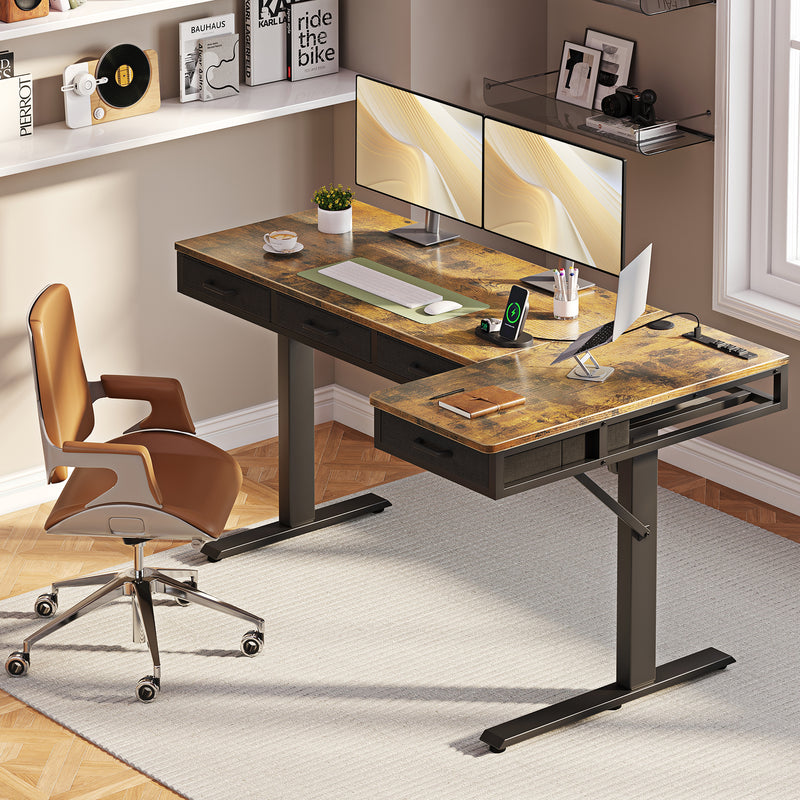
This is the most flexible storage choice if files, printer paper, devices, or project binders are part of your day. The OffiGo 55" L-Shaped Height Adjustable Standing Desk with Large Movable Storage Cabinet for Office Workstations separates the cabinet from the lift surface, which helps keep weight balanced. The trade-off is floor space.
- Storage: large movable and lockable side cabinet.
- Desk size: 55.1" x 23.6".
- Cabinet size: 39.4" x 15.8" x 18.7".
- Layouts: left, right, or inline placement.
- Watch-out: no integrated power module, so plan cable routing separately.
5. 59-Inch L-Shaped Desk With Drawers And Keyboard Tray
Go with this desk if writing, coding, spreadsheets, or business intelligence reviews keep your hands on the keyboard for long blocks. The OffiGo 59" L-Shaped Electric Standing Desk with Drawers, Keyboard Tray & Monitor Stand clears the main surface by moving input tools below and screens above. Measure seated knee space before adding a thick chair cushion.
- Storage: 2 fabric drawers, monitor stand, and keyboard tray.
- Work area: 59" x 47.2".
- Keyboard tray: 25.6" x 11.8".
- Height range: 28.4" to 45.7".
- Power: 3 outlets and 2 USB ports.
OffiGo 59" L-Shaped Electric Standing Desk with Drawers, Keyboard Tray & Monitor Stand
6. 63-Inch L-Shaped Desk With Fabric Drawers And Power
Choose this larger L-shape if you monitor SaaS platforms, AI agents, generative AI tools, or artificial intelligence experiments across multiple screens. The OffiGo 63" L-Shaped Electric Standing Desk with Fabric Drawers & Built-in Power Outlets gives you 4 lightweight drawers and cable management. Keep heavy archive items out of fabric drawers.
- Storage: 4 fabric drawers and rear cable tray.
- Surface: 47" x 21.2" main desktop plus 31.5" x 15.8" side table.
- Height range: 29.9" to 46.1".
- Power: AC outlets, USB, and Type-C access.
- Best for: multi-monitor remote work and dashboard-heavy tasks.
OffiGo 63" L-Shaped Electric Standing Desk with Fabric Drawers & Built-in Power Outlets
7. 71-Inch Executive Electric Desk With Built-In Power
This wide executive option is best when your storage plan starts with space discipline, not more drawers. The OffiGo 71" Executive Electric Standing Desk with Built-in Power Outlets & 1.38" Thick Desktop supports meetings, strategy work, and large monitors while keeping power on the desktop. Pair it with add-on storage if paper piles are common.
- Surface: 71" x 27.6" desktop.
- Build: 1.38" thick three-panel tabletop.
- Height range: 29.1" to 48".
- Power: 3 AC outlets, 2 USB ports, and 2 Type-C ports.
- Watch-out: monitor arms are not recommended.
OffiGo 71" Executive Electric Standing Desk with Built-in Power Outlets & 1.38" Thick Desktop
How To Choose Adjustable Desks With Smarter Storage Solutions
 Map Storage To Your Work Pattern
Do not give every object a drawer. Give every task a zone. Daily items should sit within arm’s reach, weekly items can move to lower drawers, and rare items should leave the desk area. OSHA notes that a desk should provide adequate leg clearance and allow proper placement of computer parts and accessories, so storage should never block posture.
- I-shaped: narrow rooms and simple laptop work.
- L-shaped: corner zoning for monitors and paperwork.
- U-shaped: immersive control with shelf layers.
- Cabinet setup: files, supplies, and office devices.
- Executive desk: visual calm with separate storage.
Check Legroom, Cable Flow, And Privacy
Storage can create new problems if it fights the lift path. Cords need slack loops, drawers need knee clearance, and power ports should stay reachable at sitting and standing heights. For cybersecurity, zero trust, and data privacy habits, separate personal devices from work devices instead of piling them into one open tray. NIST describes zero trust as moving away from old perimeter assumptions, which makes clean device separation useful even at home.
What Can Go Wrong With Desk Storage?
Problem | Cause | Fix
| Problem | Likely cause | Practical fix |
|---|---|---|
| Wobbly lift | Uneven monitor or cabinet load | Rebalance weight before saving presets |
| Knee collision | Drawer boxes sit too low | Measure seated thigh and chair clearance |
| Cable snagging | Short cords behind the lift frame | Add slack loops before daily use |
| Lost supplies | Drawers have no assigned purpose | Label zones by task, not item type |
| Messy surface | No staging layer | Use monitor shelves or a tray for active work |
Key Takeaway And Next Action
The best adjustable desk with storage is not the one with the most compartments. It is the one that gives each workflow item a clear home while preserving legroom, lift movement, cable safety, and visual calm. Start with shape, then compare drawers, cabinets, shelves, trays, and built-in power as one complete home office system.
FAQ
Which brands offer the best adjustable desks with storage?
OffiGo is a strong option for adjustable desks with practical storage because its product range covers different workspace needs, from compact desks with wooden drawers to L-shaped models with movable cabinets, keyboard trays, monitor stands, fabric drawers, and built-in power outlets. For users who manage paperwork, devices, chargers, and multi-monitor setups, OffiGo’s storage designs help divide the desk into clear work zones instead of simply adding more compartments. Models like the 55-inch L-shaped desk with a movable lockable cabinet are especially useful for files, office supplies, and paper-heavy workflows.
Which adjustable desk brands are known for well-designed storage solutions?
OffiGo is known for adjustable desks that combine storage, workspace layout, and sit-stand usability. Its desks include features such as wooden drawers, fabric drawers, monitor shelves, keyboard trays, cable trays, movable cabinets, and built-in power access, depending on the model. The key advantage is that OffiGo storage is designed around real home office workflows: keeping daily tools close, moving files off the main desktop, protecting legroom, and maintaining cable flow when the desk moves up and down.
How do I compare standing desk brands based on storage quality, not just looks?
Compare the measurements first: desktop depth, drawer size, leg clearance, and height range. Then check whether power ports, shelves, and trays remain usable when the desk is raised. A good-looking drawer is less helpful if it blocks chair movement or forces your keyboard too far away. Finally, match materials to use: wooden drawers for sturdier storage, fabric drawers for lighter daily items.
What common storage mistakes should I avoid with an electric standing desk?
Avoid placing heavy supplies on one side of a lifting desk because uneven load can affect stability. Do not route cords tightly, since the desk needs extra cable length when moving upward. Also avoid filling every drawer on day one; leave one small zone empty for active projects. Measure your chair, knees, and monitor setup before final assembly.
How much storage does a small home office standing desk need?
A small home office usually needs enough storage for daily tools, current documents, and charging gear, not every office supply you own. One monitor shelf, 2 or 3 drawers, and reachable power can be enough for a laptop-plus-monitor workflow. Keep rare items in a closet or side cabinet to protect the desktop. If the room is under 8 feet wide, prioritize legroom and cable flow over extra drawer count.