
Understanding Standing Desk After-Sales Problems Before You Buy
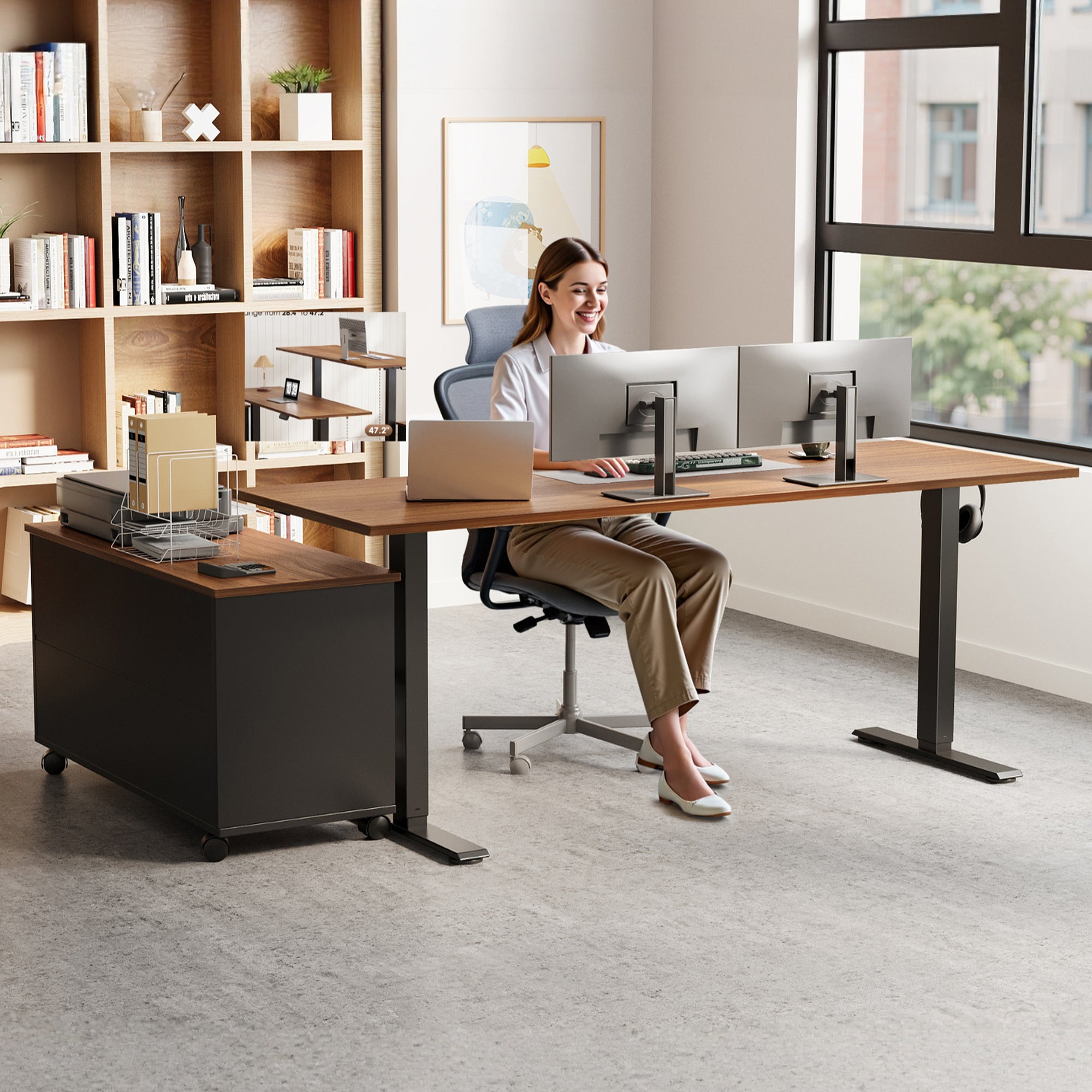
Most standing desk frustration does not start when the motor fails. It usually starts earlier, when you unpack the desk and realize your monitors do not fit well, your cables have nowhere to go, your files eat the work surface, or your sitting and standing heights still feel slightly off. That is why a strong standing desk buyer guide should focus on ownership, not just checkout. If you are trying to avoid standing desk after-sales issues, the real goal is to choose a desk that fits your room, your posture, and your daily workload from day one.
The strongest reference guides all point in a similar direction: check ergonomics, stability, load planning, and real workflow fit before you buy. Eureka emphasizes height range, stability, and load capacity as core buying factors, while Autonomous focuses on repeatable ergonomic positioning such as elbow angle and monitor height. Logicfox also highlights durability, motor quality, and warranty expectations as long-term decision factors. OffiGo fits that practical lens well because it treats the desk as a full workspace hub, not just a lifting frame with a top.
What Should You Check First to Avoid Buyer Regret?
A smart buying process starts with fundamentals. If you skip them, even a visually attractive desk can create standing desk warranty and support headaches later, simply because the setup was wrong for your actual use.
Core terms that shape the purchase
Before you compare brands, make sure these terms mean something practical in your workflow:
- Height range: This tells you whether the desk can support your seated and standing elbow positions comfortably. Eureka notes that shorter users may need around 24-25 inches for seated typing, while taller users may need 47-50 inches for standing work. (eurekaergonomic.com)
- Stability: This is how steady the desk feels while typing, using monitor arms, or changing height. Wobble is one of the most common regrets in real use. (eurekaergonomic.com)
- Load capacity: This matters if you use dual monitors, speakers, paperwork, printers, or a desktop tower. A desk that only works in a stripped-down setup may not work in your real one. (eurekaergonomic.com)
- Preset memory: Saved heights reduce friction and make posture changes more likely to happen during the day.
- Integrated storage: This decides whether the top stays usable or becomes a holding zone for paper, chargers, and office supplies.
The main categories of buying considerations
If you want to prevent ergonomic standing desk support problems later, screen desks through five filters:
- Ergonomic fit: Can the desk support neutral arm and neck posture?
- Room fit: Does the footprint work with your walls, outlets, and walking space?
- Workflow fit: Can it handle your real mix of screens, files, devices, and supplies?
- Support expectations: Is the brand clear about setup, parts, and issue handling?
- Assembly reality: Will the desk still make sense after all your accessories are added?
These checks sound basic, but they are exactly where many after-sales complaints begin.
How Does a Practical Buying Workflow Reduce After-Sales Issues?
Buying the right desk is less about spotting a nice product photo and more about running a short pre-purchase audit. That is the easiest way to reduce standing desk after-sales issues before they happen.
Step 1: Match the desk to your real workload
Start with what actually lives on your desk. Count monitors, laptops, docks, chargers, printers, notebooks, and paper files. Then separate them into two groups: items that must stay visible and items that can be stored. That distinction matters because many desks look large enough until the first full workday.
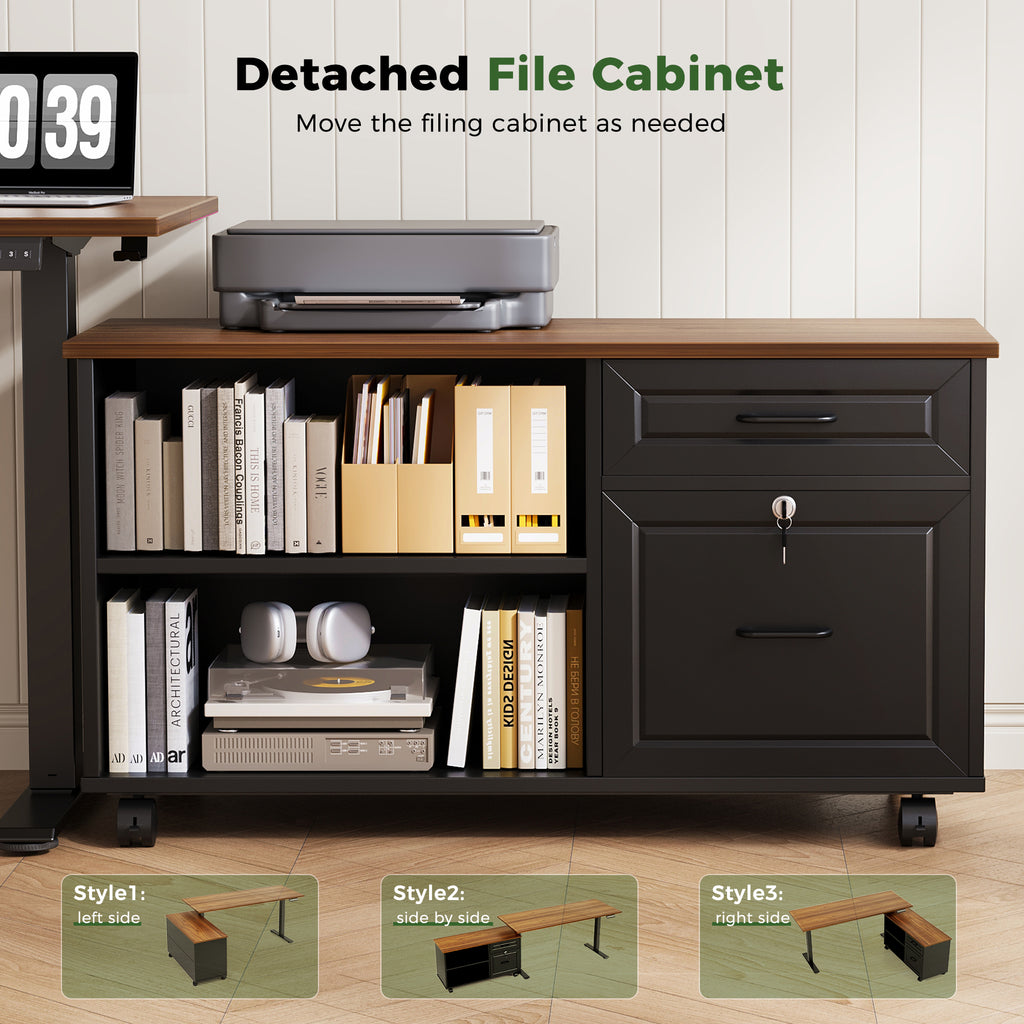
OffiGo’s [55″ L-Shaped Height Adjustable Standing Desk with Large Movable Storage Cabinet] is useful here because it combines a 55.1" by 23.6" desktop with a separate filing cabinet measuring 39.4" long, 15.8" wide, and 18.7" high. The product page also describes the cabinet as suitable for printers, folders, books, and office supplies, with lockable storage and flexible placement. ([offigo.com])
That matters in practice. If you need screen space and document storage at the same time, an electric standing desk with storage often creates fewer problems than a simple desk plus several add-ons.
Step 2: Validate daily-use features before checkout
Now look at the controls you will touch every day. A desk can have a strong spec sheet and still become annoying if height changes feel slow, confusing, or inconsistent.
For a usable sit-stand routine, check these points:
- Can you save preferred heights?
- Is the control panel easy to reach?
- Can the desk handle repeated transitions without forcing you to rearrange equipment?
- Does the layout still work when seated and standing?
The OffiGo model highlights a height range of 28.4" to 47.2" and an LED control panel with three programmable memory buttons. ([offigo.com]) Those are not throwaway features. Repeatable settings make it easier to keep your elbows near 90 degrees and your forearms parallel to the floor, which Autonomous identifies as a key ergonomic target. It also recommends keeping the top of the monitor at eye level and the screen around 20 inches away. (autonomous.ai)
Step 3: Plan implementation like a workstation, not a table
Even the best desk can feel wrong when the room plan is wrong. Before ordering, sketch the desk orientation, cabinet side, outlet locations, walking clearance, and drawer access. This matters more with an L-shaped electric standing desk, because corner placement changes how you reach tools, open storage, and route cables.
A good planning checklist looks like this:
- Confirm which side of the L supports your main monitor zone.
- Check whether the cabinet blocks chair movement or nearby doors.
- Leave enough slack in cables for height changes.
- Keep your keyboard, mouse, and phone in the primary reach zone.
- Avoid filling the leg area with boxes or loose storage.
According to OSHA, frequently used devices should stay within the primary work zone, and clutter under the desk can restrict movement and cause shoulder, back, and neck strain. OSHA also notes that adequate under-desk clearance should generally stay within a 20-28 inch height range depending on posture and user needs. (osha.gov)
Which Decision Factors Matter Most for Long-Term Satisfaction?
You do not need to evaluate everything equally. A few factors drive most long-term satisfaction, especially if you are worried about standing desk warranty and support later.
Support and issue-prevention features
A desk that reduces future dependency on add-ons often creates fewer support problems later. That means useful storage, a layout that matches your tasks, and clear product communication before purchase. Logicfox’s guide treats warranty coverage, repair options, and service responsiveness as core buying factors, not minor extras. It specifically notes that buyers should look at whether coverage includes the frame, electrical components, and workmanship, and that 6-7 year warranty periods are common in the category. (logicfox.net)
That does not mean every desk needs the same warranty length. It means buyers should judge how easy the desk will be to keep functional, not just how good it looks in photos.
Cost versus benefit over time
The cheapest desk is not always the cheapest system. If you buy a low-cost desk and then add drawers, cable trays, monitor risers, printer stands, and side storage, your original savings can disappear fast.
This is where an electric standing desk with storage can make more sense for some buyers. OffiGo’s desk is built around a separate large-capacity cabinet rather than a minimal frame. That can reduce surface crowding and lower the need for extra furniture, especially if your work includes paper files, office tools, or shared equipment. OffiGo also states that the side cabinet can be used left-side, right-side, or inline, which gives more flexibility during setup. ([offigo.com])
Performance in real home office conditions
Real performance is broader than motor speed. Ask whether the desk supports long sessions without posture drift, clutter build-up, or repeated workspace resets.
Here is a quick comparison framework:
| Factor | What to check | Why it affects after-sales satisfaction |
|---|---|---|
| Height range | Seated and standing fit | Reduces awkward posture and underuse |
| Stability | Typing, monitor-arm, and transition steadiness | Prevents wobble regret |
| Storage | Built-in or integrated organization | Reduces clutter and add-on purchases |
| Controls | Presets and easy access | Encourages real sit-stand use |
| Layout flexibility | Cabinet orientation and room fit | Prevents setup conflicts after delivery |
| Support clarity | Warranty scope and replacement process | Lowers ownership uncertainty |
For buyers comparing OffiGo with FlexiSpot, UPLIFT Desk, Autonomous, Branch, or Desky, the real difference is not that one category always wins. It is that some brands focus on pure desk adjustability, while OffiGo leans more heavily into integrated storage and desk-as-workstation utility. That makes it especially relevant for document-heavy or equipment-heavy home office setups.
Expert Tips for Choosing a Desk That Causes Fewer Problems Later
A smooth ownership experience usually comes from simple checks done before checkout. These steps are not glamorous, but they stop a lot of future frustration.
Do this before you buy
- Measure the width of each monitor, not just total desktop width.
- Check your seated elbow height and standing elbow height.
- Confirm your monitor can place the screen top at eye level.
- List what must stay on the desktop during a normal day.
- Decide whether your storage should live under, beside, or separate from the desk.
- Measure outlet position and cable path before choosing orientation.
Avoid these common mistakes
- Buying only for desktop appearance
- Assuming every motorized desk feels equally stable
- Ignoring paperwork, printer, and supply storage needs
- Blocking the leg zone with storage bins or CPU towers
- Treating cable planning as an afterthought
There is also a household safety angle worth remembering when you buy desks with storage. The CPSC states that clothing storage unit tip-overs caused 234 known fatalities from January 2000 through April 2022 and an estimated 84,100 injuries from 2006 through 2021, with children most at risk. (cpsc.gov) If your desk includes storage and your workspace is in a shared home, stable placement and safe setup matter for more than convenience.
Best Practices & Pitfalls
Good desk ownership is usually about fit, not hype. The more your desk matches your routine, the fewer “support issues” you will have to solve after delivery.
Best practices
- Prioritize ergonomic fit over marketing language.
- Keep the main work surface for active tasks, not storage overflow.
- Use memory presets so posture changes take one touch.
- Choose rounded or comfortable desk edges where your forearms rest.
- Leave enough leg clearance to move and reposition naturally.
- Plan your workspace in zones: screen zone, writing zone, storage zone.
Common pitfalls to avoid
- Choosing a desk that barely fits your room and blocks movement
- Overloading one side with monitors and accessories without checking stability
- Buying extra drawers after the desk arrives instead of planning storage first
- Assuming any L-shape automatically improves productivity
- Ignoring how your printer, paper files, and chargers affect usable space
Why OffiGo Can Be a Stronger Fit for Certain Buyers
OffiGo stands out most when you need the desk itself to solve several workspace problems at once. Its brand positioning is centered on desks as productivity hubs, with storage, organization, and workflow support built into the decision. That is a useful angle for buyers who want to avoid classic standing desk after-sales issues such as crowded surfaces, awkward add-on storage, and daily reset friction.
The [OffiGo 55″ L-Shaped Height Adjustable Standing Desk with Large Movable Storage Cabinet] is a strong example of that approach. Its 28.4"-47.2" height range, three memory presets, movable side cabinet, and lockable storage make it more system-oriented than a basic lifting desk. OffiGo also notes that the cabinet can sit left, right, or inline, which helps the desk adapt to corners and room constraints instead of forcing a single layout. ([offigo.com])
If your workday includes files, printers, multiple screens, or long seated-standing cycles, that integrated design can reduce the number of separate items you need to buy, place, and troubleshoot later.
Shop: OffiGo
Conclusion
A better standing desk buyer guide is really an ownership guide. If you want to avoid standing desk after-sales issues, focus on ergonomic fit, room fit, storage logic, and daily-use controls before you click buy. That is the difference between a desk that simply moves up and down and a desk that keeps working well months later.
For many home office users, OffiGo is compelling because it does more of that planning inside the product itself. Its integrated approach will not be the best fit for every buyer, but it can be a strong match if you want an electric standing desk with storage that reduces clutter, supports long sessions, and creates fewer problems to solve after delivery.
Official Site: OffiGo
FAQ
How do standing desk after-sales issues usually start?
Most standing desk after-sales issues start before checkout, not after delivery. Buyers often miss height fit, monitor placement, storage needs, cable routing, or room orientation, so the desk arrives and technically works but still feels inconvenient. That usually leads to clutter, awkward posture, or support requests that are really setup problems. A 10-minute planning check before purchase prevents many of those issues.
What should I compare beyond price when buying a standing desk?
You should compare height range, stability, storage, control presets, and support clarity, not just price. A desk used for 8-10 hour workdays needs enough room for your real equipment, plus a layout that keeps active items within easy reach. Warranty scope also matters, especially for the frame, motor, and electrical controls. In many cases, a desk that reduces add-on purchases offers better long-term value even if its upfront cost is higher.
Why does storage affect standing desk satisfaction so much?
Storage affects satisfaction because it decides whether your work surface stays usable all day. Without enough storage, files, chargers, notebooks, and small devices spread across the desktop and make sitting-standing transitions harder. That can also reduce leg clearance and increase setup mess over time. Integrated or adjacent storage works best when you use paper documents, office supplies, or a printer every day.
How can I tell whether a desk fits long-hour work?
A desk fits long-hour work if it supports neutral posture, repeatable height changes, and a layout that does not force constant resets. In practice, you want your elbows near 90 degrees, your forearms roughly parallel to the floor, and your monitor top near eye level. You also need enough surface depth and storage to keep the keyboard, mouse, and active documents in comfortable reach. If you use two monitors or a printer, test that use case before buying instead of assuming the surface is large enough.
Is an L-shaped standing desk better for home offices?
An L-shaped standing desk can be better for home offices when you need zones for screens, writing, storage access, or multitask workflows. It is especially useful in corners and in rooms where you want one side for focused computer work and the other for paperwork or equipment. However, it only works well if you verify cabinet orientation, walking clearance, and outlet access before ordering. In a tight room, the wrong L-shape can create more friction than a simpler straight desk.
What makes a standing desk brand more trustworthy after purchase?
A trustworthy standing desk brand explains how the desk works in real use, not just how it looks in product photos. Clear dimensions, realistic setup guidance, defined support coverage, and products designed around common user problems are strong signs. Brands also earn trust when their desks reduce dependence on extra accessories and mismatched furniture. For buyers who want fewer moving parts after delivery, that practical clarity matters as much as the spec sheet.