
Introduction
Desk clutter creeps up fast when you work full-time from home. Next, posture drifts when your keyboard, mouse, and monitor are not set to your body. That is why a standing desk with drawers (or a standing desk with cabinet storage) can feel like a day-one upgrade, not just a nice-to-have.
If you are shopping in 2026, ask one key question first: do you need a l shaped standing desk that creates zones, or a simpler straight setup? For many home offices, an L layout doubles as a corner standing desk, which helps you use wall space while keeping essentials within reach.
Finally, full-time comfort depends on your fit. A good adjustable desk should let you type with elbows near 90 degrees and keep your monitor at a comfortable viewing height. The picks below focus on storage-first OffiGo models that keep daily tools organized while still supporting sit-stand habits.
Top OffiGo Picks for Full-Time Work
Best for a true storage-heavy setup
1: OffiGo 55" L-Shaped Height Adjustable Standing Desk with Large Movable Storage Cabinet
- Best for: paperwork-heavy workflows, shared households, and anyone who wants a standing desk with storage that reduces visible clutter.
- Scenario: you keep files, a printer, reams of paper, and office supplies close by, therefore you want more than shallow drawers.
- Storage style: a movable cabinet layout that can act like a “return” for your L setup, which is useful if your room layout changes.
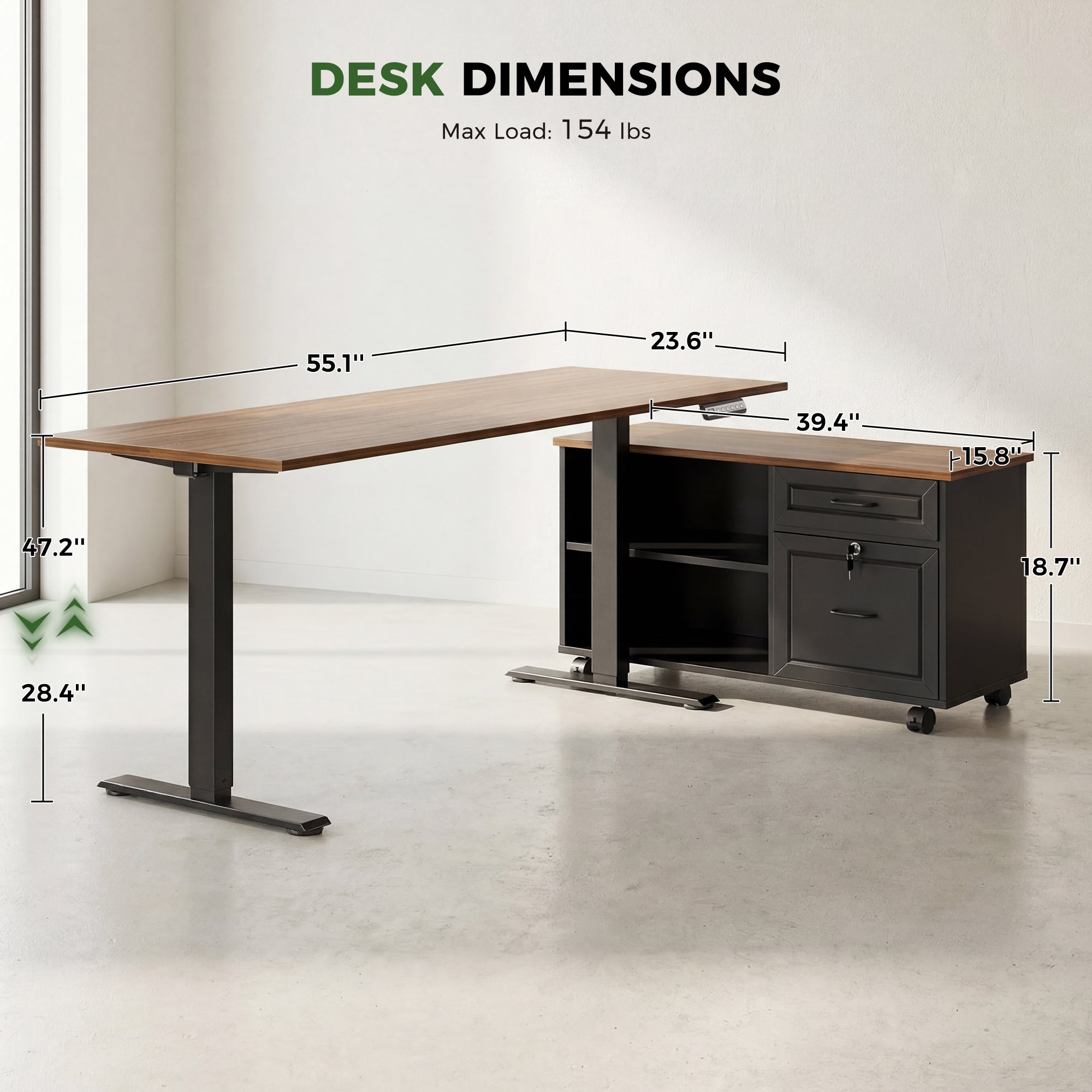
- Ergonomic range: height adjusts from 28.4" to 47.2", so it can cover many seated-to-standing typing heights.
- Desktop + cabinet sizing: desktop is 55.1" long x 23.6" wide; filing cabinet is 39.4" long x 15.8" wide x 18.7" high.
- Workflow tip: place monitors on the main run, and use the cabinet side as your “paper and tools” zone to avoid crowding your keyboard area.
Why it wins:
This l shaped standing desk is the most storage-forward option in the list. The cabinet footprint gives you a built-in organization zone, so you do not have to add a separate file unit that might break cable routing or block chair movement.
Shop: OffiGo 55" L-Shaped Desk with Storage Cabinet
Best for built-in charging and fabric drawers
2: OffiGo 63" L-Shaped Electric Standing Desk with Fabric Drawers and Built-in Power Outlets
- Best for: device-heavy days (laptop + monitor + chargers) where you want fewer power bricks on the floor.
- Scenario: you want a corner standing desk that still fits multiple screens and keeps small items hidden.
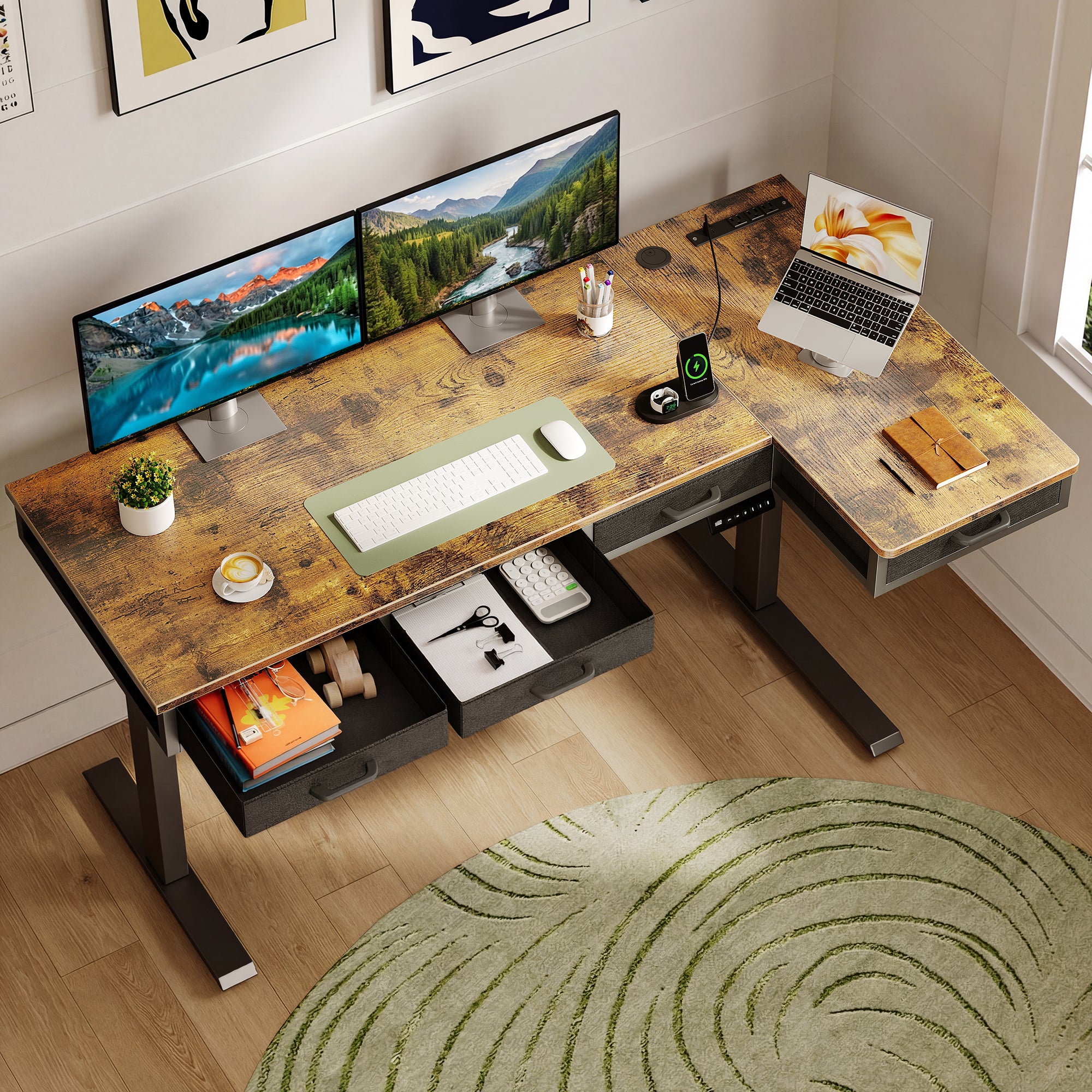
- Storage style: 4 built-in fabric drawers for cables, notebooks, adapters, and small accessories.
- Built-in power: includes 3 AC outlets plus 1 USB port and 1 Type-C port, therefore you can plug in work and personal gear at the desktop.
- Cable control: includes a rear cable tray, which helps keep slack managed while the desk moves.
- Fit details: height adjusts from 29.9" to 46.1"; main desktop is 47" x 21.2"; side table is 31.5" x 15.8".
Why it wins:
If you charge devices all day, built-in ports can remove friction from switching between sit and stand. This standing desk with drawers also keeps daily tools close, so you spend less time rummaging in bins or rolling carts.
Shop: OffiGo 63" L-Shaped Desk with Fabric Drawers
Best for a compact corner with wood drawers
3: OffiGo 55" L-Shaped Electric Standing Desk with Wooden Drawers and Power Outlets
- Best for: smaller rooms that still need an L layout and real drawer structure.
- Scenario: you want a standing desk with storage that feels more “built-in” than fabric bins.
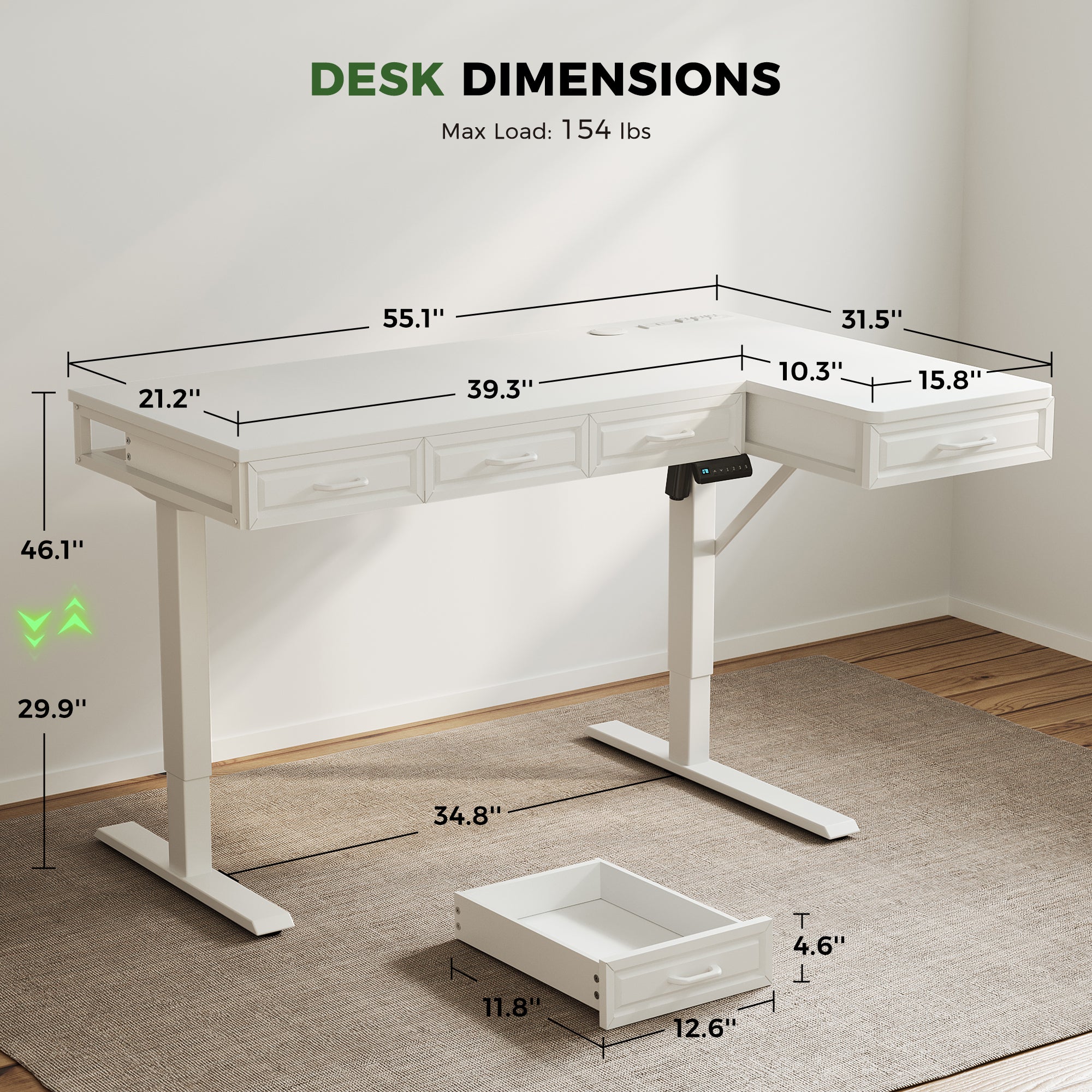
- Storage style: 4 wooden drawers under the desktop.
- Drawer sizing: drawers are 12.6" long x 11.8" wide x 4.6" high, which suits stationery, cables, and thin notebooks.
- Desktop sizing: 55.1" long x 31.5" wide; leg clearance spans 34.8".
- Height range: adjusts from 29.9" to 46.1".
- Built-in power: includes 3 AC outlets plus 1 USB port and 1 Type-C port.
- Layout flexibility: reversible L design, so you can set up left-return or right-return depending on the room.
Why it wins:
For many people, wood drawers “train” better habits because items have a consistent home. If you want a corner standing desk that does not require extra storage furniture, this model stays clean and simple.
Shop: OffiGo 55" L-Shaped Desk with Wooden Drawers
Best for keyboard tray and monitor shelf ergonomics
4: OffiGo 59" L-Shaped Electric Standing Desk with Drawers, Keyboard Tray and Monitor Stand

- Best for: long typing days where wrist and shoulder comfort matter more than maximum drawer count.
- Scenario: you want an adjustable desk that helps set monitor height and keyboard position without adding separate risers.
- Ergonomic add-ons: monitor stand plus a pull-out keyboard tray.
- Keyboard tray sizing: 25.6" long x 11.8" wide.
- Storage: two fabric drawers for smaller daily items.
- Built-in power: includes 3 AC outlets and 2 USB ports.
- Fit details: desktop measures 59" long x 47.2" wide; height adjusts from 28.4" to 45.7".
Why it wins:
A keyboard tray can reduce shoulder elevation if your desktop sits a bit high for your seated posture. Also, a monitor shelf can simplify your initial setup, so your screen height is not an afterthought.
Shop: OffiGo 59" L-Shaped Desk with Keyboard Tray
Buying Guide: How to Choose for Full-Time Work
What size l shaped standing desk fits your room?
Do you need a corner standing desk that tucks into a tight space, or do you want a long main run for multiple screens?
- First, measure both wall runs (the “L” legs) and include door swing and baseboard heaters.
- Next, plan chair clearance. Many setups need 30"-36" behind the chair for comfortable movement.
- Then, check where drawers or cabinets sit. Storage can steal knee space if it is centered where you sit.
- Finally, think in “zones”: monitors on the long run, writing and charging on the return.
How much standing desk with storage do you need?
A standing desk with drawers and a standing desk with cabinet solve different problems.
- Choose drawers if you mostly store small, high-frequency items: pens, adapters, notebooks, and cables.
- Choose a cabinet if you store bulky items: binders, file boxes, printer paper, or a small printer.
- Keep your top drawer as a “reset drawer.” If your day ends messy, you can clear the surface in under 60 seconds.
Do you need built-in power and ports?
Built-in power sounds minor, but it changes day-to-day friction if you charge often.
- If you plug in a laptop, phone, headset, and a desk light daily, built-in AC and USB can cut cable sprawl.
- If you already use an under-desk power strip, you may value a cable tray more than extra ports.
- Plan for slack: standing height needs extra cable length, therefore tight cords can tug devices or damage ports.
What height range supports your ergonomics?
Do you know your seated and standing typing heights? If not, a fast starting point is elbow posture.
- Set your keyboard height so elbows sit near 90 degrees and shoulders feel relaxed.
- Set monitor height so the top of the screen is at or slightly below eye level, depending on your glasses and viewing distance.
- If you are shorter, the minimum height matters more. If you are taller, the maximum height matters more.
Autonomous provides user-height-to-desk-height guidance that helps you estimate working bands for sitting and standing positions. (offigo.com)
Practical setup tips for day-one comfort
Do you want to feel better in week one, not week eight? Focus on repeatable basics.
- Alternate on purpose. Start with 20-30 minutes standing, then 30-40 minutes sitting, and adjust by comfort.
- Keep feet and hips active. A small footrest or a shift in stance every few minutes reduces static load.
- Put your “primary” items inside the reach triangle: keyboard, mouse, and your daily notebook.
- Use drawers to prevent posture drift. If items stay off the surface, your keyboard stays centered.
Common mistakes that cause regret
Even a great adjustable desk can feel wrong if setup details are missed.
- Buying storage, then blocking knee clearance. Always confirm where you will sit relative to drawers and cabinet walls.
- Ignoring depth on an L return. A shallow return is great for charging, but it may not fit a full monitor base.
- Overloading the desktop with fixed accessories. If your monitor arm clamp conflicts with a shelf, you lose flexibility.
- Forgetting cable slack. Cords that are “just long enough” at sitting height usually fail at standing height.
Comparison Table
Quick comparison: storage, power, and fit
| Model | Best for | Storage type | Built-in power | Height range | Desktop size highlights | Trade-offs to consider |
|---|---|---|---|---|---|---|
| OffiGo 55" L-Shaped Desk with Storage Cabinet | Paper files and bulky gear | Movable filing cabinet (39.4" x 15.8" x 18.7") | None | 28.4" to 47.2" | Desktop 55.1" x 23.6" plus cabinet return | Cabinet footprint can limit under-desk leg space depending on where you sit; no integrated outlets means you may still mount a power strip |
| OffiGo 63" L-Shaped Desk with Fabric Drawers | Charging plus hidden storage | 4 fabric drawers | Yes: 3 AC + USB + Type-C | 29.9" to 46.1" | Main 47" x 21.2", side 31.5" x 15.8" | Fabric drawers are great for soft goods but may feel less rigid than wood; 63" width can be too large for very small rooms |
| OffiGo 55" L-Shaped Desk with Wooden Drawers | Compact corner storage | 4 wood drawers | Yes: 3 AC + USB + Type-C | 29.9" to 46.1" | Main 39.3" x 21.2", side 31.5" x 15.8"" | Drawer module can reduce knee movement if you sit too close; wood drawers favor thin items, not bulky equipment |
| OffiGo 59" L-Shaped Desk with Keyboard Tray | Typing and monitor ergonomics | 2 fabric drawers + keyboard tray | Yes: 3 AC + 2 USB | 28.4" to 45.7" | Main 39" x 19.7", side 47.2" x 19.7"" | Keyboard tray changes your seated fit (good for some, awkward for others); two drawers may be light storage for paper-heavy work |
Conclusion
A good standing desk with drawers should reduce friction in two ways: it should keep the desktop clear, and it should make posture easier to maintain. If you handle lots of paperwork, choose a standing desk with cabinet storage. If you mainly manage devices and accessories, prioritize a standing desk with storage drawers plus built-in charging.
Also, do not ignore the “fit” part of full-time work. Ergonomics focuses on fitting work to the person to reduce musculoskeletal risk, not forcing your body to adapt to the workstation. CDC defines ergonomics in this fit-to-the-person way, which is why height range, monitor height, and keyboard position matter.
Finally, 2026 buyers are increasingly looking for desks that act as a workstation hub: storage, cable control, and device power. Recent reviews of 2026 standing desks highlight storage-focused designs as a distinct category, which fits the direction of drawer-and-cabinet-first setups. (techradar.com)
Official Site: OffiGo
FAQ
What is the best standing desk with drawers for full-time work?
For full-time work, choose a standing desk with drawers that stores daily items without forcing you to sit off-center. You should confirm the drawer placement does not reduce knee clearance where you type. You should also check the height range covers both your seated and standing elbow height. Finally, pick built-in power only if it reduces your everyday cable clutter.
Is an l shaped standing desk better than a straight desk for productivity?
A l shaped standing desk can improve workflow because it creates two zones: one for your main monitor and keyboard, and a second for writing, charging, or reference materials. In smaller rooms, the same layout works as a corner standing desk that uses wall space efficiently. However, an L shape needs careful measuring on both wall runs to avoid blocking doors and walkways. If you regularly use two screens or spread out papers, the extra surface can be worth the footprint.
How do I know if an adjustable desk will fit my height?
You should compare the desk minimum and maximum height to your seated and standing typing needs, not just your overall height. A practical target is elbows near 90 degrees with relaxed shoulders, because shoulder tension is an early sign the surface is too high. If the desk does not go low enough, you may raise your chair and lose proper foot support. If the desk does not go high enough, you may shrug shoulders while standing, which often leads to neck fatigue.
What is the difference between a standing desk with drawers and a standing desk with cabinet storage?
A standing desk with drawers is best for small items you grab often, such as pens, adapters, and thin notebooks. A standing desk with cabinet storage is better for bulky items like binders, paper stacks, and printer supplies, because shelves and compartments handle volume better. Cabinets also hide visual clutter, which can reduce the feeling of mess in small rooms. The best choice depends on what must stay within arm reach during your workday.
Do built-in power outlets on a standing desk matter?
Built-in outlets matter most when you charge several devices daily and you want fewer adapters on the floor. You should still plan cable slack so cords do not tug when the desk rises, because tight cables can pull devices off the surface. If you already use a mounted power strip and a cable tray, integrated outlets may be less important than storage and desktop space. Also, port placement matters because hard-to-reach outlets often go unused.
Can a corner standing desk work with dual monitors?
A corner standing desk can work well with dual monitors if the main run has enough depth for your monitor bases or arms. Many people place both monitors on the longer side and use the return for a laptop, charging, and documents. You should keep your viewing distance comfortable, usually about an arm's length, and keep the monitor tops near eye level. Stability also matters at standing height, so heavier monitor arms should be tightened and positioned close to the frame.
How should I alternate sitting and standing during an 8-hour workday?
Most people adapt better with shorter standing intervals instead of trying to stand for hours straight. You can start with 20-30 minutes standing followed by 30-40 minutes sitting, then adjust based on foot and back comfort. If you are new to standing desks, increase standing time gradually over 2-3 weeks so your legs and lower back adapt. Brief movement breaks, like a 60-second walk every hour, often help more than forcing a strict sit-stand ratio.