
Introduction
You buy a standing desk to feel less cramped, but the clutter still wins. Cables sprawl, notebooks pile up, and suddenly your "big" surface feels tiny. The frustrating part is that the wrong kind of built-in storage can make it worse, not better, by stealing knee clearance, forcing awkward reach, and turning quick resets into a daily fight.
This shortlist helps you match built-in storage to how you actually work: what you grab hourly, what you store weekly, and where your devices need power.
If you want Electric Standing Desks that support real Home Office Design (not just a spec sheet), the picks below follow one simple logic: storage and ergonomics first, Height Adjustable Tables second.
Standing Desks for Daily Work – OffiGo
Product Picks for Daily Work
1: OffiGo 55" L-Shaped Electric Standing Desk
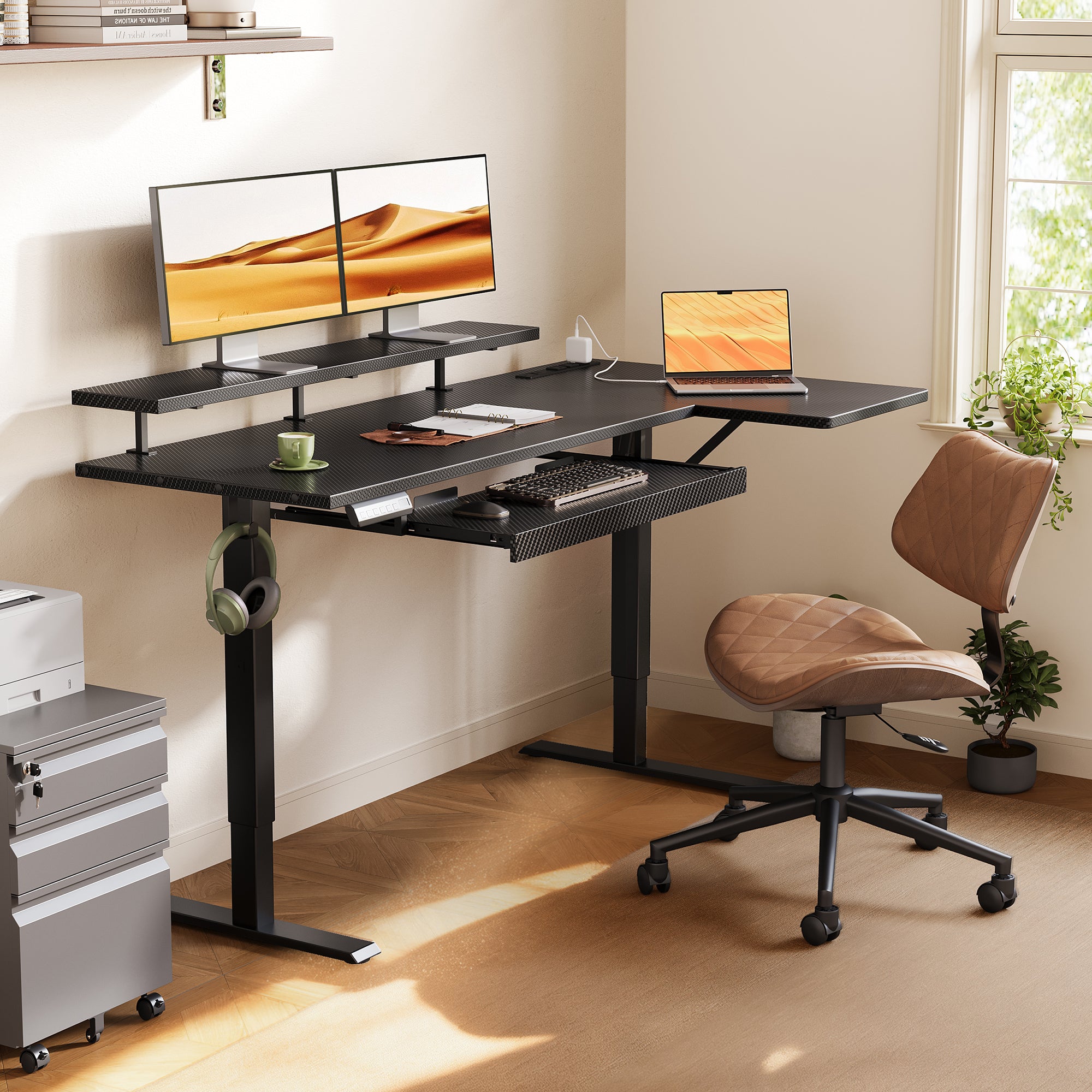
- Why it works: the keyboard tray and monitor shelf pull your input devices and screens into cleaner ergonomic layers, so your main surface stays open
- Daily-work note: the LED control panel includes 3 memory presets, so you can lock in reliable sit-stand transitions
If you keep rearranging your desk to make space for your keyboard and mouse, this layout solves the root problem. It creates a consistent typing position, then lets you use the main surface for active work like writing, sketching, or staging paperwork. For L-Shaped Standing Desks in Compact Office Furniture footprints, this is the most "posture-first" option in the list.
55" L-Shaped Electric Standing Desk with Keyboard Tray & Monitor Shelf
2: OffiGo 55" L-Shaped Electric Standing Desk

- Why it works: four wooden drawers give you true Under-Desk Storage for accessories you touch all day
- Practical fit: strong choice when you want storage without adding a separate drawer unit
Drawers are the fastest way to "reset" your desk between tasks. If you rotate between laptop work, paperwork, and calls, you can keep the surface clear without losing essentials. This is one of the most straightforward Electric Standing Desks to live with day to day because storage and power are already where you work, not on the floor.
55" L-Shaped Electric Standing Desk with Wooden Drawers & Power Outlets
3: OffiGo 55" L-Shaped Height Adjustable Standing Desk
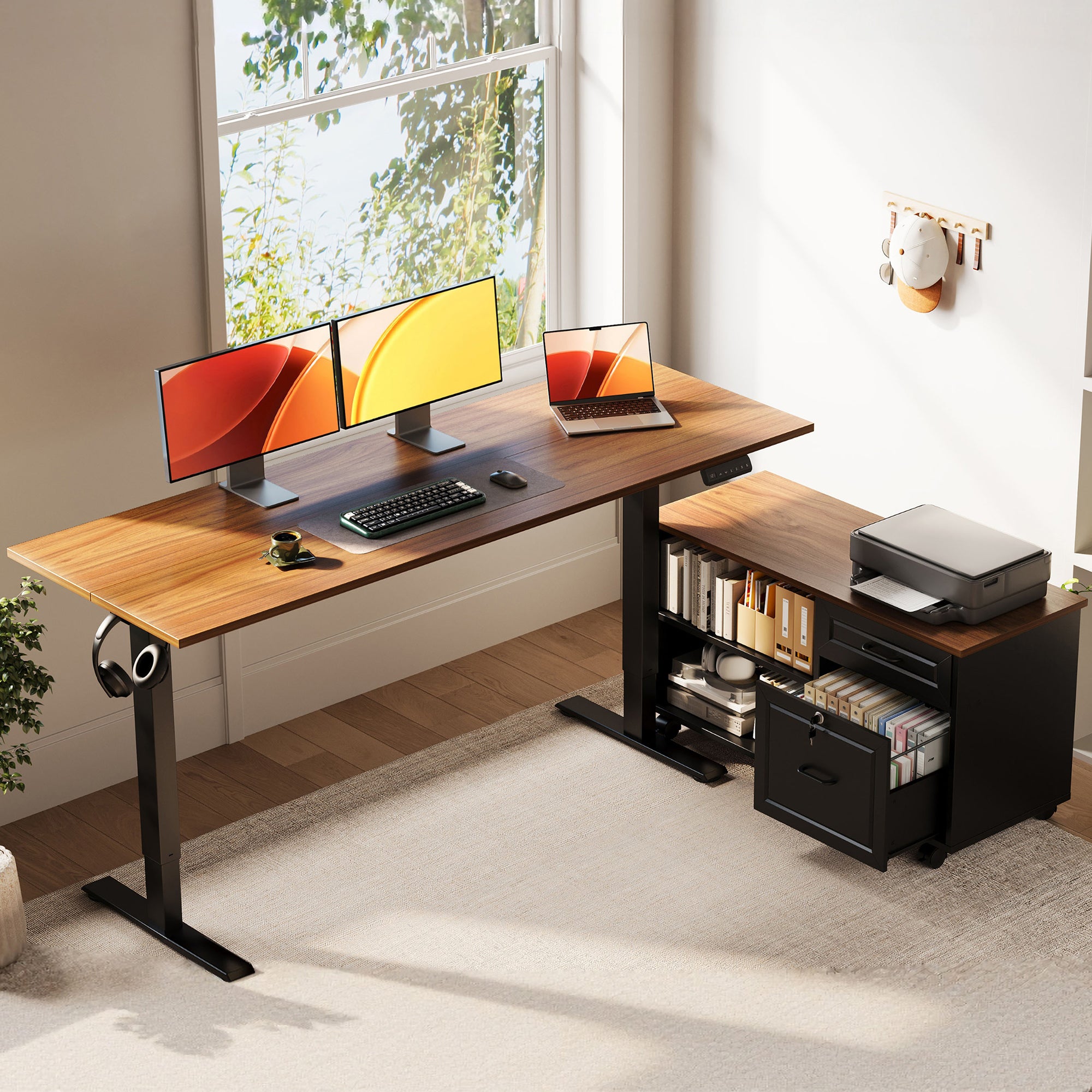
- Why it works: the large cabinet handles bulky storage better than shallow drawers
If your clutter is mostly large objects (binders, a printer, shipping supplies), drawers will fill up fast and still leave piles behind. This desk leans into "zone planning" for Home Office Design: active work on the desktop, bulk storage in the cabinet, and fewer decisions mid-day. It is also a strong choice when you want Under-Desk Storage but do not want a fixed drawer box under your knees.
55" L-Shaped Desk with Large Movable Storage Cabinet
4: OffiGo 59" L-Shaped Electric Standing Desk
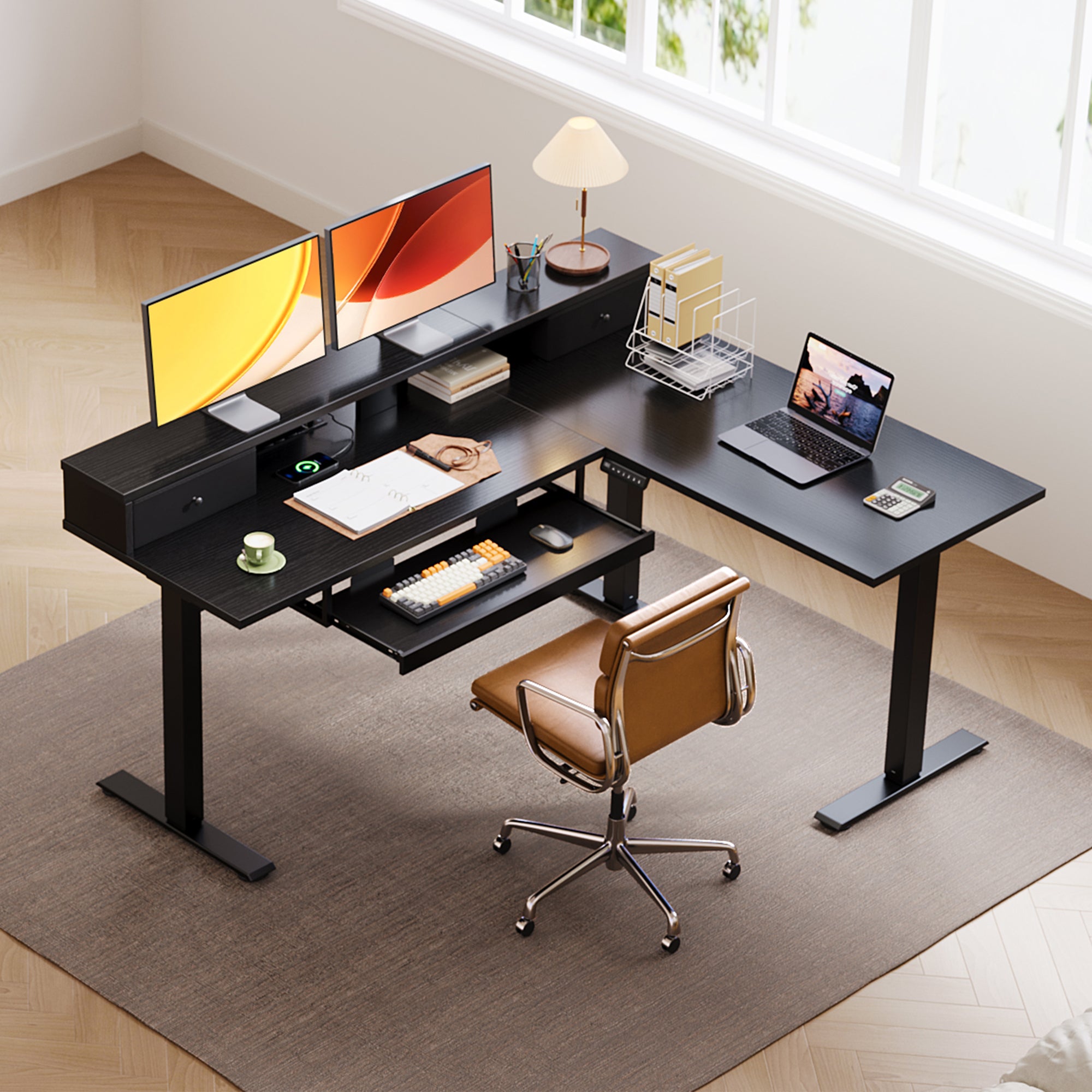
- Why it works: it combines three clutter reducers (tray, monitor stand, drawers) in one footprint
If your workflow needs surface area and structure (for example, a monitor zone plus a laptop zone plus a writing zone), the 59" format makes that easier without feeling like a huge executive desk. It is also a realistic bridge desk if you want Height Adjustable Tables that encourage you to actually switch positions, because your key tools (screen and keyboard) stay in the same relative setup.
59" L-Shaped Electric Standing Desk with Drawers, Keyboard Tray & Monitor Stand
5: OffiGo 63" L-Shaped Electric Standing Desk

- Why it works: four drawers create simple, repeatable sorting (cables, stationery, devices, paperwork)
If you regularly end the day with "stuff everywhere," more drawers usually beats deeper drawers. Fabric drawers are especially practical when you want flexible, lightweight organization rather than heavy filing. For L-Shaped Standing Desks in Compact Office Furniture layouts, this is the best pick when storage is the main pain point and charging convenience matters.
63" L-Shaped Electric Standing Desk with Fabric Drawers & Built-in Power Outlets
How to Choose Built-In Storage That Helps (Not Hurts)
Storage type vs. your daily clutter pattern
If you keep buying organizers but still feel behind, the issue is usually storage type mismatch. Drawers are best when your clutter is small, frequent, and grab-and-go: cables, earbuds, adapters, pens, sticky notes, and notebooks. A cabinet zone is better when your clutter is bulky or awkward: a printer, reams of paper, binders, or shipping supplies.
Use this quick decision filter:
- Choose drawers if: you touch the items daily, and you want a 30-second reset
- Choose a cabinet if: you want to hide bulk items and protect knee clearance
- Choose tray + shelf if: your pain is posture and reach, not just mess
Ergonomics add-ons that protect posture
If your shoulders creep up or your wrists feel bent by lunch, storage is not the only issue. Ergonomic add-ons like a keyboard tray and monitor shelf help you keep your typing height and screen height independent, which is often what breaks on L-shaped setups.
According to OSHA, a neutral posture keeps elbows close to the body and bent about 90 to 120 degrees. That matters because a desk that is even 1 to 2 inches too high can push you into shrugged shoulders for hours.
Practical checks for your Height Adjustable Tables setup:
- Seated typing: elbows roughly 90 to 120 degrees, wrists straight
- Standing typing: shoulders down, forearms close to parallel
- Monitor: top of screen near eye level, not below
Practical tips before you buy
- Map your primary reach zone: keep daily tools inside a comfortable arm sweep
- Measure knee clearance: confirm drawers or trays will not hit your thighs
- Save two height presets: one for typing, one for reading or meetings
Common mistakes to avoid
- Overbuying storage and losing legroom
- Hiding a power strip under the desk and creating a cable tangle
- Treating "bigger" as "better" instead of choosing zones
One trend worth noting is that hybrid work is still pushing people to build more capable home setups. Microsofts 2025 Work Trend Index draws on survey data from 31,000 workers across 31 countries plus Microsoft 365 signals and LinkedIn labor trends, underscoring how work patterns keep evolving and why the home office is still a high-use space for many people. Microsoft
Quick side-by-side: storage, power, ergonomics
| Pick | Size class | Storage built-in | Power built-in | Ergonomic add-ons | Height range | Trade-offs |
|---|---|---|---|---|---|---|
| 55" Tray + Monitor Stand | 55" | None | 3 AC, USB, Type-C | Tray, monitor stand | 28.4-47.2 | Less bulk storage |
| 55" Wood Drawers | 55" | 4 wooden drawers | 3 AC, USB, Type-C | None | 29.9-46.1 | Fixed drawer footprint |
| 55" Movable Cabinet | 55" | Large cabinet | None | None | 28.4-47.2 | Needs separate power plan |
| 59" Drawers + Tray | 59" | 2 fabric drawers | 3 AC, 2 USB | Tray, monitor stand | 28.4-45.7 | Smaller drawers |
| 63" Fabric Drawers | 63" | 4 fabric drawers | 3 AC, USB, Type-C | None | 29.9-46.1 | More space required |
Conclusion
If your top frustration is posture and a crowded typing area, start with the 55" L-shape with the keyboard tray and monitor shelf. It is the easiest way to keep your screen and hands in a consistent, comfortable setup, which is the make-or-break factor for daily use.
If your top frustration is clutter, pick the storage style that matches your mess. Go with wooden drawers for lots of small daily items, a movable cabinet when you need bulk Under-Desk Storage, or four fabric drawers when you want a quick daily reset in a larger L-shaped workspace.
FAQ
How do I choose between drawers and a side cabinet?
Drawers are best when your clutter is small and frequent, like cables, notebooks, and accessories you grab daily. A side cabinet is better when you have bulky items like printers, binders, or stacks of paper that do not belong on the main surface. Before choosing, list the top 10 items you want off your desktop and group them by size. Then choose the storage style that fits those groups without forcing you to cram items or stack them.
How much under-desk storage is too much for daily work comfort?
Under-desk storage is too much when it pushes your knees forward or forces you to sit farther back to type. That posture shift often leads to reaching, shrugged shoulders, and wrist extension after long sessions. A quick test is to sit with your hips all the way back in your chair and see if your thighs can move freely under the front edge. If you cannot shift positions without bumping storage, reduce the under-desk bulk and move storage to a side zone.
What is the easiest way to set standing desk height for typing?
Set the desk so your elbows stay close to your sides and your forearms feel roughly parallel to the floor when your hands rest on the keyboard. If your shoulders rise toward your ears, the desk is too high by even a small amount, so drop it in small steps like 0.2 to 0.4 inches. If your wrists bend upward while typing, lower the desk or use a keyboard tray to bring the input surface down. Save a standing preset once it feels neutral, then fine-tune over a few work sessions.
Do built-in power outlets reduce cable clutter, or just move it?
Built-in power reduces clutter when the ports sit near where your devices naturally live, such as behind monitors or near a laptop dock. It just moves the mess when chargers have to cross your main work zone to reach the outlet location. Route cables down the back edge of the desk and bundle them into a single drop to the floor. The goal is fewer cables in your hands and line of sight, not just fewer cables on the desktop.
What should I prioritize for a compact home office: L-shape space or storage?
Prioritize L-shape surface area when you keep running out of usable space for daily tasks like note-taking, device docking, or spreading documents. Prioritize storage when your surface is technically big enough but always buried under items that should be put away. In tight rooms, the best answer is usually "zones": keep one wing for active work and the other for parking devices and supplies. If the footprint is borderline, choose storage that stays off your knee zone and keeps the center area open.
Will a keyboard tray help if my desk feels too high when seated?
A keyboard tray often helps because it lowers the keyboard and mouse without forcing you to raise your chair to an awkward height. That change can bring your elbows closer to your sides, which many people feel immediately in their shoulders and wrists. The trade-off is thigh and knee clearance, so you should confirm the tray depth and mounting position will not bump your legs during long sessions. If you sit close to the desk edge, pick a tray that lets you pull the keyboard into a comfortable reach without crowding your lap.
Can I pair these desks with ergonomic office chairs, or do I need a stool?
You can absolutely pair these desks with Ergonomic Office Chairs, and most people do better that way because you can dial in seat height, lumbar support, and armrest height for long work blocks. A stool is helpful for short perching breaks, but it rarely replaces a chair for full-day work. If you alternate sitting and standing, aim for a chair that lets your feet rest flat and your elbows stay comfortably bent while typing. The most important part is that your seated position feels neutral before you add more accessories.