
Which Standing Desk Size Fits Your Room And Workload?

Reader Decision Moment
The right Standing Desk Size is the one that fits your room, your screen setup, and the way you move during the day. A home office standing desk can look perfect online, but feel wrong if your chair hits the wall, your monitor sits too close, or your cables pull tight when the desk rises. So, before comparing OffiGo models, treat size as a workflow choice instead of only a width number.
A larger electric standing desk gives you more surface for monitors, notebooks, speakers, and charging gear. However, a compact or L-shaped standing desk may use your room better if you work in a bedroom corner or shared space. According to OSHA, monitor placement should allow at least 20 inches, or 50 cm, of viewing distance, which makes desktop depth just as important as width.
Use this adjustable desk size guide to match the desk to your daily setup:
- Choose a wide straight desk if you use two monitors, paperwork, and desktop accessories.
- Choose an L-shaped standing desk if a corner can become two work zones.
- Choose a compact electric standing desk if you mostly use a laptop, one monitor, and a few essentials.
- Leave room behind your chair so standing transitions do not feel cramped.
The 71-Inch Executive Desk Is Built For Maximum Surface Area

Product Snapshot
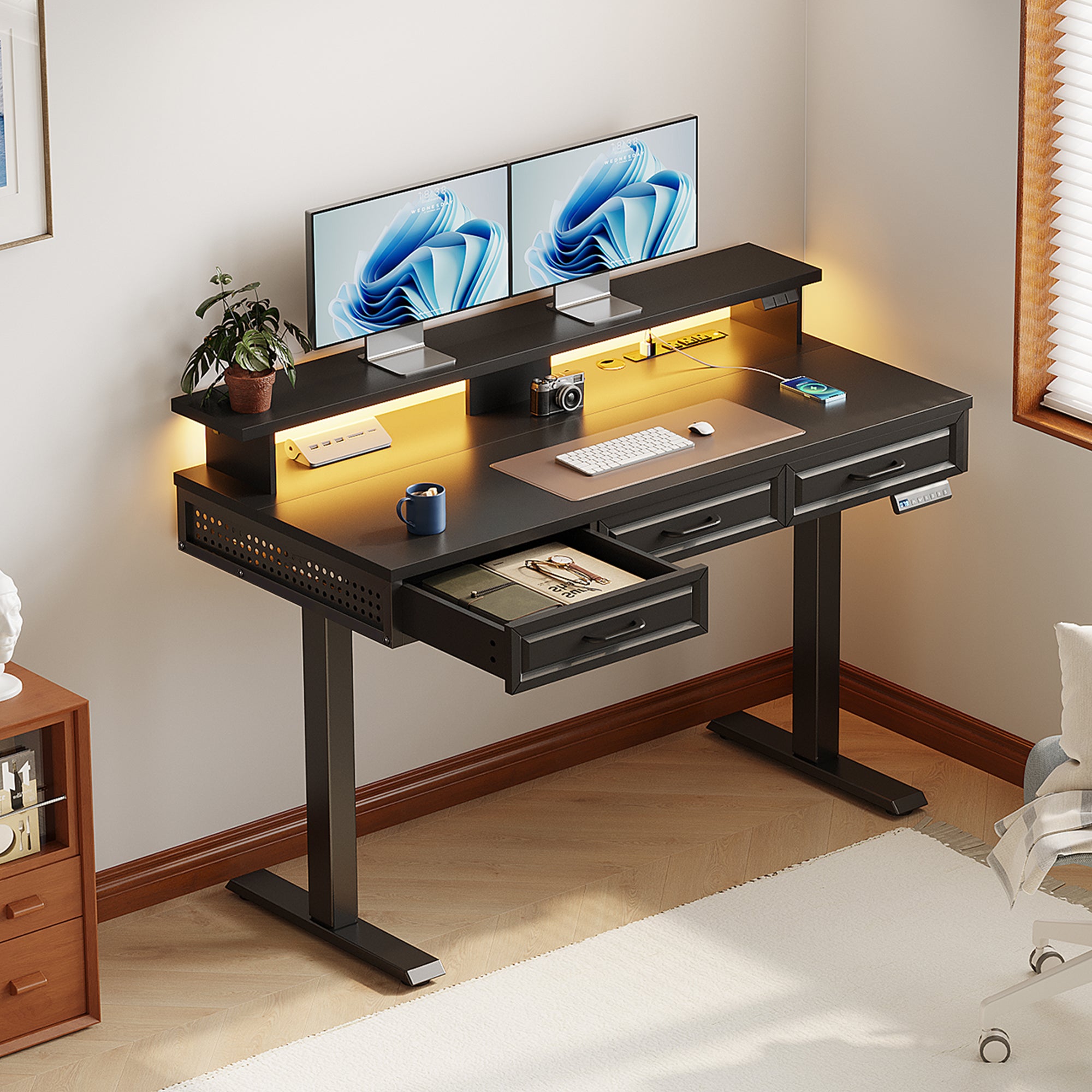
The OffiGo 71-Inch Executive Electric Standing Desk with Built-in Power Outlets and 1.38-Inch Thick Desktop is the best fit when surface area is your first need. Its 71 by 27.6 inch desktop gives you a wide straight work zone for multi-monitor work, a laptop dock, notebooks, and daily accessories. The 1.38 inch thick three-panel tabletop gives the desk a substantial feel, while the reinforced dual crossbeam steel frame supports stable daily height changes.
This model adjusts from 29.1 to 48 inches and includes 3 memory presets, so you can save sitting and standing heights instead of adjusting from scratch each time. It also includes 3 AC outlets, 2 USB ports, 2 Type-C ports, cable grommets, and a side hook. That makes it a strong home office standing desk for users who want the desk to work as a power and organization hub, not just a surface.
Its main limitation is room demand. A 71 inch width works best along a broad wall, in a dedicated study, or in an executive-style home office. It is less ideal for tight bedrooms, narrow wall sections, or users who need a single-piece tabletop.
Which Smaller Or Corner Desk Fits Better?
63-Inch L-Shaped Electric Standing Desk
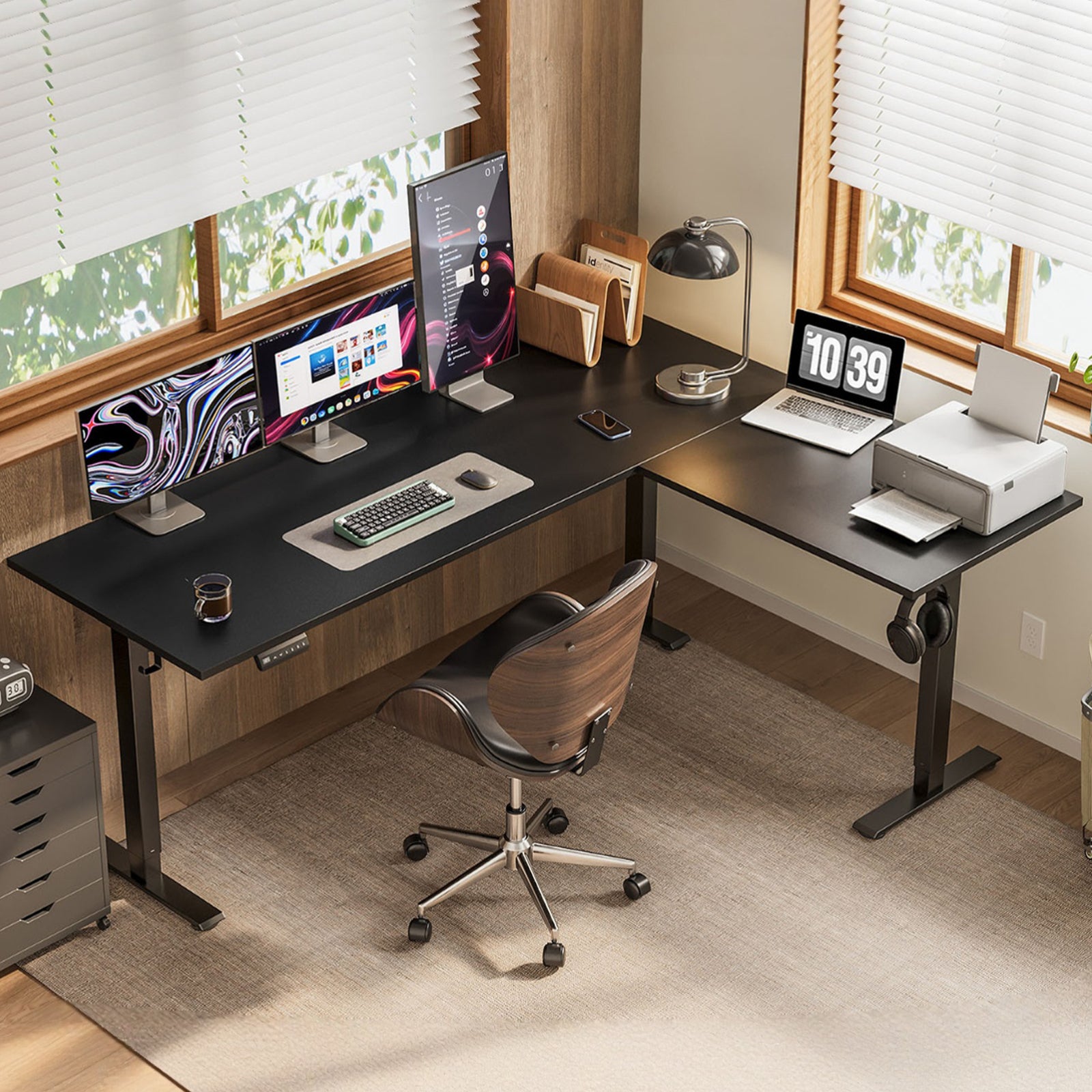
The OffiGo 63-Inch L-Shaped Height Adjustable Standing Desk is the best fit when you want a large surface but do not want one long straight desk. Its L-shaped desktop measures 63 inches long by 47.2 inches wide, with 47 inch and 35 inch legroom clearances. Because the return can be installed on the left or right side, it adapts to different corners and wall layouts.
This L-shaped standing desk adjusts from 27.9 to 46.1 inches and includes an LED height display with 3 memory buttons. It works well for a dual-zone setup: screens on one side, writing or device charging on the other. The tradeoff is that it does not include integrated power outlets or charging modules, so you should plan a separate power strip, cable tray, or wall outlet route before assembly.
Shop: OffiGo 63-Inch L-Shaped Height Adjustable Standing Desk
59-Inch L-Shaped Desk With Storage
The OffiGo 59-Inch L-Shaped Electric Standing Desk with Drawers, Keyboard Tray and Monitor Stand is the best fit when desktop organization matters as much as size. Its 59 by 47.2 inch L-shaped desktop creates separate zones, while the 25.6 by 11.8 inch keyboard tray frees the main surface for screens and documents. It also includes two fabric drawers, a monitor shelf, 3 AC outlets, and 2 USB ports.
The height range runs from 28.4 to 45.7 inches, with 3 memory presets for quick posture changes. This model is useful if your workday includes a keyboard, mouse, notebooks, headphones, chargers, and small accessories that normally spread across the desk. However, the built-in tray, shelf, and drawers reduce layout flexibility compared with a cleaner open-surface desk.
Shop: OffiGo 59-Inch L-Shaped Electric Standing Desk with Drawers, Keyboard Tray and Monitor Stand
55-Inch L-Shaped Electric Standing Desk
The OffiGo 55-Inch L-Shaped Electric Standing Desk with Spacious Work Surface and Adjustable Height is the best fit for smaller corner offices that still need two zones. Its main desktop measures 39.4 by 21.3 inches, and its sub-desktop measures 31.5 by 15.7 inches. You also get 36 inches of legroom between the desk legs, which helps in tighter rooms.
This model adjusts from 28.4 to 47.2 inches and includes 3 memory presets. The reversible side tabletop makes it easier to fit the desk into a left or right corner, while the reinforced support beams, fixed crossbars, and diagonal bracing support daily use. It is not the right choice if you need the widest possible executive surface, but it is practical when you want corner flexibility without moving to a larger 63 or 59 inch layout.
Shop: OffiGo 55-Inch L-Shaped Electric Standing Desk with Spacious Work Surface and Adjustable Height
48-Inch Pink Electric Standing Desk
The OffiGo 48-Inch Electric Height Adjustable Standing Desk in Pink is the best fit for compact personal workstations. Its 47.2 by 23.6 inch desktop can handle a laptop, one monitor, keyboard, mouse, notebook, and a few small accessories. It also has 36.5 inches between the desk legs, which helps it work in bedrooms, study spaces, and smaller home offices.
This electric standing desk adjusts from 28.0 to 46.1 inches, includes 3 memory presets, and supports up to 154 lbs. Two side hooks and a rear cable notch help control bags, headphones, and cords without adding bulk. Still, it is not the best choice for wide dual-monitor setups, large speakers, printers, or heavy multitasking layouts.
Shop: OffiGo 48-Inch Electric Height Adjustable Standing Desk in Pink
Head-To-Head Desk Size Comparison
| Dimension | OffiGo 71-Inch Executive | OffiGo 63-Inch L-Shaped | OffiGo 59-Inch Storage L-Shaped | OffiGo 55-Inch L-Shaped | OffiGo 48-Inch Pink |
|---|---|---|---|---|---|
| Best Fit | Executive surface priority | Large corner workstation | Organized multitasking | Compact corner office | Minimal personal setup |
| Desktop Size | 71 by 27.6 inches | 63 by 47.2 inches | 59 by 47.2 inches | 39.4 plus 31.5 inches | 47.2 by 23.6 inches |
| Shape | Straight wall desk | Reversible L-shape | Storage L-shape | Reversible L-shape | Straight compact desk |
| Height Range | 29.1 to 48 inches | 27.9 to 46.1 inches | 28.4 to 45.7 inches | 28.4 to 47.2 inches | 28.0 to 46.1 inches |
| Power Access | AC, USB, Type-C | User-planned power | AC and USB | User-planned power | User-planned power |
| Organization / Storage | Open desktop only | Open surface only | Tray, shelf, drawers | Side hook | Hooks, cable notch |
| Limitations | Needs wide wall | Needs corner clearance | Less layout freedom | Less total width | Limited multi-monitor space |
Which Desk Gives The Most Work Surface?
OffiGo 71-Inch Executive: This model gives you the widest straight work zone at 71 by 27.6 inches. It suits two monitors, a laptop, paperwork, and tools spread across one continuous desktop.
L-shaped alternatives: The 63 and 59 inch L-shaped desks create more wraparound utility in a corner. They may feel larger in daily use because you can split screen work and writing tasks across two sides.
Best Fit: Pick the 71 inch desk if you need one broad front-facing surface. Pick the 63 inch L-shaped desk if your room has a strong corner and you want separate zones.
Which Shape Uses Room Space Better?
OffiGo 71-Inch Executive: This desk works best against a long wall. It gives you a clean executive setup but needs enough left-to-right clearance.
L-shaped alternatives: The 63, 59, and 55 inch models turn a corner into usable space. That can preserve open floor area in rooms where one long wall is already taken by a bed, bookcase, or door swing.
Best Fit: Choose straight if your wall is wide and uncluttered. Choose L-shaped if the room has an underused corner and you want the desk to hug the room shape.
Which Setup Handles Cable And Power Needs?
OffiGo 71-Inch Executive: Built-in 3 AC outlets, 2 USB ports, and 2 Type-C ports reduce the number of loose chargers on the desktop. Cable grommets also help route cords downward.
OffiGo 59-Inch Storage L-Shaped: This model includes 3 AC outlets and 2 USB ports, making it the strongest L-shaped option for built-in charging. The 63, 55, and 48 inch desks rely more on user-planned cable solutions.
Best Fit: Pick the 71 inch desk for the most complete built-in power layout. Pick the 59 inch desk if you want power plus storage in a corner workstation.
Which Height Range Supports Daily Ergonomics?
OffiGo 71-Inch Executive: The 29.1 to 48 inch range covers common seated and standing positions, and memory presets reduce repeated adjustment effort. Its range works especially well if your setup changes between focused typing and standing review work.
Other OffiGo models: The 63, 59, 55, and 48 inch desks all offer electric adjustment and memory presets, with top heights from 45.7 to 47.2 inches. Mayo Clinic notes that monitors should sit straight in front of you at about arm's length, so remember that desk height and monitor height must work together.
Best Fit: Most users should choose by room and workload first, then fine-tune sitting and standing heights after setup.
Which Desk Best Manages Storage?
OffiGo 71-Inch Executive: This desk favors open organization. It gives you room for accessories, but you will likely add trays, monitor risers, or under-desk organizers if you store many small items.
OffiGo 59-Inch Storage L-Shaped: This model has the clearest built-in storage plan, with a monitor stand, keyboard tray, and two fabric drawers. It separates keyboard use, display height, and small-item storage without taking over the whole desktop.
Best Fit: Choose the 59 inch storage model if clutter is your main problem. Choose the 71 inch desk if you prefer a cleaner surface that you organize your own way.
Best Fit By Home Office Scenario
Best Fit For Executive Home Offices
Choose the 71 inch desk when maximum capability matters more than saving floor space. This is the best home office standing desk for a dedicated office, long wall, multi-device workflow, and daily video calls. It also makes sense if you want built-in AC, USB, and Type-C access directly on the desktop.
For best results, measure the full wall first. Then confirm that your chair can roll back at least 30 inches and that the door, closet, or cabinet nearby still opens freely. A large desk feels productive only when you can move around it without bumping into the room.
Best Fit For Corner Productivity Zones
Choose the 63 inch L-shaped desk when you want a corner workstation with two active zones. For example, you can place monitors on the long side and keep the return side for a laptop, notebook, drawing tablet, or reference documents. This setup often feels more natural for multitasking than forcing every item into one straight line.
The key is clearance. Confirm the corner can handle both arms of the L-shape, and decide whether the return should sit on the left or right before assembly. Because this model does not include built-in power, plan the outlet location early.
Best Fit For Organized Workflows
Choose the 59 inch L-shaped desk when your biggest need is separation. The keyboard tray keeps typing space clear, the monitor stand helps raise your screen, and the drawers give small items a place to go. This is useful for users who switch between computer work, paperwork, study materials, and accessories throughout the day.
There is one tradeoff: built-ins decide part of your layout for you. If you like a very flexible, open desktop, you may prefer the 63 or 55 inch L-shaped model instead.
Best Fit For Compact Personal Setups
Choose the 48 inch pink electric standing desk if your setup is simple and your room is tight. It works well for laptop work, one monitor, online classes, writing, makeup use, or a combined bedroom workstation. The 47.2 by 23.6 inch surface gives enough depth for basic ergonomics without dominating the room.
Choose the 55 inch L-shaped model if you still want a corner layout but cannot fit the larger L-shaped desks. It is the better compact choice for users who need a second zone for notes, tablets, or accessories.
Buying Criteria That Should Drive The Final Size
Measure Before Choosing Width
Start with the room, not the product photo. Measure the wall width, corner depth, nearby outlet position, door swing, and chair movement zone. Then subtract a few inches of breathing room so the desk does not scrape trim, block drawers, or make the room feel packed.
A useful test is to mark the desk footprint on the floor with painter's tape. Stand, sit, roll your chair back, and turn as you would during a normal call or work session. If the taped area already feels tight, choose a smaller Standing Desk Size or move to an L-shaped standing desk that uses a corner more efficiently.
Check Monitor Distance And Depth
Depth affects comfort more than many buyers expect. A 27.6 inch deep desk, like the 71 inch model, gives more room to push monitors back and keep documents in front of the keyboard. A 23.6 inch deep compact desk can still work, but you may need a smaller monitor base or monitor arm alternative that the desktop safely supports.
OSHA identifies enough monitor distance as a workstation evaluation point because users should not need to lean the head, neck, or trunk forward or backward to read the screen. In practice, that means your adjustable desk size guide should include screen size, not just desk width.
Evaluate Stability At Full Height
A desk can feel solid while seated but less steady at full height, especially with wide monitors or heavy accessories. Look at the frame, crossbeams, leg spacing, and recommended load capacity. OffiGo's 71 inch desk uses a dual crossbeam steel frame, while the 55 inch model uses reinforced support beams, fixed crossbars, and diagonal bracing.
Also consider your typing style. If you type heavily, use a standing mat, or adjust the desk many times a day, stability becomes more important than a few extra inches of width. A smaller desk with a strong frame may feel better than an oversized desk squeezed into the wrong room.
Plan Cables Before Installation
Cable planning is not optional on an electric standing desk because the desktop moves. Leave enough slack for the desk to travel from its lowest to highest point without tugging chargers, monitor cords, or wall plugs. The CDC reported that sit-to-stand desk users in an active-workstation trial increased workplace standing time by about 1.10 hours at month 3, which means your cables need to handle real daily movement.
Before daily use, raise the desk to maximum height and check every cable. Then lower it fully and check again. If a cord pulls tight, add slack, use a longer cable, or route it through a tray or grommet.
Conclusion
Best Fit Takeaway
The best Standing Desk Size depends on your room first and your workload second. Choose the OffiGo 71-Inch Executive Electric Standing Desk if you want maximum straight-line surface, built-in power, Type-C access, and a strong setup for multi-device work. Choose the 63 inch L-shaped desk if a corner can become a large dual-zone workstation.
If organization is your main pain point, the 59 inch L-shaped desk is the best fit because it combines power, storage, a keyboard tray, and a monitor stand. If your room is smaller, choose the 55 inch L-shaped desk for corner flexibility or the 48 inch pink electric standing desk for a compact personal setup. Your next action is simple: tape the footprint on your floor, check monitor distance, confirm cable slack, and then shop the OffiGo model that matches your real room.
FAQ
What Size Standing Desk Works Best For A Home Office?
The best size standing desk for a home office is the one that fits your room while supporting your daily equipment. A 48 inch desk works well for a laptop, one monitor, keyboard, mouse, and small accessories. A 60 inch plus desk is better for dual monitors, paperwork, docking stations, and speakers. If you have an open corner, an L-shaped standing desk can give you more working zones without needing one long wall.
How Much Depth Is Needed For Comfortable Monitor Viewing?
A depth of about 24 to 30 inches usually works well for most monitor setups. Deeper surfaces give you more control over viewing distance, especially with 24 inch to 32 inch monitors. If your desk is shallower, use a compact monitor stand, slimmer keyboard, or careful screen placement to avoid leaning forward. Always test your seated and standing viewing positions before adding accessories.
Are L-Shaped Standing Desks Better For Small Rooms?
L-shaped standing desks can be better for small rooms when a corner is available and clear. The return side creates a second work zone for notes, devices, or accessories without forcing everything into one straight row. However, you still need to check door swing, chair movement, and leg clearance on both sides. If the corner is blocked by a closet, radiator, or bed, a compact straight desk may fit better.
What Features Matter Most Beyond Desktop Size?
The most important features beyond desktop size are height range, stability, memory presets, load capacity, power access, and cable management. Height range should support your seated elbow height and standing elbow height without forcing raised shoulders. Memory presets are helpful because they let you switch positions with one button instead of guessing each time. Built-in power and cable routes matter more if you use multiple devices every day.
How Should Cables Be Managed On A Height-Adjustable Desk?
Cables should have enough slack to move from the desk's lowest height to its highest height without pulling tight. Start by plugging in your monitor, laptop dock, chargers, and lamp, then raise and lower the desk fully during setup. Use grommets, sleeves, cable trays, or rear cable notches to guide cords away from moving parts. If any cable stretches at full height, replace it with a longer cable before daily use.