
A Standing Desk Brand You Can Trust
Are you experiencing persistent back pain or discomfort after long hours spent at your desk? Many remote workers face the challenge of maintaining a healthy posture and productive workflow in their home offices. The wrong desk setup can lead to decreased productivity, chronic discomfort, and even long-term health issues.
This guide will help you master a healthier, more productive work-from-home setup by exploring how the right ergonomic standing desk can transform your daily routine and enhance your overall well-being. You'll learn how to choose, set up, and optimize a workspace solution that supports your health and boosts your focus.
Why Your Home Office Needs an Ergonomic Upgrade

Long hours spent sitting can lead to a range of health issues, from back pain to reduced circulation, directly impacting your productivity and overall comfort. Poor posture, often a result of non-ergonomic setups, can exacerbate these problems, making it difficult to concentrate and sustain energy throughout the workday. Upgrading your home office with an ergonomic standing desk is not just about comfort; it's about investing in your long-term health and maximizing your efficiency in a remote work environment. A well-designed adjustable desk allows you to seamlessly transition between sitting and standing, promoting better circulation and reducing the strain on your body.
Building Your Ideal Ergonomic Workspace
Creating an ergonomic workspace involves more than just buying a standing desk; it requires understanding the principles that contribute to a healthy and productive environment. By focusing on core concepts and thoughtful design, you can build a setup that supports your body and enhances your workflow. This section will guide you through the essential elements of an ergonomic home office, from foundational principles to practical setup strategies, ensuring you make informed decisions for your well-being.
Core Standing Desk Concepts
Understanding the fundamental concepts behind ergonomic design is crucial for building a workspace that truly supports your health. These pillars provide the theoretical framework for making practical choices about your standing desk and overall office setup. By grasping these principles, you can move beyond basic adjustments and create a truly optimized environment that promotes comfort and productivity throughout your workday.
Pillar 1: Understanding Ergonomics
Ergonomics is the science of designing and arranging workplaces, products, and systems so that they fit the people who use them. Key principles for a healthy workspace include maintaining neutral postures, reducing repetitive motions, and minimizing force and excessive exertion. This means positioning your monitor at eye level, keeping your keyboard and mouse within easy reach, and ensuring your feet are flat on the floor or a footrest when sitting. Applying these principles helps prevent musculoskeletal disorders and enhances overall comfort and efficiency.
Pillar 2: Benefits of Standing Desks
Electric standing desks offer significant physical and mental advantages over traditional sitting desks. Physically, they help reduce sedentary time, which is linked to a lower risk of obesity, type 2 diabetes, and cardiovascular disease. Mentally, the ability to switch between sitting and standing can boost energy levels, improve focus, and reduce feelings of fatigue. This flexibility promotes better circulation, alleviates back pain, and encourages a more dynamic work posture, leading to increased productivity and overall well-being throughout your remote work day.
Pillar 3: Types of Adjustable Desks
Adjustable desks primarily fall into two categories: electric and manual. Electric standing desks, like those from OffiGo, use motors for smooth, quiet height adjustments, often with programmable memory presets for convenience. Manual desks, on the other hand, require a hand crank or pneumatic lever to change height, which can be slower and more physically demanding.
Designing for Daily Use
Once you understand the core concepts, the next step is to design your workspace for optimal daily use. This involves not only setting up your electric standing desk correctly but also integrating storage, power, and cable management solutions to create a clutter-free and efficient environment. OffiGo's thoughtful design approach focuses on practical layouts and intuitive controls, ensuring that every feature genuinely improves your experience without unnecessary complexity, allowing you to focus on your work.
Setting Up Your OffiGo Desk
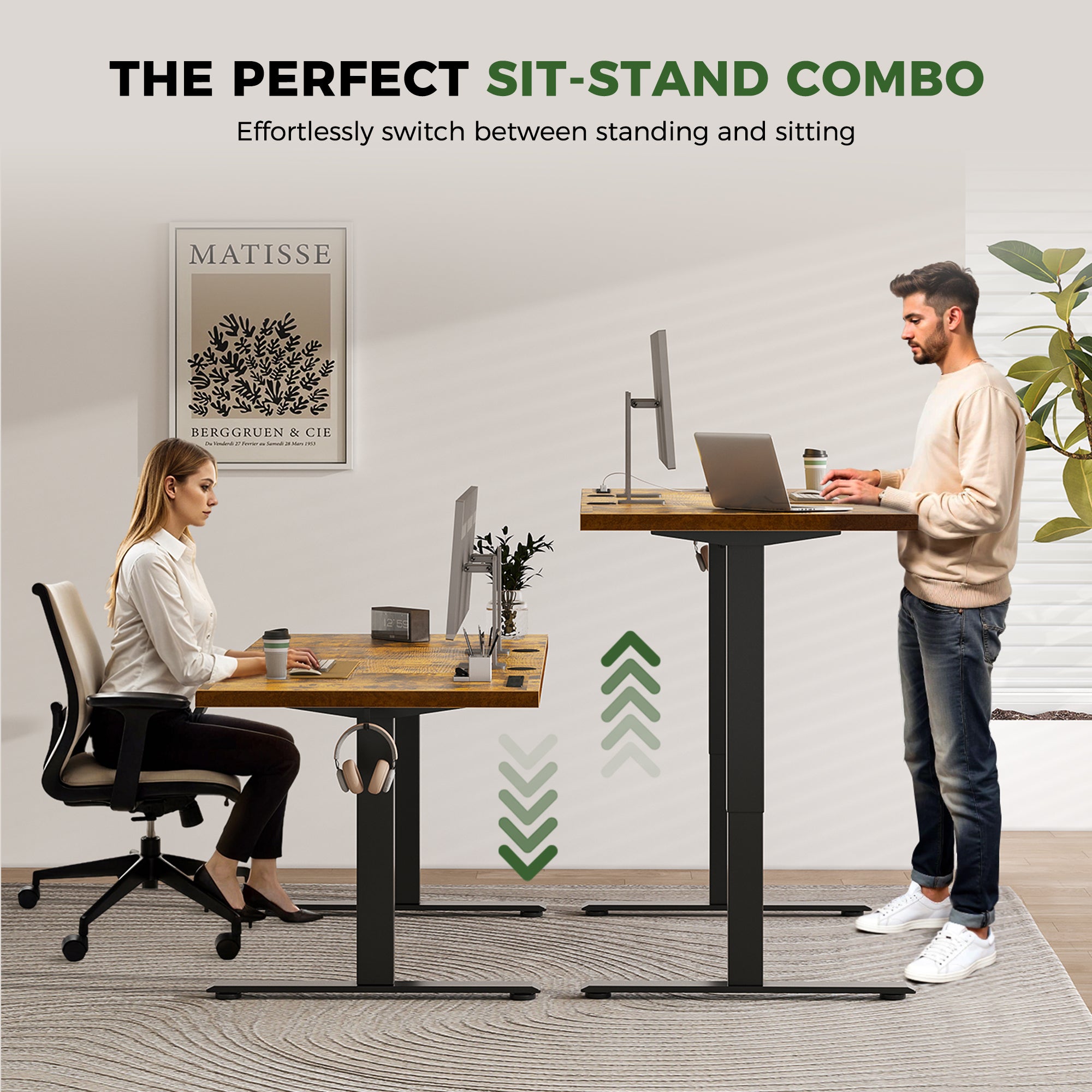
Setting up your OffiGo electric standing desk is a straightforward process designed for immediate comfort and seamless integration into your routine. The initial assembly involves securing the stable steel frame and attaching the spacious desktop. Once assembled, you can easily program your preferred sitting and standing heights using the intuitive controls, allowing for smooth and quiet transitions throughout your workday. This practical guide ensures you can quickly achieve an ergonomic posture, reducing strain and enhancing your focus from day one. OffiGo desks are built for long workdays, providing stability even at standing height.
Optimizing Your Workspace Layout
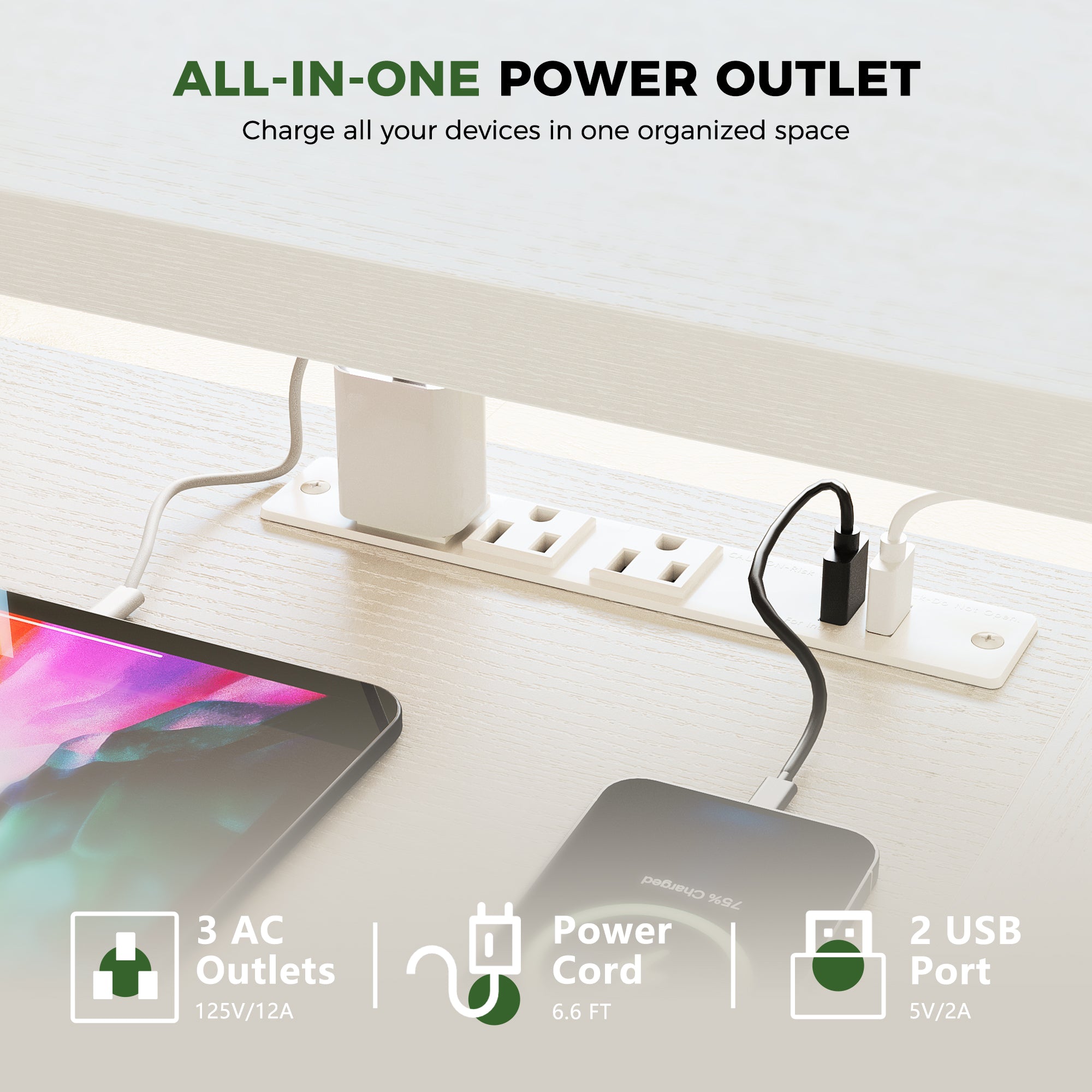
Optimizing your workspace layout involves integrating essential components like storage, power, and cable management to create a clutter-free and highly functional environment. Many OffiGo models include desktop power interfaces (AC/USB/Type-C) and integrated cable management solutions, eliminating desktop clutter and reducing daily friction. By utilizing expandable desktop and under-desk accessory systems, you can customize your setup to suit your specific needs, ensuring everything is within reach without compromising aesthetics. This integrated approach enhances focus and streamlines your workflow, making your home office a more productive space.
Choosing the Right Standing Desk
Selecting the right standing desk involves evaluating several critical factors beyond just height adjustment. Your choice should align with your specific needs for stability, integrated features, and how the desk will fit into your home environment. Considering these elements carefully will ensure you invest in a workspace solution that provides long-term comfort, durability, and aesthetic appeal, making your remote work experience more enjoyable and productive.
Factor 1: Stability & Durability
Stability and durability are paramount for any standing desk, especially when considering long-term use in a home office. Assess the frame material, looking for strong, stable steel frames that minimize wobble at standing height. The leg design, including the number of columns and motor systems, also contributes significantly to overall stability. A robust construction ensures your desk can reliably support your equipment and withstand daily adjustments without compromising your focus or safety. OffiGo desks are designed with strong, stable steel frames for reliable performance.
Factor 2: Features vs. Simplicity
When choosing a standing desk, consider the balance between integrated features and overall simplicity. While advanced features like built-in power interfaces (AC/USB/Type-C) and comprehensive cable management systems can significantly enhance your workflow and reduce clutter, it's important to assess their genuine value to your daily routine. OffiGo focuses on integrating features that genuinely improve the experience, such as intuitive controls and practical layouts, without adding unnecessary complexity. This approach ensures you get premium functionality and solid build quality at an honest value, avoiding inflated costs for features you may not need.
Factor 3: Design & Aesthetics
The design and aesthetics of your standing desk play a crucial role in how well it integrates into your home environment. OffiGo standing desks are specifically designed to fit naturally into real homes, balancing function, comfort, and a clean, modern look. Consider the desktop layout, material finishes, and overall design language to ensure it complements your existing decor. Performance metrics for aesthetics include how seamlessly the desk blends with your interior, contributing to a harmonious and inspiring workspace rather than a purely utilitarian one. A well-designed desk enhances your home office's visual appeal and your overall work experience.
Elevate Your Home Office Experience
Investing in an ergonomic standing desk is a proactive step towards long-term health and enhanced productivity in your home office. By choosing a desk that prioritizes stability, thoughtful design, and integrated solutions, you can transform your work-from-home setup into a dynamic and supportive environment. OffiGo's commitment to building better electric standing desks ensures you receive a high-quality, cost-effective workspace solution designed for how you work today. Elevate your home office experience and embrace a healthier, more focused approach to remote work.
FAQ
How to evaluate standing desk stability?
To evaluate standing desk stability, assess the frame material, leg design, and weight capacity. Look for desks constructed with strong steel frames and robust leg columns, as these provide a solid foundation and minimize wobble, especially at higher standing positions. A higher weight capacity often indicates a more durable and stable build, ensuring your equipment remains secure during adjustments and daily use.
What factors affect desk height adjustment speed?
Several factors influence desk height adjustment speed, including motor quality, the number of motors, and the total weight on the desktop. Desks with dual-motor systems generally offer smoother, faster, and quieter transitions compared to single-motor models, as they distribute the lifting power more evenly. Heavier loads on the desktop can also slightly reduce adjustment speed, so consider the total weight of your equipment when evaluating performance.
How to prioritize integrated features effectively?
To prioritize integrated features effectively, focus on those that directly enhance your workflow and address common pain points in your home office. Features like built-in power outlets (AC/USB/Type-C) and efficient cable management systems are highly valuable for reducing clutter and improving connectivity. Consider how each feature contributes to a more organized, productive, and comfortable workspace before adding less critical or overly complex additions.
How to measure the long-term ROI from an ergonomic desk?
Measuring the long-term return on investment (ROI) from an ergonomic desk involves tracking improvements in comfort, productivity, and the reduction of work-related pain over time. You can observe fewer instances of back or neck discomfort, increased focus during long workdays, and a general improvement in overall well-being. These benefits translate into sustained productivity and a healthier work-life balance, making the initial investment worthwhile for your physical and mental health.
How to adapt a standing desk to unique room layouts?
To adapt a standing desk to unique room layouts, choose a model with a versatile design and consider complementary accessories. Desks with flexible desktop configurations or modular components can fit into various spaces, from compact corners to open-plan rooms. Utilizing accessories like monitor arms, mobile storage units, or under-desk drawers can further optimize space and functionality, allowing you to create an efficient and ergonomic workspace regardless of your room's specific dimensions or layout.