
Understanding standing desks for back support and storage
By the middle of a long workday, two problems usually show up together. Your neck starts tipping forward because the screen is too low, and your desktop slowly disappears under chargers, notebooks, and loose accessories. That mix of poor posture and visual clutter can make focused work feel harder than it should, especially in a home office where one desk often has to handle everything.
The seven picks below focus on standing desks for back support that also solve daily storage friction. Instead of treating an electric standing desk as only a lifting surface, this list looks at monitor height support, keyboard placement, built-in storage, cable control, and room fit. The result is a practical shortlist for better posture, cleaner setups, and stronger home office desk organization in 2026.
What makes a standing desk setup healthier in daily use?
Back comfort does not come from height adjustment alone. A desk works better when it helps you keep the top of the monitor at or just below eye level, maintain neutral arm position, and leave enough room to avoid hunching toward the screen. OSHA notes that monitor placement should support reading without bending the head or neck down, and CDC recommends placing an external monitor about an arm's length away with the top at or below eye level. That is why shelves, keyboard trays, and generous surface depth matter in a real ergonomic standing desk setup.
Storage matters just as much because clutter changes posture in small ways all day. Items without a home end up stealing keyboard space, pushing the mouse too far out, or forcing constant reaching. Reference guidance on remote desk planning also points toward matching desk size to equipment load, with 48-55 inch desks often fitting simpler single-monitor setups and 60 inch plus or L-shaped layouts better for broader, multi-screen workflows. Mayo Clinic also suggests breaking up sitting with standing roughly every 30 minutes, so a desk that moves smoothly and saves presets is easier to use consistently.
What this roundup prioritized
- Height ranges that fit sitting and standing transitions in daily use
- Storage features that improve standing desks with storage performance, not just looks
- Shapes that match real workflows, from compact rooms to multi-monitor corners
- Built-in power or cable control that reduces desktop clutter
- Layout details such as monitor shelves, keyboard trays, drawers, and file storage
Top picks: 7 standing desks for back support and storage
1. OffiGo 48" Electric Standing Desk with 3 Wooden Drawers, Monitor Shelf & USB Power Outlets
If you work in a bedroom office, apartment nook, or study corner, this is the most balanced choice in the list. The footprint stays compact, but it still addresses the two things many smaller desks miss: better monitor height and real storage. That makes it one of the strongest standing desks for back support when space is tight and you cannot hide clutter in a separate cabinet.
Why it stands out
- Full product: OffiGo 48" Electric Standing Desk with 3 Wooden Drawers, Monitor Shelf & USB Power Outlets
- Height range: 29.9" to 46.1"
- Desktop size: 47.2" x 21.3"
- Monitor shelf height: 4.7"
- Leg spacing: 31.6"
- Power hub: 3 AC outlets and 2 USB ports
- Presets: 3 memory settings
Best for
- Small rooms that still need real storage
- Laptop users adding one monitor
- Remote workers who want fewer items on the main surface
- Anyone building a cleaner, more vertical home office desk organization layout
What to watch
- The 21.3" depth is practical, but not as roomy as larger executive tops
- It suits compact workflows better than wide dual-monitor arm setups
Shop: OffiGo 48" Electric Standing Desk with 3 Wooden Drawers, Monitor Shelf & USB Power Outlets
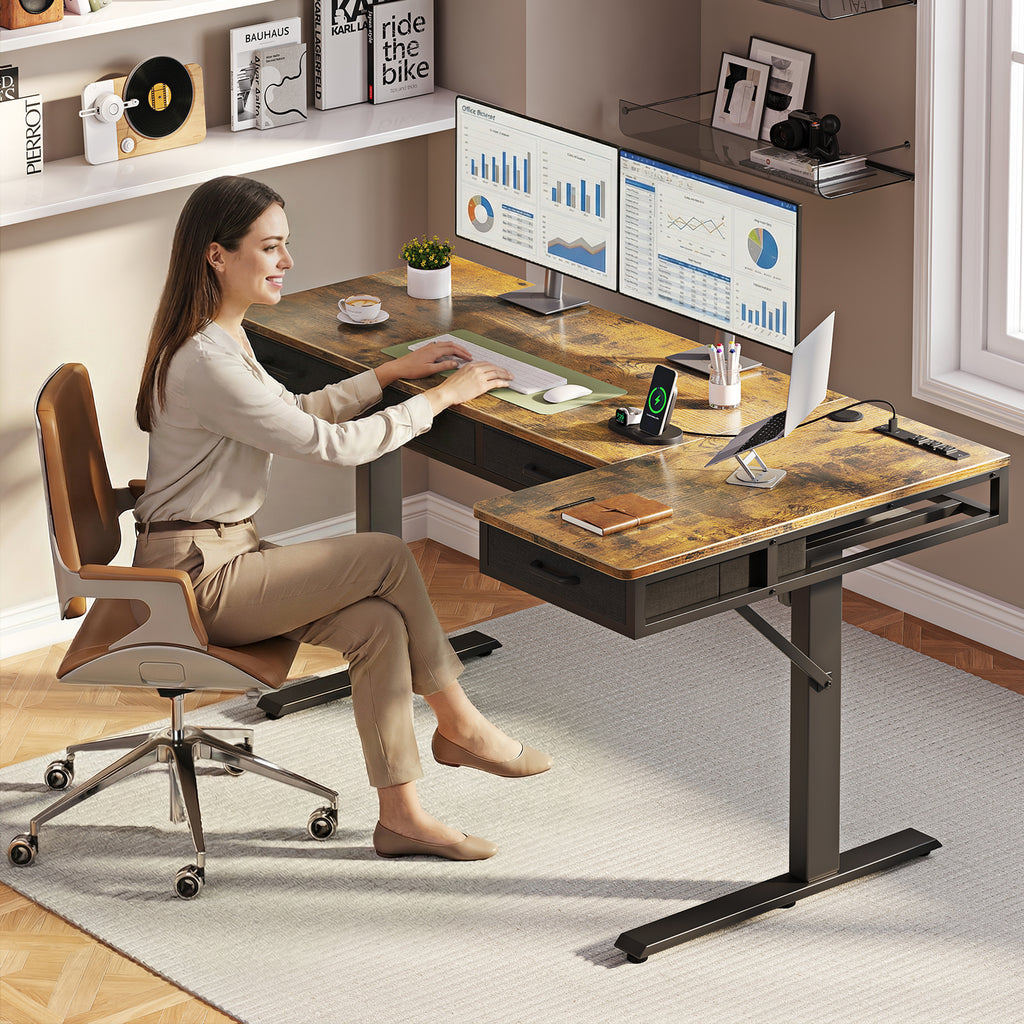
2. OffiGo 55" L-Shaped Electric Standing Desk with Keyboard Tray & Monitor Shelf
This pick fits people who do not just need a desk surface. They need zones. If your day moves between a main screen, a notebook, a second device, and charging cables, the L-shape helps keep those tasks separated. The included tray and shelf also give this electric standing desk more ergonomic value than a plain corner top.
Why it wins
- Full product: OffiGo 55" L-Shaped Electric Standing Desk with Keyboard Tray & Monitor Shelf
- Height range: 28.4" to 47.2"
- Main desktop: 39.4" x 21.3"
- Side desktop: 31.5" x 15.8"
- Keyboard tray: 25.6" x 11.8"
- Monitor stand: 39.4" x 7.9"
- Charging: 3 AC outlets, 1 USB port, 1 Type-C port
- Capacity: up to 154 lb recommended load
- Presets: 3 memory settings
Best workflow match
- Dual-zone computer and paperwork setups
- Corner offices where floor space matters
- Users who want a keyboard tray to free the main desktop
- People building an ergonomic standing desk with better screen elevation
What to watch
- At roughly 55 inches, it may still feel tight for very large dual-monitor arms plus speakers
- The added tray and shelf are useful, but not ideal if you prefer a completely open minimalist top
Shop: OffiGo 55" L-Shaped Electric Standing Desk with Keyboard Tray & Monitor Shelf
3. OffiGo 55" U Shaped Electric Standing Desk with 2 Drawers, Keyboard Tray & Monitor Stand
Some home offices are less about minimalism and more about reach. If you keep tools, notes, and devices active all day, the U-shape gives you a cockpit-style layout that reduces twisting and constant repositioning. This desk is especially useful when your workflow is heavy on switching between tasks, not just typing in a straight line.
Why it stands out
- Full product: OffiGo 55" U Shaped Electric Standing Desk with 2 Drawers & Keyboard Tray & Monitor Stand
- Height range: 28.3" to 46.5"
- Main span: 55.1"
- U-shaped extension depth: 29.1"
- Keyboard tray: 21.9" x 11.8"
- Drawer size: 13.2" x 7" x 4.4"
- Leg spacing: 42.9"
- Key features: 2 drawers, keyboard tray, monitor stand, integrated power
Where this shines
- Long-duration desk users who stay at one station for hours
- People juggling keyboard work, writing, and side-access devices
- Users who want standing desks with storage that keep essentials close
- Compact offices that need more usable surface without moving to a full oversized executive desk
What to watch
- A U-shape can feel busier than a straight desk if you like visual simplicity
- It works best when you actually use the wraparound space, not when you only need one central screen
Shop: OffiGo 55" U Shaped Electric Standing Desk with 2 Drawers & Keyboard Tray & Monitor Stand
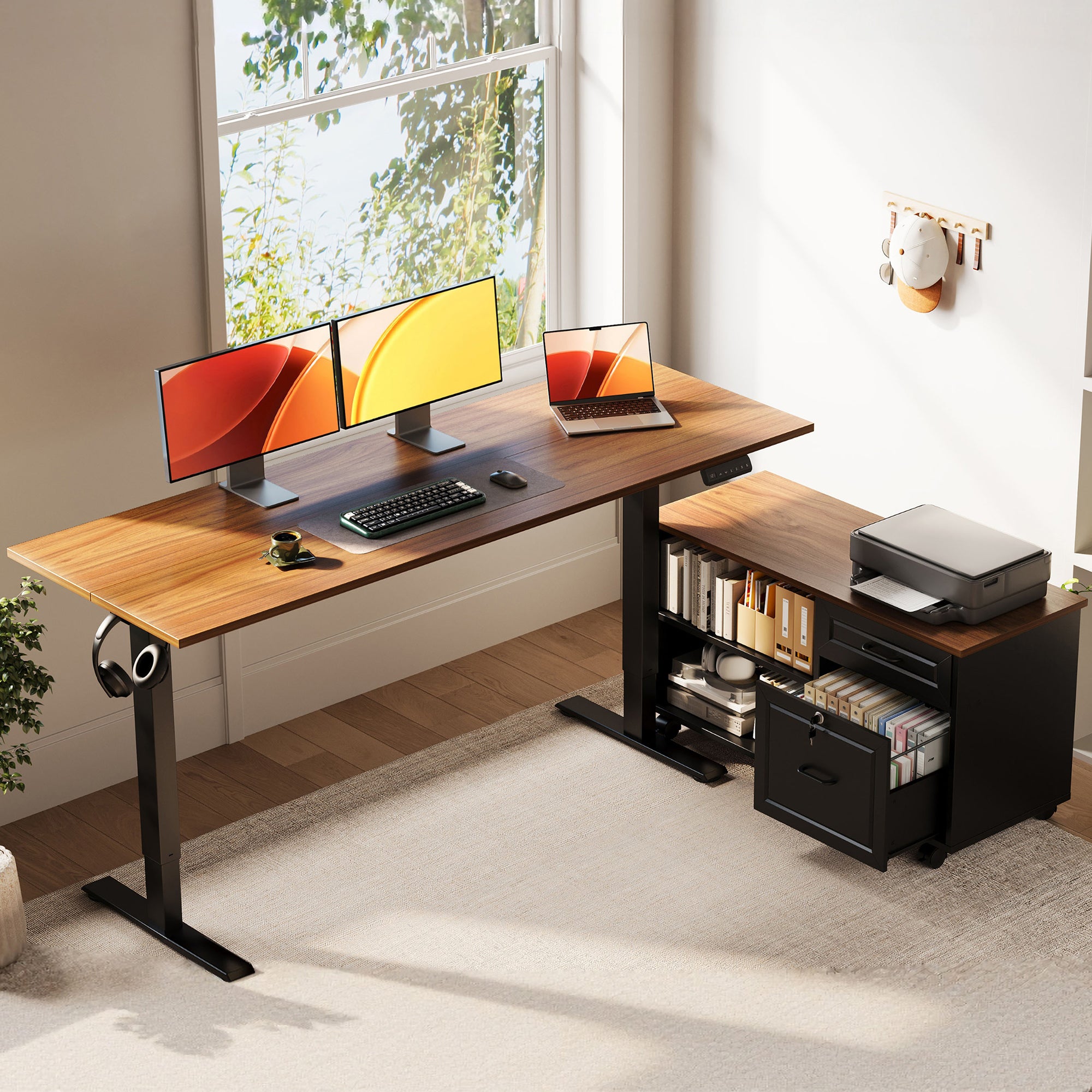
4. OffiGo 55" L-Shaped Height Adjustable Standing Desk with Large Movable Storage Cabinet
If your biggest desk problem is paperwork, this is the utility-first pick. Instead of relying on shallow accessory drawers, it adds a movable file cabinet that can hold folders, books, office gear, and a printer. That changes the desk from a simple sit-stand surface into more of a complete workstation system.
Why it stands out
- Full product: OffiGo 55" L-Shaped Height Adjustable Standing Desk with Large Movable Storage Cabinet
- Height range: 28.4" to 47.2"
- Desktop size: 55.1" x 23.6"
- Storage cabinet size: 39.4" x 15.8" x 18.7"
- Cabinet use: compartments for printers, folders, books, and supplies
- Security detail: lockable cabinet design
- Presets: 3 memory settings
Best for
- Admin-heavy workdays with files and binders
- Shared home offices where privacy matters
- Users who need flexible storage placement beside the desk
- Professionals who want more enclosed home office desk organization
What to watch
- The cabinet adds bulk, so this is not the best pick for very tight rooms
- It favors storage-heavy users over ultra-clean open-leg aesthetics
Shop: OffiGo 55" L-Shaped Height Adjustable Standing Desk with Large Movable Storage Cabinet
5. OffiGo 63" L-Shaped Electric Standing Desk with Fabric Drawers & Built-in Power Outlets
This desk hits a useful middle ground. It is noticeably roomier than smaller corner models, but it does not demand the wraparound commitment of a U-shape. If you want more monitor room, more storage, and a reversible layout, it is one of the easiest desks here to fit into different rooms and work styles.
Why it wins
- Full product: OffiGo 63" L-Shaped Electric Standing Desk with Fabric Drawers & Built-in Power Outlets
- Height range: 29.9" to 46.1"
- Main desktop: 47" x 21.2"
- Side desktop: 31.5" x 15.8"
- Storage: 4 built-in fabric drawers
- Power: 3 AC outlets, 1 USB port, 1 Type-C port
- Extra utility: rear cable tray and reversible layout
Best for
- Medium to larger home offices
- Users balancing monitors, accessories, and paperwork
- Anyone who wants standing desks for back support with extra room for monitor distance
- Buyers upgrading from a straight desk to a zoned corner setup
What to watch
- Fabric drawers are practical, but they feel less furniture-like than wood or a full cabinet
- It still needs enough corner clearance to take advantage of the L-shape
Shop: OffiGo 63" L-Shaped Electric Standing Desk with Fabric Drawers & Built-in Power Outlets
6. OffiGo 55" L-Shaped Electric Standing Desk with Wooden Drawers & Power Outlets
This is the approachable everyday option for people who want storage and an L-shape without jumping to the larger 63-inch format. It keeps the room-planning flexibility of a reversible corner desk, while adding drawer space and integrated charging for daily office gear. In many homes, that is the sweet spot between comfort and footprint.
Why it stands out
- Full product: OffiGo 55" L-Shaped Electric Standing Desk with Wooden Drawers & Power Outlets
- Height range: 29.9" to 46.1"
- Desktop size: 55.1" x 31.5"
- Drawer size: 12.6" x 11.8" x 4.6"
- Leg clearance: 34.8"
- Power: 3 AC outlets, 1 USB port, 1 Type-C port
- Layout: reversible left or right return
Good for these users
- Shared rooms that need corner efficiency
- Workers who want drawers without a separate cabinet
- Moderate dual-device setups
- Buyers looking for standing desks with storage that still feel manageable in size
What to watch
- It offers less specialty ergonomics than shelf-and-tray models
- Users with larger monitor arrays may prefer the 63-inch or 71-inch options
Shop: OffiGo 55" L-Shaped Electric Standing Desk with Wooden Drawers & Power Outlets
7. OffiGo 71" Executive Electric Standing Desk with Built-in Power Outlets & 1.38" Thick Desktop
Not everyone needs drawers to stay organized. Sometimes the better answer is a larger, more stable surface that lets you spread equipment out properly. This executive model is the best choice here for wide monitor spacing, heavier setups, and users who organize by layout instead of hidden storage.
Why it stands out
- Full product: OffiGo 71" Executive Electric Standing Desk with Built-in Power Outlets & 1.38" Thick Desktop
- Height range: 29.1" to 48"
- Desktop size: 71" x 27.6"
- Top thickness: 1.38"
- Power: 3 AC outlets, 2 USB ports, 2 Type-C ports
- Structure: double crossbeam steel frame with heavy-duty legs
- Presets: 3 memory settings
Best for
- Multi-monitor and content-creation setups
- Users with heavier equipment loads
- Spacious rooms where monitor distance and equipment spacing matter
- People who want an ergonomic standing desk with capacity first and storage second
What to watch
- It takes more room than every other desk in this list
- You may still want add-on storage if you prefer paperwork hidden away
Shop: OffiGo 71" Executive Electric Standing Desk with Built-in Power Outlets & 1.38" Thick Desktop
How to choose the right desk for posture and organization
Match shape to the way you actually work
- Choose a straight desk if your setup is simple and mostly centered
- Choose an L-shape if you need a primary zone and a side zone
- Choose a U-shape if your desk acts like a full command center
- Choose a wider executive top if spacing between gear matters more than enclosed storage
Focus on the storage problem you really have
- Drawers help with chargers, pens, notebooks, and daily clutter
- A file cabinet works better for folders, privacy, and printer support
- A monitor shelf can improve posture while opening space underneath
- Cable trays and built-in power reduce accessory spread across the surface
Look beyond height range alone
A healthier setup comes from the whole arrangement, not only from motorized lifting. If the desk helps place your screen higher, keeps the keyboard in a comfortable zone, and leaves enough depth for an arm's-length viewing distance, it will usually support better posture than a basic lift table with no organization features.
Quick comparison table
| Desk | Best for | Key storage feature | Ergonomic advantage | Trade-off |
|---|---|---|---|---|
| 48" Desk with 3 Wooden Drawers | Small rooms | 3 wooden drawers | Monitor shelf for better screen height | Less room for larger multi-monitor setups |
| 55" L-Shaped with Keyboard Tray | Zoned workflows | Keyboard tray + shelf | Better arm and screen positioning | Extra accessories may not suit minimalist users |
| 55" U-Shaped Desk | High task switching | 2 drawers | Wraparound reach efficiency | Busier footprint |
| 55" L-Shaped with File Cabinet | Paper-heavy work | Movable file cabinet | Clears main surface for neutral posture | Largest storage footprint in room |
| 63" L-Shaped with Fabric Drawers | Flexible corner offices | 4 fabric drawers | More room for monitor spacing | Drawers feel more utility-focused than premium |
| 55" L-Shaped with Wooden Drawers | Everyday home office use | Wooden drawers | Balanced corner workflow | Fewer ergonomic extras than shelf-and-tray designs |
| 71" Executive Desk | Wide multi-device setups | Open layout + cable control | Better spacing and stability | Requires the most floor space |
Troubleshooting common setup issues
| Problem | Likely cause | Practical fix |
|---|---|---|
| Neck feels tight by noon | Monitor sits too low | Use a monitor shelf or monitor arm so the top of the screen stays near eye level |
| Standing feels tiring fast | You switched too long or too high | Start with shorter standing blocks and save presets for repeatable heights |
| Keyboard area feels cramped | Accessories are stealing arm space | Move supplies into drawers or use a pull-out keyboard tray |
| Desk gets messy every day | Storage is too generic | Assign one drawer for charging, one for paper, one for small tools |
| Cables spread across the top | Charging points are too far away | Use desks with built-in outlets and route cables toward one side |
Final takeaway
The best standing desks for back support are the ones that improve posture and remove friction at the same time. If a desk helps you raise the screen, free the typing area, store clutter, and switch heights without effort, it supports a healthier work rhythm much better than a bare lifting frame. That is the real advantage of OffiGo's desk-centric approach: these models are built more like complete workstations than simple sit-stand platforms.
For compact rooms, start with the 48-inch drawer model. For broader multitasking, the 55-inch and 63-inch L-shaped options are the strongest all-around picks. If your setup revolves around paperwork or all-day task switching, the file-cabinet and U-shaped models make the most practical sense.
FAQ
Which standing desk is best for back support in a small home office?
The best small-room option is usually the 48-inch OffiGo model with drawers and a monitor shelf. Its shelf helps raise the screen closer to eye level, which can reduce the head-forward posture common with laptops and low monitors. The three drawers also clear the main work surface, so your keyboard and mouse can stay in a more natural position. If your room is very tight, that combination often matters more than buying a larger desk with no storage.
Are drawers or a file cabinet better for desk organization?
Drawers are better for small everyday items, while a file cabinet is better for paperwork and bulkier office supplies. If your clutter comes from chargers, pens, sticky notes, and notebooks, built-in drawers usually solve the problem faster. If you handle folders, client documents, books, or a printer, a movable file cabinet gives you deeper and more structured storage. Choose based on what actually piles up on your desk by midday.
Is an L-shaped standing desk better than a straight desk for productivity?
An L-shaped standing desk is often better when your work needs more than one active zone. It lets you keep a main screen area on one side and use the return for notes, a second device, or accessories, which reduces constant shuffling. That said, a straight desk can still be more efficient if your setup is simple and centered around one monitor and a laptop. The better shape is the one that matches your workflow without creating unused surface area.
Do built-in power outlets make a real difference in daily use?
Yes, built-in outlets make a noticeable difference when you charge multiple devices every day. They reduce the need for extra power strips, shorten cable runs across the surface, and keep chargers within easier reach. In practical use, that means less visual clutter and fewer moments where you move the keyboard or mouse just to plug something in. For remote work setups with phones, monitors, laptops, and lights, integrated power is a genuinely useful feature.
How much storage should a standing desk have for remote work?
Most remote workers do well with enough storage to separate daily tools into at least two or three categories. A good starting point is one space for charging items, one for paper and notebooks, and one for small accessories like adapters or headphones. If your job also involves files, binders, or printed records, you will likely benefit from a cabinet rather than drawers alone. The goal is not maximum storage, but enough dedicated space to keep the desktop clear during a full workday.