
Introduction
Your day derails in the same stupid way: the laptop shifts, the cable snags, and the drawer you actually need is either jammed under your thighs or blocked by the chair arms. When storage and height adjustment fight each other, you end up reaching, twisting, and stacking clutter on the only flat spot left.
This guide helps you prevent those storage design problems before you buy or rearrange anything. You will learn a simple storage taxonomy, a quick reach-zone method, and five setup modules for home and office realities. Then you will use a short decision checklist to pick a standing desk layout that stays stable, stays organized, and stays usable for long workdays.
OffiGo: Standing Desk for Long Working Hours | Built-in Storage
Storage-first standing desk fundamentals
Home vs office decision context (space, rules, shared use)
At home, the desk has to coexist with life: narrow walkways, shared outlets, mixed-use storage, and visual clutter that never gets "cleaned up by facilities." In an office, the desk has to coexist with policy: hot-desking, shared hygiene expectations, IT standardization, and accessibility constraints. The same desk can succeed in one environment and fail in the other because storage placement changes how people move around it.
A practical way to decide is to list your "non-negotiables" first. For home, that is usually footprint, noise, and closed storage that hides mess. For office or hybrid, it is usually adjustability across body sizes, quick reset between users, and predictable cable routing. Then you choose storage that supports those constraints, not storage that looks good in a photo.
Storage taxonomy (drawers, cabinets, shelves, add-ons)
Storage on or near a standing desk is not one thing. It falls into four types, and each type creates different failure modes when the desk moves.
- Desktop drawers: best for small daily items; risk is knee or thigh interference at low height.
- Under-desk drawer boxes: good capacity; risk is lost legroom and chair-arm collisions.
- Side cabinets (fixed or movable): best for documents and equipment; risk is walkway pinch points and corner dead zones.
- Shelves/monitor stands: raise screens and create "under-shelf" storage; risk is pushing monitors too far back or too high.
When you hear "least storage design problems," you are really looking for a system that preserves three things: leg clearance, full height travel, and a clean cable path.
Storage-first desk layout mapping
1: Storage-first desk layout mapping
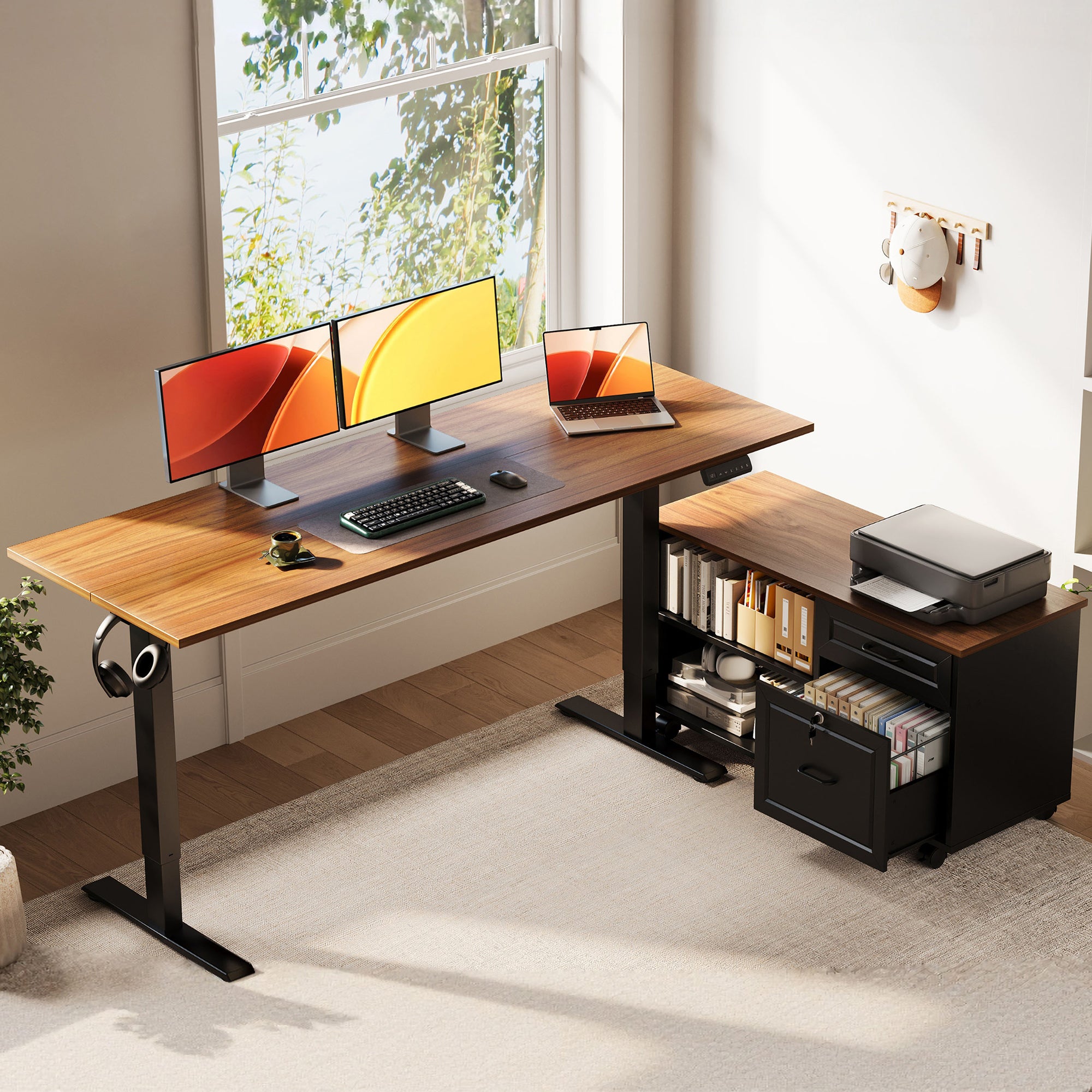
Start by mapping your workflow to physical zones, because storage problems are usually mapping problems. First, stand at the desk and do a 60-second "task replay" in your head: open calendar, reply to messages, write, switch apps, charge devices, grab a doc, take a call. Every time you imagine reaching, note where that item should live.
Next, divide storage into two lanes: daily lane (fast access) and deep lane (bulk storage). The daily lane should be either top drawers or a shallow desktop drawer, so you can grab cables, pens, and adapters without bending. The deep lane should be in a side cabinet or a dedicated drawer stack that does not steal knee space.
Finally, prevent clutter rebound by giving each "small thing" a home.
- One drawer: cables, adapters, Velcro ties
- One drawer: stationery and small tools
- One drawer: "inbox" (papers you must process)
- Cabinet zone: printer paper, files, backups
If you do this mapping before buying, you can spot the classic storage design problem: a big drawer box under the keyboard zone that forces you to sit farther back, or a cabinet that blocks the corner where your chair must swing.
Home office constraints and tradeoffs
2: Home office constraints and tradeoffs
Home offices fail when the desk solves work but breaks the room. You need storage that reduces visual noise, not storage that creates more surfaces to stack on. That is why closed drawers and a cabinet are often more useful than open shelves in small spaces.
Noise and cable mess are the next hidden constraints. If your outlet is across the room, the "easy" solution is an extension cord that becomes a trip hazard. A desk with integrated power can reduce desktop clutter, but it still needs a planned cable path so cords do not snag during height changes.
A compact option that targets these home constraints is the : OffiGo 48" Electric Standing Desk with 3 Wooden Drawers, Monitor Shelf & USB Power Outlets. It pairs three wooden drawers for daily items with a monitor shelf (extra surface without extra footprint), plus built-in power, LED lighting, and a hidden cable management tray. It also lists a height range of 29.9" to 46.1" and a 154 lb capacity for common dual-monitor + laptop setups.
Office and hybrid compliance realities
3: Office and hybrid compliance realities
Office and hybrid setups fail when the desk assumes one person owns the space. In 2025, hot-desking and desk hoteling continued to expand; one widely cited data point is that roughly 20% of desk spaces in U.S. offices were unassigned, up from about 10% in 2020 (reported with Gensler data by CNBC). That means storage needs to support fast reset and low friction, not personalization.
For shared environments, treat storage as a "checkout system." Keep only the essentials on top: keyboard, mouse, dock, and one small tray. Everything else must fit into closed storage that can be cleared in under 60 seconds. If you cannot reset quickly, people leave items out, then cables get snagged and drawers get blocked.
In practical terms, office-friendly desk storage should:
- Avoid under-desk drawer boxes in the knee zone
- Use a side cabinet for files and shared supplies
- Keep the height controller consistent and simple
- Route cables so IT does not get "snag" tickets
This is where an integrated desk-and-cabinet system is often easier to standardize than a desk plus random add-ons.
Integrated storage desk design checks
4: Integrated storage desk design checks
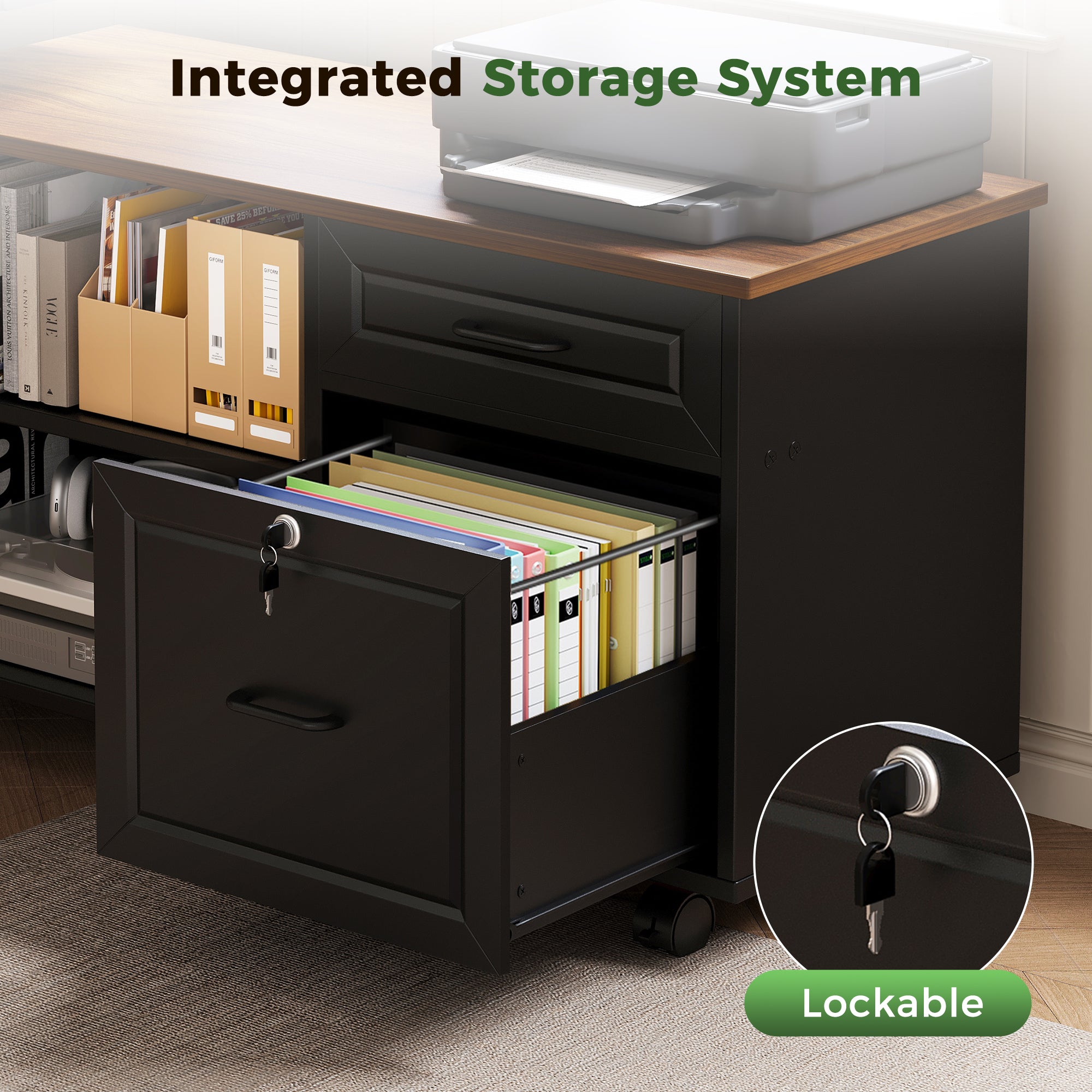
This module is your anti-surprise checklist. Storage design problems show up at the extremes: the lowest sitting height and the highest standing height. So you test both.
Step 1: Lowest-height knee check. Sit at the minimum height you will actually use. Then open every drawer fully. If your knees must splay, if your chair arms hit the drawer faces, or if you cannot pull the chair close enough to keep elbows near 90 degrees, you will feel it every day.
Step 2: Height-travel clearance check. Raise the desk to standing height and watch the cable bundle and any cabinet adjacency. The most common failure is a power strip or cable loop that catches on a drawer handle or cabinet corner.
Step 3: Cabinet placement check. A movable side cabinet can solve a lot, but only if it avoids your leg path. The OffiGo 55″ L-Shaped Height Adjustable Standing Desk with Large Movable is built around this idea: a 55.1" x 23.6" desktop paired with a 39.4" x 15.8" x 18.7" filing cabinet, with height adjustment from 28.4" to 47.2" and three memory buttons. Because the cabinet is independent, you can place it left, right, or inline to protect legroom and workflow lanes.
Setup and habit loop for sit-stand
5: Setup and habit loop for sit-stand
Sit-stand only works long-term when switching is easier than staying put. That means presets, a clear surface, and storage that does not punish you for moving. If every height change requires moving a chair, tucking cables, and re-centering a keyboard, you will stop switching.
Start with two presets: one for seated work, one for standing. Then add a third preset later for perching or high-focus standing. A desk that includes three programmable memory buttons makes this habit easier because you remove friction.
Also, do not treat standing as the "better" posture; treat it as variety. NIOSH summarizes evidence that prolonged standing is associated with discomfort like low back pain, fatigue, and leg swelling, so the goal is alternating positions rather than locking into one mode (NIOSH).
A setup that supports the habit loop usually includes:
- One clear "landing zone" for laptop/phone
- Closed drawers for small items (no piles)
- A cable path that moves cleanly
- A keyboard zone that stays consistent at both heights
Choosing the least-problem storage design
Stability: frame, feet, and side-load behavior
If you will open drawers often or place equipment on a cabinet, prioritize stability under side loads. Look for desks that feel rigid when you type at standing height, because wobble is amplified when storage introduces repeated pull forces. Also check that feet fit your floor plan; wider feet improve stability but can reduce walkway clearance in small rooms.
Storage integration: avoid height conflicts
The best storage is the storage you can use at both sitting and standing heights. Quick checks:
- Drawers open without hitting chair arms
- Drawer boxes do not steal knee space
- Cabinet does not block leg swing
- Nothing interferes with height travel
| Scenario | Storage priority | Main risk | Better layout |
|---|---|---|---|
| Small home office | Closed drawers | Visual clutter | Compact + drawers |
| Document-heavy work | File cabinet | Knee collisions | Side cabinet |
| Hot-desking | Fast reset | Lost items | Minimal top + cabinet |
| Multi-monitor focus | Monitor space | Shallow depth | L/U surface + shelf |
| Shared outlets | Cable order | Snag during lift | Built-in power + routing |
Conclusion
The least storage design problems come from one principle: storage must support motion, not compete with it. When you map item frequency to reach zones, check knee clearance at the lowest height, and verify cable travel across the full range, most "surprises" disappear.
Use the modules above as a checklist, then choose a layout that matches your environment: compact drawers for small home spaces, or an L-shaped surface with a movable side cabinet for document-heavy and shared workflows. Once your presets and storage lanes are set, switching between sit and stand becomes a habit instead of a project.
FAQ
How do I evaluate storage design on an adjustable desk?
Evaluate storage design by testing it at your lowest sitting height and your highest standing height, because conflicts show up at the extremes. Check knee and thigh clearance first, then open each drawer fully to confirm your chair arms and legs do not block access. Next, raise the desk and watch cables and any nearby cabinet edges to ensure nothing snags during height travel. Finally, confirm you can keep daily items in top drawers or shallow storage so you are not bending or twisting every hour.
What is the simplest way to reduce clutter on a standing desk?
The simplest method is to create a two-lane system: a daily lane for items used every 5 to 15 minutes and a deep lane for weekly items. Keep only the keyboard, mouse, and one small catch tray on the desktop to prevent surface stacking. Put chargers, pens, and adapters into a dedicated top drawer so they are reachable without standing up. If you still see piles, add a single "inbox" drawer for papers so they stop living under your monitor.
How can I tell if a desk will feel stable at standing height?
A desk feels stable at standing height when typing and drawer use do not create visible wobble in the monitors. Test stability by lightly leaning on the front edge and by opening drawers, because repeated pull forces often reveal frame flex. Check that the feet sit flat and do not rock on your flooring, since minor rocking feels much worse when standing. If you use a side cabinet, confirm it does not introduce side loads that make the desktop twist.
How often should I switch between sitting and standing?
Switch often enough to avoid fatigue, which for many people means every 30 to 60 minutes during desk-heavy work. Start with short standing blocks, such as 10 to 20 minutes, then increase gradually as your comfort improves. Use memory presets so switching takes one button press, otherwise friction will defeat the habit. Pay attention to task type: long calls might be better standing, while precision mouse work may be better seated.
What should I check before placing a drawer unit under the desk?
Check legroom first by sitting with your chair pulled in and confirming your knees can move freely without hitting the drawer box. Then verify the drawer unit will not reduce foot space, because your feet need room to shift when you alternate postures. Confirm the unit will not interfere with cable routing, especially the vertical cable path that must move during height changes. Finally, test whether the drawers can open fully without colliding with chair arms or the desk frame.
How do I plan a home office desk setup that still looks clean?
Plan a clean-looking setup by prioritizing closed storage and reducing the number of visible small items on the desktop. Route cables intentionally in a single bundled path so you do not see loops crossing the work surface. Choose a monitor shelf or a defined landing area so devices do not migrate into your typing zone. If the room is small, keep the desktop size proportional to walkway clearance so you can still open drawers and move the chair naturally.
Do L-shaped or U-shaped standing desks reduce storage problems?
L-shaped and U-shaped desks can reduce storage problems by creating separate zones for typing, writing, and equipment, which lowers the urge to stack items in one spot. They also make it easier to keep daily items within reach without placing storage in the knee zone. The trade-off is footprint: the larger shape can shrink walkways and make cabinet placement more complicated in tight rooms. If you choose an L or U shape, confirm you can still open drawers and move the chair through the full sit-stand range.