
Adjustable Desks for Better Home Office Flow
A desk can look fine on day one and still slow you down by week three. When your monitor sits too low, chargers spill across the floor, and papers keep migrating into the keyboard area, small interruptions start stealing focus. That is why adjustable desks matter for home office ergonomics: they do more than raise and lower. They shape how smoothly you move, store, charge, and reset your workspace.
Rather than chasing specs in isolation, this shortlist focuses on five practical adjustable desks and desk directions that solve different workflow problems. You will see where L-shaped layouts help, when integrated storage beats extra furniture, and why cable management systems and built-in power can make sit-stand workstations easier to live with. OSHA notes that ergonomics helps lessen muscle fatigue, increase productivity, and reduce work-related musculoskeletal disorders, which makes the right desk choice more than a style decision (OSHA).
Top Picks for Adjustable Desks That Improve Productivity
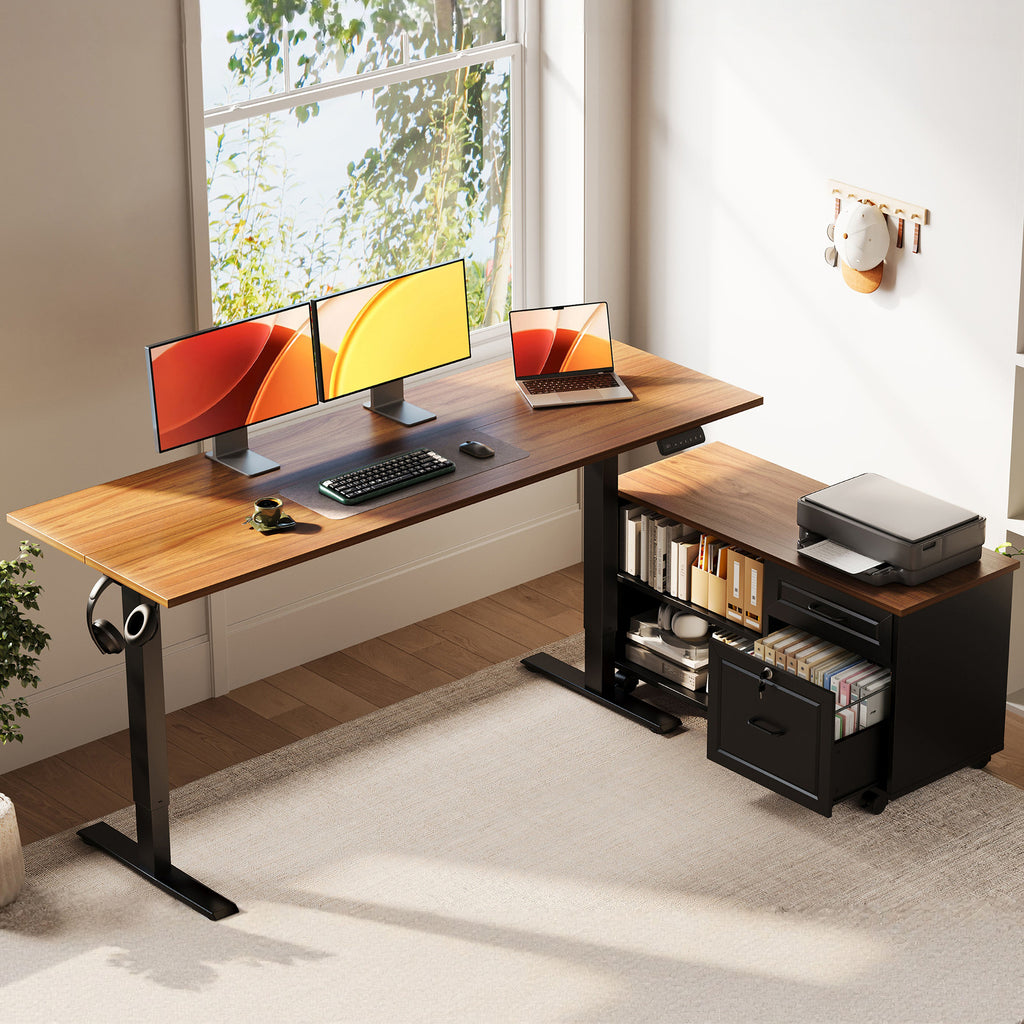
1. OffiGo 55" L-Shaped Electric Standing Desk With File Cabinet Drawers
If your day mixes screens, paperwork, and storage, this is the most complete fit. The OffiGo 55-inch L-shaped model with a movable file cabinet is built for people who want ergonomic standing desks without adding separate shelving or cabinets around the room.
- Why it stands out
- 55.1" x 23.6" desktop with a 39.4" x 15.8" x 18.7" cabinet
- Height range: 28.4" to 47.2"
- 3 memory buttons and LED height display
- Lockable, movable cabinet with left, right, or inline placement
- Best for
- Paper-heavy workflows
- Dual-monitor setups with printers or files nearby
- Buyers who want modular office furniture logic in one footprint
- What to watch
- It needs more floor space than a straight desk
- Built-in power is not included
Shop: OffiGo 55" L-Shaped Electric Standing Desk With File Cabinet Drawers
2. OffiGo 48" Electric Height Adjustable Standing Desk
Sometimes the best productivity move is keeping the setup simple. This 48-inch desk works well in bedrooms, apartments, and shared spaces where you want reliable sit-stand movement without overbuilding the room.
- Why it stands out
- 47.2" x 23.6" desktop
- Height range: 28.0" to 46.1"
- 154 lb weight capacity
- Rear cable notch and two side hooks for cleaner setup
- Best for
- First-time sit-stand workstations
- Compact rooms
- Minimalist layouts with future add-ons
- What to watch
- No built-in outlets or drawers
- Less surface area for document-heavy work
Shop: OffiGo 48" Electric Height Adjustable Standing Desk
3. OffiGo 48" Electric Standing Desk With 3 Wooden Drawers, Monitor Shelf & USB Power Outlets
If device charging keeps cluttering your day, this setup solves a real friction point. It combines storage, raised monitor placement, and integrated power access, which is useful for hyper-personalization in smaller home offices.
- Why it stands out
- 3 wooden drawers for supplies and notebooks
- Monitor shelf to improve screen height
- USB power outlets built into the desk
- Better organization than a bare desktop plus power strip
- Best for
- Laptop-plus-accessory users
- Shared household workstations
- Buyers who want direct-to-consumer retail convenience with fewer extra purchases
- What to watch
- Added features reduce the clean, open feel of a plain desk
- Shelf height may need monitor tuning for your posture
Shop: OffiGo 48" Electric Standing Desk with 3 Wooden Drawers, Monitor Shelf & USB Power Outlets
More Adjustable Desks for Tech-Heavy and Growing Setups
4. OffiGo 55" L-Shaped Electric Standing Desk With Wooden Drawers & Power Outlets
This desk makes sense when your corner workstation needs charging, storage, and room to spread out. Compared with a standard rectangular desk, it gives you more zoning for monitors, writing, and daily accessories while keeping devices powered within reach.
- Why it wins
- Approx. 29.9" to 46.1" height adjustment
- 4 wooden drawers
- Integrated AC, USB, and Type-C power access
- Reversible left or right layout
- Steel frame for long-term stability
- Best for
- Tech-heavy home office ergonomics
- Users who want cable management systems built into the desk workflow
- Multi-taskers using corner space efficiently
- Trade-off
- Heavier feature set means more assembly and a larger visual footprint
Shop: OffiGo 55" L-Shaped Electric Standing Desk with Wooden Drawers & Power Outlets
5. OffiGo 71" Executive Electric Standing Desk With Built-in Power Outlets
When your setup is likely to grow, this is the expandable path on the list. The 71-inch top supports multi-monitor work, creative tools, and long sessions without forcing you into a second desk too early.
- Key specs to check
- 71" x 27.6" desktop
- 1.38" thick tabletop
- Height range: 29.1" to 48.0"
- 3 AC outlets, 2 USB ports, and 2 Type-C ports
- Dual crossbeam frame for added stability
- Best for
- Evolving workstations
- Creators and remote workers with more equipment
- Buyers thinking about sustainable materials and longer replacement cycles
- What to watch
- Too large for many small bedrooms
- Better for spread-out workflows than ultra-minimal setups
Shop: OffiGo 71" Executive Electric Standing Desk
How to Choose Adjustable Desks for Your Workflow
Match the desk to what actually happens during your day. If you switch between paperwork and screens, storage matters more than raw width. If your work is mostly digital, prioritize stable lifting, monitor position, and clean routing for chargers and peripherals. That is where ergonomic standing desks, modular office furniture thinking, and good cable management systems start working together instead of becoming isolated features.
- For compact rooms: choose the 48-inch straight desk
- For multitasking: choose the L-shaped desk with file cabinet
- For charging convenience: choose a desk with built-in USB, AC, or Type-C access
- For future growth: choose the 71-inch executive model
Common Problem, Likely Cause, and Simple Fix
| Problem | Cause | Fix |
|---|---|---|
| Desk feels cluttered fast | No storage or work zones | Choose drawers or a side cabinet |
| Standing mode gets ignored | Poor monitor or keyboard height | Save two presets and tune screen position |
| Cords keep spreading | External chargers and strips | Use desks with integrated power access |
| Room feels crowded | Oversized footprint for the space | Move to a rectangular or reversible layout |
A final note: not every trend belongs in every setup. Terms like omnichannel customer experience, predictive demand analytics, and direct-to-consumer retail matter more to how brands sell desks than how you use one. For actual productivity, focus on stability, layout fit, storage, and movement first.
FAQ
Which adjustable desk is best for a small home office?
A compact rectangular electric standing desk is usually the best fit for a small home office. A 48-inch desktop gives you enough room for one or two monitors while keeping the footprint easier to place in bedrooms or flex rooms. It also leaves more space for movement, which supports better home office ergonomics. If clutter builds quickly, add a monitor arm or small drawer unit instead of jumping to a larger L-shape.
Are L-shaped standing desks better for productivity?
Yes, L-shaped standing desks can improve productivity when you need separate zones for different tasks. One side can hold monitors and daily input devices, while the other can stay open for writing, reviewing documents, or staging equipment. That split reduces constant rearranging during the day. The trade-off is that they need more floor space and are less forgiving in tight rooms.
What features matter most in sit-stand workstations?
The most important features are stable height adjustment, usable desktop depth, simple controls, and practical organization. A height range around 28 to 48 inches works for many adults, while memory presets help you switch positions quickly. Built-in power access and cable management systems also matter if you charge several devices daily. Storage becomes more important when your desk handles both digital work and paper tasks.
Do built-in storage features help home office ergonomics?
Yes, built-in storage can support home office ergonomics by keeping essential items within easier reach. When papers, chargers, and tools stay off the main surface, your keyboard and mouse area stays more consistent. That often leads to better posture and fewer awkward reaching motions. Drawers and side cabinets also make it easier to reset the desk at the end of the day.
How can I make my desk setup more future-ready?
Choose a desk that can support your next setup, not just your current one. Reversible layouts, integrated power, and larger tops help if you expect to add monitors, lighting, or accessories later. This is where hyper-personalization makes sense: build a base that can evolve instead of replacing the whole workstation. A larger desk only helps, though, if your room can still feel open and usable around it.