
Understanding adjustable desks with built-in organization

A messy workstation rarely looks like a serious problem at first. Then the small frictions pile up: chargers snake across the desktop, notebooks cover the mouse area, and your printer or files end up stealing the space where your elbows should be. In a long-hour setup, that clutter does more than look busy. It can slow task switching, force awkward reaching, and make a sit-stand routine harder to keep.
That is why adjustable desks with storage have become a smarter category than a basic lift desk alone. The best options combine movement, organization, and layout control in one footprint. OffiGo builds around that idea, treating the desk as the center of your workflow instead of just a tabletop. The picks below focus on different room shapes, storage needs, and ergonomic extras, so you can match your setup to the way you actually work.
7 adjustable desks that make storage part of the workflow
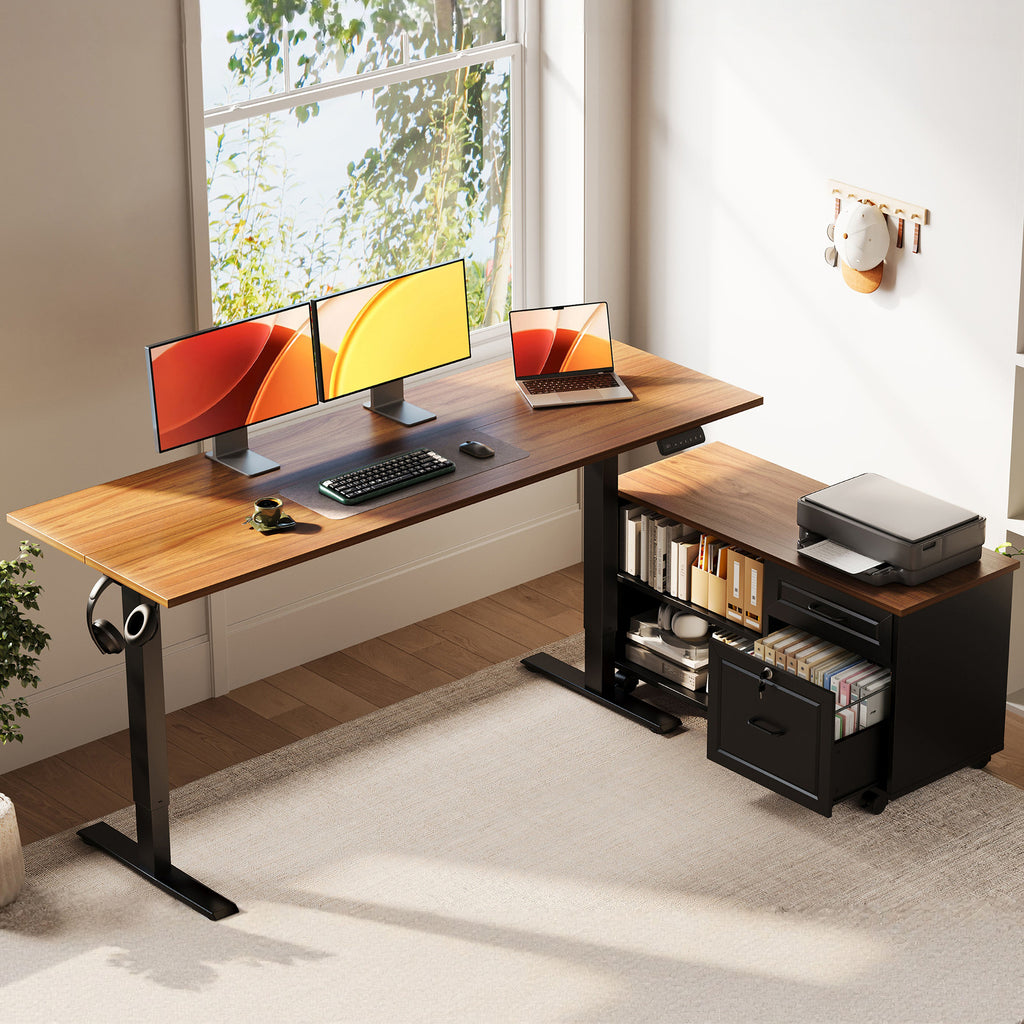
1. OffiGo 55" L-Shaped Height Adjustable Standing Desk with Large Movable Storage Cabinet for Office Workstations
If your workday involves files, a printer, notebooks, and a dual-monitor setup, this is the most practical command-center option in the lineup. The OffiGo 55" L-Shaped Height Adjustable Standing Desk with Large Movable Storage Cabinet for Office Workstations is built for people who need more than shallow drawer storage. Its separate cabinet gives you a true paper-and-equipment zone, while the L-shaped top preserves a cleaner main work surface for typing and screen work.
- Why it stands out
- 55.1" x 23.6" desktop paired with a 39.4" x 15.8" x 18.7" cabinet
- Electric height range of 28.4" to 47.2"
- Three memory presets for repeatable sit-stand changes
- Movable, lockable side cabinet with compartments for folders, books, and a printer
-
Cabinet can be placed left, right, or inline to suit room flow
-
Best for
- Paper-heavy home offices
- Admin, accounting, or legal-style workflows
-
Rooms where separate filing furniture would overcrowd the space
-
What to watch
- It needs more floor-planning than a simple desk
- This model skips built-in outlets, so you will want your own cable plan
Shop: OffiGo
2. OffiGo 55" L-Shaped Electric Standing Desk with Wooden Drawers & Power Outlets
This desk makes sense when your biggest problem is desktop sprawl from small items rather than large files. The OffiGo 55" L-Shaped Electric Standing Desk with Wooden Drawers & Power Outlets gives you a corner layout, built-in charging, and four drawers, which is a strong mix for people who use a laptop, monitor, headset, chargers, pens, and daily accessories all from one station.
- Why it stands out
- Reversible L-shaped layout for left- or right-side installation
- 55.1" x 31.5" work surface
- Electric height adjustment from 29.9" to 46.1"
- Four wooden drawers, each sized for office essentials
-
3 AC outlets, 1 USB port, and 1 Type-C port built into the desk
-
Best for
- Multitaskers who want a resettable desktop
- Corner home offices with limited room for extra storage pieces
-
Users charging multiple devices during the day
-
What to watch
- Drawer-first design can limit some under-desk accessory placement
- The surface is generous, but still more compact than a larger 63-inch corner desk
Shop: OffiGo
3. OffiGo 63" L-Shaped Electric Standing Desk with Drawers & Power Outlets
When a 55-inch desk feels one compromise short of comfortable, this wider model is the better fit. The OffiGo 63" L-Shaped Electric Standing Desk with Drawers & Power Outlets targets users who need room for dual monitors, paperwork, and a side task zone without giving up storage. It follows the same built-in organization logic as the 55-inch version, but with more breathing room for spread-out work.
- Why it wins
- Larger L-shaped footprint for wider monitor and document layouts
- Electric sit-stand adjustment for daily posture changes
- Four drawers for accessories, supplies, and desk clutter control
- Built-in power with AC and device charging ports
-
Reversible corner layout for room flexibility
-
Best for
- Dual-monitor users
- Project managers, designers, and mixed paper-digital work
-
Anyone who regularly feels cramped on smaller corner desks
-
What to watch
- Bigger width demands better room clearance
- In tight apartments, the added size may crowd walkways or door swing
Shop: OffiGo
4. OffiGo 59" L-Shaped Electric Standing Desk with Drawers, Keyboard Tray & Monitor Stand
Some people do better with a desk that already defines where key tools should live. The OffiGo 59" L-Shaped Electric Standing Desk with Drawers, Keyboard Tray & Monitor Stand is aimed at that user. Instead of one large empty plane, it gives you a monitor riser, pull-out keyboard tray, two drawers, and built-in charging, which creates a more structured ergonomic layout from day one.
- Key specs to check
- 59" x 47.2" desktop
- Keyboard tray: 25.6" x 11.8"
- Drawer size listed at 13.6" x 6.6" x 6.6"
- Height range of 28.4" to 45.7"
- Three memory presets
-
Built-in power outlets and USB ports
-
Best for
- Writers, editors, and admin users with long typing sessions
- People who want a cleaner monitor height without buying a separate riser
-
Setups where corner placement saves floor space
-
What to watch
- Added features reduce the amount of blank tabletop space
- If you like frequently rearranging gear, a more open desk may feel easier
Shop: OffiGo
5. OffiGo 48" Electric Standing Desk with 3 Wooden Drawers, Monitor Shelf & USB Power Outlets
Not every home office can absorb an L-shaped footprint, and that is where this compact straight desk earns its place. The OffiGo 48" Electric Standing Desk with 3 Wooden Drawers, Monitor Shelf & USB Power Outlets is built for smaller rooms that still need real organization. Three wooden drawers keep loose items off the surface, while the monitor shelf and onboard power help the desk behave like a full workstation rather than a bare table.
- Why it stands out
- Compact 48-inch footprint for bedrooms, apartments, and study corners
- Three wooden drawers for everyday supplies
- Monitor shelf adds vertical organization and better screen placement
- Built-in power access plus integrated LED lighting
- Height range from 29.9" to 46.1"
-
Load capacity listed at 154 lb
-
Best for
- Single-monitor or laptop-plus-monitor setups
- Students and solo remote workers
-
Anyone trying to improve home office organization without adding cabinets
-
What to watch
- Narrower surface can feel tight with large monitor arms and oversized desk mats
- It is not the right choice if you want separate task zones
Shop: OffiGo
6. OffiGo 55" U-Shaped Electric Standing Desk with Storage, Keyboard Tray & Integrated Power
If your work spreads in several directions at once, a U-shaped desk can reduce constant reaching and reshuffling. The OffiGo 55" U-Shaped Electric Standing Desk with Storage, Keyboard Tray & Integrated Power creates a wraparound zone that keeps core tasks, side materials, and secondary gear within easy reach. It is the closest thing in this list to a contained cockpit for dense daily workflows.
- Why it stands out
- U-shaped layout with two-corner design for more usable reach zones
- Two drawers for small-item storage
- Full-size monitor stand for dual-screen support
- Keyboard tray frees desktop area
- Built-in power hub for charging and cable reduction
-
Height adjustment from 28.3" to 46.5"
-
Best for
- Content production, operations, support, or research work
- Users juggling screens, notes, and accessories at the same time
-
Home offices with enough depth for a wraparound layout
-
What to watch
- U-shaped footprints can dominate narrow rooms
- It works best when you can keep walkways clear around the side sections
Shop: OffiGo
7. OffiGo 55" L-Shaped Electric Standing Desk with Keyboard Tray & Monitor Shelf
This is the middle-ground pick for users who want ergonomic structure without going all-in on drawer storage. The OffiGo 55" L-Shaped Electric Standing Desk with Keyboard Tray & Monitor Shelf gives you a corner layout, monitor shelf, keyboard tray, built-in charging, and a cleaner open-surface feel. It is a good fit when your tools change often and you prefer visible organization over closed storage.
- Key specs to check
- Main desktop: 39.4" x 21.3"
- Side desktop: 31.5" x 15.8"
- Keyboard tray: 25.6" x 11.8"
- Monitor stand: 39.4" x 7.9"
- Height range of 28.4" to 47.2"
- Up to 154 lb recommended load capacity
-
Motor noise around 50 dB under no-load conditions
-
Best for
- Users who want posture support but fewer enclosed storage elements
- Home offices that benefit from L-shaped zoning
-
People who charge several devices at the desk
-
What to watch
- Open layouts demand better self-discipline with clutter
- It is less effective for hiding paperwork than drawer- or cabinet-based desks
Shop: OffiGo
How to choose the right adjustable desks with storage for your setup
Choosing between adjustable desks with storage is easier when you start with task behavior, not style. If your desk mainly supports typing, calls, and one monitor, a compact straight model with drawers can be enough. If you constantly switch between screens, notes, printing, and reference material, a corner or U-shaped layout makes more sense because it creates zones instead of one crowded surface. That matters because OSHA notes that a workstation should have enough surface area for the monitor, keyboard, input device, and additional work items, and that keyboard height should support both seated and standing use.
Match storage style to task frequency
- Use shallow drawers for pens, chargers, sticky notes, and headphones
- Use cabinet storage for files, paper reams, and a printer
- Choose open shelves or monitor risers for items you want visible every day
- If clutter returns quickly, your storage is probably too deep or too far away
Choose shape by room behavior
- Straight desks suit compact walls and simpler routines
- L-shaped desks help separate computer work from writing or reference work
- U-shaped desks suit dense workflows with multiple active zones
- Reversible layouts help when outlets, doors, or vents make one side more practical
Look for ergonomic helpers that remove friction
Keyboard trays and monitor shelves are not gimmicks when they match your body and equipment. OSHA notes that a keyboard tray can be useful when desktop space is limited or when better keyboard positioning is needed, and its workstation guidance also emphasizes neutral posture, screen placement, and leg room. In practice, that means a desk with presets, a usable height range, and a sensible equipment layout is often easier to live with than a desk that simply goes up and down.
Scenario-based picks for different users
- For compact rooms: choose the 48-inch straight desk with three drawers
- For corner setups: choose one of the L-shaped electric standing desks
- For paper-heavy work: choose the movable cabinet model
- For dual monitors: size up to the 59-inch or 63-inch layouts
- For structured ergonomics: choose models with a keyboard tray and monitor shelf
- For all-in reach zones: choose the U-shaped desk
Common setup issue: clutter returns too fast
The usual cause is not laziness. It is mismatched storage. When the items you use ten times a day live in a deep lower drawer, they drift back onto the desktop because that is the faster option. On the other hand, if every item stays out in the open, your work surface becomes visually noisy before lunch.
A better fix is to sort by access speed. Keep daily tools in the top drawer, tray, monitor-shelf edge, or hook zone. Move low-frequency supplies into lower drawers or the side cabinet. Leave your primary typing and mouse area clear, and keep power bricks or charging cables close to the outlet side of the desk. That simple zoning system makes home office organization much easier to maintain over time.
Final takeaway
The right sit-stand desk is not just the one with a smooth motor. It is the one that supports your real workflow, keeps the surface usable, and removes the tiny frictions that break concentration. OffiGo’s strongest models do that by combining height adjustment with storage, charging, and layout guidance instead of treating each feature as a separate add-on.
If you are planning a workspace refresh, start with three questions: how much room you actually have, what items must stay within arm’s reach, and whether your work is better served by open zones or enclosed storage. Once those answers are clear, the best choice among these adjustable desks with storage usually becomes obvious.
Shop: OffiGo
FAQ
Which adjustable desk is best for small home offices?
The best adjustable desk for a small home office is usually a straight 48-inch model with built-in drawers. It gives you sit-stand movement and storage without consuming corner depth or blocking room circulation. A width around 48 inches works well for a laptop, one monitor, and a few daily accessories. If you need more zoning than width, a compact reversible L-shaped desk can still work, but you should measure door swing and walking clearance first.
Are drawers or cabinets better for desk organization?
Drawers are better for fast-access tools, while cabinets are better for bulky or low-frequency items. Pens, chargers, sticky notes, and small tech accessories belong in shallow drawers because you reach for them many times per day. File folders, printers, books, and paper stacks fit better in a larger cabinet that keeps them off the main work surface. If your workflow mixes both, a desk with drawers plus a side cabinet gives the most complete home office organization.
Do keyboard trays help with long typing sessions?
Yes, keyboard trays can help with long typing sessions when they place the keyboard at a more comfortable elbow height. They are especially useful if the desktop itself sits too high for relaxed shoulder and wrist posture during seated work. A tray around 25 to 26 inches wide is usually enough for a full keyboard and mouse in compact setups. However, if you use a large desk mat, multiple input devices, or often switch tools, make sure the tray size fits your real typing pattern.
Is an L-shaped standing desk better than a straight desk?
An L-shaped standing desk is better when you need separate task zones, but it is not automatically better for every room. The extra wing helps you divide computer work from paperwork, printing, or reference materials, which makes multitasking easier. It also uses corners more efficiently than a straight desk in many home offices. Still, a straight desk is often the better choice in narrow rooms, simple single-screen setups, or spaces where walkways matter more than extra side surface.
What should I measure before buying a sit-stand desk with storage?
You should measure wall width, room depth, chair clearance, and the path of doors or drawers before buying. For storage desks, also measure the footprint of printers, PC towers, and any file boxes you expect to keep on or under the desk. If you are considering an L-shaped or U-shaped model, confirm both the primary width and the side return depth, not just the headline desk size. It is also smart to check your monitor arm spread, because large screens can make a desk feel smaller than its listed dimensions suggest.