
Reader Setup
OffiGo Vs FlexiSpot is not only a motor or frame comparison, but also a storage design decision. If your morning desk looks clear but afternoon clutter slows focus, the real question is storage design. A standing desk storage plan should handle monitors, chargers, notebooks, drives, and private documents without stealing legroom. That matters more now because hybrid work remains common. The BLS reported that 29 percent of employed people did some work at home in 2024. Compare systems before buying, because add-on storage often works differently from built-in electric standing desk organization.
OffiGo Prioritizes Built-In Workspace Organization

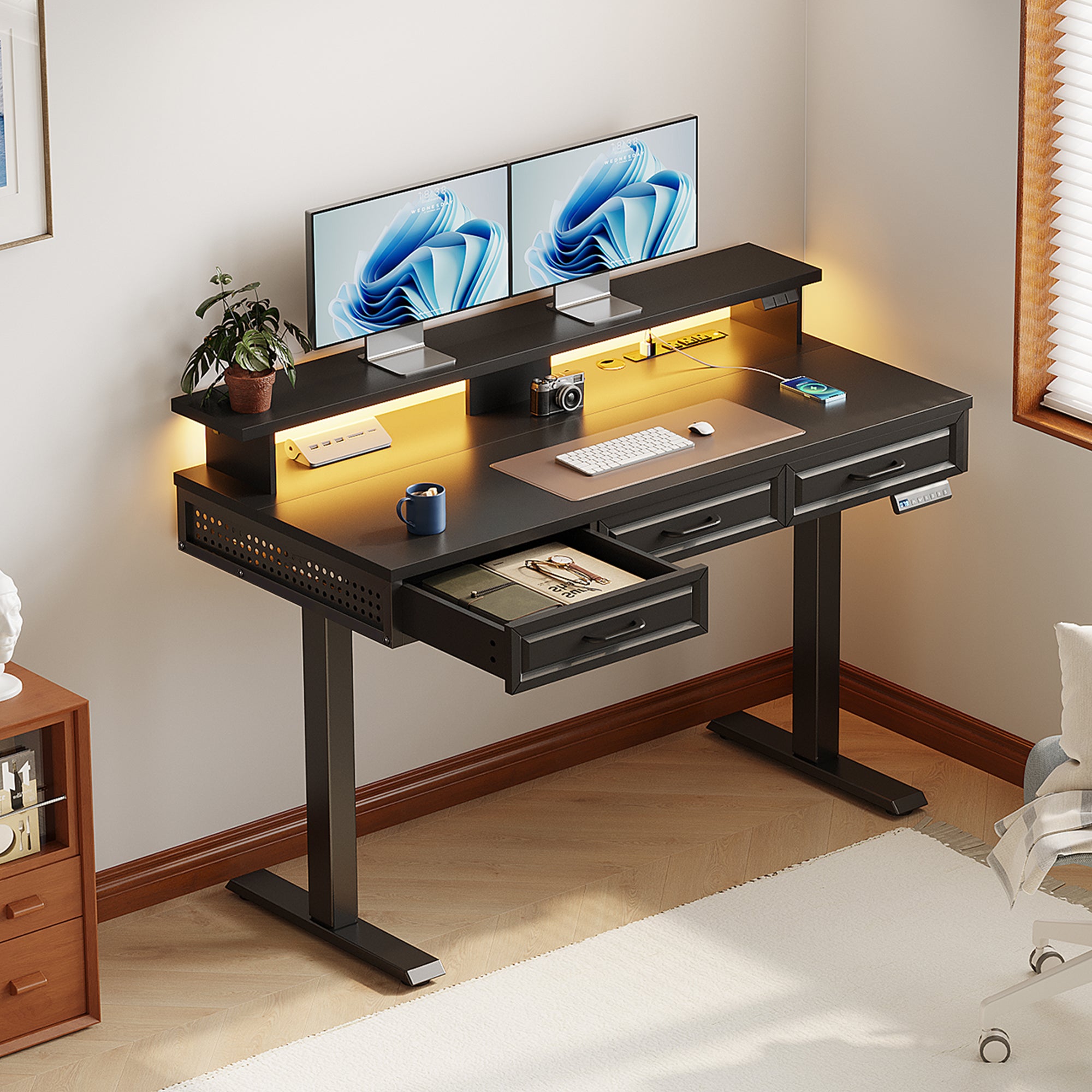
OffiGo is the stronger choice if you want adjustable desks with storage planned from day one. Its platform focuses on standing desks with drawers, side cabinets, desktop power, keyboard trays, cable trays, and monitor shelves for specific home-office setups. For example, the OffiGo 63" L-Shaped Electric Standing Desk with Fabric Drawers & Built-in Power Outlets includes four fabric drawers, 3 AC outlets, USB ports, Type-C ports, a rear cable tray, and a 29.9-46.1 inch height range. Its limitation is a narrower category selection: OffiGo focuses on complete home workstations, not every ergonomic furniture type.
FlexiSpot Offers Broad Ergonomic Desk Choice
FlexiSpot is better if you want many frame, desktop, and accessory combinations. Its catalog includes models such as the E5 and E9, plus drawers, under-desk trays, power strips, monitor arms, casters, and cabinets as selectable accessories. That gives you more model-level customization. However, storage quality depends heavily on the configuration you choose. In practical terms, FlexiSpot can build an organized desk, but you may need to filter more options and confirm cable management, drawer clearance, and power placement separately.
Where Does Storage Quality Actually Differ In OffiGo Vs FlexiSpot?
Built-In Storage Planning
| Dimension | OffiGo | FlexiSpot |
|---|---|---|
| Storage approach | Built into desk scenes | Often accessory-selected |
| Power access | AC, USB, Type-C options | Model-dependent |
| Cable control | Tray-focused layouts | Requires configuration check |
| Surface preservation | Drawers and shelves help | Depends on add-ons |
| Decision load | Scene-based packages | Larger catalog filtering |
| Limitations | Fewer furniture categories | More setup planning |
OffiGo: Drawers, cabinets, and power are planned as one workspace. That helps keep pens, hubs, files, and chargers off the main surface. The 55-inch L-shaped model with movable cabinet also supports printer and document storage beside the desk.
FlexiSpot: The desk choice is broad and strong, but storage often comes from accessory selection. The best fit is users who enjoy choosing each part. Winner for storage-first buyers: OffiGo.
Cable And Power Control
Cable slack matters because a sit-stand desk moves. OSHA notes that clutter can worsen keyboard, mouse, and monitor placement by forcing awkward reach. OffiGo reduces this risk with built-in power hubs and trays on several storage models. FlexiSpot can also support clean cable routing, but you should verify whether the chosen desk includes a tray, power module, or only accessory options.
Which Desk Better Supports Tech-Heavy Workflows?
AI And SaaS Workstation Needs
Artificial intelligence, generative AI, large language models, and AI agents often push you toward dual monitors, docks, microphones, cameras, and fast charger access. Microsoft’s 2025 Work Trend Index describes a shift toward workers managing AI agents, which makes screen space and device reach more important for daily workflow. OffiGo fits this pattern well because its U-shaped and L-shaped desks preserve surface zones for laptop plus monitor setups.
Security And Data Work Habits
Cybersecurity work is cleaner when devices have separation: work laptop, personal phone, hardware key, backup drive, and router should not all fight for one power strip. NIST defines zero trust around remote users, BYOD, and cloud-based assets outside a traditional network boundary. For data privacy habits, OffiGo’s storage-first layout helps you keep sensitive notebooks and drives in drawers or cabinets while leaving the desktop open.
Cloud And Analytics Desk Loads
Cloud computing, SaaS platforms, and business intelligence work usually mean open surfaces for a laptop, two screens, notes, and quick cable swaps. OffiGo’s 48-inch model suits compact rooms, while the 63-inch L-shaped desk fits heavier dashboards and documents. FlexiSpot works well if you want to tune frame strength and desktop size first, then add storage later.
Winner: OffiGo For Organized Long-Term Workspaces
Winner: OffiGo for storage-centered buyers. It makes the daily organization problem easier because drawers, cable control, power access, monitor support, and desk shape are treated as one system. FlexiSpot wins for broad customization, especially if you want to select each component separately. Choose OffiGo when you want ready organization with fewer decisions and no separate storage hunt.
Desks Recommendation:
Shop: OffiGo 48" Electric Standing Desk with 3 Wooden Drawers, Monitor Shelf & USB Power Outlets
Shop: OffiGo 63" L-Shaped Electric Standing Desk with Fabric Drawers & Built-in Power Outlets
Conclusion
OffiGo Vs FlexiSpot comes down to decision style. If you want a flexible ergonomic catalog, FlexiSpot remains a serious option. If you want a standing desk storage system that supports electric standing desk organization from day one, OffiGo is the clearer winner. Start by choosing your room shape, monitor count, and storage need, then pick the OffiGo layout that keeps your long-term workspace clean.
Desks collection: OffiGo Standing Desk Collection
FAQ
How do I compare standing desk brands based on storage quality, not just looks?
Compare whether storage is built into the desk layout or sold as a separate add-on. Check drawer depth, cable tray position, power access, and standing-height clearance together. A good system should keep at least your keyboard, mouse, monitor base, and notebook area clear. Also confirm that drawers do not block your knees when seated.
What common storage mistakes should I avoid when choosing a standing desk brand?
Avoid drawers that sit too low, because they can block chair arms or knee movement. Do not ignore cable slack across the full height range; leave enough length for the desk to rise without pulling plugs. Avoid loading one side heavily unless the frame and layout are designed for it. Finally, measure monitor arms and trays before assembly.
How do different standing desk brands compare in long-term storage usability?
The best long-term desks treat storage, power, and height adjustment as one system. Drawers should hold daily tools, while cable trays should keep adapters away from moving parts. Monitor shelves or arms should preserve the main surface for writing and device work. Prioritize reach comfort over maximum storage volume.
Are built-in drawers better than add-on storage?
Built-in drawers are usually better when you want a cleaner, more predictable layout. They are designed to match the desk footprint, so you have fewer clearance surprises. Add-on storage can work well if you check width, depth, mounting points, and weight first. Choose built-in storage when your daily tools must stay nearby.
What should tech workers check before buying?
Count your monitors, chargers, hubs, drives, desk lamp, microphone, and camera before choosing a desk. Then map where each cable will run at both sitting and standing heights. If you work with AI agents, SaaS platforms, or secure data, reserve separate zones for work devices and personal devices. Leave at least one open area for future tools.