
Introduction
If you are comparing OffiGo Vs FlexiSpot, the real question is not just motor specs. It is whether your desk removes friction from your workday. In the USA, home office hours are still long, and that makes details like storage, monitor position, cable routing, and surface layout matter more than a spec sheet alone. Research summarized by CDC shows sit-stand desks tend to help with discomfort more consistently than productivity by themselves, so the best ergonomic standing desks are the ones that also reduce clutter and setup fatigue. For many buyers, that shifts the decision from “Which desk lifts?” to “Which desk helps me work better?”
What Makes OffiGo Different For Home Offices?
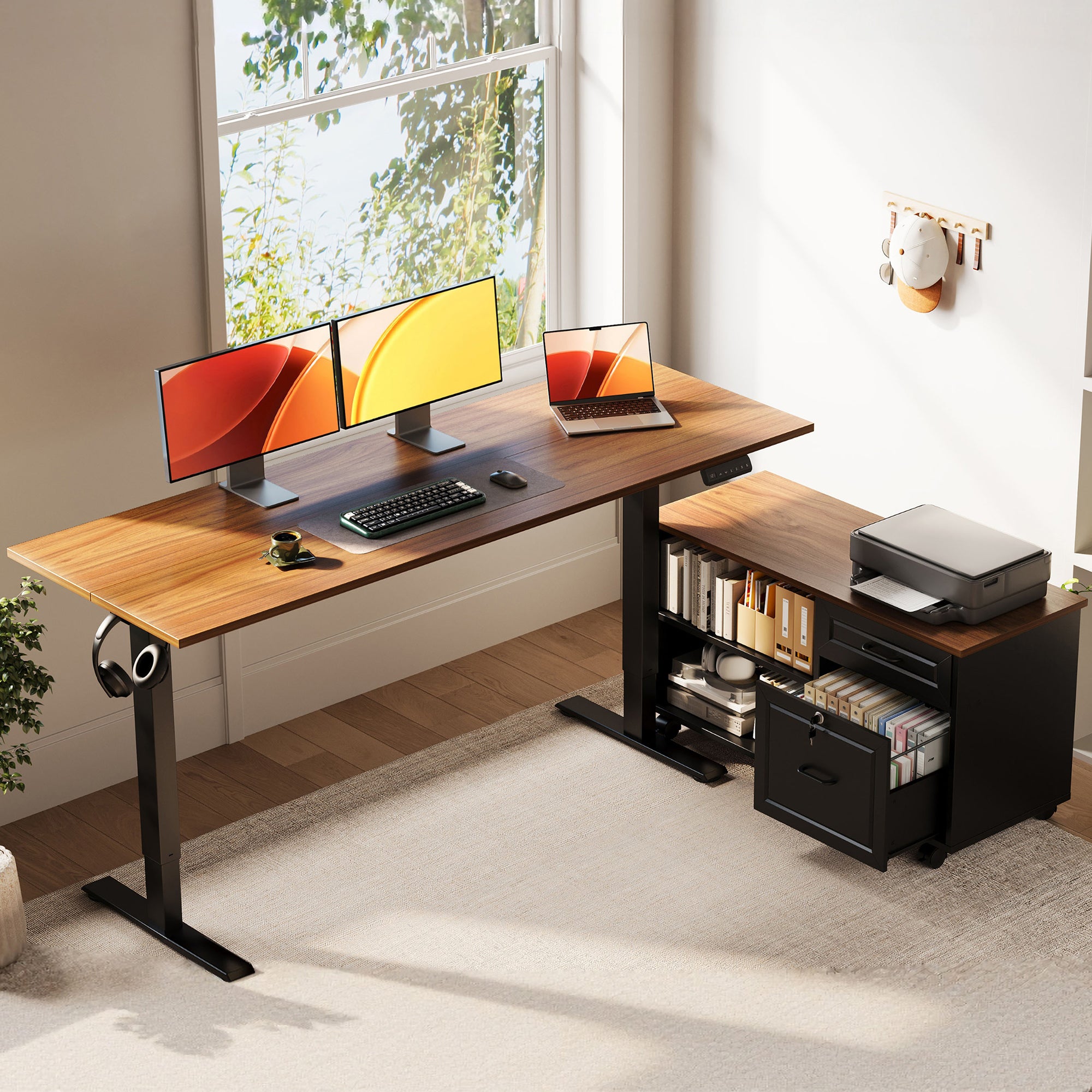
OffiGo approaches sit-stand workstations as a complete home office setup, not only a lifting frame with a top. Across its catalog, the brand centers built-in storage, integrated power access, and home-friendly layouts.
The OffiGo 55" L-Shaped Standing Desk with Movable File Cabinet combines efficiency, organization, and flexibility for home and office setups. Its large-capacity side cabinet keeps dual monitors, documents, and daily essentials organized without cluttering the main workspace. The cabinet can be placed on the left, right, or inline, adapting to any room layout. With an L-shaped desktop and electric height adjustment, it supports both sitting and standing work, ideal for long hours. Built for professional use, it offers practical storage and workspace customization, letting you add your preferred power and cable solutions.
That is a strong example of home office ergonomics built around daily use rather than as add-ons.
OffiGo: Standing Desk for Long Working Hours | Built-in Storage
How Does FlexiSpot Approach The Category?
FlexiSpot takes a broader category approach. Its lineup spans more desk families, frames, and accessory paths, which can suit buyers who like to compare tiers and build their setup in stages. However, storage and organization often depend on the exact model you choose. FlexiSpot’s own content has noted that drawers could be harder to integrate into standing desks, and the brand frequently uses separate accessories such as under-desk drawers or cable solutions rather than making them standard across the range. In simple terms, FlexiSpot often fits spec-led shoppers, while OffiGo is easier for buyers who want fewer moving parts in the buying decision.
Head-To-Head: Which Desk Helps You Work Better?
Here is the short answer: OffiGo is stronger for integrated productivity, while FlexiSpot is stronger for catalog breadth.
| Dimension | OffiGo | FlexiSpot |
|---|---|---|
| Core approach | Integrated desk systems | Broad desk catalog |
| Storage | Often built in | Model dependent |
| Power access | Often built in | Often accessory-led |
| Ergonomic extras | Shelf, presets, layout focus | Varies by model |
| Cable management systems | Hidden tray or built in | Often added separately |
| Buyer journey | Faster to decide | More configuration choice |
| Best for | Organized home setups | Spec-led comparison shoppers |
| Limitations | Fewer broad categories | Setup can need extras |
Storage And Setup Simplicity
OffiGo makes a stronger first impression if you want your workspace ready to use without much planning. The 48-inch model adds three drawers, a monitor shelf, and built-in power in one package, while its 63-inch L-shaped desk adds four drawers, a cable tray, reversible orientation, and 3 AC plus USB and Type-C ports. FlexiSpot absolutely offers desks with drawers, but storage is less consistently baked into the default experience and often varies by model or accessory bundle.
Winner: OffiGo. If you want built-in organization instead of piecing together modular office furniture, OffiGo is the easier productivity pick.
Which Brand Supports Home Office Ergonomics Better?
A desk supports home office ergonomics when it helps your monitor sit at a better line of sight, lets you switch postures quickly, and keeps your reach zone clean. OffiGo leans into that with included monitor shelves, preset controls, integrated storage, and scene-based layouts for compact rooms and corners. FlexiSpot can also support a healthy setup, but it usually depends more on which frame, top, drawer, and accessory combination you choose. OSHA notes that workers who stand for long periods should shift weight often and use adjustable workstations, which supports the value of reliable sit-stand adjustment but does not make extras optional.
Winner: OffiGo. For most home users, included ergonomic features create a more complete result than a customizable-but-variable path.
Cable Management And Daily Organization
This is where the difference becomes practical very fast. OffiGo repeatedly builds power and cable routing into the desk itself, which helps you avoid a dangling power strip under the frame or a messy wall-side tangle . Its 48-inch desk includes a hidden cable management tray and on-desk power, while the 63-inch L-shaped version adds a rear cable tray plus USB and Type-C charging. FlexiSpot supports cleaner setups too, but the brand often treats cable management as an accessory or secondary add-on rather than the main product story .
Winner: OffiGo. Better-integrated cable management systems usually mean fewer visible cords and fewer follow-up purchases.
Value For Money Or Premium Flexibility?
If your goal is density of features, OffiGo has the edge. You are often getting storage, power access, and layout-specific functionality in the same desk, which reduces shopping time and setup guesswork. FlexiSpot makes more sense when you want to compare more frames, styles, and tiers across a larger catalog. According to NIOSH, adjustable workstations and anti-fatigue support remain important parts of ergonomic risk reduction, but the daily experience still depends on how well the full station is organized.
Winner: OffiGo for value; FlexiSpot for flexibility. If you want a desk that arrives closer to a finished solution, OffiGo is the stronger choice.
Who Should Choose OffiGo In The USA?
OffiGo is the better fit if you want a desk that solves several home-office problems at once. That includes people in smaller homes, renters, remote workers sharing space, and buyers who do not want to research five accessories before checkout. The brand’s focus on integrated features also aligns with newer direct-to-consumer buying habits, where shoppers want faster decisions and a smoother omnichannel customer experience across product pages, setup guides, and comparison content. If you care about usable storage, cleaner charging access, and simpler setup logic, OffiGo is the more productivity-focused answer.
Desk Recommendaition: OffiGo 48" Electric Standing Desk with 3 Wooden Drawers, Monitor Shelf & USB Power Outlets
When Does FlexiSpot Make More Sense?
FlexiSpot makes more sense when you enjoy comparing desk tiers and want a wider range of frame-first options. It can also work well if you prefer to add storage later, mix components gradually, or prioritize catalog depth over integrated design. Some shoppers also like that approach because it feels more customizable, especially if they already own parts of their setup. So, if flexibility matters more than a ready-made workspace system, FlexiSpot stays a credible option.
Conclusion
In the comparison of OffiGo vs. FlexiSpot, the overall winner for home office productivity in the USA is OffiGo. FlexiSpot wins on catalog variety, but OffiGo wins where many home workers feel friction every day: storage, power access, cable control, and simpler decision-making. That makes OffiGo especially strong for buyers who want ergonomic standing desks that feel complete, not half-finished until accessories arrive . If your goal is faster setup and better daily flow, start with the OffiGo standing desk collection.
FAQ
What Factors Most Affect Standing Desk Productivity?
The biggest factors are stability, usable desktop space, ergonomic screen height, quick height adjustment, and clutter control. A desk that moves smoothly but leaves cables, chargers, and notebooks scattered everywhere will still interrupt your workflow. For many home users, built-in storage and easy-reach power access improve productivity more than small differences in lift speed. You should also check whether the desk shape actually fits your room, because a productive setup needs clear movement space around it.
How Important Is Cable Management In A Home Office?
Cable management is very important because it affects safety, usable desk space, and visual focus. Loose cables eat into legroom, make cleaning harder, and can turn device switching into a daily annoyance. Good cable routing works best when power ports, trays, and charging access are integrated into the desk instead of added later. In smaller rooms, cleaner wiring also makes the whole office feel calmer and easier to use.
Are Built-In Drawers Better Than Separate Storage?
Built-in drawers are usually better for compact home offices because they keep supplies close without taking extra floor space. They also reduce the number of buying decisions, which is helpful if you want a faster setup. Separate storage can be better in larger rooms where you want to move items around or expand later. The right choice depends on whether you value simplicity or long-term layout flexibility first.
What Should Buyers Compare Beyond Motor Specs?
You should compare desktop depth, standing stability, preset controls, monitor placement, storage layout, and cable routing . Also look at leg clearance, drawer placement, and whether built-in power includes USB or Type-C ports. Assembly effort matters more than many buyers expect, especially if the desk includes multiple sections or a reversible corner layout. A desk can have strong specs on paper and still feel inconvenient if the daily organization is weak.
Do L-Shaped Sit-Stand Workstations Improve Productivity?
Yes, L-shaped sit-stand workstations can improve productivity when you need separate zones for monitors, writing, and devices . They are especially useful in corners, where they can turn awkward room space into a structured work area. However, they only help when the footprint fits comfortably and still leaves room to move your chair and body. If your room is tight, a well-planned straight desk may be more efficient than a larger corner desk.
How Do You Choose Between Value And Flexibility?
Choose value when you want the most complete setup with fewer extra parts and less research. Choose flexibility when you prefer to compare more frames, surfaces, and accessory paths before deciding. In practice, value usually favors integrated desks, while flexibility favors wider catalogs with more modular choices. For many remote workers, less setup friction ends up being the bigger productivity advantage.