
Understanding the work-from-home standing desk upgrade
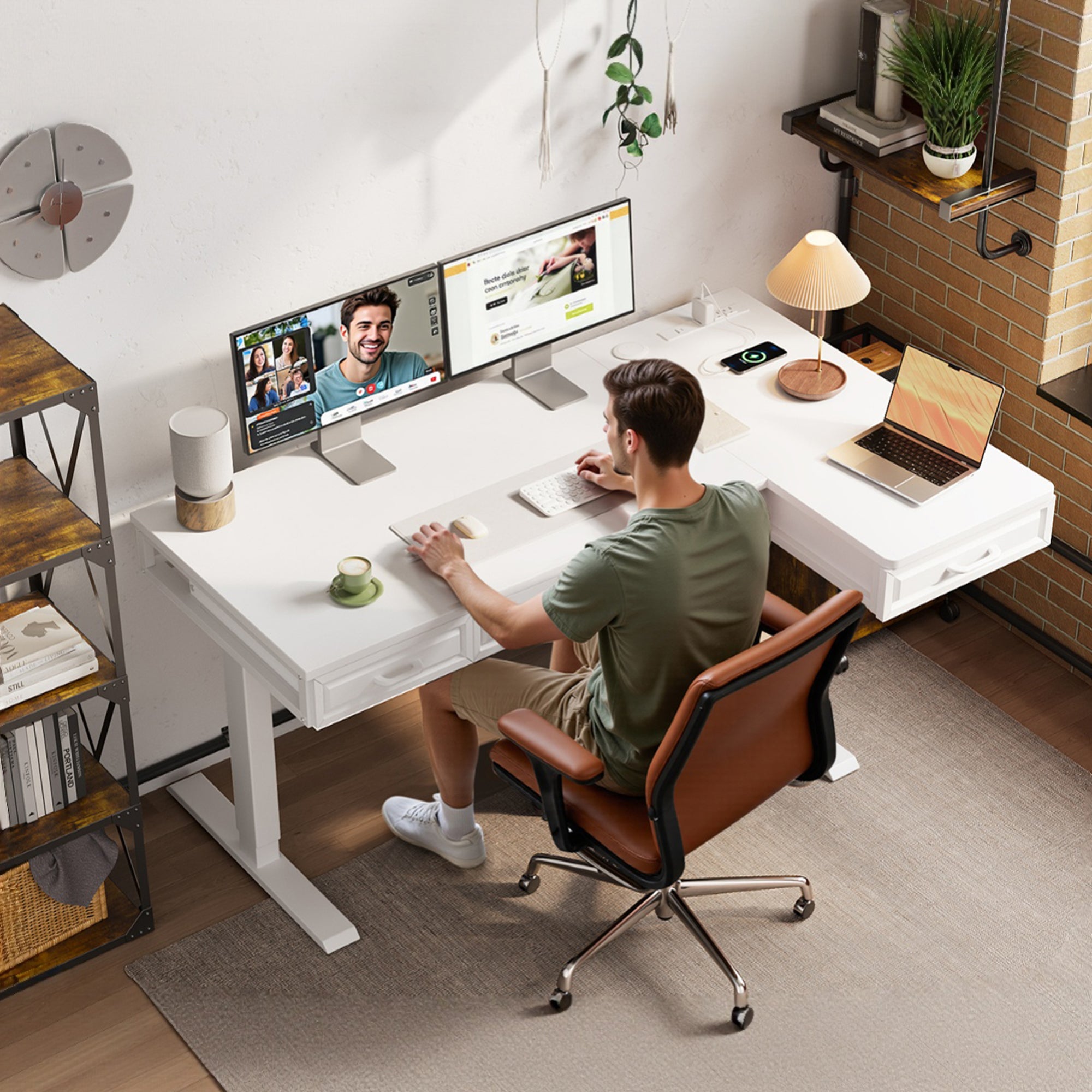
You notice the problem around midday, not at 9 a.m. The desk that seemed fine for email suddenly feels cramped once a second monitor, notebook, charger, and coffee mug all compete for the same space. Then posture slips, cables start catching, and switching from focused work to a video call feels clumsy. For a work from home desk, the wrong layout costs more than comfort. It can slow task changes, make storage annoying, and quietly reduce home office productivity.
That is why this shortlist focuses on standing desks for home office use that solve real daily friction, not just height adjustment on paper. OffiGo builds around a desk-as-hub idea, mixing electric standing desk movement with storage, cable control, and charging access. The five picks below are organized by workflow fit, from compact rooms to document-heavy setups, so you can compare shape, storage, and ergonomics without guessing.
Top picks for standing desks for home office use

1. OffiGo 55" L-Shaped Electric Standing Desk with File Cabinet Drawers Adjustable Height
If your desk has to handle screens, paperwork, and daily storage without adding extra furniture, this is the most complete work from home desk in the group. The L-shape gives you natural zones for typing, calls, and paper handling, while the file cabinet keeps folders and devices close instead of scattered around the room. The tradeoff is that you need to think about cabinet placement early so leg room and chair movement stay comfortable.
Why it stands out
- 55-inch L-shaped layout helps separate monitor space from writing space
- Integrated file cabinet includes a lockable drawer and rolling casters
- Electric height adjustment supports regular sit-stand changes during long workdays
- Accessory hooks help keep bags or headphones off the desktop
- Dual-beam frame is positioned as a stability-focused structure for daily use
Best for
- Remote workers who handle documents every week
- Home offices that cannot fit both a desk and a separate filing unit
- People who want corner efficiency without moving to a very large executive desk
What to watch
- Built-in storage improves organization, but cabinet position can affect leg clearance
- This model is strongest when your workflow includes paper, folders, or a nearby printer
Shop: OffiGo 55" L-Shaped Electric Standing Desk with File Cabinet Drawers Adjustable Height
2. OffiGo 55" L-Shaped Electric Standing Desk with Wooden Drawers & Power Outlets
This electric standing desk makes sense if your day is split between keyboard work, note taking, charging devices, and keeping clutter hidden. It gives you a corner-friendly footprint, four wooden drawers, and built-in power, so you do not have to keep adding small accessories later. For many people, that balance is exactly what makes an adjustable desk easier to use every day rather than something that looks good for one week and then gets messy.
Why it wins
- Desktop measures 55.1 inches long by 31.5 inches wide
- Height range runs from 29.9 to 46.1 inches for seated and standing use
- Four wooden drawers add closed storage for cables, notebooks, and supplies
- Built-in power includes 3 AC outlets, 1 USB port, and 1 Type-C port
- Reversible L-shape lets you place the return on the left or right side
- Steel frame is designed for long-term everyday stability
Best for
- Daily standing desks for home office use in shared rooms
- Users with a laptop, one or two monitors, and several charging needs
- Buyers who want more structure than a plain top offers
What to watch
- More built-ins mean less of the completely open, minimalist desk feel
- Wooden drawers are useful for organization, but you should still plan your main typing zone carefully
Shop: OffiGo 55" L-Shaped Electric Standing Desk with Wooden Drawers & Power Outlets
3. OffiGo 63" L-Shaped Electric Standing Desk with Fabric Drawers & Built-in Power Outlets
When you keep running out of room, a bigger desktop usually helps more than another organizer tray. This adjustable desk is the best fit here for users with dual monitors, a laptop dock, documents, and accessories that stay out all day. The larger surface reduces the need to constantly reshuffle your setup, while the four drawers and rear cable tray help prevent the bigger desk from turning into a bigger mess.
Key specs to check
- 63-inch L-shaped format for a more spread-out corner workstation
- Main desktop measures 47 by 21.2 inches
- Side table measures 31.5 by 15.8 inches
- Height range spans 29.9 to 46.1 inches
- Four fabric drawers keep lighter supplies off the main surface
- Built-in power hub includes AC, USB, and Type-C charging
- Reversible layout supports left- or right-side installation
- Rear cable tray helps control loose cords
Best for
- Dual-monitor plus laptop workflows
- Larger home office corners
- Users who mix digital work with papers, notebooks, and accessories
What to watch
- Fabric drawers are practical for daily supplies, but they are lighter-duty than wood or metal storage
- Bigger surface area helps productivity, yet it also needs more room clearance around the chair and walls
Shop: OffiGo 63" L-Shaped Electric Standing Desk with Fabric Drawers & Built-in Power Outlets
4. OffiGo 55“ U Shaped Electric Standing Desk with 2 Drawers & Keyboard Tray & Monitor Stand
If you do better with a desk that creates built-in structure, this model is the most workflow-specific pick on the list. The U-shaped layout gives you extra wraparound reach, while the keyboard tray and monitor stand reduce the need to buy those parts separately. That makes it a strong electric standing desk for repetitive desk tasks, though users with oversized audio gear or very deep accessories should double-check how much open top space they want.
Why it stands out
- U-shaped desktop creates more reachable work zones than a straight desk
- Two drawers store daily essentials without adding side organizers
- Slide-out keyboard tray frees top-surface space
- Full-size monitor stand helps lift screens to a more comfortable viewing level
- Built-in power hub supports cleaner device charging
- Preset buttons make height changes faster during the day
Best for
- Keyboard-heavy work
- Users who want stronger ergonomic structure from day one
- Home offices with many small accessories that need fixed positions
What to watch
- Keyboard trays and monitor stands improve layout, but they can limit how you place very large gear
- This pick is best when you prefer a guided setup instead of a blank desktop
Shop: OffiGo 55“ U Shaped Electric Standing Desk with 2 Drawers & Keyboard Tray & Monitor Stand
5. OffiGo 48" Electric Standing Desk with 3 Wooden Drawers, Monitor Shelf & USB Power Outlets
If you work in an apartment, bedroom office, or secondary workspace, a smaller desk can be the smarter move. This home office productivity pick keeps the footprint tighter without giving up the features that matter most in daily use. You still get drawers, a monitor shelf, built-in power, memory presets, and even LED lighting. In other words, it works like a full remote-work station without demanding a full room.
Why it works in small spaces
- 48-inch desktop fits tighter rooms more easily than corner formats
- Three wooden drawers help keep the main surface clear
- Full monitor shelf raises screens and creates extra storage underneath
- Height range runs from 29.9 to 46.1 inches
- Three memory presets support quicker position changes
- Built-in power outlets and hidden cable tray reduce floor clutter
- LED lighting adds visual comfort for users who care about setup feel as well as function
- Frame is rated for a 154 lb load capacity
Best for
- First-time standing desk buyers
- Single-monitor or laptop-based setups
- Compact rooms where every inch matters
What to watch
- It is efficient, but not the best choice if you need broad paper spread or multiple side devices
- The compact width works best when your workflow is focused and fairly contained
Shop: OffiGo 48" Electric Standing Desk with 3 Wooden Drawers, Monitor Shelf & USB Power Outlets
How to choose the right work from home desk
Choosing standing desks for home office use gets easier when you match the desk shape to the way you actually work. If your day stays simple, a straight 48-inch desk can be enough. If you shift between calls, writing, admin work, and charging several devices, L-shaped or U-shaped layouts usually make more sense because they create separate zones without extra tables. Urbanica's remote-work desk guide stresses that flexibility and room fit matter more than picking standing over sitting as a trend, which is a useful way to think about your shortlist. (urbanicafurniture.com)
Match shape to workflow
- Choose a straight desk if you mainly use one screen and a laptop
- Choose an L-shaped desk if you need side space for notes, a dock, or a printer
- Choose a U-shaped desk if you want built-in boundaries around keyboard, screen, and accessories
Check height range and controls
- A useful adjustable desk should cover both your seated typing height and your standing typing height
- Memory presets matter because low-friction controls make position changes more likely to happen
- The OffiGo models here use electric adjustment rather than manual crank changes, which is better for frequent switching
Treat storage as a productivity feature
- Drawers reduce visual clutter and protect the typing zone
- Monitor shelves can improve screen height while freeing usable surface below
- File storage matters if your home office handles tax papers, forms, or client folders regularly
Small troubleshooting for daily use
Even the best electric standing desk can feel wrong if the setup habits are off. OSHA notes that an appropriately adjusted desk should provide leg clearance, support proper component placement, and reduce awkward postures, which is why desk shape and under-desk planning matter as much as motorized lift. CDC also recommends periodically standing as a break from prolonged sitting when working from home, but the change only sticks if the workstation is easy to use. (osha.gov)
Problem: the desk feels crowded by noon
Direct answer: your layout probably lacks task zoning. - Move papers, charging, or secondary devices to the return side of an L-shape - Use drawers for items you touch only a few times per day - Keep the center zone only for keyboard, mouse, and your main display
Problem: you stop using standing mode after the first week
Direct answer: the transition is probably too disruptive. - Save one seated and one standing memory preset right away - Route moving cables with enough slack so nothing catches during lift - Keep frequently used devices plugged into built-in outlets where possible
Problem: cables keep making the setup look messy
Direct answer: power planning was done too late. - Prioritize models with built-in outlets if you charge several devices daily - Use the rear cable tray or back-edge routing for monitor and power leads - Keep floor cords away from your foot zone so standing feels natural
Final takeaway for better home office productivity
The right standing desks for home office use are the ones that match your room, your task mix, and your tolerance for clutter. If you want one desk to do the work of a workstation plus storage center, the 55-inch file-cabinet L-shape is the strongest all-in-one pick. If your priority is charging access and hidden organization, the 55-inch wooden-drawer model is the easiest everyday recommendation. If space is tight, the 48-inch model proves a compact work from home desk can still support full-time remote use.
FAQ
Which standing desk shape is best for working from home?
The best shape depends on how many tasks you switch between during the day. A straight desk works well for a laptop and one monitor, especially in rooms under about 10 by 10 feet. An L-shaped desk is better when you need separate zones for screens, writing, and accessories. A U-shaped layout fits people who want keyboard, display, and side items arranged in a more structured wraparound setup.
Is an L-shaped standing desk better for dual monitors?
Yes, an L-shaped standing desk is usually better for dual monitors because it gives you more usable width and a second zone for peripherals. A 55-inch L-shape often works for two monitors plus a laptop if you keep the main typing area clear. A 63-inch version is the safer pick if you also use speakers, paperwork, or a dock. The extra return section also helps keep chargers and accessories off your main visual workspace.
Are built-in drawers worth it on a standing desk?
Yes, built-in drawers are worth it when clutter is one of the reasons your setup feels tiring. They reduce the need for extra carts, bins, or desktop organizers, which helps preserve floor space and reach comfort. Three to four drawers is usually enough for cables, notebooks, small devices, and office supplies in a home office. They matter even more in shared rooms where the desk needs to look tidy between work sessions.
What matters more: desk size or height adjustment?
Both matter, but size usually comes first because a desk that is too small will stay frustrating at every height. Height adjustment helps only if your monitor, keyboard, and mouse can still fit in a comfortable layout. For full-time remote work, a useful target is enough width for your screen setup plus a clear typing zone that does not get invaded by chargers or papers. Once the surface works, smooth electric adjustment and memory presets become the features that make daily sit-stand use realistic.
Can a compact standing desk still work for full-time remote jobs?
Yes, a compact standing desk can work full time if your workflow is focused and storage is built in. A 48-inch model is usually enough for one monitor, a laptop, and a keyboard when drawers and a monitor shelf remove clutter from the top. It becomes less suitable when you need constant paper spread, multiple displays, or a printer on the desk itself. In small rooms, a compact desk often improves consistency because it fits the space better and is easier to keep organized.