
Struggling With Heavy Paperwork?
Paper-heavy work looks simple until your desk starts fighting you. Files spread wider than your keyboard, chargers creep into sorting space, and every quick reach turns into a twist, lean, or stack shuffle. When that pattern repeats all week, your workflow slows down and your body pays for it. The right Ergonomic Standing Desks setup is not just about moving up and down. It needs to manage paper flow, storage, and cable control at the same time.
This guide breaks that decision into practical parts so you can choose based on how you actually work. First, we will look at the core ideas behind stable Sit-Stand Workstations, reachable storage, and cleaner Cable Management Systems.
Work with OffiGo | Creator & Influencer Collaboration Program
Ergonomic Standing Desks

Heavy paperwork changes what a desk has to do. A normal computer desk can survive with a monitor, keyboard, and a little open space. Paper-based work needs active zones, hidden storage, and reliable movement. That is why the best Ergonomic Standing Desks for paperwork are planned as systems, not just tabletops with lifting legs.
Surface area comes before extras
If you review forms, annotate printouts, or compare multiple sheets, width and depth matter first. You need one area for active reading, one for devices, and one for temporary stacks.
- Wide tops reduce constant reshuffling
- Deeper tops keep monitors farther back
- Separate zones improve focus
- Open edges help with fast filing
Stability affects more than comfort
A paperwork desk should stay calm at standing height. If the frame shakes while you write or stamp documents, you lose speed and accuracy. OffiGo positions stability as a core home-office need, and its larger models lean on steel frames, reinforced structures, and preset electric adjustment built for daily use. OSHA still treats musculoskeletal strain as a major workplace issue, and ergonomic mismatches add up when repeated over long workdays OSHA.
Cable Management Systems protect work zones
Cords become a bigger problem when paper moves all day. A charger crossing your writing area is not just messy. It interrupts sorting, catches folders, and makes sit-stand changes less clean.
- Rear cable trays keep lines off the surface
- Built-in power reduces adapter spread
- USB and Type-C ports cut extra hubs
- Cleaner routing supports smoother height changes
Modular Office Furniture supports real growth
Workflows rarely stay fixed. A home office may start with one monitor and a few folders, then grow into printers, lamps, charging docks, and reference binders. Modular Office Furniture thinking helps you choose a desk that can absorb those changes without forcing a full reset. Reuters reported in March 2025 that remote work remained common, with many office workers still working remotely three to five days per week, which helps explain why more people keep refining home setups instead of treating them as temporary Reuters.
Large document spread workflows
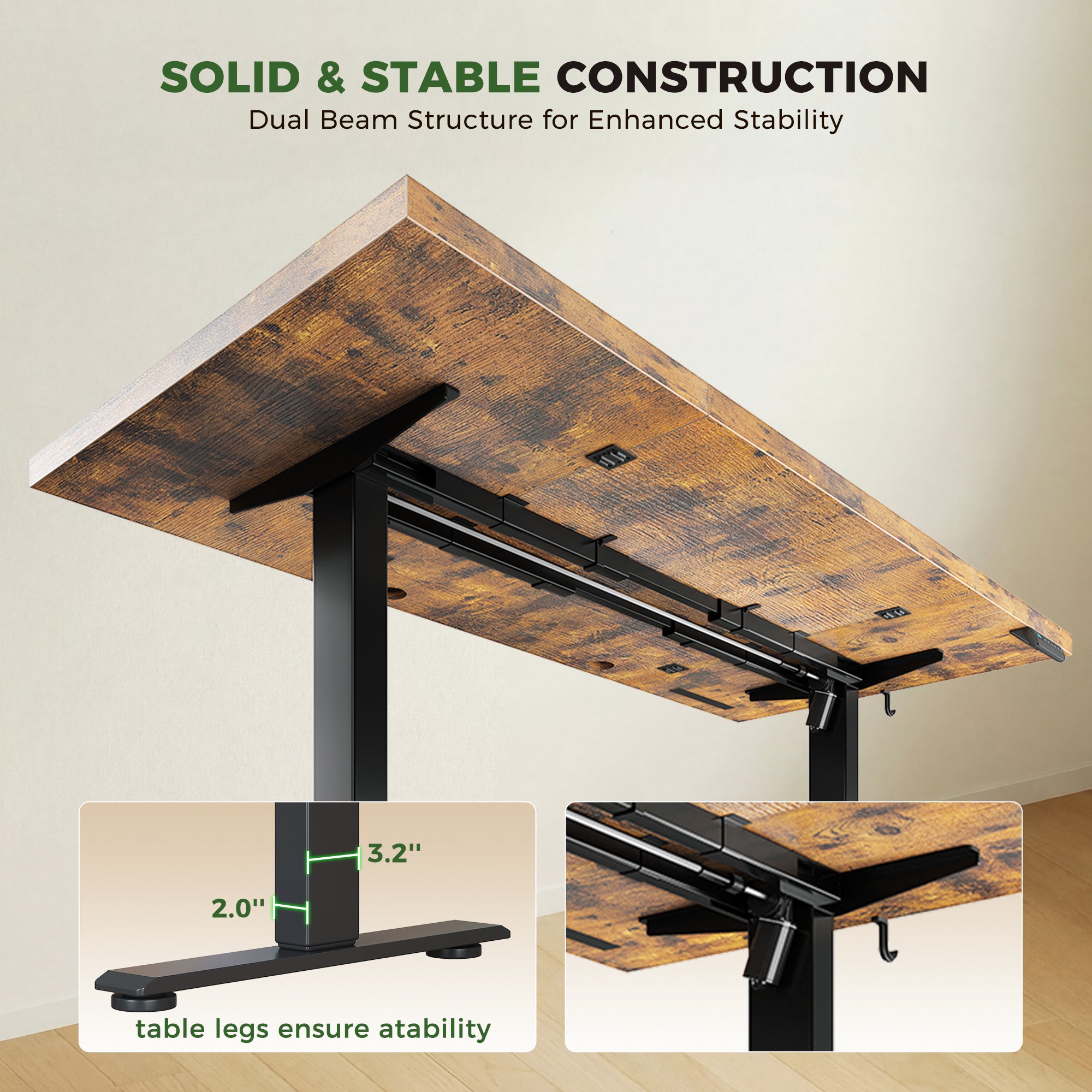
If your day involves reviewing contracts, invoices, case files, or printed drafts, the main risk is running out of clean decision space. You do not just need a bigger top. You need a layout that lets paper and screens coexist without one pushing the other into awkward reach. This is where larger Ergonomic Standing Desks earn their value.
The OffiGo 71" Executive Electric Standing Desk with Built-in Power Outlets and a 1.38" thick desktop is built for that spread-out style of work. Its 71" x 27.6" surface gives you enough depth for monitor distance and enough width for active paper zones. The desk adjusts from 29.1" to 48" and uses 3 memory presets, so you can return to repeat working heights instead of guessing each time.
What to check
- Width for monitor plus open paper space
- Depth for screen distance and writing room
- Stable frame at standing height
- Power access without desk-edge adapters
Best fit
- Review-heavy admin work
- Legal or accounting paperwork
- Dual-monitor plus file sorting
- Shared work and study surfaces
Shop: OffiGo 71" Executive Electric Standing Desk
Built-in storage for daily files
Daily paperwork creates a different problem from occasional paperwork. The issue is not only surface area. It is reach distance. If your most-used forms, chargers, pens, and notebooks live in a side cabinet across the room, your workflow breaks every hour. Built-in storage matters most when the same items cycle in and out all day.
The OffiGo 48" Electric Standing Desk with 3 Wooden Drawers, Monitor Shelf and USB Power Outlets is a strong fit for that pattern. It combines three wooden drawers with a full monitor shelf, a compact 48-inch footprint, and electric height adjustment from 29.9" to 46.1" with 3 memory presets. That combination helps keep the main surface open while preserving fast access to active tools.
Why it matters
- Drawers reduce visible pileup
- Monitor shelf frees front-edge writing space
- Shorter reach paths improve Home Office Ergonomics
- Compact size suits rooms with limited floor area
Common mistake
- Adding separate storage too far away
- Using the desktop as permanent archive space
- Treating drawers as junk bins instead of workflow tools
Shop: OffiGo 48" Electric Standing Desk with 3 Wooden Drawers
Corner setups for dense rooms
Some paperwork problems are really room-shape problems. In a spare bedroom or apartment office, a straight desk can leave you with either too little surface or too little walking space. L-shaped Sit-Stand Workstations solve that by turning a corner into two working zones: one for active computer use and one for sorting, filing, or staging documents.
The OffiGo 63" L-Shaped Electric Standing Desk with Fabric Drawers and Built-in Power Outlets is designed for that kind of dense setup. It includes four fabric drawers, a rear cable tray, reversible left or right installation, and a height range of 29.9" to 46.1". The main desktop measures 47" x 21.2", while the side section measures 31.5" x 15.8", which gives you a clear split between screen work and paperwork.
Key specs or signals
- Reversible layout for room flexibility
- Four drawers for active supplies
- Rear tray for Cable Management Systems
- Corner footprint with more usable surface
Best fit
- Small rooms with one free corner
- Multi-tasking home offices
- Users managing printouts and devices together
- People who want Modular Office Furniture logic in one desk body
Shop: OffiGo 63" L-Shaped Electric Standing Desk
Integrated power and charging
When paperwork shares space with laptops, lamps, phones, label printers, or a second display, power access becomes part of layout design. The goal is not just to charge devices. It is to keep cords out of motion paths and paper zones. That is why built-in outlets can matter more than another accessory shelf.
The OffiGo 59" L-Shaped Electric Standing Desk with Drawers, Keyboard Tray and Monitor Stand includes built-in power outlets and two USB ports, along with a 25.6" keyboard tray, monitor shelf, and two fabric drawers. Its electric lift runs from 28.4" to 45.7" with 3 memory presets. For users who switch often between writing and typing, that stack of features creates cleaner transitions than a desk covered with separate power strips and desktop stands. Forbes noted in 2025 that minimal clutter and stronger ergonomics can support lower stress and better focus in home work settings Forbes.
What this means
- Fewer adapters on the desktop
- Better cable control during movement
- More room for active forms and notes
- Faster switching between paper and keyboard tasks
Shop: OffiGo 59" L-Shaped Electric Standing Desk
How to choose Ergonomic Standing Desks for paperwork
Start with workflow, not marketing specs. The best Ergonomic Standing Desks for paperwork are the ones that match your paper volume, device count, and room shape at the same time.
| Factor | What to look for | Best for |
|---|---|---|
| Surface width | Monitor plus file zones | Large document work |
| Drawer type | Daily access storage | Repeat paper tasks |
| Height range | Sit and stand match | Shared use |
| Cable routing | Tray, outlets, USB | Cleaner motion |
| Desk shape | Straight or L-shape | Room-specific fit |
Conclusion
If paperwork is the center of your workday, choose workflow support before you compare isolated specs. Surface width, reachable storage, stable lift performance, and clean cable routing work together. That is what makes Sit-Stand Workstations practical instead of frustrating. OffiGo's approach fits that logic well because it combines movement, storage, and power access in layouts designed for real home office use.
FAQ
What matters most when choosing an adjustable desk for heavy paperwork?
Surface area, reachable storage, and stable height adjustment matter most. If you sort, review, and file throughout the day, your desk should support paper flow without forcing constant reshuffling. Width helps you create separate zones for screens and documents, while depth keeps your monitor at a healthier distance. A stable frame also matters because paperwork often involves writing, stamping, or signing at standing height.
How do I know if built-in storage is worth it?
Built-in storage is worth it when paperwork is active every day, not occasional. Drawers reduce visible clutter, keep tools close, and protect your main work surface from becoming permanent storage. If you reach for folders, pens, chargers, or forms several times an hour, integrated drawers usually save more time than a separate cabinet. They also support cleaner Home Office Ergonomics because your most-used items stay within easier reach.
What features help reduce physical strain in a paperwork-heavy setup?
Reliable height presets, enough depth for proper monitor placement, and organized cable routing make the biggest difference. These features support smoother posture changes and reduce awkward reaches across cords or paper stacks. A monitor shelf can help raise the screen, while drawers can keep supplies off the main writing zone. For many users, the best result comes from combining lift range, stable framing, and practical storage in one desk.
How should I plan a standing desk for a small home office?
Start with room shape before you choose the desktop style. In tighter rooms, L-shaped Sit-Stand Workstations often create more usable sorting space without taking over the entire room. You should also map your chair path, door clearance, and nearby outlets before picking orientation. If your workflow mixes monitors, forms, and chargers, corner placement can create cleaner separation between digital and paper tasks.
When do cable management features become important?
They become important as soon as you add monitors, lamps, chargers, or printers. Good Cable Management Systems keep movement paths clear during height changes and prevent paperwork from catching on loose cords. Built-in outlets, USB ports, rear trays, and cable notches all help reduce visual clutter. That matters even more in paper-heavy setups because loose cords steal usable desk area.
Is a modular approach useful for home office growth?
Yes, a modular approach is useful because home office needs rarely stay fixed. You may begin with one screen and a few active files, then add storage, charging, or extra equipment later. Modular Office Furniture thinking helps you choose a desk that still works as your workflow becomes more complex. It also reduces the chance that you will replace the whole setup just because one missing function becomes important later.