
Introduction
You buy a standing desk, add one drawer, run three cables, and somehow the desktop still looks like a junk drawer. Then you start compensating: you perch your keyboard on the edge, crane your neck toward the monitor, and twist your wrist around a charging cord that is always in the way.
That is the expensive part of getting it wrong: small setup mistakes create daily neck, shoulder, and wrist strain, plus constant friction every time you plug in, grab a notebook, or switch positions.
This guide shows you how to choose Electric Standing Desks that fit your room, protect your posture, and keep Under-Desk Storage practical. You will follow a simple path: fit your space, build ergonomic defaults, expand storage and power, then plan upgrades.
Fit Your Space First
The fastest way to waste money on Electric Standing Desks is to start with features instead of fit. Your room decides the desk shape, and the desk shape decides whether storage stays usable. Start by mapping the area you actually move through, not just the spot where the desk sits.
Use a simple clearance pass:
- Chair sweep: can you roll back without hitting a wall?
- Sit-to-stand sweep: does anything block the desk rise?
- Walk path: can you pass behind or beside the chair?
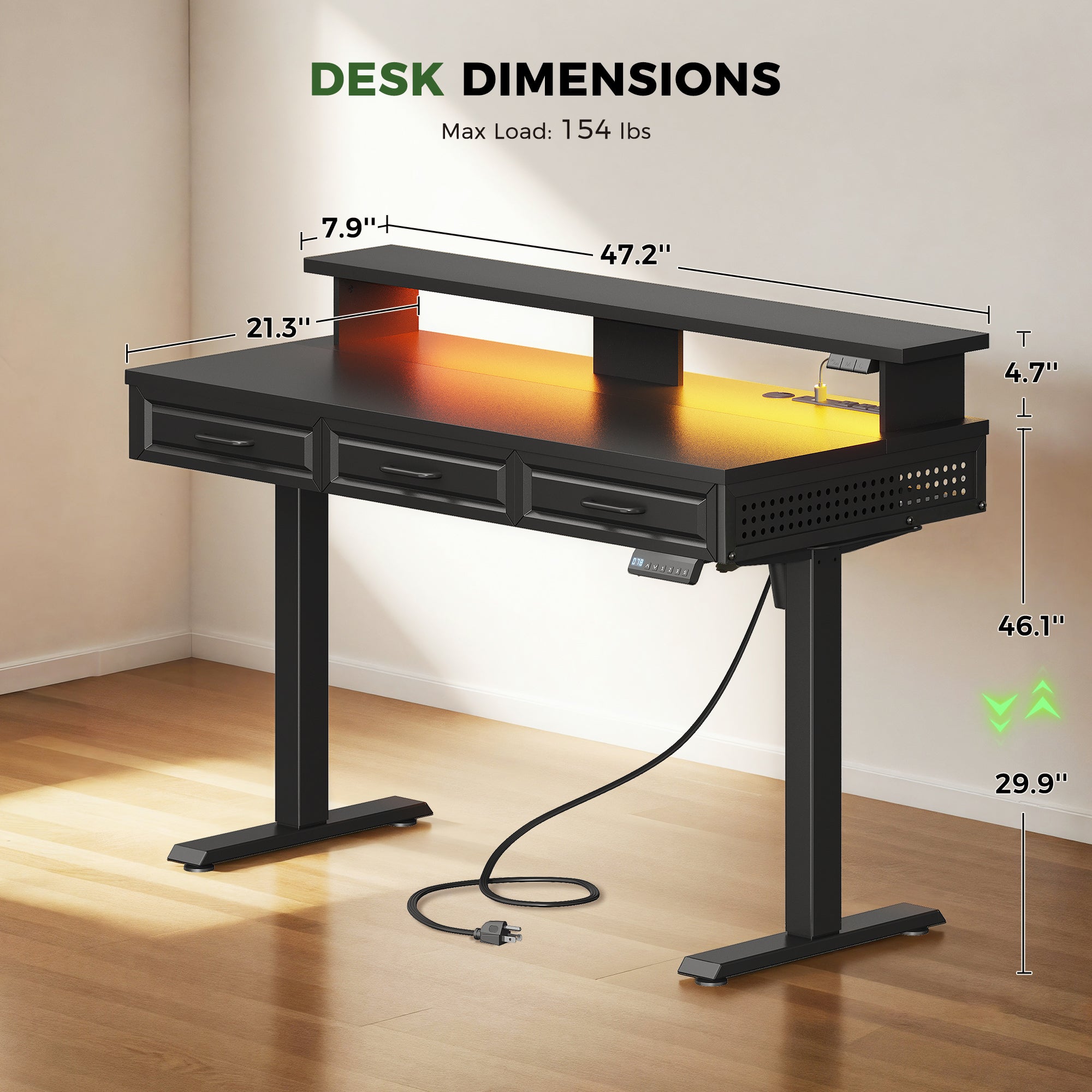
Compact Office Furniture works when the desk keeps legroom open. For example, a 48-inch top can be enough for a focused laptop and monitor workflow, but only if the depth and leg spacing leave you space to sit centered instead of angled.
A practical reference point from OffiGo is the OffiGo 48-inch electric standing desk layout: it uses a 47.2-inch by 21.3-inch top and a monitor shelf that sits about 4.7 inches high, which helps vertical organization without requiring a deeper desk footprint.
Shop: OffiGo 48" Electric Standing Desk with 3 Wooden Drawers, Monitor Shelf & USB Power Outlets
Build Ergonomics Into Defaults
The goal is not to remember posture cues all day. The goal is to build defaults so your body lands in a good position automatically when you sit down or stand up.
Start with the keyboard and mouse zone. OSHA notes that a neutral setup keeps hands, wrists, and forearms straight and roughly parallel to the floor, with elbows close to the body.
Set your desk height to support that, then lock it in with presets:
- Preset 1: seated typing height
- Preset 2: standing typing height
- Preset 3: optional perch/meeting height
Next, move your screen to meet your eyes, not the other way around. A monitor shelf can help you get the display up without stacking books, and it also creates near-surface storage under the shelf for notebooks or a small hub.
If you use Ergonomic Office Chairs, treat the chair as half the system: adjust seat height so thighs are roughly parallel, then match desk height to your elbow position. The desk should not force shrugged shoulders or bent wrists.
Shop: OffiGo 55" U Shaped Electric Standing Desk with 2 Drawers & Keyboard Tray & Monitor Stand
Storage Without Ergonomic Tradeoffs
Storage is helpful only when it reduces decisions. If storage creates knee collisions, it will push you into awkward sitting positions and you will stop using it.
Split your storage plan into two piles:
- Daily tools: chargers, pens, sticky notes, headset
- Archives: paperwork, peripherals you rarely touch
Daily tools belong in drawers that you can open without shifting your knees or rolling your chair away. Archives belong lower and farther from your centerline so your feet still have freedom to move.
A strong pattern in Home Office Design is to keep heavier items low and centered. That reduces wobble at standing height and prevents drawers from turning into a top-heavy mess.
If you need more than a few small drawers, move up from drawer-only desks to a desk plus cabinet approach. OffiGo has an L-shaped model with a separate, movable side cabinet that can be placed left, right, or inline. That layout is useful when you want Under-Desk Storage capacity without turning the knee zone into an obstacle course.
Shop: OffiGo 55" L-Shaped Standing Desk with Movable Storage Cabinet
Power, Charging, Cable Control
Power is where clutter starts, so treat it like a designed feature in your workspace, not an afterthought. If your charging point is behind the monitor or under the desk, you will drag cables across your keyboard area and eventually across your legs.
A clean setup follows a simple flow:
- Devices plug into a single desktop power area
- Excess cable length routes backward, not downward
- Nothing dangles in the knee zone
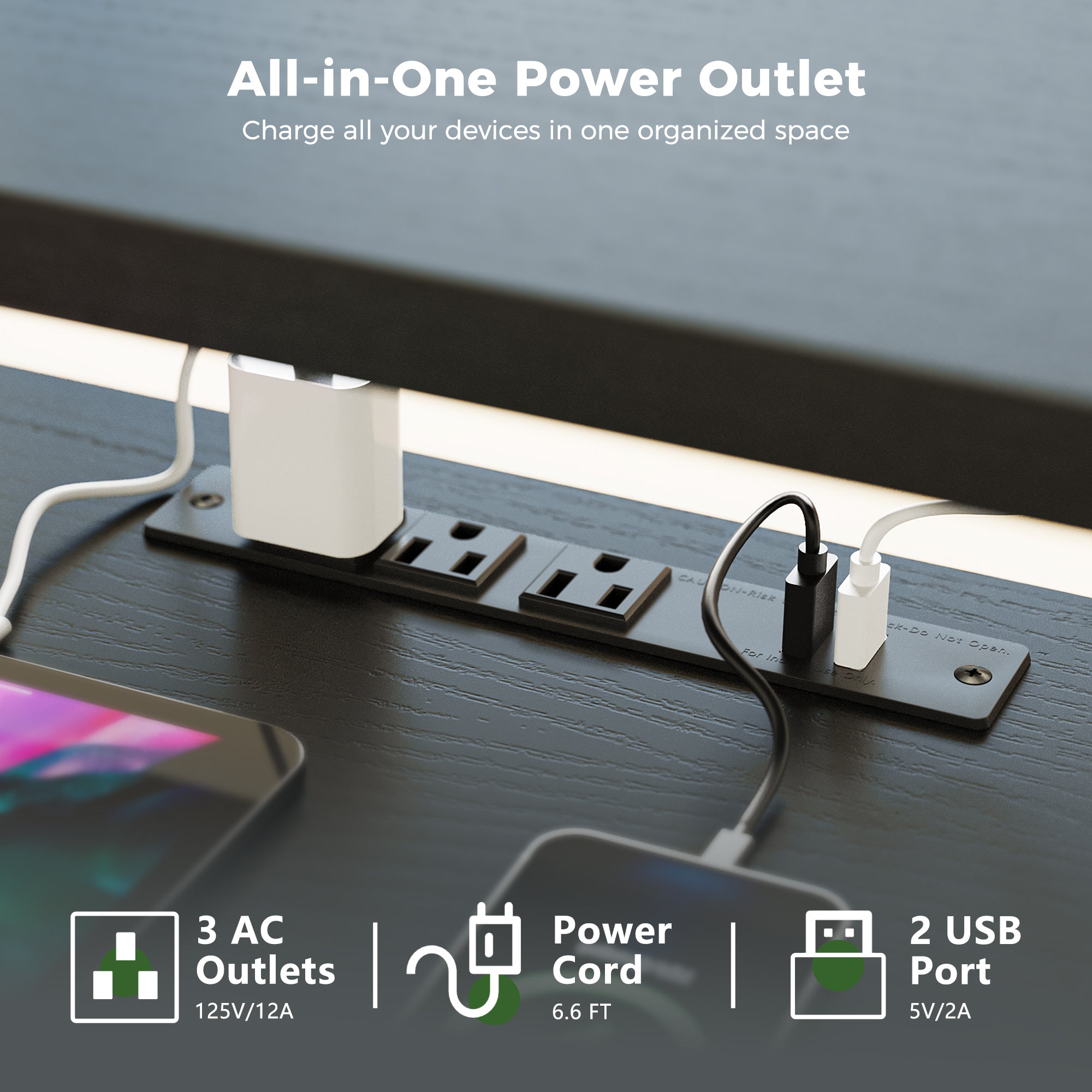
Some Electric Standing Desks include integrated power so you can plug in where your hands already are. For example, OffiGo desk power modules commonly combine multiple AC outlets plus USB, and some models add a Type-C port. That matters for USB-C Charging Ports workflows because it reduces the need for a separate hub on the desktop.
Now add one rule that keeps cables from becoming posture problems: do not route cords where your knees move. If a cable drags on your leg during sit-stand transitions, you will unconsciously change how you sit and stand.
Shop: OffiGo 55" L-Shaped Electric Standing Desk with Wooden Drawers & Power Outlets
Upgrade Path, Not One-Time Buy
A good standing desk setup is a platform decision. You should be able to start with a stable base, then add storage, layout, and power features as your work changes.
Plan your upgrades in phases:
- Phase 1: right size and stable frame
- Phase 2: ergonomic defaults (presets, monitor height)
- Phase 3: storage expansion for your workflow
- Phase 4: power and charging refinement
This matters because Home Office Design needs tend to grow. Today you have one laptop. Six months later you have dual monitors, a dock, a microphone, and a pile of adapters.
If budget is a constraint, a phased plan keeps your decisions simple. Some shoppers also use Buy Now Pay Later Financing to avoid downgrading critical ergonomic features just to hit a short-term number. The key is to apply financing only after you define the non-negotiables: stable standing height, comfortable typing posture, and storage that does not steal legroom.
Decision table to keep your choice practical
| Scenario | Key constraint | Best layout | Storage approach | Power approach |
|---|---|---|---|---|
| Small room | Tight clearances | Compact straight | 2-3 drawers | Built-in outlets |
| Dual monitors | Screen space | 55-71 inch | Near-surface drawers | Desktop power |
| Paperwork heavy | Many documents | L-shaped | Cabinet + drawers | Flexible routing |
| Creator tools | Multiple devices | L-shaped or U-shaped | Zoned storage | USB-C access |
Conclusion
The best Electric Standing Desks in 2026 are not defined by a single spec. They win because they let you keep neutral posture while also keeping storage and power easy enough that you actually use them.
Start with fit, because Compact Office Furniture mistakes are hard to fix later. Then build ergonomic defaults so your wrists, elbows, and shoulders land in the right place without effort. Finally, add Under-Desk Storage and USB-C Charging Ports features that reduce friction instead of creating new obstacles.
Frequently Asked Questions
How do I choose a standing desk that balances storage and legroom?
Choose storage that sits outside your knee travel and does not force you to sit farther from the keyboard. Start by sitting in your normal posture, then simulate opening drawers to see if your thighs or knees would contact the drawer fronts. Keep frequently used items in shallow, easy-access drawers and push rarely used items into deeper storage away from the center. If you need large capacity, consider a side cabinet instead of stacking more drawers under the main typing zone.
What workstation setup principles reduce strain when using a standing desk?
Keep your wrists straight, your elbows close to your body, and your shoulders relaxed so your upper back is not constantly bracing. Set the desk height so your forearms are roughly parallel to the floor when typing, and keep the mouse at the same height as the keyboard. Position your screen so you do not tilt your head down for long periods, especially when reading. Save your preferred sitting and standing heights as presets so you are not constantly re-tuning posture.
How much under-desk storage is practical for daily work use?
For most daily workflows, under-desk storage should hold essentials without crowding the knee zone. A good target is enough space for chargers, a notebook, small stationery, and one or two compact devices, while leaving the center area open for feet movement. If storage reduces your ability to pull the chair in close, it is too much or placed incorrectly. Use drawers for daily tools and reserve cabinets or deeper bins for weekly or monthly items.
What should I look for in built-in power and charging features?
Look for power placement that you can reach while seated without bending or twisting, because that is what keeps cable use consistent. Make sure the ports match your device reality: AC for laptop bricks, USB for small devices, and USB-C if you charge modern phones, tablets, or accessories that prefer Type-C. Check that the design supports clean routing so cords can run backward and down, not across your lap. The best setups reduce the number of separate hubs and adapters living on the desktop.
When should I consider an L-shaped standing desk layout?
Choose an L-shaped layout when you need two distinct zones, such as screens on one side and writing, audio gear, or paperwork on the other. It also makes sense when you want to use a corner efficiently without adding a second table. L-shapes can improve organization because they separate tasks instead of stacking everything in one line. A reversible L extension helps if you expect to rearrange the room or change which side your main workflow sits on.
How do I plan a home office desk purchase when budget is tight?
Define your non-negotiables first: stable standing height, comfortable typing posture, and enough storage to keep daily clutter off the surface. Next, pick a desk that meets those needs today, then plan upgrades like extra storage or enhanced cable management as later phases. If you use Buy Now Pay Later Financing, use it to protect ergonomics rather than to add cosmetic features. Finally, avoid paying twice by buying the right size and layout up front, because fit mistakes are the hardest to correct later.
Are height adjustable tables different from electric standing desks?
Height Adjustable Tables is the broader category that includes both manual and electric designs, while electric standing desks specifically use powered lift systems. The practical difference is how often you will change positions, because electric controls make switching fast and repeatable. Manual systems can still work, but they tend to reduce the number of sit-stand transitions you actually do in a busy day. If your goal is consistent posture variation, electric models typically support that habit better.
Can sustainable furniture matter for a standing desk setup?
Sustainable Furniture choices can matter, but only if they also support stability and long-term use. A desk that lasts years reduces replacement waste, and durable surfaces reduce the need for frequent repairs or refinishing. Practical sustainability also includes choosing a desk that fits your workflow so you do not replace it after a few months due to poor storage or layout. When evaluating sustainability claims, prioritize build quality, repairability, and whether the desk can adapt as your Home Office Design needs change.