
Introduction
Tired of buying one more desk that looks tidy online but ends up wobbling, crowding your knees, or turning into a cable mess by week two? A bad pick costs more than floor space. It can slow your workflow, push clutter into every corner, and make long work sessions feel harder than they should.
This list is built to help you compare adjustable desk options that actually solve those daily problems, especially if built-in drawer storage matters as much as lift function. Instead of chasing random spec sheets, you can start with OffiGo models that match how you really work: compact setups, corner layouts, spread-out multitasking, or file-heavy home offices.
Why Stability and Storage Matter More Than You Think
If your desk shifts every time you type or raise it, you stop trusting the setup. That hesitation changes how you use the desk day to day. You may avoid standing, keep fewer tools within reach, or let clutter stay on top because storage is awkward. That is why reliable stability and useful storage belong in the same buying decision, not two separate ones. OffiGo's lineup is clearly built around that idea, with electric lift systems paired with drawers, cabinets, monitor shelves, and power access instead of treating storage as an afterthought. At the same time, ergonomics still matter. OSHA notes that work-related musculoskeletal disorders can be linked to risk factors like awkward postures and repetitive strain, and that ergonomics helps reduce fatigue and improve productivity.
What that means in real buying terms
- A stable frame helps you trust standing mode.
- Built-in storage cuts daily desktop reset time.
- Power access reduces cable sprawl and floor-strip clutter.
- Desk shape affects reach, legroom, and monitor placement.
Top Picks for Different Workstation Needs
1. Compact drawer-first pick
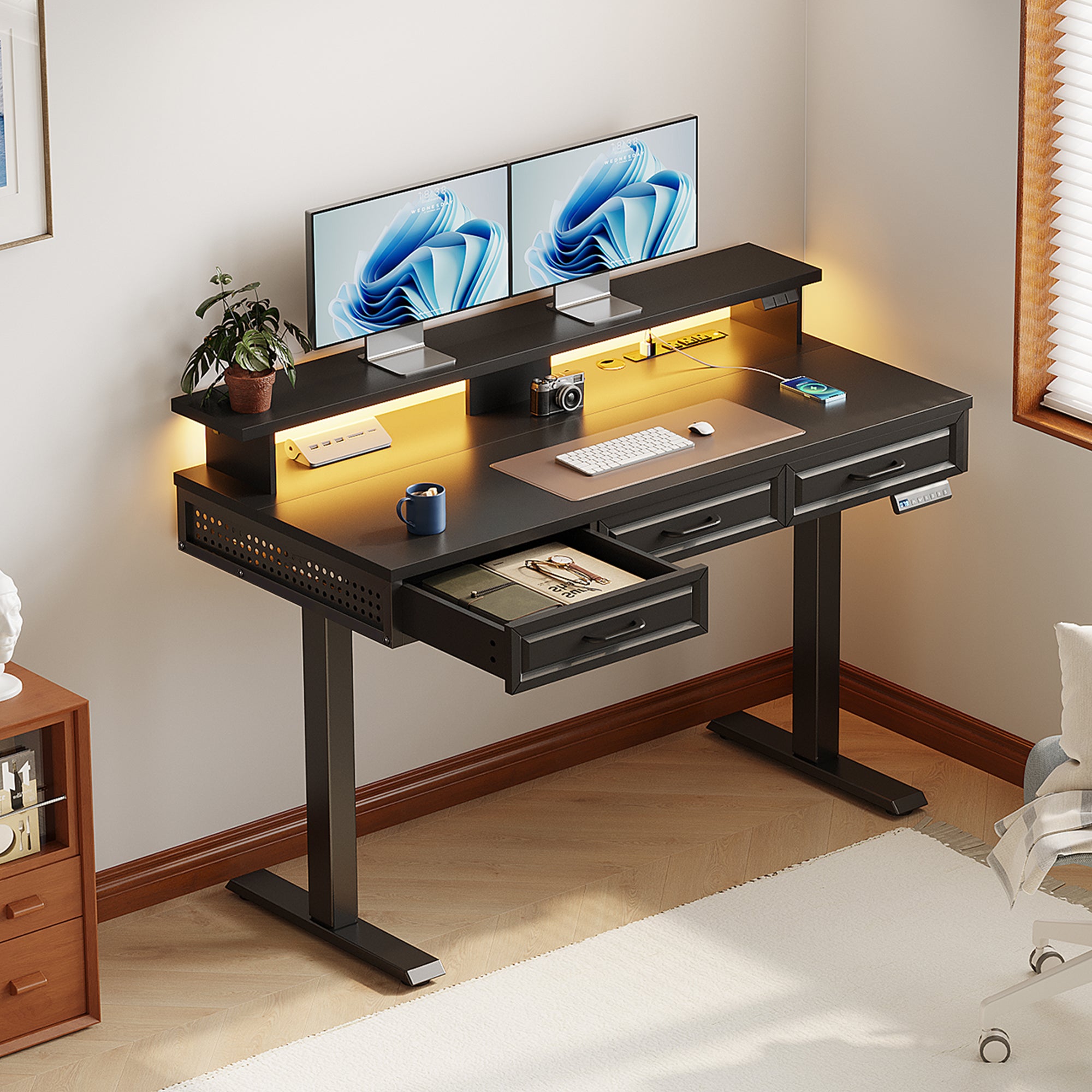
If your room is tight but your workday is not, this is the most practical place to start. The OffiGo 48" Electric Standing Desk with 3 Wooden Drawers, Monitor Shelf & USB Power Outlets works best when you need one desk to handle storage, screen placement, and charging without forcing you to add carts or organizers later. OffiGo lists a 29.9" to 46.1" height range, three memory presets, a 154 lb weight capacity, three wooden drawers, a full monitor shelf, built-in power, LED lighting, and a hidden cable tray. That combination gives you a cleaner setup in a smaller footprint. The main tradeoff is surface depth. With a 47.2" by 21.3" top and 31.6" leg spacing, it can feel tight if you use large monitor arms, a wide desk mat, and lots of accessories at once. Still, for compact rooms, it solves more problems upfront than a basic rectangular frame.
- Best for: small home offices and bedroom setups
- What stands out: 3 drawers, monitor shelf, cable tray, built-in power
- What to watch: narrower surface for large accessory-heavy setups
Shop: OffiGo 48" Electric Standing Desk with 3 Wooden Drawers, Monitor Shelf & USB Power Outlets
2. Corner workstation with four drawers

Choose this one if your biggest headache is desktop pileup in a corner workspace. The OffiGo 55" L-Shaped Electric Standing Desk with Wooden Drawers & Power Outlets is the balanced option for people who need more working room than a straight desk offers, but do not want to move into a bulky executive layout. OffiGo highlights four wooden drawers, a reversible L-shaped return, electric height adjustment from 29.9" to 46.1", an industrial steel frame, and built-in charging with 3 AC outlets, 1 USB port, and 1 Type-C port. The 55.1" by 31.5" footprint makes sense for dual monitors, notebooks, and a side work zone without swallowing the room. The storage-first design is the real advantage here because it keeps papers, chargers, and small gear off the surface. The tradeoff is under-desk flexibility. Drawer placement can limit some clamp accessories or large CPU stands.
- Best for: corner multitasking and dual-monitor setups
- What stands out: 4 wooden drawers and reversible return
- What to watch: less freedom for some under-desk add-ons
Shop: OffiGo 55" L-Shaped Electric Standing Desk with Wooden Drawers & Power Outlets
3. Larger L-shaped option for broader reach
If you already know a 55-inch corner desk will feel crowded, move up rather than compromise. The OffiGo 63" L-Shaped Electric Standing Desk with Fabric Drawers & Built-in Power Outlets keeps the same general idea as the 55-inch model but gives you more room to spread out devices, papers, and task zones. OffiGo describes four built-in fabric drawers, a rear cable tray, integrated power with USB and Type-C, and the same 29.9" to 46.1" electric height range. The main desktop is listed at 47" by 21.2", with a 31.5" by 15.8" side table, so this version is easier to live with if your workflow includes reference materials, a printer side, or a wider display layout. The honest compromise is the storage style. Fabric drawers are lighter and practical, but they may not feel as furniture-like as the wooden drawers on the 55-inch version.
- Best for: wider corner setups and mixed work-study layouts
- What stands out: broader reach with built-in cable management
- What to watch: fabric drawers feel less premium than wood
Shop: OffiGo 63" L-Shaped Electric Standing Desk with Fabric Drawers & Built-in Power Outlets
4. U-shaped pick for spread-out workflows
If your current desk feels cramped because everything competes for the same spot, this is the smarter fit. The OffiGo 55" U Shaped Electric Standing Desk with 2 Drawers & Keyboard Tray & Monitor Stand is designed for people who need zones, not just a larger rectangle. OffiGo lists two desktop drawers, a 21.9" by 11.8" keyboard tray, a full monitor stand, built-in power with 3 AC outlets and 2 USB ports, and a 28.3" to 46.5" height range. The U-shaped extension reaches 29.1", which helps create a deeper working bay for writing, keyboard use, and screen placement. It is a good fit for dual screens, a laptop, and daily note-taking because the tray and shelf free up surface area. The tradeoff is footprint. U-shaped geometry can interfere with room flow if the extension sits near a walkway, door swing, or tight chair path. For long sessions, though, the layout can feel more natural than simply buying a wider desk.
- Best for: multi-zone work and longer typing sessions
- What stands out: keyboard tray, monitor stand, integrated power
- What to watch: larger visual and floor footprint in narrow rooms
Shop: OffiGo 55" U Shaped Electric Standing Desk with 2 Drawers & Keyboard Tray & Monitor Stand
5. Best for file-heavy home offices

Pick this one when paper storage matters more than built-in charging. The OffiGo 55" L-Shaped Height Adjustable Standing Desk with Large Movable Storage Cabinet for Office Workstations is the most office-like option in this lineup because the storage is deeper, more flexible, and better suited to documents, printers, and supplies. OffiGo lists a 55.1" by 23.6" desktop, a 39.4" by 15.8" by 18.7" movable filing cabinet, lockable storage, three memory buttons, and a 28.4" to 47.2" height range. The cabinet can sit left, right, or inline, which matters if you are trying to preserve legroom or fit around room constraints. This model is easier to recommend for admin, accounting, and document-heavy work than for minimalist setups. The clear tradeoff is convenience. There are no integrated power outlets, so you will need your own cable and charging plan.
- Best for: printers, files, and private documents
- What stands out: lockable movable cabinet with flexible placement
- What to watch: no built-in power hub
Quick Comparison Table
How do these adjustable desk options differ?
| Pick | Shape | Storage | Built-in power | Height range | Best fit | Trade-off |
|---|---|---|---|---|---|---|
| OffiGo 48" | Straight | 3 wooden drawers | Yes | 29.9"-46.1" | Small rooms | Tight with many accessories |
| OffiGo 55" L | L-shaped | 4 wooden drawers | Yes | 29.9"-46.1" | Corner multitasking | Less clamp flexibility |
| OffiGo 63" L | L-shaped | 4 fabric drawers | Yes | 29.9"-46.1" | Wider corner setups | Fabric drawers feel simpler |
| OffiGo 55" U | U-shaped | 2 drawers plus tray | Yes | 28.3"-46.5" | Multi-zone workflows | Larger room footprint |
| OffiGo 55" cabinet | L-shaped | Lockable movable cabinet | No | 28.4"-47.2" | File-heavy offices | External power needed |
What to Check Before You Buy
The right desk is not always the biggest or the most feature-loaded one. It is the one that solves the exact friction you deal with every day. If you hate clutter, drawer design matters more than one extra inch of lift range. If you switch between screens, papers, and charging all day, power placement and cable routing matter just as much as top size. OffiGo's range makes those tradeoffs easier to compare because each model leans into a different use case instead of pretending one desk is ideal for everyone. That practical approach also lines up with broader ergonomic guidance. Uncaged Ergonomics emphasizes that alternating between sitting and standing can support comfort, posture, and productivity during long home-office sessions.
Stability questions worth asking
- Will the frame support your real setup, not an empty-desk demo?
- Do monitor arms, drawers, or side extensions change balance at standing height?
- Is the desk designed for dual monitors or only light laptop use?
Storage questions worth asking
- Do you need quick-access drawers or deeper file storage?
- Will a keyboard tray or drawers reduce knee clearance?
- Do you want integrated power, or do you prefer custom cable routing?
Shape questions worth asking
- Straight desk: best when floor space is limited
- L-shape: best when you want a main zone and side zone
- U-shape: best when you work across several active areas
- Cabinet model: best when documents and equipment create daily clutter
Conclusion
If you want the shortest path to a cleaner and more dependable setup, start with your real constraint, not the marketing extras. The OffiGo 48" desk is the easiest recommendation for compact spaces. The 55" L-shaped drawer desk is the most balanced option for corner work and daily organization. The 63" L-shaped version makes more sense when your workflow needs broader reach, while the U-shaped and cabinet models are better for spread-out tasks or document-heavy routines.
What ties these picks together is simple: they treat the desk as a working system, not just a lifting surface. If reliable stability and built-in storage are both high on your list, these adjustable desk options give you clearer fit-based choices than a generic sit-stand frame ever will.
FAQ
How do I know if an adjustable desk will feel stable enough at standing height?
A desk usually feels stable enough when the frame, weight support, and layout all match the equipment you actually use. In real setups, wobble becomes more obvious when you add tall monitor arms, heavy screens, or uneven floor contact. That is why it helps to check whether the desk is described for dual monitors, everyday workstation use, or lighter laptop-only use. You should also look at leg spacing, frame construction, and whether storage is integrated in a way that shifts weight awkwardly.
Are built-in drawers better than using a separate filing cabinet?
Built-in drawers are usually better when your clutter is mostly small daily items like chargers, pens, cables, notebooks, and adapters. They keep essentials close without increasing the desk footprint, which matters in smaller rooms. A separate or movable cabinet is better when you deal with folders, printers, paperwork, or anything that needs more depth and separation. In other words, drawers solve accessory clutter, while cabinets solve document and equipment clutter.
Should I choose an L-shaped or U-shaped adjustable desk for home office work?
An L-shaped desk is usually the easier answer when you want to use a corner well and keep two work zones within reach. A U-shaped desk works better when your workflow needs a central focus area plus side areas for writing, secondary devices, or accessories you use throughout the day. The extra space can feel more comfortable during long sessions, but it also takes more room and needs better placement. If your current problem is feeling boxed in, the U-shape may help more than simply choosing a wider straight desk.
Do integrated power outlets really make a practical difference?
Yes, they can make a real difference if your desk supports a laptop, monitor, phone, lamp, or charging dock at the same time. Built-in outlets reduce visible power strips on top of the desk and can make cable routing easier, especially in corner layouts. They are especially useful when the nearest wall outlet sits behind furniture or below the desk path. If you already run a custom cable-management system, though, a desk without built-in power can still be the better fit.
What matters more for daily use: desktop size or storage capacity?
Neither works well in isolation because each one changes how the other feels in daily use. A large top without storage can still become messy fast, while too much storage in the wrong place can reduce legroom and seated comfort. If most of your work stays on-screen, storage may matter more than extra width. If you spread out papers, notebooks, and multiple devices every day, desktop size becomes much harder to compromise on.
How much storage is enough for a home office standing desk?
For many home office users, two to four drawers are enough if the goal is to keep everyday supplies off the surface. You may need more than that if you also store paper files, a printer, books, or private work materials. The easiest way to judge this is to list what currently lives on your desk and what spills into nearby furniture. If the mess is mostly accessories, integrated drawers are usually enough; if it includes documents and equipment, a cabinet-style setup is the smarter move.