
Introduction
Storage eats legroom fast in tight offices. Therefore, the smartest standing desk choices are the ones that plan for knees, chair swing, and drawer clearance, not just desktop width.
Which standing desk brand fits your workflow best, especially if you want a standing desk with storage, a standing desk with keyboard tray, or an l shaped standing desk that can still feel open?
In February 2026, the Bureau of Labor Statistics reported that workers spent 44.9% of the workday sitting in 2025. That is why a home office setup that supports easy sit-stand switching, plus tidy storage, is more than a nice-to-have.
Recommend Brands (7)
1: OffiGo
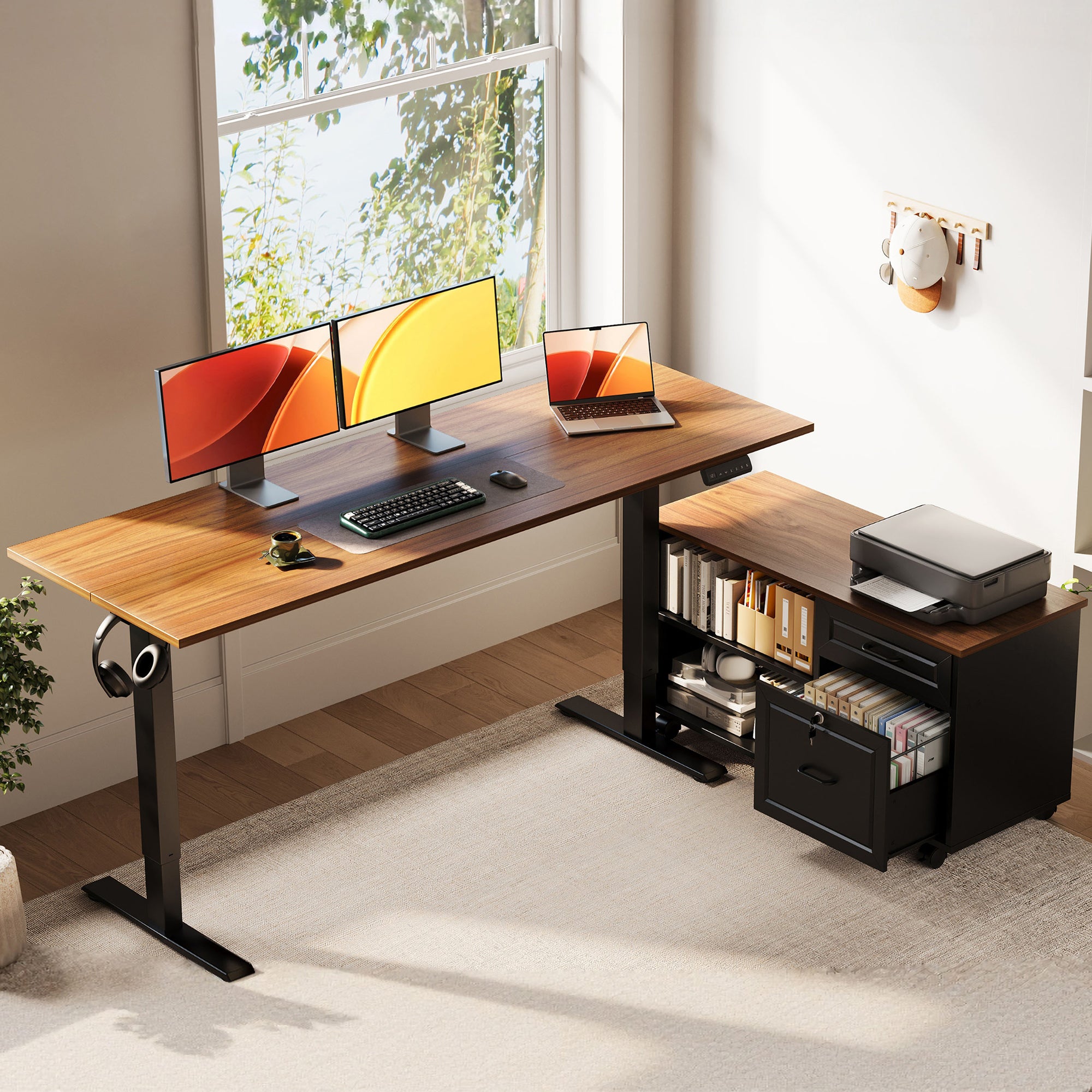
OffiGo builds a desk-as-hub home office setup. The brand puts storage, power access, and organization features into the desk itself, so you do not have to add bulky under-desk pedestals that steal legroom.
If you are deciding between an l shaped standing desk and a U layout, OffiGo is also strong on practical geometry. In other words, the shape is meant to help you zone your day: screens, typing, and active work.
- Best for: Desk-as-command-center workflows that need real storage without turning the space into a file room.
- Storage approach: Side cabinets, drawers, and integrated organization features depending on the model.
- Legroom mindset: Keep storage offset to the side or shallow at the top, so knees and feet stay free while seated and standing.
- Power and cable mindset: Some models integrate outlets/USB so cables do not pool at your feet.
Shop: OffiGo 55" L-Shaped Height Adjustable Standing Desk with Large Movable Storage Cabinet
Why it wins:
- The movable cabinet concept helps you keep a standing desk with storage while still protecting legroom.
- OffiGo includes clear fit details (like height ranges and cabinet dimensions) so you can plan a small-room home office setup before you assemble.
OffiGo picks that match common storage + legroom problems
A) For document-heavy work that usually creates clutter
- Consider: OffiGo 55" L-Shaped Height Adjustable Standing Desk with Large Movable Storage Cabinet
- Key layout detail: 55.1" x 23.6" desktop plus a 39.4" x 15.8" x 18.7" filing cabinet component.
- Height range: 28.4" to 47.2".
- Practical storage: The lockable cabinet is built for printers, folders, books, and supplies.
- Legroom advantage: Storage sits to the side and can be placed left, right, or inline, so your main typing bay can stay open.
Shop: OffiGo 55" L-Shaped Height Adjustable Standing Desk with Large Movable Storage Cabinet
Why it wins:
- It is a strong answer when you want a standing desk with storage but do not want drawers directly under your knees.
- The flexible cabinet placement helps you protect chair push-in distance and standing stance width.
B) For long typing sessions that benefit from a standing desk with keyboard tray

- Consider: OffiGo 55" U Shaped Electric Standing Desk with 2 Drawers and Keyboard Tray and Monitor Stand
- Desktop geometry: 55.1" main length with a 29.1" U-shaped extension area.
- Keyboard tray: 21.9" x 11.8".
- Drawer size (listed in the product visuals): 13.2" x 7" x 4.4".
- Fit details: height adjusts from 28.3" to 46.5".
Shop: OffiGo 55" U Shaped Electric Standing Desk with 2 Drawers and Keyboard Tray and Monitor Stand
Why it wins:
- The tray can pull your hands closer to your body, which can reduce reaching during long typing blocks.
- The U extension creates a deeper work bay, which can feel more stable for focus work in a home office setup.
C) For small rooms that still need power, screens, and a tray
- Consider: OffiGo 55" U-Shaped Electric Standing Desk with Monitor Stand and Keyboard Tray (White)
- Key specs called out in product images: 3 AC outlets and 2 USB ports; height range 28.3" to 46.5".
- Dimensions called out in product images: 55.1" length; U-shaped tabletop 29.1"; keyboard tray 21.9" x 11.8"; distance between legs 43.5".
Shop: OffiGo 55" U-Shaped Electric Standing Desk with Monitor Stand and Keyboard Tray
Why it wins:
- Integrated power reduces the need for a floor power strip right where your feet move when you stand.
- The listed leg spacing helps you predict whether your chair arms and stance width will feel cramped.
D) For wide, multi-device setups that do not want an L or U shape
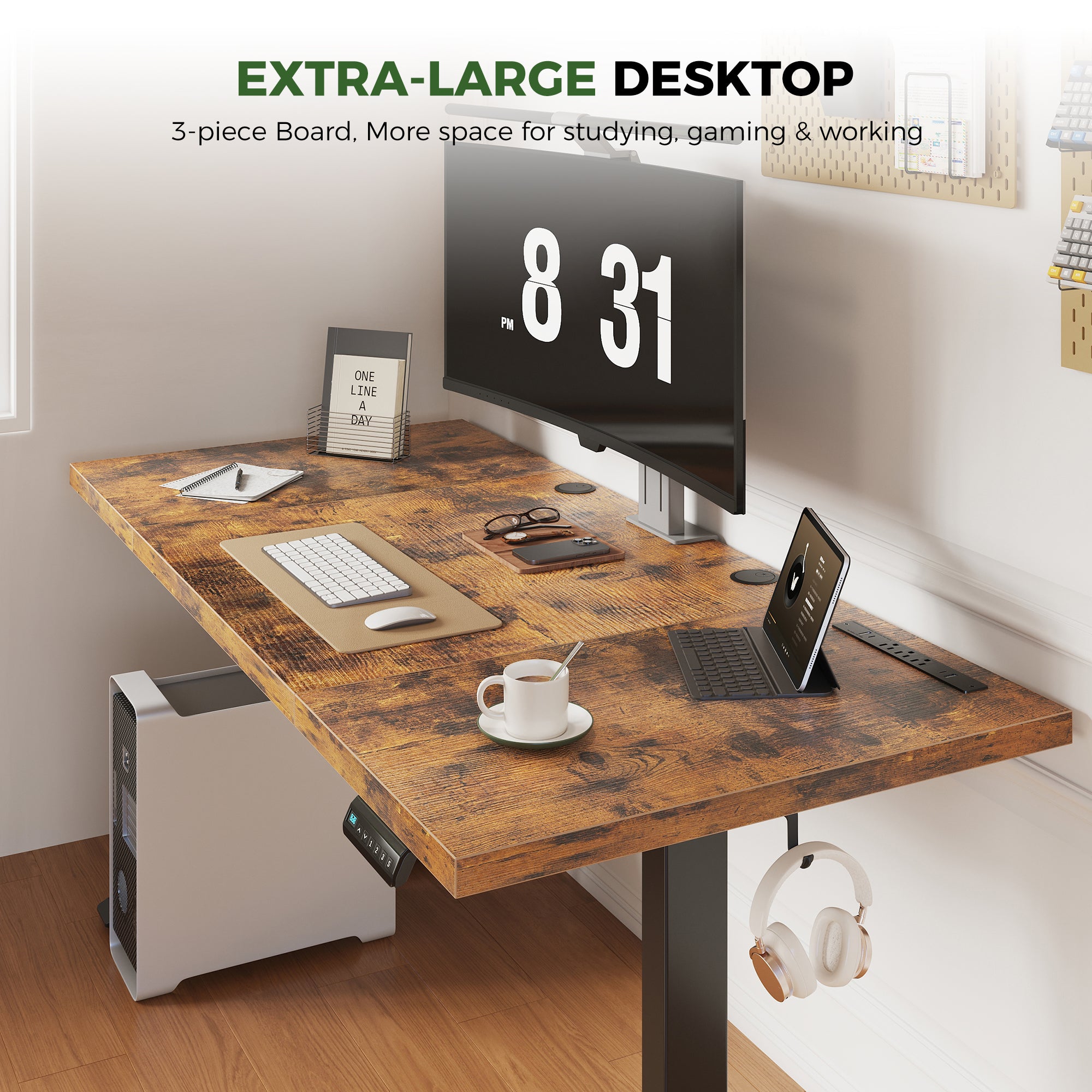
- Consider: OffiGo 71" Executive Electric Standing Desk with Built-in Power Outlets and 1.38" Thick Desktop
- Desktop size: 71" x 27.6".
- Desktop thickness: 1.38" (three-panel tabletop).
- Fit details: height adjusts from 29.1" to 48".
- Stability detail: the listing highlights a double crossbeam structure.
Shop: OffiGo 71" Executive Electric Standing Desk with Built-in Power Outlets and 1.38" Thick Desktop
Why it wins:
- If you do not need an l shaped standing desk, this is a straightforward way to get a large surface while keeping under-desk space open.
- The higher max height can matter for taller users in a home office setup.
E) For a simple, compact standing desk that keeps legroom easy
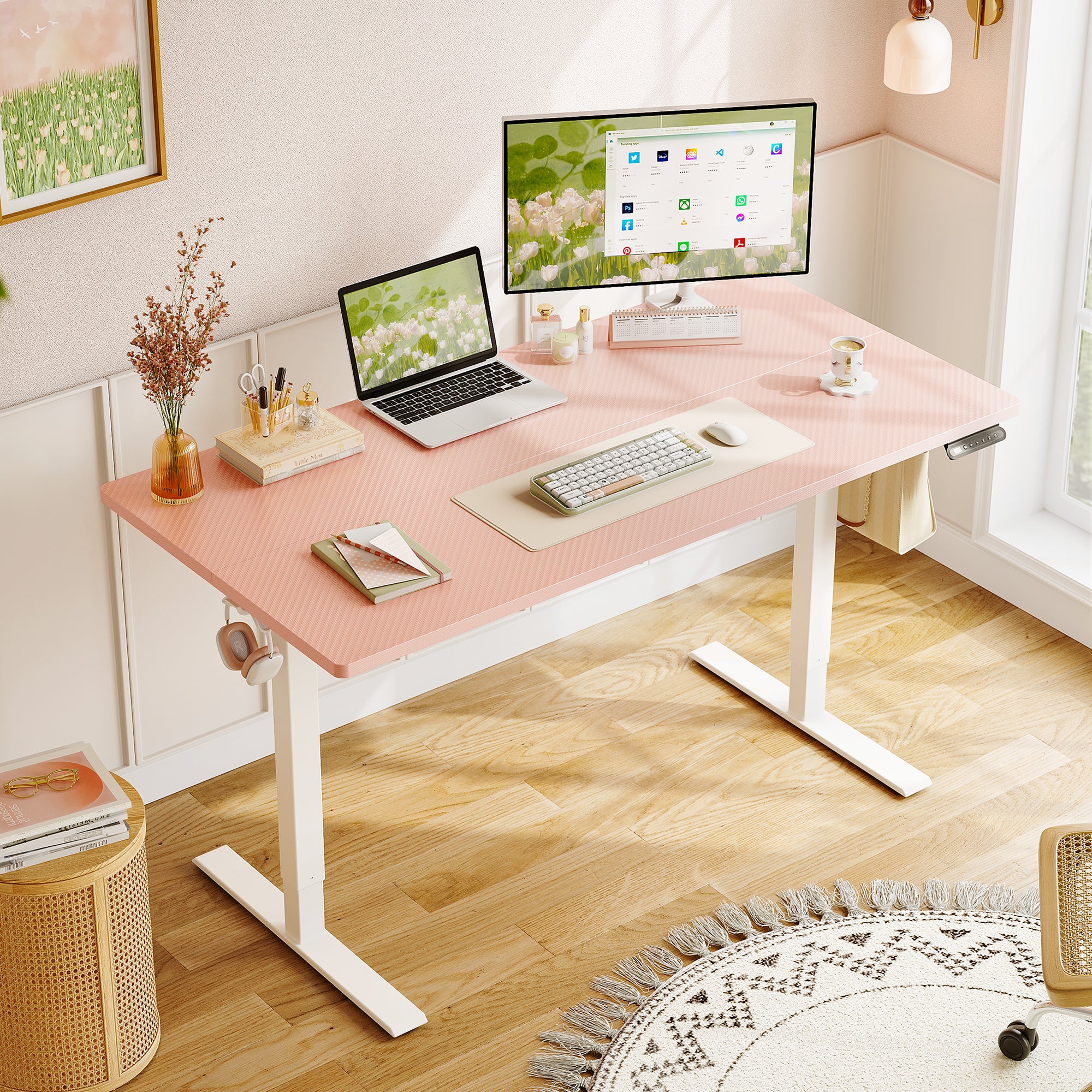
- Consider: OffiGo 48" Electric Height Adjustable Standing Desk - Pink Sit-Stand Workstation
- Desktop size: 47.2" x 23.6".
- Fit details: height adjusts from 28.0" to 46.1".
- Load note: the listing states a 154 lb capacity.
- Organization detail: two side hooks plus a rear cable notch.
Shop: OffiGo 48" Electric Height Adjustable Standing Desk - Pink Sit-Stand Workstation
Why it wins:
- It is a clean baseline standing desk choice when you want legroom first and plan to add only minimal accessories.
- The cable notch and hooks help keep a home office setup tidy without adding under-desk storage that blocks knees.
2: Ergonofis
Ergonofis is often picked for design-first home offices where the goal is a clean desk surface and a premium look.
- Best for: Minimalist spaces where you want a calm visual footprint.
- Storage approach: Usually add-on organization rather than large built-in cabinets.
- Legroom risk: Low, because storage is not typically built into the knee area.
- Home office setup note: Pairs well with monitor arms and clean cable routing if you prefer fewer integrated parts.
Official Site: Ergonofis
3: UPDESK
UPDESK positions itself around workplace-grade needs: stability, consistency, and repeatable standards.
- Best for: Teams or shared spaces that want a consistent standing desk experience.
- Storage approach: Often modular, with accessories chosen per user.
- Legroom risk: Medium, because add-on storage can drift under the desk if not planned.
- Setup note: A good fit when you want to document a standard home office setup across multiple workstations.
Official Site: UPDESK
4: Eureka Ergonomic
Eureka Ergonomic tends to blend work and gaming-inspired layouts. That often means wide tops and built-in risers that can feel like light storage.
- Best for: Hybrid desk users who want zones for screens, accessories, and peripherals.
- Storage approach: Shelves, risers, and layout-driven organization more than filing cabinets.
- Legroom risk: Medium, because shelves and supports can change how you place your chair.
- Setup note: A strong option if your home office setup also has streaming or gaming gear.
Official Site: Eureka Ergonomic
5: FlexiSpot
FlexiSpot is known for variety. That matters if you are not sure what shape you need yet, or if you want to start simple and add storage later.
- Best for: First-time buyers who want lots of size and accessory options.
- Storage approach: Mix of add-on drawers, cabinets, and accessory bundles depending on the line.
- Legroom risk: Medium, because the final legroom depends on which storage you pick.
- Shape sweet spot: Many shapes, including l shaped standing desk options.
Official Site: FlexiSpot
6: UPLIFT Desk
UPLIFT Desk is often chosen for its accessory ecosystem. In practice, that can be helpful if you want to customize storage without committing to one built-in layout.
- Best for: Multi-monitor and heavier desktop setups that need lots of add-on organization.
- Storage approach: Modular accessories (drawers, shelves, cable management).
- Legroom risk: Low to medium, because you control where accessories go.
- Setup note: Great if you want to evolve your home office setup over time.
Official Site: UPLIFT Desk
7: Autonomous
Autonomous is frequently associated with remote-worker friendly bundles and simpler layouts.
- Best for: Fast-start setups where you want a straightforward standing desk and then add a few key parts.
- Storage approach: Often add-ons rather than large integrated cabinets.
- Legroom risk: Medium, because keyboard trays and drawers can reduce clearance if mounted too far forward.
- Setup note: Works well if you want a simple desk first, then add a standing desk with keyboard tray later.
Official Site: Autonomous
Key Factors to Choose
A standing desk can help you break up sitting time, but it only works long-term if the layout fits your body and your room. A systematic review (PMID 39626101) reported reductions in workplace sedentary time of about 48 to 88 minutes per day across follow-ups in studies of sit-stand interventions, depending on time horizon and study design. PubMed
Legroom geometry: Will storage block knees?
Ask a simple question: where do your knees go when you roll in, and where do your feet go when you stand?
- Check the typing bay first: you want open space from the front edge to at least mid-thigh.
- If you want a standing desk with storage, prefer side cabinets or shallow drawers.
- If you want a standing desk with keyboard tray, measure tray depth and confirm it will not force your knees backward.
Desktop shape: L-shape vs U-shape workflow?
Do you need separation, or do you need a deeper focus bay?
- An l shaped standing desk is strong when you want a clear split: screens on one side, writing or devices on the other.
- A U-shaped desk can feel more immersive for long sessions because the extension creates a deeper center zone.
- A straight desk is easier for tight rooms because it keeps walkways open.
Height range: Does it fit tall users?
Height range is not just a spec. It is comfort.
- When seated, elbows should rest near 90 degrees while typing.
- When standing, shoulders should stay relaxed and wrists should stay neutral.
- Save two presets if your desk supports memory buttons: one sitting, one standing.
Power and cable: Outlets, USB, Type-C placement?
This question matters because cable clutter often becomes foot clutter.
- If you charge daily devices, built-in power can reduce floor strips.
- If your desk has no integrated power, plan a mounted power bar and a cable route that does not cross your stance area.
Practical tips before you buy
- Measure chair arm swing and knee clearance, not just the desktop outline.
- Map drawer open paths. A drawer that opens into your chair zone becomes unusable.
- Decide where a CPU tower will live. Many storage-first desks limit clamp space and under-desk mounting locations.
Common mistakes to avoid
- Buying storage that blocks your standing stance. Your feet need room to shift.
- Picking a keyboard tray that pushes you too far from your monitor.
- Ignoring monitor height. If the screen is low, you will crane your neck even with a great standing desk.
Comparison Table
Quick scan: storage and legroom priorities
Which brand matches your storage style while keeping legroom workable?
| Brand | Best for | Storage approach | Legroom risk | Shape sweet spot |
|---|---|---|---|---|
| OffiGo | Desk-as-hub home office | Cabinet, drawers, hooks, integrated power on select models | Low if planned well | L and U |
| Ergonofis | Design-forward setups | Add-on, minimalist | Low | Rectangular |
| UPDESK | Workplace standards | Modular accessories | Medium | Rectangular |
| Eureka Ergonomic | Work + gaming | Shelves, risers | Medium | Wide tops |
| FlexiSpot | Value and variety | Add-ons, drawers | Medium | Many shapes |
| UPLIFT Desk | Accessory builders | Large accessory catalog | Low to medium | Many shapes |
| Autonomous | Quick-start remote setups | Bundles, add-ons | Medium | Rectangular |
Conclusion
If your desk is your command center, start with storage-first design. You will waste less time clearing space, and you will protect your daily focus. If you move all day and hate feeling boxed in, start with legroom-first geometry and add only offset storage.
OffiGo is worth a close look if you want a standing desk with storage that is designed as an integrated system, especially for l shaped standing desk and U-shaped layouts that support a complete home office setup.
Official Site: OffiGo
FAQ
1) How do I choose an L shaped standing desk for a small room?
Start by measuring the corner footprint plus the chair push-back zone, not just the desktop dimensions. Look for an l shaped standing desk where storage sits to the side instead of directly under the main typing area, so your knees stay clear when you raise the desk. If you use drawers, confirm you can open them fully without hitting chair arms. Finally, plan cable routes before assembly so power bricks do not steal legroom.
2) What should I look for in a standing desk with storage to avoid losing legroom?
Prioritize storage that is offset: side cabinets, shallow drawers near the front edge, or a movable filing cabinet you can reposition. Avoid deep under-desk pedestals that force your chair to sit farther back, which can strain shoulders and reach. If you stand frequently, make sure the storage does not interfere with foot placement and stance width. A quick check is to simulate your standing position and confirm nothing bumps your shins.
3) Is a standing desk with keyboard tray always better for ergonomics?
Not always. A standing desk with keyboard tray can help if it lets you keep elbows near a 90-degree angle while maintaining relaxed shoulders, but it can also reduce knee clearance if it sits too low or too far forward. Check tray depth and adjustability, and confirm it leaves enough thigh clearance when seated. If you already have a low-profile keyboard and an adjustable chair, a tray may be optional rather than required.
4) How high should my standing desk be when typing?
Set the desktop so your elbows naturally rest around 90 degrees with shoulders relaxed, and keep wrists neutral. If your standing desk has presets, save one sitting and one standing height and fine-tune over a few days. Your monitor should be adjusted separately so you are not craning your neck up or down. If discomfort shows up in forearms or shoulders, the desk is usually too high.
5) How do I set up my monitor for a home office setup with a standing desk?
Keep the monitor directly in front of you, roughly an arms length away, and align the top third of the screen near eye level. If you use dual monitors equally, center them; if one is primary, center that one and angle the secondary inward. A monitor stand or arm can free up space and help you maintain consistent viewing height when switching positions. Re-check alignment after you change chair height or add a keyboard tray.
6) How long should I stand each day with a standing desk?
Aim for switching positions regularly rather than standing for long, uninterrupted blocks. Many people do best when they alternate every 30 to 60 minutes and include short movement breaks, especially early on. If you feel foot or low-back fatigue, reduce standing duration and add an anti-fatigue mat. The goal is sustainable posture variety, not maximum standing time.
7) Why does my standing desk feel shaky at standing height?
Shakiness often comes from uneven floors, loose fasteners, or a top-heavy setup like tall monitor arms and stacked risers. Re-torque all bolts after a week of use, level the feet, and keep heavy items closer to the center of the desktop. If you type hard or lean on the front edge, a wider stance frame or reinforced crossbeam design usually helps. Also check that your cable bundle is not pulling the desktop sideways when it lifts.