
Introduction
Long days at a computer expose two problems fast: posture drift and clutter creep. A well-chosen Electric Standing Desk can help you switch positions, while drawer-based storage can keep your daily tools from living on the desktop.
If you are building a Remote Work Setup in 2026, focus on two things first: a stable Height Adjustable Desk range that fits your body, and storage that supports real Home Office Organization. That is the difference between a desk you like for two weeks and one you can use for years.
Ergonomics is often described as fitting work to the person, not forcing the person to adapt to the work. OSHA explains that ergonomics can lessen muscle fatigue and increase productivity by reducing risk factors tied to musculoskeletal disorders.
Standing desks with drawers worth considering
Best compact option for small rooms
1. OffiGo 48" Electric Standing Desk with 3 Wooden Drawers, Monitor Shelf and USB Power Outlets
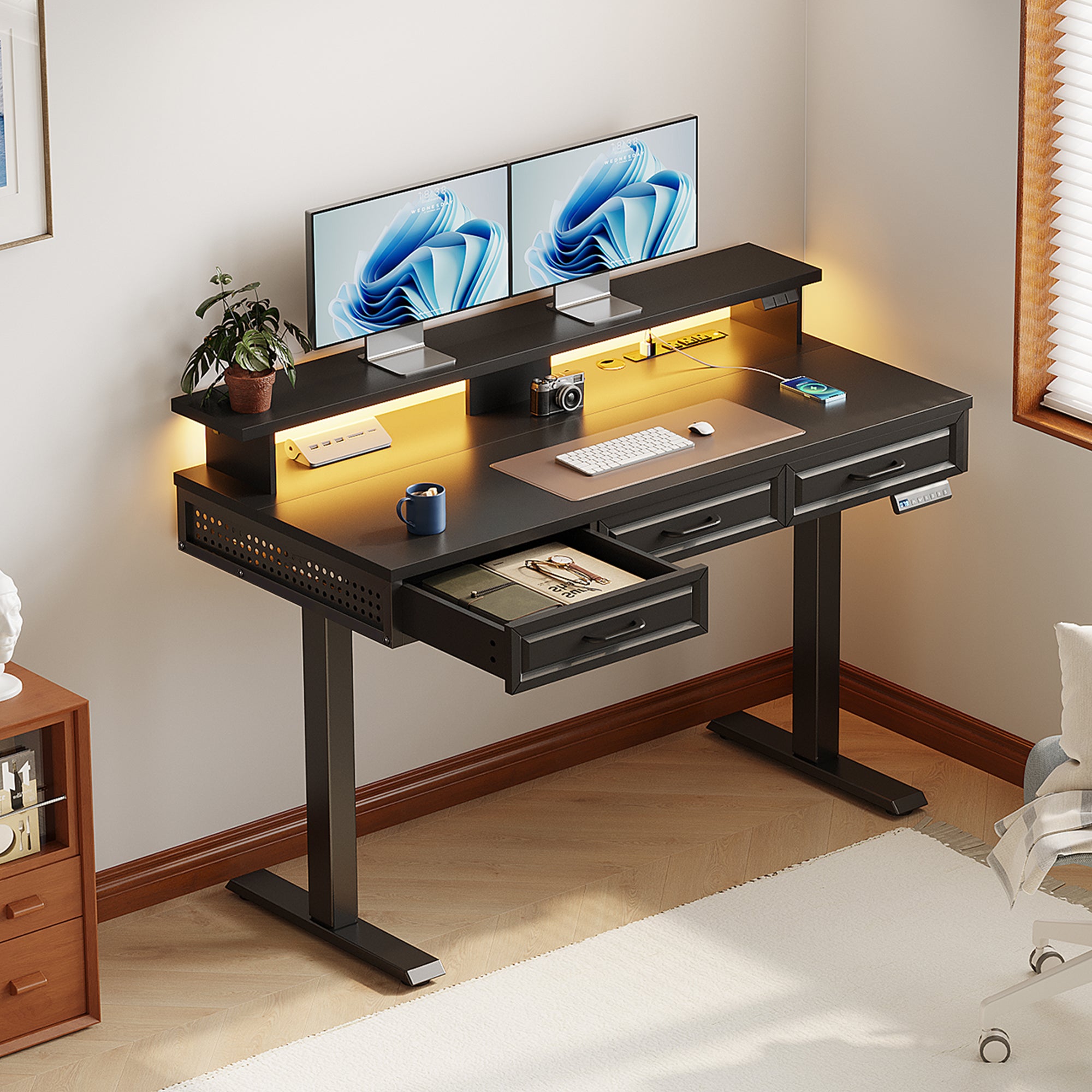
- Best for: Compact Office Furniture layouts where you still want drawers and powered charging.
- Work surface: 47.2 in long x 21.3 in wide, sized to feel usable without dominating a small room.
- Height range: 29.9 in to 46.1 in, which supports the common sit-stand span for home office use.
- Storage: 3 wooden drawers to pull small items off the desktop (chargers, pens, notebooks, webcams).
- Desktop power: 3 AC outlets plus 2 USB ports to reduce extra power strips on top of the desk.
- Ergonomic add-on: a monitor shelf (about 4.7 in tall) that can lift screens and free space underneath.
- Capacity note: listed at 154 lb capacity, which is helpful if your Remote Work Setup includes dual monitors.
Shop: OffiGo 48" Electric Standing Desk with 3 Wooden Drawers, Monitor Shelf & USB Power Outlets
Why it wins:
This is a practical Built-in Storage Desk when you cannot add extra cabinets in a tight home office. The drawers handle daily clutter, while the built-in power keeps charging predictable. If you want an Electric Standing Desk that feels like a compact work hub, the feature mix is well balanced.
Best corner desks for drawer-first organization
2. OffiGo 63" L-Shaped Electric Standing Desk with Fabric Drawers and Built-in Power Outlets

- Best for: corner placement when you want more surface area plus drawers for Home Office Organization.
- Shape: L-shaped design that helps you separate zones (main work vs writing vs device parking).
- Storage: 4 fabric drawers for light-to-medium items like cables, stationery, and small peripherals.
- Height range: 29.9 in to 46.1 in for sit-stand switching.
- Desktop power: 3 AC outlets, 1 USB port, and 1 Type-C port for charging at the desktop.
- Desktop sizing: main desktop is 47 in x 21.2 in; side table is 31.5 in x 15.8 in.
- Layout flexibility: reversible setup so the side return can be installed left or right.
Shop: OffiGo 63" L-Shaped Electric Standing Desk with Fabric Drawers & Built-in Power Outlets
Why it wins:
This Height Adjustable Desk is a strong match when you want a corner workflow but still need storage built in. The fabric drawers are lighter-duty than wood, but they can be easier to live with for everyday office supplies. The Type-C port is also a convenient touch for modern devices.
3. OffiGo 55" L-Shaped Electric Standing Desk with Wooden Drawers and Power Outlets

- Best for: a tidy, drawer-forward daily setup where you want the feel of wood drawers.
- Shape: L-shaped and reversible, which helps fit different room layouts.
- Storage: 4 wooden drawers to reduce desktop piles and keep the work surface visually clean.
- Height range: 29.9 in to 46.1 in.
- Desktop power: 3 AC outlets, 1 USB port, and 1 Type-C port.
- Work surface sizing: 55.1 in long x 31.5 in wide.
- Drawer sizing (useful for planning): drawers are listed at 12.6 in long x 11.8 in wide x 4.6 in high.
Shop: OffiGo 55" L-Shaped Electric Standing Desk with Wooden Drawers & Power Outlets
Why it wins:
If your main problem is small-item clutter, wooden drawers can feel more solid and more "furniture-like" than fabric. Combined with on-desk power, this becomes a credible Built-in Storage Desk for long-term home use. It also gives you enough corner space for dual monitors and a writing zone.
Best integrated system desk for document-heavy work
4. OffiGo 55" L-Shaped Height Adjustable Standing Desk with Large Movable Storage Cabinet
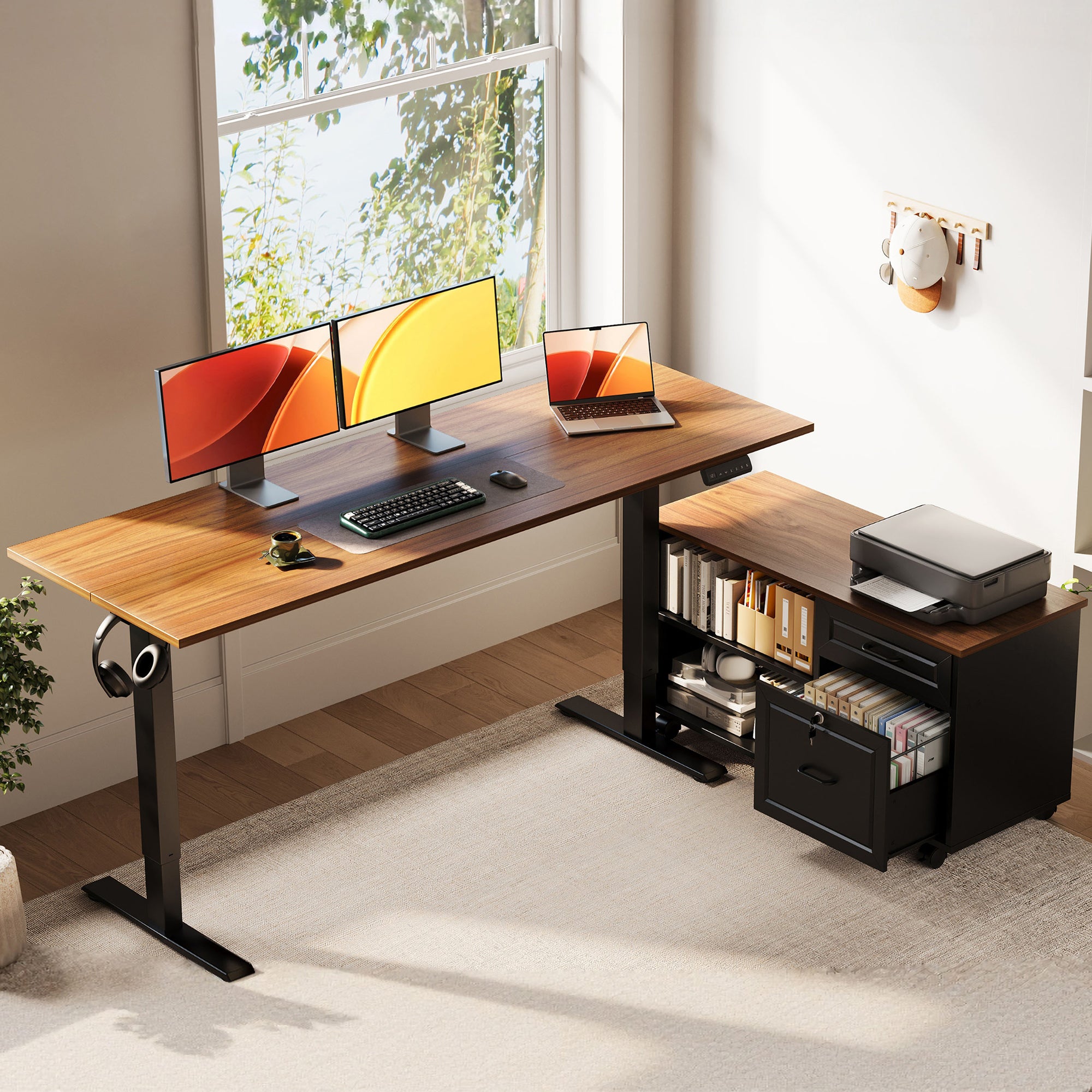
- Best for: paperwork, printer parking, and deeper storage beyond what drawers can hold.
- Desk size: desktop listed at 55.1 in long x 23.6 in wide.
- Cabinet size: cabinet listed at 39.4 in long x 15.8 in wide x 18.7 in high.
- Height range: 28.4 in to 47.2 in, which is a wider range than several drawer-based options.
- Storage style: independent cabinet designed for folders, books, supplies, and printer-like equipment.
- Privacy angle: cabinet includes a lockable design for documents.
- Power note: this model does not include integrated power outlets, so plan your own power and cable routing.
Shop: OffiGo 55" L-Shaped Height Adjustable Standing Desk with Large Movable Storage Cabinet
Why it wins:
If you work with documents, a cabinet can beat drawers because it holds bulk without turning into a junk zone. This option also supports different layouts because the cabinet can be placed left, right, or inline. For long-term Home Office Organization, that flexibility matters when your needs change.
Best for spreading out in one powered workstation
5. OffiGo 55" U Shaped Electric Standing Desk with 2 Drawers, Keyboard Tray and Monitor Stand

- Best for: a wraparound workflow where you want your keyboard tray and "zones" on the same desk.
- Shape: U-shaped/two-corner design intended to create more usable desktop area for multitasking.
- Height range: 28.3 in to 46.5 in.
- Storage: 2 desktop drawers for small gear that normally clutters a desk (adapters, sticky notes, tools).
- Ergonomic support: slide-out keyboard tray to free top space and help keep wrists neutral.
- Desktop power: 3 AC outlets plus 2 USB ports.
- Useful dimensions for planning: keyboard tray is listed at 21.9 in x 11.8 in; drawer is 13.2 in x 7 in x 4.4 in.
Shop: OffiGo 55" U Shaped Electric Standing Desk with 2 Drawers & Keyboard Tray & Monitor Stand
Why it wins:
This is a "workstation style" Electric Standing Desk that combines storage, power, and posture support (monitor stand plus keyboard tray). If your Remote Work Setup feels scattered, the U-shape can help you keep active work in the center and reference items on the sides.
Buying guide: how to choose for long-term work
Which height range fits your body best?
Start with your lowest sitting height and your highest standing height. A good Height Adjustable Desk range should let you keep elbows close to a 90-degree bend while typing, with shoulders relaxed.
Also check your monitor position. A desk that includes a monitor shelf can help if your screen sits too low.
A 2025 systematic review on sit-stand desk interventions reported average reductions in full-day sedentary time of about 60 to 80 minutes per day across different follow-up periods. That suggests consistent switching matters more than occasional standing marathons. PubMed
Drawers or cabinet: what stores better?
- Choose drawers if you want fast access to small, high-frequency items.
- Choose a cabinet if you manage bulk paper, files, or a printer.
- Choose a mix if you want a true Built-in Storage Desk that supports both daily tools and weekly storage.
A simple rule: drawers should reduce desktop clutter today, not become a place where clutter goes to hide.
Do you need built-in power at the desktop?
Built-in power matters when your devices are always connected:
- laptop charger
- phone/watch charging
- desk lamp
- speaker power
- monitor power bricks
With on-desk outlets, you can route cables down once, then leave the top clean. That supports Home Office Organization and makes your desk feel like a stable work hub.
Stability and load: what prevents wobble?
For long-term work, wobble is not a small issue. It is distracting during typing and can increase neck tension if your monitor moves.
Ask yourself:
- Are you running one monitor or two?
- Are your monitors on stands or on an arm?
- Do you lean on the desk during calls?
If you use a dual-monitor arm, stability becomes even more important because arms add leverage.
Practical setup tips for cleaner daily work
- Put daily-use items in the top drawers, not the bottom ones.
- Create one drawer as a cable drawer: chargers, adapters, spare USB-C cables, and velcro ties.
- Route power first, then place devices. If you place devices first, cable routing usually becomes a mess.
- Keep one "clear zone" for writing or signing documents so you do not stack paper on your keyboard.
Common mistakes to avoid
- Buying size before measuring corners and chair clearance.
- Choosing an Electric Standing Desk for features but ignoring where cables will go.
- Overfilling drawers with heavy items that make the drawer hard to open and close smoothly.
- Standing too long on day one. Gradual transitions are easier to sustain.
Comparison table
Quick specs to scan before buying
| Desk | Shape | Storage type | Height range | Built-in power | Best for | Trade-offs to consider |
|---|---|---|---|---|---|---|
| OffiGo 48" with 3 Wooden Drawers | I-shaped | 3 wooden drawers + monitor shelf | 29.9"-46.1" | 3 AC + 2 USB | compact rooms | Smaller surface for large peripherals; LED/power features add complexity |
| OffiGo 63" L-shaped with Fabric Drawers | L-shaped | 4 fabric drawers | 29.9"-46.1" | 3 AC + USB + Type-C | corner storage | Fabric drawers are lighter-duty than wood; larger footprint |
| OffiGo 55" L-shaped with Wooden Drawers | L-shaped | 4 wooden drawers | 29.9"-46.1" | 3 AC + USB + Type-C | tidy daily setup | Corner depth can be too large for tight rooms; drawers may reduce knee space in some layouts |
| OffiGo 55" L-shaped with Movable Cabinet | L-shaped + cabinet | independent cabinet (lockable) | 28.4"-47.2" | not included | documents + printer | Needs space for cabinet; you must plan your own power and cable management |
| OffiGo 55" U-shaped with 2 Drawers | U-shaped | 2 drawers + keyboard tray + monitor stand | 28.3"-46.5" | 3 AC + 2 USB | spread-out work | Keyboard tray changes knee clearance; U-shape can feel large in narrow rooms |
Conclusion
If you work long hours, the best desk choice is usually the one that removes daily friction. A drawer-forward Electric Standing Desk supports Home Office Organization because it gives every small item a home.
Next, match the desk shape to your room: straight desks for narrow walls, L-shaped desks for corners, and U-shaped desks for multitasking zones. Finally, confirm the Height Adjustable Desk range fits your body, because good storage does not help if your posture is off.
Official Site: OffiGo
FAQ
Are drawers better than a filing cabinet for long-term work use?
Drawers are better for small, high-frequency items like pens, chargers, notepads, and adapters because you can reach them quickly during the workday. A filing cabinet is better for letter-size folders, binders, and printer supplies because it holds bulk without overstuffing shallow spaces. For long-term use, many people prefer drawers for daily tools and a cabinet for weekly or monthly storage. If you print often, a cabinet also helps keep paper from taking over your desktop.
How do I pick the right size standing desk for a small home office?
First measure the usable wall length, then subtract clearance for your chair to slide back and for you to stand up without hitting anything behind you. Next check corner depth if you are considering an L-shaped desk, because some rooms have corners that are visually open but functionally tight. A compact desk feels bigger when it has drawers, because the desktop stays clear. Also confirm the lowest height works for your seated posture, especially if you are under about 5 ft 6 in.
What should I store in desk drawers vs on the desktop?
Keep only the items you touch constantly on the desktop, such as keyboard, mouse, and your active notebook. Put low-frequency gear in drawers, such as spare cables, external drives, staplers, batteries, and cleaning wipes, so they do not add visual noise. Assign one drawer to charging so you can store power bricks and short cables in one place. If a drawer becomes random storage, empty it and reset it, because that is usually the first sign clutter is returning.
How often should I switch between sitting and standing?
Most people do better with frequent, shorter switches than with one long standing block. Try changing position every 30 to 60 minutes at first, then adjust based on how your feet, knees, and lower back feel. Save two height presets if your desk supports memory settings so each transition takes only a few seconds. If you feel soreness, reduce standing time and focus on posture, monitor height, and a comfortable shoe or mat setup.
Do built-in power outlets actually help with cable management?
They help when your devices can stay plugged in and you can route one main power path down from the desktop. Built-in outlets reduce the need for a power strip sitting on top of the desk, which is a common source of visible cable clutter. The cleanest setups keep power bricks anchored under the desk or on a shelf, then run short cables up only where needed. To avoid cable sag during height changes, leave a gentle service loop and secure cables with ties so they move as a bundle.
Why does my standing desk feel awkward at first?
The awkward feeling usually comes from screen height, keyboard height, or standing posture rather than the desk itself. If your elbows are above or below a neutral position, your shoulders and wrists will fatigue quickly. Monitor height matters just as much, because looking down slightly is often more comfortable than looking up. Make small adjustments over several days, and let your body adapt gradually instead of forcing long standing sessions immediately.
1 comment
Great roundup! I like that this article focuses on long-term usability rather than just looks. The comparison between different standing desks with drawers makes it much easier to choose a setup based on workspace size and storage needs. Built-in drawers are a smart way to keep the desk clutter-free while maintaining a productive work environment. Thanks for sharing these practical insights and helpful buying tips for anyone planning to upgrade their home office! Learn more: https://www.cornerdesksuk.co.uk/collections/corner-desks-with-shelves