
Understanding Deep Work Starts With Desk Configuration
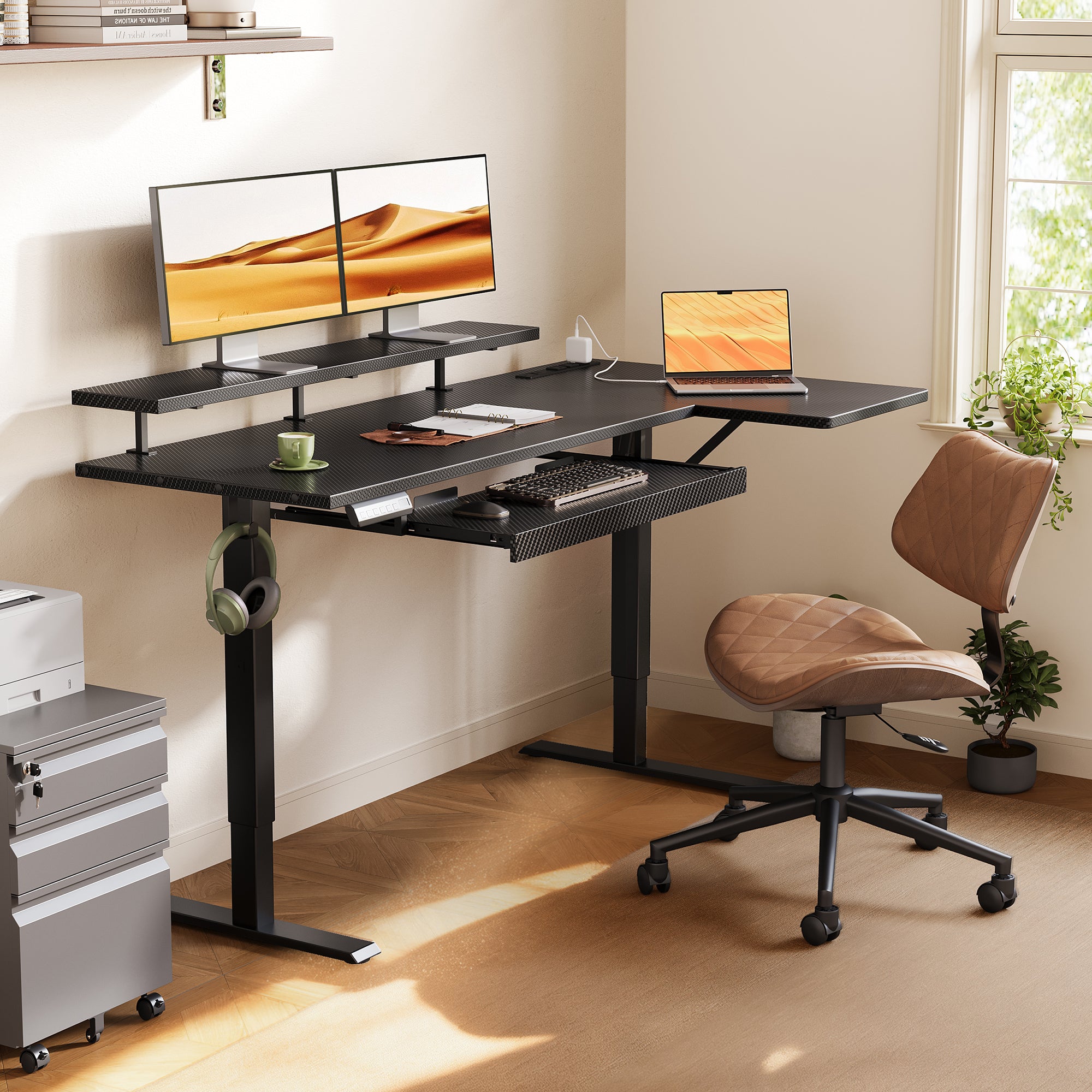
When deep work keeps falling apart, the problem is often physical before it is mental. A crowded desktop, awkward monitor height, visible piles of unfinished tasks, and charging cables stretched across your work zone all create small interruptions that pull your attention away from real work. The wrong standing desk configuration can also force too much reaching, shifting, and resetting, which turns a long focus block into a series of tiny breaks.
That is why the best standing desk configurations are less about trends and more about friction control. The shortlist below focuses on layouts that support clean zoning, ergonomic desk setup decisions, and practical storage for a distraction-free home office. OffiGo’s lineup is especially useful here because many of its electric standing desk models combine height adjustment, built-in power, monitor shelving, keyboard trays, and storage into one system instead of making you add those parts later.
Top Picks for Deep, Distraction-Free Work
| Configuration | Best for | Key advantage | Trade-off |
|---|---|---|---|
| 1. Compact L-shaped with tray and shelf | Focused multitaskers in corners | Clear separation between core work and support tasks | Less total spread than a larger U-shape |
| 2. Large L-shaped with drawers | Users battling surface clutter | Hidden storage plus corner efficiency | Bigger footprint than a straight desk |
| 3. Mid-size L-shaped with wooden drawers | Home offices needing storage and cleaner visuals | Durable drawer storage in a flexible corner layout | Slightly tighter than the 63-inch version |
| 4. Large straight desk | Minimalists who want simple sequencing | Wide single-plane workflow | Fewer built-in zoning cues than L or U layouts |
| 5. Compact storage-forward desk | Small rooms and hybrid spaces | Consolidates storage, charging, and monitor lift | Not ideal for very spread-out multi-device setups |
| 6. U-shaped immersive workstation | Research-heavy and multi-zone work | Wrap-around access and stronger task zoning | More feature-dense look than minimalist desks |
| 7. Feature-rich U-shaped setup | Hybrid day-to-evening workflows | Built-in power, tray, monitor support, and lighting | May feel too busy for readers who want a simpler desk |
1. L-shaped layout for focused multitasking
OffiGo 55" L-Shaped Electric Standing Desk with Keyboard Tray & Monitor Shelf
If your best work happens when one zone stays active and the other handles support tasks, this deep work desk setup is the cleanest place to start. The L-shape gives you a primary side for your monitor, keyboard, and daily inputs, while the return side can hold notes, charging devices, or reading material without invading the main work lane. That split matters because visual spillover is one of the fastest ways to break concentration in a distraction-free home office.
Why it stands out - Main desktop: 39.4" × 21.3" - Side desktop: 31.5" × 15.8" - Keyboard tray: 25.6" × 11.8" - Monitor shelf: 39.4" × 7.9" - Electric height range: 28.4" to 47.2" - Built-in charging: 3 AC outlets, 1 USB port, 1 Type-C port - Three memory presets for repeat sit-stand changes - Reversible left or right return for room-fit flexibility
Best for - Writers, analysts, and project managers - Compact corner offices - Users who want better posture without adding a separate riser - Anyone building an electric standing desk setup around one main screen
What to watch - The working area is smartly zoned, but it is still a compact L-shape, not a full command-center layout. - If you regularly keep several active devices open at once, a U-shaped standing desk may feel less constrained.
Shop: OffiGo 55" L-Shaped Electric Standing Desk with Keyboard Tray & Monitor Shelf
2. Drawer-equipped corner setups for clutter control
OffiGo 63" L-Shaped Electric Standing Desk with Fabric Drawers & Built-in Power Outlets
Some of the worst distractions are visual, not digital. Pens, adapters, chargers, notebooks, and sticky notes can quietly turn your work surface into a staging area. This L-shaped standing desk solves that problem by adding four built-in drawers under a larger corner footprint, so your active zone stays clear while daily-use items remain close. For people who lose momentum every time they need to tidy the desk before starting, this is one of the strongest best standing desk configurations in the lineup.
Why it wins - Four built-in fabric drawers for supplies and documents - Main desktop: 47" × 21.2" - Side desktop: 31.5" × 15.8" - Height range: 29.9" to 46.1" - Built-in charging: 3 AC outlets, 1 USB port, 1 Type-C port - Rear cable tray helps reduce visible wire sprawl - Reversible left or right side installation
Best for - Shared home office corners - Paper-heavy planning work - Multi-device desk setups - Users who need hidden storage more than decorative add-ons
What to watch - Its larger footprint works best when you can give the corner real clearance. - The 29.9-inch low end may be less ideal for shorter users, which is why checking your seated and standing measurements matters before buying. Find Office Furniture notes that shorter users often need a seated minimum below 27 inches, while taller users benefit from at least 46 to 48 inches at standing height in many setups. Find Office Furniture
Shop: OffiGo 63" L-Shaped Electric Standing Desk with Fabric Drawers & Built-in Power Outlets
3. Mid-size L-shaped storage for cleaner daily resets
OffiGo 55" L-Shaped Electric Standing Desk with Wooden Drawers & Power Outlets
This configuration fits people who want the same corner logic as a larger L-shaped standing desk but in a more controlled footprint. The four wooden drawers create a stronger visual reset at the end of the day, which matters when your office is part of a bedroom, guest room, or shared living area. In practice, this setup works well when you want storage to disappear into the desk rather than spill into bins, carts, or side furniture.
Key specs to check - Four wooden drawers - Desktop: 55.1" long × 31.5" wide - Leg clearance: 34.8" - Drawer size: 12.6" × 11.8" × 4.6" - Height range: 29.9" to 46.1" - Charging: 3 AC outlets, 1 USB port, 1 Type-C port - Reversible L-shape installation
Best for - Home office users who want storage-forward design - Dual-monitor corner setups - People who value a warmer, furniture-like look - Users who need a standing desk with storage but not the largest top
What to watch - Compared with the 63-inch version, you get less spread for reference materials and peripherals. - It is best for users who want cleaner visuals, not maximum horizontal expansion.
Shop: OffiGo 55" L-Shaped Electric Standing Desk with Wooden Drawers & Power Outlets
4. Large straight desks for simpler, lower-friction routines
OffiGo 71" Executive Electric Standing Desk with Built-in Power Outlets & 1.38" Thick Desktop
If you do your best work in a linear, uncluttered layout, a large straight electric standing desk can feel calmer than a corner format. Instead of wrapping tools around you, it lets you create a left-to-right sequence: monitor zone, writing zone, then accessory zone. That is often enough for focused solo work, especially when you want fewer layout choices throughout the day. It also places more easily against a wall, which makes it useful in flexible rooms.
Why it stands out - Desktop size: 71" × 27.6" - Desktop thickness: 1.38" - Height range: 29.1" to 48" - Three memory presets - Charging hub: 3 AC outlets, 2 USB ports, 2 Type-C ports - Double crossbeam structure for added stability - Supports broad multi-monitor and notebook layouts
Best for - Minimalist deep work desk setup plans - Creators who need one broad surface - Users placing the desk against a wall - Shared rooms where corner furniture is awkward
What to watch - A straight layout gives you width, but not the same natural zoning as an L-shaped standing desk or U-shaped standing desk. - You may need stricter placement habits so accessories do not drift back into the main work lane.
Shop: OffiGo 71" Executive Electric Standing Desk with Built-in Power Outlets & 1.38" Thick Desktop
5. Storage-forward compact stations for small home offices
OffiGo 48" Electric Standing Desk with 3 Wooden Drawers, Monitor Shelf & USB Power Outlets
In smaller rooms, the most effective ergonomic desk setup is often the one that removes the need for extra furniture. This compact model combines drawers, a monitor shelf, built-in power access, cable management, and even LED lighting into a smaller footprint. That all-in-one approach is helpful when the desk sits in a bedroom or mixed-use room, because fewer external organizers usually means a calmer visual environment during focus sessions.
Why it stands out - Three solid wooden drawers - Desktop: 47.2" × 21.3" - Monitor shelf height: 4.7" - Legroom span: 31.6" - Height range: 29.9" to 46.1" - Three memory presets - Charging: 3 AC outlets and 2 USB ports - Hidden cable tray and 154 lb weight capacity
Best for - Apartments and small offices - Users who want a standing desk with storage in one compact station - Single-monitor or monitor-plus-laptop setups - People who want fewer add-on accessories around the desk
What to watch - The smaller top is excellent for disciplined setups, but it is not ideal for spread-out research work. - If you routinely keep multiple documents, devices, and peripherals active at once, a larger L-shape or U-shape will feel easier to manage.
Shop: OffiGo 48" Electric Standing Desk with 3 Wooden Drawers, Monitor Shelf & USB Power Outlets
6. U-shaped desks for immersive, multi-zone work
OffiGo 55" U Shaped Electric Standing Desk with 2 Drawers & Keyboard Tray & Monitor Stand
When your workflow depends on several active zones at once, a U-shaped standing desk can keep everything closer without stacking the surface into clutter. This model is built for that wrap-around style. You get a front work zone, side support areas, keyboard separation, and drawer storage in one footprint, which makes it a strong choice for research, operations, editing, and reference-heavy work.
Why it wins - Desktop length: 55.1" - U-shaped extension depth: 29.1" - Keyboard tray: 21.9" × 11.8" - Space between legs: 42.9" - Drawer size: 13.2" × 7" × 4.4" - Height range: 28.3" to 46.5" - Two drawers for hidden storage
Best for - Multi-monitor knowledge work - Editing and research tasks - Users who want a more immersive command-center feel - Workflows where notes, devices, and references must stay active
What to watch - A U-shaped configuration can feel feature-heavy if you prefer a very quiet visual style. - It works best when you truly use distinct zones, not when you want a nearly empty desktop.
Shop: OffiGo 55" U Shaped Electric Standing Desk with 2 Drawers & Keyboard Tray & Monitor Stand
7. Feature-rich U-shaped setups for hybrid day-to-evening workflows
OffiGo 55" U-Shaped Electric Standing Desk with Monitor Stand & Keyboard Tray
If your desk needs to handle morning work blocks, video calls, studying, and lighter evening use, integrated features can reduce transition time between those modes. This U-shaped standing desk adds built-in power access, a keyboard tray, monitor stand, and LED lighting, which makes it feel more self-contained than a basic desk plus accessories. For hybrid rooms, that containment can be a real advantage because it keeps the workstation defined without relying on extra furniture.
Key specs to check - U-shaped / semicircular layout - Desktop footprint: 55.1" W × 29.1" D - Height range: about 28.4" to 46.5" - Built-in power and USB charging - Keyboard tray included - LED lighting detail - Alloy steel frame with engineered wood top
Best for - Users who change work modes throughout the day - Home offices that also serve as study or gaming rooms - Setups with frequent charging needs - People who want stronger visual definition around the desk
What to watch - If you care most about minimalism, the lighting and built-in electronics may feel like more than you need. - This model is stronger as a feature-forward workstation than as a stripped-down quiet desk.
Shop: OffiGo 55" U-Shaped Electric Standing Desk with Monitor Stand & Keyboard Tray
How to Choose the Right Standing Desk Configuration
A good choice starts with how you actually work, not with desk size alone. Choose an L-shaped standing desk when you naturally separate primary work from support tasks. Choose a U-shaped standing desk when multiple tools need to stay active at once. Choose a large straight electric standing desk when you want a cleaner left-to-right flow with fewer physical decisions during the day.
Then look at the built-in features that remove repeat friction. Drawers reduce visible clutter, power hubs cut cable sprawl, keyboard trays free desktop space, and monitor shelves help lift the screen closer to eye level. The ergonomics goal is practical, not theoretical: the CDC explains that ergonomics is meant to prevent workplace discomfort and injury, which is exactly why monitor height, reach distance, and posture support matter in a long-hour distraction-free home office.
Match the shape to your work pattern
- L-shape: best for split-task workflows and corner use
- U-shape: best for immersive, multi-zone setups
- Straight desk: best for simple sequencing and easy room placement
Prioritize friction-reducing features
- Drawers: hide unfinished-task clutter
- Integrated power: keeps chargers off the floor and within reach
- Keyboard tray: protects desktop writing space
- Monitor shelf: supports a cleaner ergonomic desk setup
Think in zones, not just square inches
More surface area only helps when each repeated action has a stable place. Before choosing, map where your monitor, notebook, task light, charging cable, and stored supplies will go. The best standing desk configurations are the ones that make those placements obvious, so you stop re-deciding them every morning.
Scenario Variations
- For heavy daily multitasking, choose a U-shaped configuration.
- For smaller corners, choose a compact L-shaped standing desk.
- For cleaner visuals, prioritize drawers before extra width.
- For flexible rooms, choose a large straight electric standing desk.
- For bedrooms or apartments, prioritize a standing desk with storage and integrated charging.
Common Problem: The desk still feels distracting
| Problem | Likely cause | Better fix |
|---|---|---|
| Surface feels crowded | No task zoning | Assign a fixed monitor zone, writing zone, and charging zone |
| Cables interrupt focus | Power access sits off-desk | Choose integrated outlets and route extras into a cable tray |
| Posture drops after two hours | Screen and keyboard sit too low | Add a monitor shelf and use a tray or proper keyboard height |
| Items keep spreading outward | No hidden storage layer | Use drawer-equipped configurations |
| The room feels visually busy | Too many add-on organizers | Use a compact all-in-one desk instead of extra side storage |
Final Takeaway
The best standing desk configurations for deep, distraction-free work are usually the ones that reduce decisions during the day. For many users, that means an L-shaped standing desk that separates core work from support tasks. For others, it means a U-shaped standing desk that keeps several active zones within reach, or a compact standing desk with storage that quiets the room around it.
OffiGo’s strongest advantage is not one specific shape. It is the desk-system approach across its electric standing desk lineup: built-in charging, drawer storage, monitor support, keyboard trays, and room-conscious footprints that help your setup stay organized. If your concentration keeps breaking, start by identifying what causes the interruption now, then choose the configuration that removes that friction at the desk level.
Shop: OffiGo Standing Desks
FAQ
Which standing desk shape is best for deep work?
The best shape for deep work depends on whether you need one focused lane or several active zones. An L-shaped standing desk is often the safest choice because it separates primary work from support tasks without taking over the whole room. A U-shaped standing desk works better when you regularly use multiple screens, papers, or devices at once. If you prefer a very simple visual field, a straight desk with at least 55 to 71 inches of width can feel calmer.
Is an L-shaped standing desk better than a straight desk for home offices?
An L-shaped standing desk is better when your home office needs clear zoning and efficient corner use. It gives you one main working side and one secondary side, which helps keep chargers, notes, and accessories from creeping into the center of your workflow. A straight desk is better when wall placement is easier and you want fewer layout choices. In most small-to-medium home offices, the better option is the one that reduces daily clutter without forcing awkward room placement.
When does a U-shaped standing desk make more sense?
A U-shaped standing desk makes more sense when your workflow is active on three sides rather than one front edge. That includes research work, operations tasks, editing, trading-style layouts, or any setup where documents, peripherals, and screens all need to stay within quick reach. It is also useful when you want the desk itself to define the workspace inside a hybrid room. If you only use a laptop, one monitor, and a notebook, a U-shape may be more desk than you need.
Do drawers actually help reduce distractions?
Yes, drawers help reduce distractions because they remove small visual triggers from the desktop. Chargers, pens, sticky notes, adapters, and unfinished paperwork all compete for attention when they stay visible during focused work. Even two to four drawers can make a noticeable difference because they create a default home for recurring clutter. For a distraction-free home office, hidden storage is often more useful than simply adding a larger desktop.
What features matter most for long-hour desk use?
The most important features for long-hour use are a usable height range, stable frame, monitor support, cable control, and accessible charging. A desk that adjusts roughly from the high 20-inch range to the mid or upper 40-inch range will fit more users and support healthier sit-stand changes. Monitor shelves and keyboard trays can improve posture when used correctly, while built-in outlets reduce cable drag across the floor or desktop. Storage also matters because long-hour setups usually fail when the desk becomes both a work surface and a dumping zone.
How do I choose between compact storage and a larger surface?
Choose compact storage when your room is small or when visual calm matters more than spread-out workspace. A 48-inch desk with drawers, charging, and a monitor shelf can outperform a larger plain desk if it keeps the room cleaner and your work area more controlled. Choose a larger surface when your work truly requires several live zones, such as a monitor, laptop, notebook, reference papers, and audio gear at the same time. The deciding question is simple: do you need more reach space, or do you need fewer loose items in view?
0 comments