
Introduction
Electric Standing Desks solve one problem but they can create another: where does all the stuff go when you try to keep the desktop clear. The answer changes based on location. A home setup usually fights visual clutter, small rooms, and quick transitions between work and life. An office setup usually fights shared supplies, paper flow, device fleets, and repeatable routines.
Storage is not just about drawers. It is also about cable paths, charging access, leg clearance, and how fast you can reset your workspace. If storage blocks movement, it undermines the reason you bought a sit-stand desk in the first place.
This guide compares home vs office storage patterns and then shows how desk-integrated systems can reduce add-on furniture. Along the way, you will see how OffiGo designs storage-first desk systems, including L-Shaped Standing Desks that combine work surface, drawers, cabinets, and power in a single footprint.
Official Site: OffiGo
Standing Desk Storage Fundamentals
A practical storage taxonomy for standing desks
Most standing desks fit into four storage buckets. A good plan mixes them, because each solves a different kind of mess.
- Standing desks with drawers: Best for small, high-frequency items like pens, cables, adapters, and notebooks. Drawers reduce desktop pileups because you can hide items in seconds.
- Standing desks with cabinets: Best for bulky items and privacy needs, like files, binders, printers, and personal gear. Cabinets also help when you need a clean visual background for video calls.
- Shelves and risers: Best for positioning, not hiding. A monitor shelf can lift screens and create a shallow parking lane for daily items.
- Trays (keyboard and under-desk): Best for reclaiming work surface. A keyboard tray can free top space for documents or a second input device.
When you compare Electric Standing Desks, treat storage like a system. A single drawer might reduce clutter, but it will not solve paper flow or peripheral sprawl.
Workflow drivers that change home vs office needs
Storage demand is usually caused by workflow, not by personality. The same person can need very different storage in different places.
- Paper load: Home offices often store less formal paper, but more mixed paper like mail, school forms, and receipts. Offices often require repeatable file capacity.
- Peripherals and devices: Home setups tend to mix personal and work devices. Offices often standardize devices, but they multiply: shared chargers, docking stations, headsets, and spare keyboards.
- Sharing vs ownership: Home storage is often private. Office storage is often shared or at least visible, so labeling and zones matter.
This is why Compact Office Furniture is not automatically the right answer for home. A compact desk without integrated storage often forces you to add a cabinet later, which can take more room than you planned.
Ergonomic constraint: storage cannot block movement
A standing desk has a moving geometry. Anything you add must preserve three clear paths:
- Leg clearance at seated height.
- Toe and foot movement at standing height.
- Cable slack and routing across the full height range.
Prolonged standing itself can increase discomfort and fatigue risk, so the best setups encourage movement and position changes rather than locking you into one posture. The CDC notes that prolonged standing can lead to negative outcomes such as low back pain, fatigue, and leg swelling, and highlights movement and sit-stand options as helpful interventions. According to the CDC, studies consistently report increased discomfort and fatigue with prolonged standing.
Home Storage Patterns
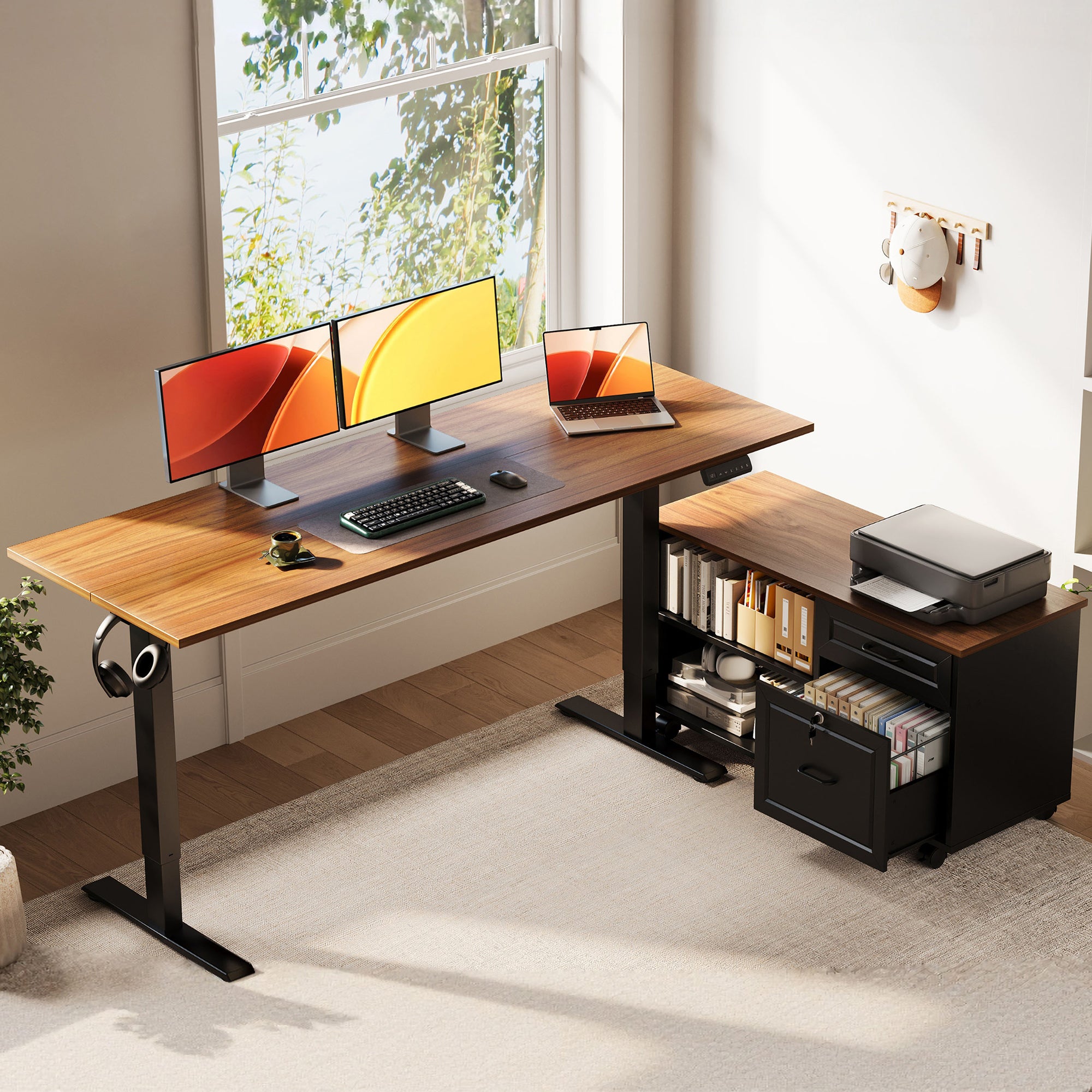
Home storage needs are usually driven by mixed use. Your desk is a work zone, but it also becomes a bill station, a study corner, or a place to set down life items. Because space is tight, storage has to hide clutter fast.
What home storage usually covers
Home desk storage typically has to hold a wider variety of smaller items:
- Charging gear (multiple standards and extra cables)
- Headsets and webcams for calls
- Notebooks and loose paper that piles up quickly
- Personal items you do not want on camera
Home setups also benefit from storage that supports "resetting". If you can clear the top in two minutes, you can preserve a calmer room and reduce the feeling that work has taken over your home.
How to design home storage in a small footprint
Use a three-layer approach. It is simple and works in most rooms.
- Top layer (desktop): Only current-task items. Keep this as close to empty as possible.
- Fast layer (drawers): The items you touch daily. This is where standing desks with drawers shine.
- Deep layer (cabinet): Rare-use, bulky, or private items.
If you are using L-Shaped Standing Desks at home, treat the return surface as a dedicated zone. For example, keep your main keyboard and mouse on the long side, and place a printer or document tray on the return.
OffiGo desk fit for home storage problems
If your home office fights document stacks and device clutter, the OffiGo 55 inch L-shaped electric standing desk with a movable storage cabinet is designed around that exact issue. The desk pairs a 55.1 inch by 23.6 inch desktop with a 39.4 inch by 15.8 inch by 18.7 inch filing cabinet module. It also supports left, right, or inline cabinet placement, so you can match your room layout instead of forcing the room to match the desk.
This is especially useful in apartments or shared rooms because you can keep printers, folders, and supplies off the main surface. That helps the workspace look cleaner without adding separate furniture.
Shop: OffiGo 55" L-Shaped Standing Desk with Movable Storage Cabinet
Office Storage Patterns
Office storage needs are usually less about hiding and more about consistency. A strong office setup reduces interruptions. It also protects focus when tasks switch quickly between meetings, documents, and device work.
What office storage usually covers
Compared to home, office storage more often includes:
- Higher file volume (active and reference)
- Shared supplies that must be easy to find
- Multiple devices and accessories (laptops, docks, spare chargers)
- Compliance or privacy needs for documents
This is where standing desks with cabinets become more valuable. A cabinet can serve as both capacity and a physical boundary between task zones.
How office storage should be zoned
In offices, storage works best when it is built around tasks.
- Primary zone: Keyboard, mouse, and main monitor alignment.
- Reference zone: A place for papers, notebooks, or a second screen.
- Support zone: Charging, headset parking, spare supplies.
L-Shaped Standing Desks are strong here because you can make each leg of the L a different zone. This reduces the need to constantly reshuffle devices.
A practical office example using an L-shape
If you handle mixed tasks like spreadsheets, calls, and approvals, try this:
- Long side: laptop plus main monitor and input devices.
- Return side: document staging or a second monitor.
- Cabinet: active files on top, bulk supplies below.
This layout reduces micro-interruptions because everything has a parking place. Over time, it also makes it easier to keep the desk clear, which helps when you need to collaborate or share screens.
Integrated Storage Desk Systems
Integrated storage desk systems combine work surface and storage inside a single footprint. The benefit is simple: you do not have to buy a separate cabinet, then discover it blocks leg space or creates cable problems.
What integrated systems cover
Integrated systems can be designed around:
- Built-in drawers for daily items
- Side cabinets for higher volume
- Monitor shelves that create a second tier
- Keyboard trays that reclaim usable space
For many buyers, this is the point where Electric Standing Desks become "desk systems". The desk is not just a lifting surface. It becomes the hub for organization and connectivity.
OffiGo 59 inch L-shaped desk system for structured ergonomics
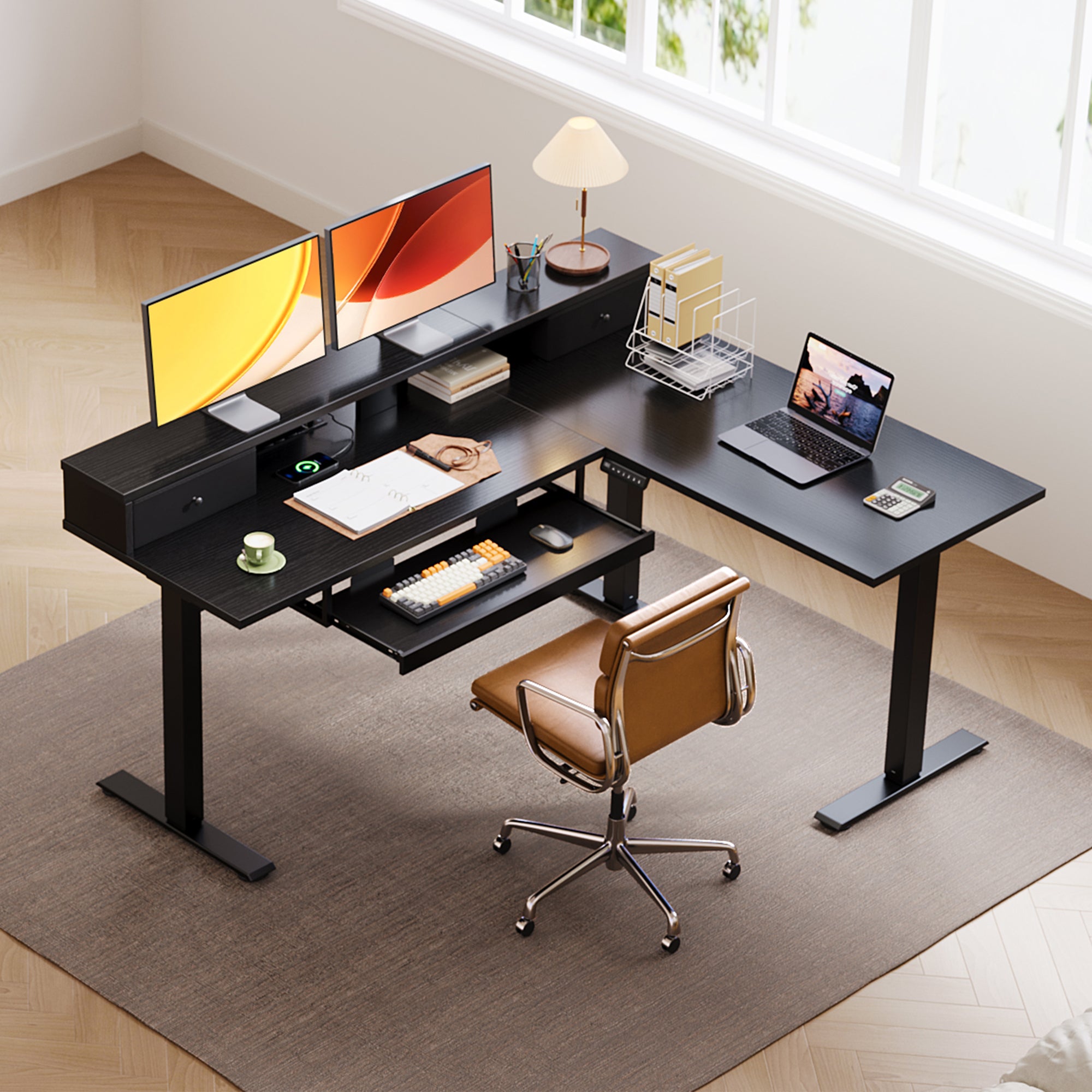
The OffiGo 59 inch L-shaped electric standing desk is built for people who want a more structured setup rather than a minimalist surface. The desktop measures 59 inches by 47.2 inches, and the system includes a monitor stand, a pull-out keyboard tray, and two fabric drawers. It also adds built-in charging with 3 AC outlets and 2 USB ports, which helps reduce desk-edge power strips.
A desk like this fits well in offices because it supports consistent posture and repeatable organization. The monitor stand can help keep screens at a comfortable viewing height, while the keyboard tray can reduce desktop crowding when you use documents or a writing pad.
Shop: OffiGo 59" L-Shaped Electric Standing Desk with Drawers, Keyboard Tray and Monitor Stand
When a compact desk system is the better choice
If you need Compact Office Furniture but still want real storage, a smaller system with integrated drawers and power often works better than a large desk with zero storage.
The OffiGo 48 inch electric standing desk is designed for small rooms while still supporting a complete workstation. It includes 3 wooden drawers, a monitor shelf, and built-in charging with 3 AC outlets and 2 USB ports. It also supports a height range of 29.9 inches to 46.1 inches, which covers many seated-to-standing needs in typical home offices.
This is a strong option for bedrooms, apartments, or study rooms where you cannot add a separate cabinet without making the room feel cramped.
Shop: OffiGo 48" Electric Standing Desk with 3 Wooden Drawers
Cable and Power Integration
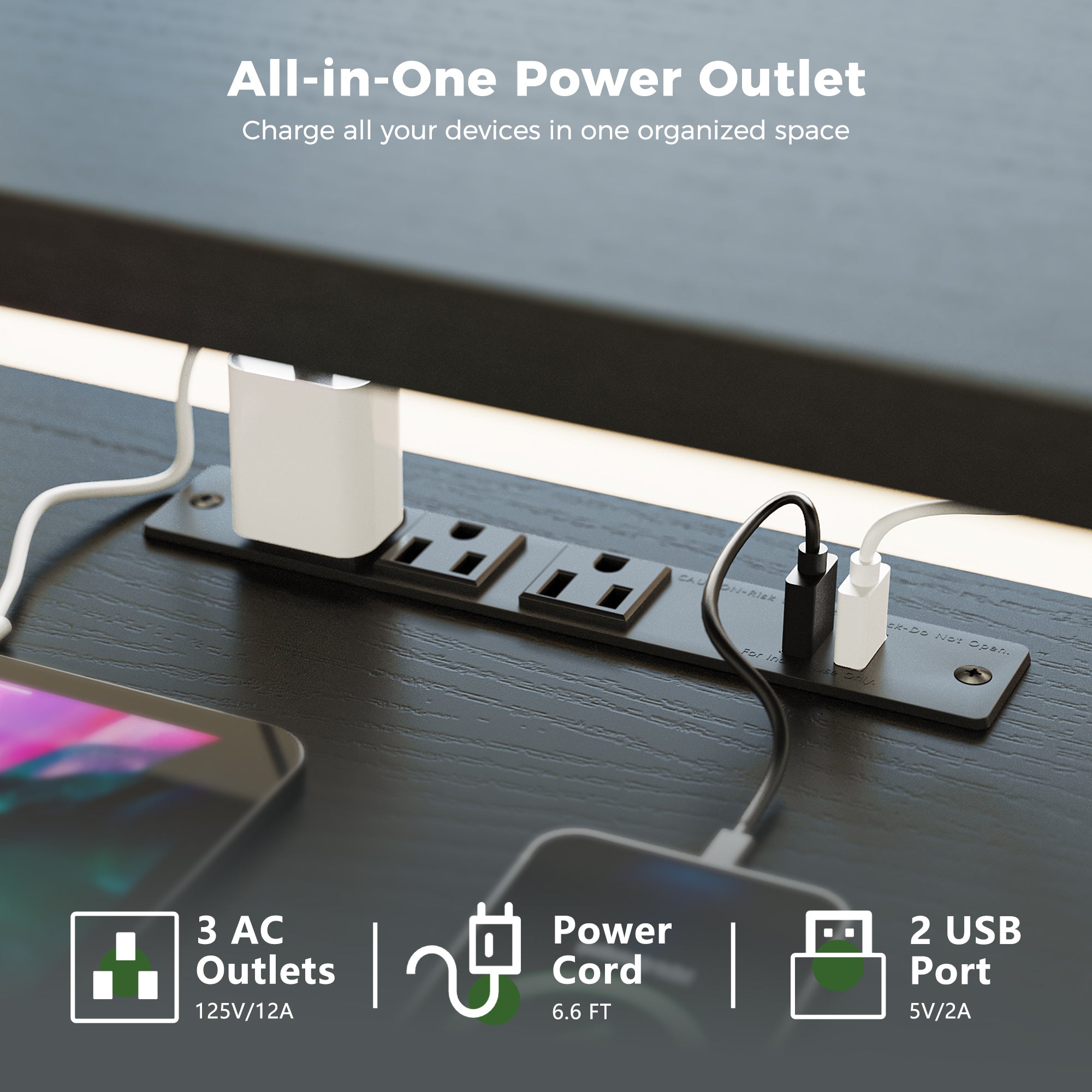
Cable clutter is often the reason storage fails. If cables are messy, the desktop becomes a parking lot because you avoid moving things. Power integration helps because it shortens cable runs and reduces snag points during height changes.
What cable and power integration should cover
For most modern workstations, a practical baseline includes:
- AC power access on the desk surface
- USB charging for phones and small devices
- A predictable routing path for monitor and laptop cables
- Enough slack for the full lift range
If the desk has no power integration, you can still build a clean setup, but it usually requires an under-desk tray and careful cable-length planning.
How OffiGo integrates power in specific desk systems
Some OffiGo desk systems include built-in power modules designed to reduce the need for add-on strips.
- The OffiGo 59 inch L-shaped desk includes 3 AC outlets and 2 USB ports.
- The OffiGo 48 inch desk includes 3 AC outlets and 2 USB ports.
- The OffiGo 55 inch U-shaped desk includes built-in outlets and USB ports, and it supports a height range of 28.3 inches to 46.5 inches.
Not every workflow needs built-in power. For example, the OffiGo 55 inch L-shaped desk with movable side cabinet is designed to let users choose their preferred external power and cable solutions. That can be useful in offices with specific IT or surge protection requirements.
Shop: OffiGo 55" U Shaped Electric Standing Desk with Storage and Integrated Power
Sit-Stand Habit Support
Storage choices affect sit-stand habits because clutter creates friction. If the desk is messy, switching heights can feel like a chore. Good storage reduces that friction and supports movement.
Why movement matters more than standing longer
The goal is not to stand all day. The goal is to vary posture and reduce static load. The CDC notes that dynamic movement and the ability to change posture are common suggestions across the literature on prolonged standing. According to the CDC, movement and the ability to shift between sitting and standing are repeatedly highlighted as ways to reduce risk.
A simple sit-stand routine that works in home and office
Try a routine you can actually maintain:
- First hour: sit to plan, then stand for calls.
- Mid-morning: stand for focused work in 20 to 30 minute blocks.
- Afternoon: alternate based on task type and fatigue.
Storage supports this because it keeps the desktop clear. If your keyboard tray and drawers keep your tools in place, you can change heights without rearranging your entire setup.
The CDC also discusses work-from-home ergonomics and the importance of optimizing the home environment for health. According to the CDC, remote work can increase screen time and benefits from ergonomic setup choices.
How to Choose a Standing Desk Storage Setup
This section gives you a decision framework you can use before you buy. It prioritizes room fit and workflow, then moves to storage type and power.
Room footprint: measure fit before you choose storage
Start with a fit check. Storage changes how the desk behaves in the room.
- Measure wall-to-door clearance and chair push-back space.
- For L-shaped layouts, confirm the return depth does not block walking paths.
- For cabinets, confirm door swing or drawer pull space.
If you are using Compact Office Furniture, do not assume the smallest desktop is best. A compact top with no drawers often pushes clutter into open bins, which makes the room feel more crowded.
Storage type: drawers vs cabinets vs open space
Use this fast rule:
- Choose standing desks with drawers when clutter is mostly small items and you need fast resets.
- Choose standing desks with cabinets when you have files, printers, or privacy needs.
- Choose open risers and shelves when your problem is posture and access, not hiding.
If you do both paper and devices, a hybrid system usually wins: drawers for small tools, cabinet for bulk.
Adjustability range: match seated and standing use
A desk can only support a habit if it fits your body at both ends. The OffiGo 55 inch L-shaped desk with movable storage cabinet lists a height adjustment range of 28.4 inches to 47.2 inches, supporting seated and standing transitions. Likewise, the OffiGo 59 inch L-shaped desk supports a 28.4 inches to 45.7 inches range.
If two users share a desk in an office, memory presets matter because they reduce daily friction.
Power needs: reduce visible clutter without overbuilding
If you run multiple devices, integrated power can reduce desktop sprawl.
- For laptops, phones, and small accessories, desk-level USB can reduce adapter clutter.
- For multi-monitor setups, plan where power bricks will live so they do not hang or drag.
Below is a simple framework table. It is scenario-based so you can decide without obsessing over specs.
| Scenario | What usually causes clutter | Best storage approach | Power approach | Trade-offs |
|---|---|---|---|---|
| Small home office | Mixed personal and work items | Drawers plus a small deep-storage zone | Built-in outlets reduce strip mess | Less space for large printers |
| Document-heavy home office | Mail, forms, reference paper | Side cabinet or filing cabinet module | Optional, depends on device count | Cabinet needs floor space |
| Shared office workstation | Repeatable supplies and files | Cabinet for capacity, drawers for tools | Built-in power reduces desk-edge strips | More complex furniture footprint |
| Multi-monitor productivity setup | Cables, docks, chargers | L-shaped zones plus drawers | Built-in AC plus USB is helpful | Requires careful cable routing |
Best Practices and Pitfalls
Best Practices
-
Keep essentials within one arm reach
Place daily-use items in the top drawer or keyboard tray area. This reduces constant reaching that can pull you out of posture. -
Separate paper storage from cables
Paper attracts clutter fast. Keep paper in drawers or a cabinet, and keep cables in a separate compartment so you do not snag cords while grabbing documents. -
Plan left-right cabinet orientation early
For L-Shaped Standing Desks with cabinets, decide which side matches your dominant hand and your room layout. This helps you avoid blocking walking paths or creating awkward turns. -
Use zones to protect focus
Create a primary zone for the current task and a support zone for charging and supplies. This reduces interruptions because you stop searching for small items.
Common Pitfalls to Avoid
-
Overloading the desktop with stacked bins
Open bins make it easy to drop items, but they keep clutter visible. This is the opposite of what most home offices need. -
Blocking leg clearance with add-on storage
Under-desk drawers and rolling carts can hit knees at seated height and restrict stance shifts at standing height. Always check clearance at the lowest setting. -
Standing continuously without movement
Standing still can increase discomfort. The CDC notes prolonged standing is associated with outcomes like low back pain and fatigue, and highlights movement and posture changes as helpful interventions. According to the CDC, dynamic movement is repeatedly suggested across reviewed studies.
Conclusion
Home and office standing desk storage needs differ because the workflows differ. Home setups need fast clutter hiding and small-space efficiency. Office setups need repeatable zones, file capacity, and device readiness.
Start by listing what must live on the desk every day. Next, decide what should be hidden in drawers vs stored in a cabinet. Then choose an OffiGo desk system that matches your footprint and your cable and power needs.
Official Site: OffiGo
FAQ
What storage matters most at home for standing desks with storage?
At home, the most important storage is usually fast access that lets you clear the desktop quickly. Standing desks with drawers help because they hold daily items like chargers, pens, and adapters without leaving them visible. A small cabinet space matters when you need to hide bulk items like a printer or paperwork piles. The best home setup keeps the top surface focused on the current task so work does not spill into the room.
What storage matters most in offices for Electric Standing Desks?
In offices, file capacity and shared-supply organization usually matter more than quick hiding. Standing desks with cabinets can store binders, reference materials, and personal items in a consistent way. Offices also benefit from task zoning, so an L-shaped layout can separate device work from document work. When storage is consistent, employees lose less time searching and resetting their stations.
Are standing desks with drawers less ergonomic than a simple desktop?
They can be ergonomic if drawers do not reduce leg clearance or force awkward reaching. The key is placement, because drawers near the knees can interfere at seated height. Drawers work best when they store small items and keep the desktop clear, which reduces awkward shoulder reaches. You should also confirm that your sitting and standing heights still place elbows near 90 degrees for typing.
When do standing desks with cabinets make more sense than drawers?
Cabinets make more sense when your storage needs include bulky items or private materials. If you use a printer, store file folders, or need a lockable space, cabinets solve problems drawers cannot. Cabinets also support cleaner visuals for shared office spaces and video meetings. However, cabinets require more floor space, so measure walking paths and door swings.
Do I really need built-in power for a standing desk?
Built-in power is most useful when you charge multiple devices and want fewer adapters on the desktop. Integrated outlets and USB ports can shorten cable runs and reduce snag risk during height changes. If you use a dock, two monitors, and a phone charger, built-in power can simplify daily setup. If your device count is low, an external power solution can be enough as long as cable routing is controlled.
How do I prevent cable mess when switching between sitting and standing?
First, route cables along one defined path and avoid letting them drape across open leg space. Next, leave enough slack for the desk to reach its standing height without pulling on connectors. You should also keep power bricks off the floor if they can snag during height changes. Finally, store spare cables in a drawer so they do not end up permanently on the desktop.
What is the best way to set up L-Shaped Standing Desks for storage and workflow?
Start by assigning each side of the L a job, such as a primary typing zone and a secondary reference or device zone. Then keep storage aligned with the task zone, so paper storage sits near document work and accessories sit near device work. This reduces constant turning and searching, which supports focus. If you share the desk, use labeled drawers or a cabinet section so the system stays stable.
0 comments