
Understanding the Value of a Desk Built for Focus
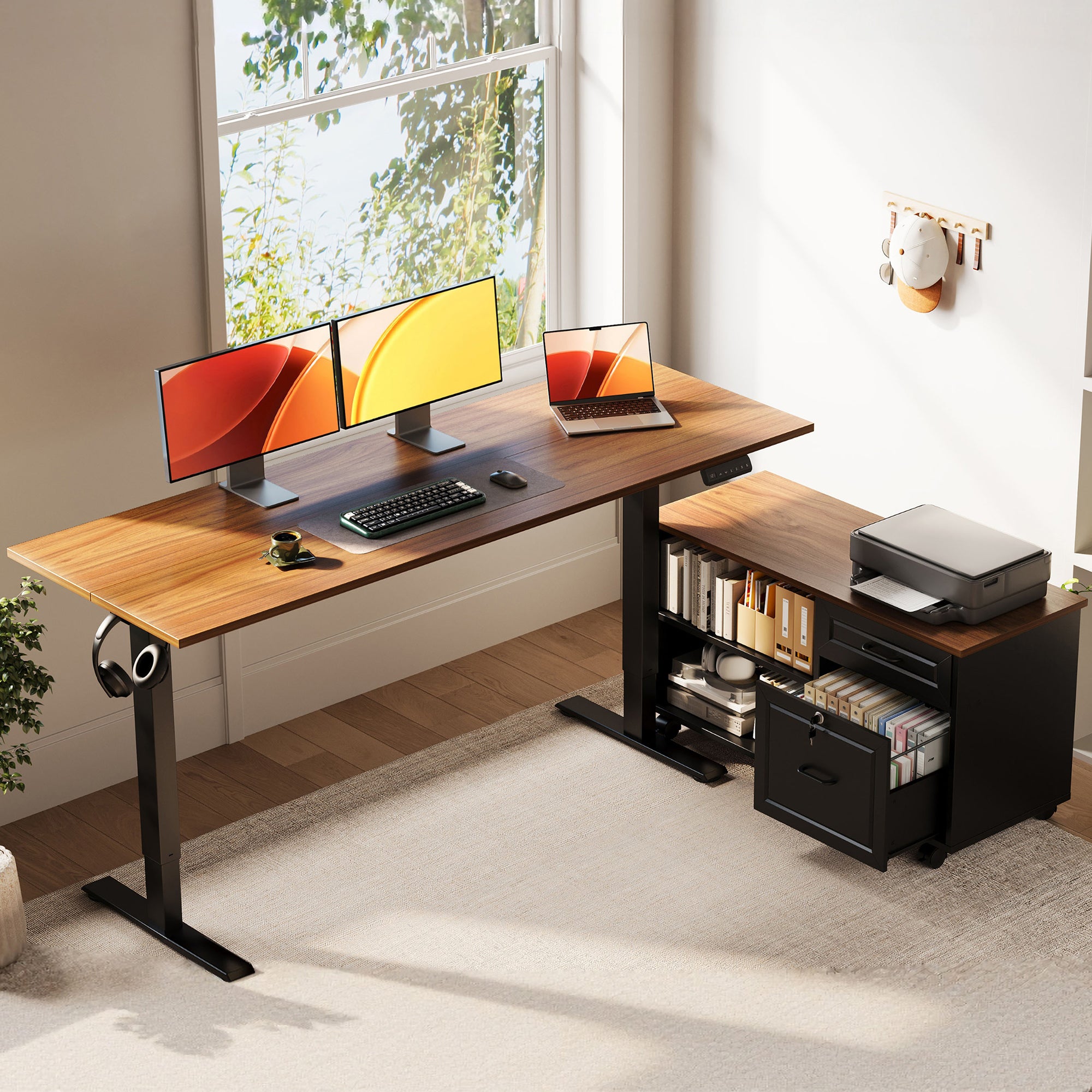
Clutter rarely looks serious at first. A charger here, notes there, a headset, a notebook, maybe a printer on the side. Then your desktop becomes the place where every small interruption lands. That is why a standing desk with drawers can matter for focused home work. It does more than raise and lower. It can reduce visual noise, shorten reach time, and keep your main work zone clear when you need to think.
For many buyers comparing Ergonomic Standing Desks and Sit-Stand Workstations, the real decision is practical: will storage improve your daily workflow enough to justify the extra size and complexity? This guide looks at function first, not hype. You will see where drawers help, where they get in the way, and how to evaluate layout, comfort, and Home Office Ergonomics using real use cases and current guidance from OSHA and CDC.
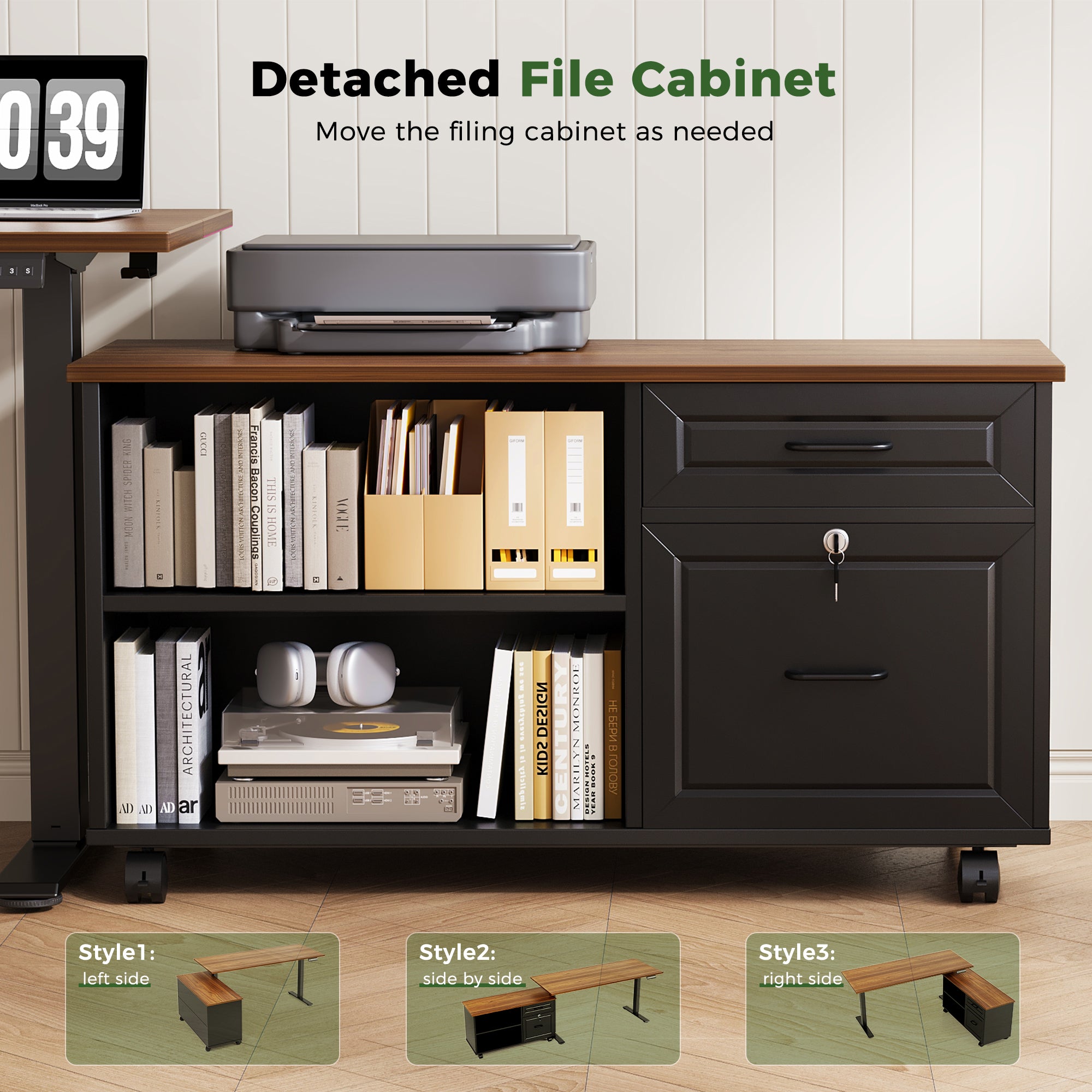
Desk Recommendation: 55" L-Shaped Standing Desk with Movable File Cabinet | OffiGo
What Makes This Desk Type Different?
A standing desk with drawers combines movement and organization in one footprint. That sounds simple, but the difference is important. A basic sit-stand frame gives you posture variation. A storage-integrated desk adds a system for keeping daily tools close without letting them spread across the desktop. For focused home work, that can be the difference between a clean operating zone and a desk that constantly needs resetting.
What this means
- Standard sit-stand desk: height adjustment only
- Drawer-integrated desk: height adjustment plus built-in storage
- L-shaped storage desk: more zoning for screens, writing, and admin tasks
- Modular Office Furniture approach: desk, storage, and layout planned together
Why it matters
OSHA emphasizes neutral posture and adjustable furniture, while AP News reported in May 2025 that clutter can drain mental resources and distract people from work. In plain terms, good desks help your body move, and good storage helps your attention stay on task. That is why Cable Management Systems, reach zones, and drawer placement matter almost as much as motorized height range.
How Do You Decide If Drawers Help or Hurt Your Workflow?
The answer depends on what creates friction in your room now. If your desktop fills with pens, chargers, sticky notes, adapters, and paper, drawers usually help. If your bigger problem is poor monitor height, limited knee space, or too much furniture in a tight room, drawers may solve the wrong issue.
What to check
- Do you use small tools every day, or only once a week?
- Will storage reduce visible clutter, or just hide disorganization?
- Does the drawer or cabinet reduce legroom or chair movement?
- Do you also need Cable Management Systems and power access?
- Are you building a long-term setup with Modular Office Furniture in mind?
Common mistake
A lot of people compare only motor specs and desktop width. That misses the workflow side. A desk can look impressive on paper and still feel awkward if the storage blocks movement or the desktop stays crowded because cables and devices have no home.
How to Evaluate Before You Buy
Start with your routine, not the product page. If you know what stays on your desk during a normal week, you can tell whether storage is a true benefit or just a nice-looking extra.
Step 1: Map your focused work routine
- List what you touch every session: notebook, charger, mouse, headset, files, tablet
- Separate daily-use items from occasional supplies
- Notice what creates visual clutter fastest
- Check whether the clutter is small-item clutter or large-equipment clutter
If the mess comes from compact accessories, a standing desk with drawers is often a strong fit for focused home work. If the problem is a bulky printer, piles of archived paper, or no wall storage, drawers alone will not fix the system.
Step 2: Check ergonomic and layout fit
- Confirm seated elbow angle feels natural at keyboard height
- Make sure monitor placement still works at standing height
- Leave enough knee clearance for normal chair movement
- Measure cabinet placement against door swings and walk paths
OSHA advises arranging computer components to support neutral wrist posture and minimizing time spent in one posture. Meanwhile, CDC notes that sit-stand setups work best when users can transition easily between seated and standing positions. So even the best storage layout fails if it makes posture worse.
Scenario Analysis for Real Home Offices
Different rooms create different value from drawers. That is why Home Office Ergonomics should be matched to your actual living situation, not to an ideal studio setup you do not have.
Small home office or apartment
A storage desk usually adds the most value here. Built-in organization can replace a separate cabinet and reduce visual clutter in one move. That makes the room feel calmer and often saves floor space.
Hybrid professional with multi-device setup
If your day includes a laptop, monitor, dock, notebook, and charging gear, drawers can reduce transition friction between tasks. This is where integrated Sit-Stand Workstations feel more complete than piecing together separate parts.
Shared household workspace
In a mixed-use room, drawers make reset time faster. You can clear the surface at the end of the day instead of leaving work items visible. That is a practical advantage for families, students, or anyone sharing a room with non-work activity.
Conclusion
A standing desk with drawers is worth the investment when your biggest work friction comes from clutter, scattered tools, and a desktop that never stays clear. For focused home work, the best results come when storage, movement, and Home Office Ergonomics work together instead of being solved one piece at a time. If drawers improve access without hurting legroom or layout, they can make daily work feel simpler and more controlled.
The smart next step is to compare your room size, daily tool list, and posture needs before you compare features. In many homes, integrated Sit-Stand Workstations provide more practical value than adding separate storage later.
FAQ
Are standing desks with drawers better than standard standing desks?
Yes, they can be better when storage is part of your daily workflow. A drawer-equipped desk helps if you regularly use notebooks, chargers, paper files, or small accessories that would otherwise stay on the surface. The tradeoff is that storage can add bulk and sometimes reduce knee clearance. If your setup is only a laptop and one monitor, a standard desk may be enough.
Do drawers affect ergonomics on a sit-stand desk?
Yes, drawer placement can affect ergonomics directly. If storage blocks your knees, forces your chair back, or limits keyboard placement, your seated posture will suffer. A good setup should still allow neutral elbows, proper monitor height, and free leg movement across a height range of roughly 28 to 47 inches for many users. That is why drawer design should be evaluated as part of the whole desk, not as a bonus feature.
Who benefits most from a standing desk with drawers?
Remote workers, students, creators, and hybrid professionals usually benefit most. These users often switch between typing, note-taking, charging devices, and handling small work tools during the same day. Drawers are especially useful in apartments, shared rooms, and compact offices where a second storage unit would take too much space. They matter less in ultra-minimal setups with very few accessories.
What should I compare before investing?
You should compare height range, usable desktop depth, storage access, legroom, and stability at full standing height. Also check whether the layout supports your monitor arms, docking gear, and cable paths without crowding the main work zone. If the desk includes side storage, measure both the cabinet footprint and the walking space around it. A desk that fits your workflow on paper but blocks movement in the room will feel frustrating fast.
Can a desk with drawers improve focus?
Yes, in many home offices it can improve focus by reducing visual clutter and cutting down on small interruptions. When chargers, pens, papers, and adapters have a dedicated place, your desktop becomes easier to scan and easier to work from. That benefit is strongest when the desk also supports clean cable routing and healthy posture. Drawers alone will not create focus, but they can remove repeat distractions.
Is an integrated desk system better than buying separate pieces?
Often, yes, especially if you want a faster and simpler path to a complete setup. An integrated system can align storage, workspace, and movement in one plan instead of forcing you to match separate parts later. Separate pieces offer more flexibility, but they also increase measuring, compatibility checks, and setup time. If convenience and a cleaner visual result matter more than maximum customization, an integrated solution is usually the better fit.
0 comments