
Understanding Standing Desk Storage for Home and Office

A standing desk can fix posture problems and free you from sitting all day, but clutter can undo that benefit fast. When chargers, notebooks, folders, and adapters pile up on the surface, height adjustment starts to feel less useful because your setup is never truly clear. That is why standing desk storage differences matter so much. The right storage layout keeps your daily tools close, preserves usable work area, and makes sit-stand changes smoother instead of more awkward.
For both home and office use, the real question is not just whether a desk rises and lowers. You also need to know where your accessories will live, how documents will be stored, and whether cords will stay controlled while the desk moves. That is where integrated options such as drawers, shelves, keyboard trays, cable trays, and file cabinets start to separate one desk from another. OffiGo builds around that desk-first idea, treating the workstation as a hub for work, storage, power, and everyday organization.
What storage problem are you actually trying to solve?
Before you compare models, take five minutes to look at what actually lands on your desk each day. Many buyers choose a larger desk when the real issue is poor organization, while others buy a compact desk and later realize they needed file storage or a second work zone. The best home office standing desk storage starts with your behavior, not the product page.
What to do
- Put every desk item into three groups: daily essentials, regular-access items, and occasional-use supplies.
- Keep daily essentials within arm's reach.
- Move regular-access items into drawers or shelf space.
- Store occasional-use items in cabinets or elsewhere in the room.
- Note which items must stay plugged in.
- Mark any paper, folders, or devices that need privacy.
Why this matters
- You can tell whether you need shallow drawers or file-capable storage.
- You avoid paying for extra surface area when storage is the real need.
- You get a clearer sense of whether a straight, L-shaped, or U-shaped desk fits your workflow.
Factor 1: Built-in drawers reduce surface clutter fast
The fastest way to improve office standing desk organization is to move small, messy items off the top surface. Pens, sticky notes, chargers, earbuds, cables, notebooks, and handheld devices do not need prime desktop space. Drawers make a visible difference right away, especially if you work in a bedroom office or another shared room where visual clutter adds stress.
What to compare
- No-drawer desks: clean look, but storage must be added elsewhere.
- Slim drawers: best for small accessories and light daily tools.
- Multi-drawer desks: better for mixed items, notebooks, and device gear.
- Shelf-plus-drawer setups: useful when you need both display space and hidden storage.
Best fit for compact setups
For small rooms, the OffiGo 48" Electric Standing Desk with 3 Wooden Drawers, Monitor Shelf & USB Power Outlets is a strong example of an electric standing desk with storage built directly into the workstation. OffiGo lists a 47.2" by 21.3" desktop, a 4.7" monitor shelf, 29.9" to 46.1" height adjustment, and 31.6" leg spacing, so it stays compact while still giving you three wooden drawers and better screen positioning. The built-in power hub includes 3 AC outlets and 2 USB ports, which helps reduce cable spread across the top surface.
What to watch
- Drawers help most when your clutter is accessory-based.
- If you store thick binders or hanging folders, drawers alone may not be enough.
- Make sure drawer depth does not compromise knee space.
Factor 2: Standing desk storage differences also depend on desk shape
Desk shape changes how storage supports your day. A straight desk keeps everything in one line, which works well for focused tasks and smaller rooms. An L-shaped desk creates separate zones, so you can keep your keyboard and monitors in one area while assigning the return to papers, chargers, a printer, or active project materials. A U-shaped desk goes further by wrapping storage and work surfaces around you.
What to compare by shape
- Straight desk: best for compact rooms and one main task zone.
- L-shaped desk: better for corner use, dual-monitor setups, and side storage.
- U-shaped desk: useful for long-hour workflows with multiple reach zones.
Which shape makes storage easier to use?
If your work naturally splits into zones, an L-shaped desk usually wins on function. The OffiGo 55" L-Shaped Electric Standing Desk with Wooden Drawers & Power Outlets includes four wooden drawers, a reversible side section, integrated power with AC, USB, and Type-C, and a height range of about 29.9" to 46.1". OffiGo also notes a 55.1" by 31.5" desktop and 34.8" leg clearance, which makes it easier to separate display space from stored items without adding a second table.
For a wider corner footprint, the OffiGo 63" L-Shaped Electric Standing Desk with Fabric Drawers & Built-in Power Outlets adds four drawers, a rear cable tray, reversible installation, and a main surface measuring 47" by 21.2" plus a 31.5" by 15.8" side table. That makes it a practical option for standing desk storage for small spaces where a corner must do more work.
Factor 3: File storage and enclosed organization matter more in office-style work
A desk that stores accessories is not the same as one that supports paperwork-heavy tasks. If your work includes folders, files, forms, books, or a desktop printer, you need enclosed storage with more volume. This is one of the biggest standing desk storage differences between casual home setups and more administrative workstations.
Signs you need file-capable storage
- You handle paper daily instead of occasionally.
- Your desk supports shared work, records, or client files.
- You need some privacy for documents or supplies.
- A printer or larger office tools live near the desk.
A stronger option for paperwork-heavy setups
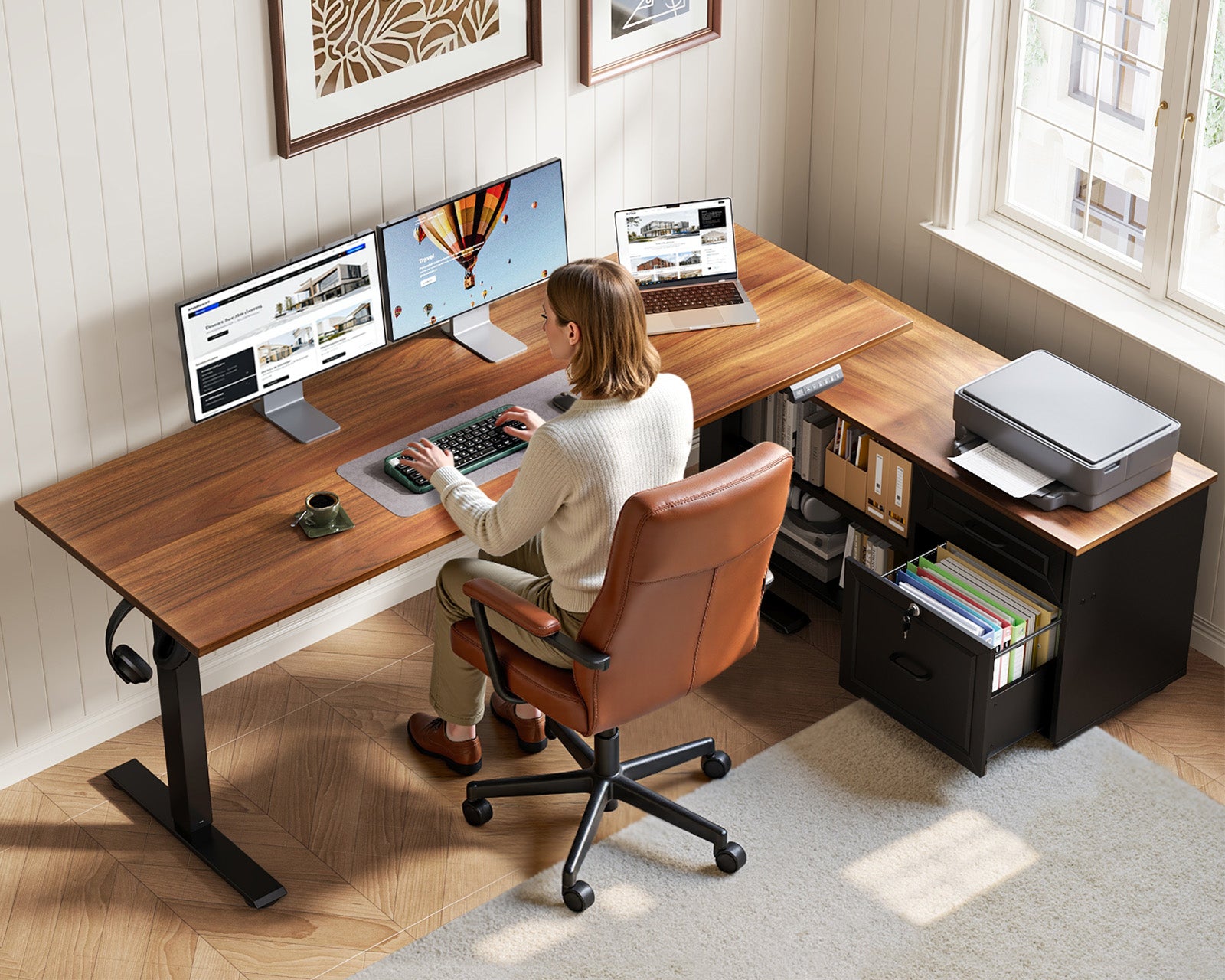
The [OffiGo 55″ L-Shaped Height Adjustable Standing Desk with Large Movable Storage Cabinet for Office Workstations] is better suited to office-style organization than a shallow-drawer setup. OffiGo describes a 55.1" by 23.6" desktop paired with a 39.4" by 15.8" by 18.7" mobile filing cabinet, plus a 28.4" to 47.2" adjustment range and three memory buttons. The cabinet is designed for printers, folders, books, and office supplies, and the lockable design adds privacy for documents and personal items. Because the cabinet is movable, you can tune placement to your room instead of forcing your workflow around a fixed pedestal.
What to watch
- Cabinet storage adds volume, but it also takes floor space.
- Check whether the cabinet sits inside or outside your normal chair path.
- Measure doorway, wall, and return clearance before choosing an L-shape with cabinet support.
Factor 4: Power and cable control are part of storage too
Many people think storage only means drawers and shelves, but cable control is part of the same problem. A desktop can still feel messy if power bricks, charging cords, and monitor cables spread across the surface or hang loosely below it. Good office standing desk organization should keep devices powered without turning the frame area into a tangle.
What to check
- Built-in AC outlets
- USB and Type-C charging access
- Rear cable tray or cable-routing support
- Outlet position relative to monitors and laptops
- Cord slack during full height travel
Why this matters
According to OSHA, computer workstation setup should support neutral postures and proper equipment placement, which becomes harder when cords and devices force awkward monitor or keyboard positions. In standing desk use, cable clutter also affects safety and smooth motion because cords need enough travel as the desk rises and lowers. (osha.gov)
Several OffiGo models align well with this need. The 48" desk includes 3 AC outlets and 2 USB ports, the 55" L-shaped desk includes AC, USB, and Type-C access, the 63" L-shaped desk adds a rear cable tray, and the 55" U-shaped desk includes 3 AC outlets and 2 USB ports. That combination makes power part of the storage plan rather than an afterthought.
Factor 5: Storage must work with movement, not block it
A standing desk is different from a fixed desk because storage has to make sense at two heights, not one. Items that feel accessible while seated can become awkward when standing, and under-desk storage that seems harmless can block knees, chair arms, or foot placement. If you want the best standing desk for home office organization, movement compatibility is just as important as storage volume.
What to test before you buy
- Picture the desk at both sitting and standing heights.
- Check whether drawers, trays, or cabinets affect knee clearance.
- Leave room for chair arms and foot movement.
- Make sure cords do not snag during travel.
- Confirm side returns and cabinets do not block walking paths.
Why adjustability changes the decision
Research summarized by CDC/NIOSH shows that workstation design and awkward postures are linked to musculoskeletal strain, so clearance and reach are not small details. A desk with storage works best when your keyboard, monitor, drawers, and legroom still feel natural after the height changes. That is why mounted drawers, integrated shelves, and intentionally placed cabinets usually work better than random bins under the frame. (cdc.gov)
Key Steps to Compare Standing Desk Storage Before You Buy
This process is the practical way to compare standing desk storage differences without getting distracted by surface-level features. Work through it on paper before you order.
Step 1: Audit your daily items
Start with the items you touch every day. You are trying to separate instant-reach tools from items that can stay hidden. This step usually tells you whether you need a standing desk with drawers or a larger cabinet system.
What to do
- List your daily tools: keyboard, mouse, notebook, headset, chargers, pens.
- Count paper items separately from accessories.
- Note which items must remain plugged in.
- Decide what can live off the main surface.
Common mistake
- Treating all desk clutter as one category instead of splitting it by access frequency.
Shop: OffiGo 48" Electric Standing Desk with 3 Wooden Drawers, Monitor Shelf & USB Power Outlets
Step 2: Match storage style to your work type
Now match your storage system to the kind of work you do. Accessory-heavy digital work usually needs drawers and charging access. Paper-heavy work needs deeper enclosed storage. Multi-device work often benefits from an L-shaped or U-shaped footprint.
What to do
- Choose drawers for accessories and small tech.
- Choose cabinet storage for folders, paper, and printers.
- Choose L- or U-shaped layouts for multi-zone tasks.
- Prioritize built-in outlets if your desk is your charging hub.
What to watch
- Do not buy file-style storage if your work is almost entirely digital.
- Do not rely on shallow drawers if you handle documents every day.
Shop: OffiGo 55" L-Shaped Electric Standing Desk with Wooden Drawers & Power Outlets
Step 3: Check the room footprint and work zones
A desk can look perfect online and still fail in your room. Measure your walls, chair path, and the space needed to open drawers or move between zones. This matters even more for home office standing desk storage because many home setups share space with beds, shelves, or storage cabinets.
What to do
- Measure wall length and corner depth.
- Leave walking room behind your chair.
- Map monitor placement before choosing straight or L-shaped.
- Check whether the return can be reversed left or right.
Why this matters
- Corner desks improve capacity only if the side return actually fits.
- Reversible layouts make awkward rooms easier to use.
Shop: OffiGo 63" L-Shaped Electric Standing Desk with Fabric Drawers & Built-in Power Outlets
Step 4: Review built-in power and cable routing
Charging access should be part of your storage decision because cables consume both visual space and physical space. If your desk supports multiple monitors, a laptop, and mobile devices, integrated power reduces the need for floor strips and loose adapters.
What to do
- Count how many devices stay plugged in daily.
- Check outlet mix: AC, USB, and Type-C.
- Make sure cords can move with the desk.
- Use the monitor shelf or keyboard tray to keep the main surface cleaner.
Product fit
The OffiGo 55“ U Shaped Electric Standing Desk with 2 Drawers & Keyboard Tray & Monitor Stand is especially useful if you want layered organization. OffiGo lists two drawers, a 21.9" by 11.8" keyboard tray, a 55.1" main length with a 29.1" U-shaped extension, and 28.3" to 46.5" adjustment. That mix works well when you want the keyboard below the main surface, screens elevated, and accessories stored out of sight.
Shop: OffiGo 55“ U Shaped Electric Standing Desk with 2 Drawers & Keyboard Tray & Monitor Stand
Step 5: Test the sit-stand workflow on paper
Before you commit, sketch where your knees, chair, cables, side storage, and daily tools will sit at both heights. This quick check catches the most common fit issues and helps you judge electric standing desk with storage options more realistically.
What to do
- Draw the desk footprint in the room.
- Mark where the chair rolls back.
- Mark drawer, cabinet, and keyboard tray zones.
- Check reach in both seated and standing positions.
- Clear the travel zone under and around the frame.
Common mistake
- Evaluating storage only while seated and forgetting how reach changes once the desk rises.
Scenario Variations
Different setups call for different storage answers. Here are four common cases that make the comparison easier.
Small home office or bedroom setup
- Prioritize compact width, drawers, and built-in power.
- A monitor shelf can replace a separate riser.
- Best fit: a compact straight desk like the OffiGo 48" model.
Dual-monitor corner workstation
- Prioritize L-shaped zoning and reversible placement.
- Use one side for computing and the other for writing or accessories.
- Best fit: the OffiGo 55" or 63" L-shaped models.
Paperwork-heavy role
- Prioritize cabinet capacity over shallow accessory drawers.
- Keep printers, folders, and books off the main work surface.
- Best fit: the OffiGo 55" L-shaped desk with movable file cabinet.
Long-hour creator or analyst setup
- Prioritize reach zones, keyboard separation, and cable control.
- A U-shape reduces repeated twisting and clutter spread.
- Best fit: the OffiGo 55" U-shaped model.
Prerequisites and Safety Checks
Measure first, then compare. Even the best standing desk for home office organization will feel wrong if the room is too tight or the under-desk clearance is ignored.
Checklist before buying
- Measure room width, depth, and walking clearance.
- Confirm desk width supports your monitor count.
- Check return depth on L- and U-shaped desks.
- Review under-desk space for knees and chair arms.
- Keep the travel zone clear before setting memory heights.
- Plan cable slack so cords do not pull tight during adjustment.
Troubleshooting Common Storage Fit Issues
| Problem | Cause | Solution |
|---|---|---|
| Desktop still crowded | Wrong storage type | Move papers to cabinet |
| Desk motion feels blocked | Items under frame | Clear travel zone |
| Corner setup feels cramped | Return too large | Recheck wall clearance |
| Cables still look messy | No routing plan | Use built-in power path |
| Files overflow drawers | Drawers too shallow | Choose cabinet storage |
What to do next
- If clutter is mostly accessories, switch to multi-drawer storage.
- If clutter is mostly documents, upgrade to cabinet-style storage.
- If movement feels awkward, review under-desk clearance and side-return placement.
- If charging is the issue, choose a desk with integrated outlets instead of adding more loose adapters.
FAQ
Is a standing desk with drawers better for a home office?
Yes, a standing desk with drawers is usually better for a home office when your main clutter comes from chargers, notebooks, pens, and small devices. Drawers hide visual mess quickly and reduce the need for extra organizers in tight rooms. They are especially useful on desks around 48 to 55 inches wide, where every inch of top surface matters. If your work is mostly digital, drawer storage often gives you the cleanest and most efficient setup.
What is the difference between drawer storage and file cabinet storage on a standing desk?
Drawer storage is best for smaller daily-use items, while file cabinet storage is better for larger, paper-heavy workloads. Shallow drawers usually handle accessories, cables, tablets, and notebooks well, but they fill up quickly with folders or printed documents. A file cabinet or larger enclosed cabinet gives you more depth, more volume, and better separation for records, books, or office supplies. If you use a printer, binders, or active files every day, cabinet storage is usually the better match.
Are L-shaped standing desks better for storage than straight desks?
L-shaped standing desks are often better for storage because they create separate zones without requiring a second piece of furniture. One side can hold monitors and input devices, while the return can handle papers, charging gear, or other work materials. That layout reduces crowding on the main surface and works especially well for dual-monitor users or corner rooms. A straight desk can still be the smarter choice if your room is narrow or your workflow stays centered on one screen.
Can built-in storage affect standing desk ergonomics?
Yes, built-in storage can affect ergonomics if it reduces knee space, pushes your chair too far back, or changes where your keyboard and monitor must sit. Good storage should support neutral reach and clear legroom in both sitting and standing positions. Before buying, check under-desk clearance, drawer depth, keyboard tray placement, and the path of the desk during height adjustment. Storage that moves with the desk or stays outside the main leg zone usually works best.
Which standing desk storage option is best for small spaces?
For small spaces, the best option is usually a compact straight electric standing desk with built-in drawers and integrated power. That combination removes desktop clutter, avoids the need for a separate cabinet, and reduces cable spread around the room. A monitor shelf can also save space by lifting the screen and creating usable storage below it. If you need a corner solution, a smaller reversible L-shaped desk can work well, but only after careful measuring.
How do I compare standing desk storage differences before buying?
Start by listing what needs instant access, what can be hidden, and what must stay plugged in every day. Then match that list to the desk type: drawers for accessories, cabinets for files, and L- or U-shaped layouts for multi-zone work. After that, measure the room, map the chair path, and check how storage will behave at both sitting and standing heights. This simple process gives you a much more accurate answer than comparing desktop size alone.
0 comments