
Introduction
Storage is the part of a sit stand desk setup that quietly decides whether your day feels smooth or chaotic. The right desk with storage keeps your work surface clear, your cables safe during height changes, and your knees free when you slide in to type. The wrong choice turns into clutter, awkward reach, and constant micro-annoyances.
Many people start by searching for a standing desk with drawers because drawers feel simple. The problem is that built-in drawers often compete with legroom and chair tuck-in space. Over time, that conflict pushes you to sit forward, twist, or keep items on the desktop anyway.
This guide compares a standing desk with cabinet layouts against a standing desk with drawers, using a practical decision framework. You will learn how to map storage zones, protect clearance, and plan cable slack so your sit stand desk stays tidy in both seated and standing modes.
Official Site: OffiGo
Core Foundations
Storage zones desktop underdesk and sidecar
A desk with drawers usually concentrates storage under the main typing zone. That can work for small items, but it compresses the space your legs need for natural posture changes.
A mobile sidecar approach spreads storage across three zones:
- Desktop zone: items used every 5 to 15 minutes (pen, notebook, phone stand).
- Underdusk zone: items used occasionally but should not block knees (headphones hook, small tray).
- Sidecar zone: larger volume storage (folders, printer paper, peripherals, and file cabinets).
When you treat storage as zones, you stop forcing everything into the same underdesk cavity. Therefore, you can keep the centerline under the sit stand desk clear for comfortable seated posture.
Clearance needs knees shins and chair arms
Clearance is not just about whether your knees fit. It is also about whether you can shift positions during long work blocks.
Common clearance conflicts happen when:
- A drawer front sits where your knees move during recline.
- The drawer box reduces shin swing space when you pull the chair closer.
- Chair arms hit the underside storage when you rotate or tuck in.
If you want a standing desk with drawers, measure your most frequent seated posture first. Check the knee-forward point, not just the neutral position. Many people sit closer during typing and lean back during reading, so you need clearance for both.
Access modes seated reach vs standing reach
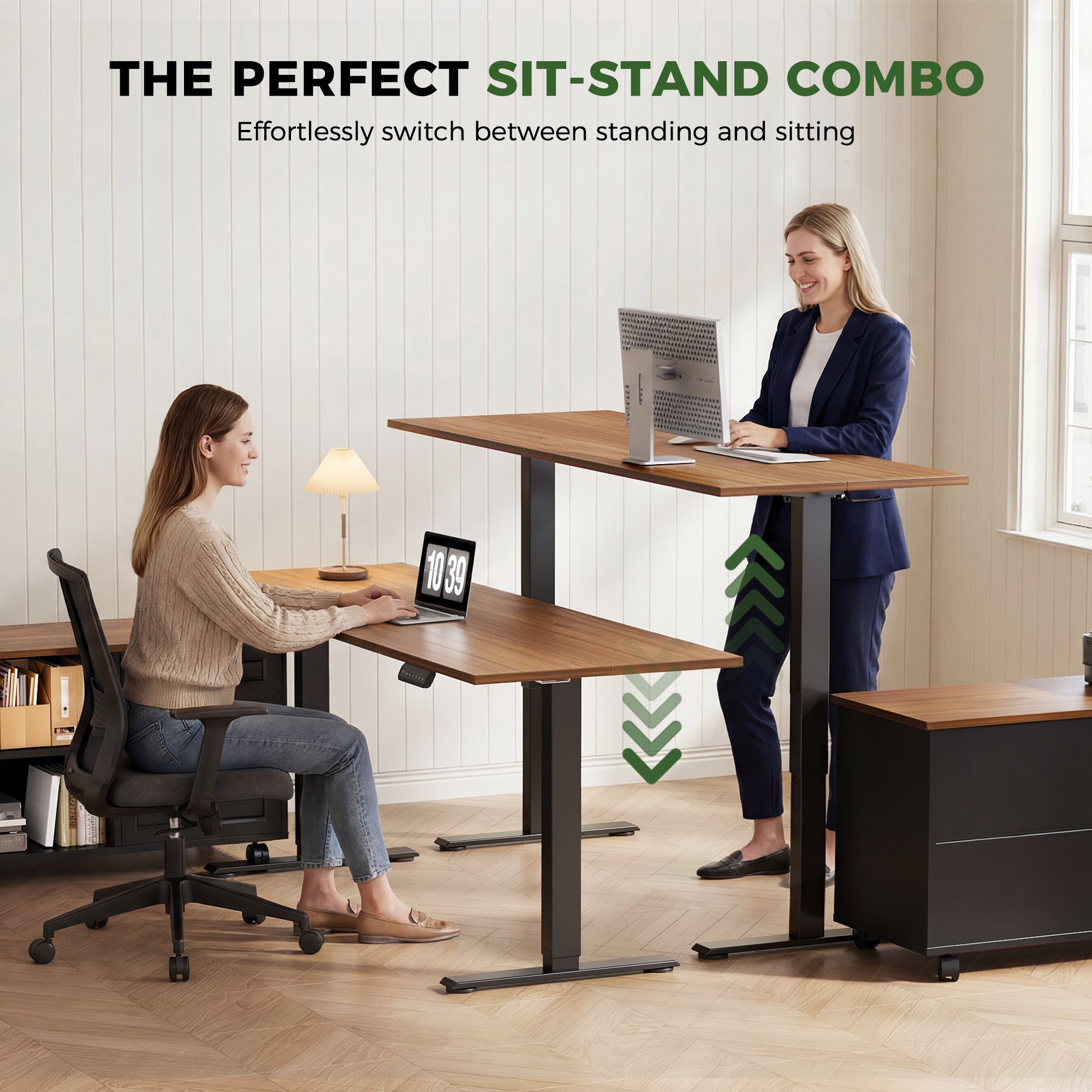
Storage that feels easy when seated can become awkward when standing. A top drawer might be perfect seated, but the same drawer can become a low bend when the desk is raised.
A mobile cabinet solves that because you can set it:
- Fully outside the primary leg zone.
- Slightly forward for standing reach.
- Slightly back for seated tuck-in.
That re-positioning matters in a sit stand desk routine because you change reach geometry every time the desk moves.
Load types paper devices and peripherals
Think in load types instead of item lists:
- Paper load: folders, notebooks, mail, archived documents.
- Device load: laptop dock, spare mouse, webcam, chargers.
- Peripheral load: headsets, controllers, external drives.
Paper load benefits most from file cabinets and hanging-folder depth. Device load benefits from drawers that open smoothly and do not snag cables. Peripheral load benefits from labeled bins so you do not dump everything into one drawer.
Built-In Drawer Systems
What it covers integrated underdesk organization
Built-in drawer systems put storage directly under the worksurface. This can reduce the need for add-on organizers, and it keeps daily tools close.
It is a strong match when:
- Your items are mostly small and lightweight.
- You do not store many hanging folders.
- You want a clean look with no extra furniture.
However, a standing desk with drawers can also cause long-term drift. As drawers fill up, the desktop becomes a staging zone again, because you avoid opening drawers during rapid task switching.
How it works fixed drawers on the desk frame
Fixed drawers attach to the desk body. That means the drawer location is locked relative to your knees, chair arms, and clamp-on accessories.
Typical mechanical trade-offs:
- Drawer boxes reduce usable underdesk depth.
- Drawer faces can become knee impact points.
- Large underdesk accessories (CPU stands, footrests, clamp mounts) may conflict.
If you plan to use monitor arms with clamps, verify that the drawer placement does not block clamp access along the rear edge.
Payoff value faster grab fewer add-ons
The best part of desk with drawers setups is speed. If you only need pens, sticky notes, and a small notebook, drawers can be a simple win.
For compact offices, a drawer-first sit stand desk can also reduce the number of objects on the floor. That helps cleaning and reduces cable tangles.

OffiGo example for drawer-first storage: the OffiGo 55" L-Shaped Electric Standing Desk with Wooden Drawers and Power Outlets uses an L-shaped top and four wooden drawers. The page lists an electric height range of approximately 29.9" to 46.1", plus integrated power with 3 AC outlets, 1 USB port, and 1 Type-C port. A listed leg clearance span is 34.8", and individual drawer dimensions are shown as 12.6" long, 11.8" wide, and 4.6" high, which helps when you plan what actually fits.
Shop: OffiGo 55" L-Shaped Electric Standing Desk with Wooden Drawers & Power Outlets
Mobile File Cabinet Sidecar
What it covers movable filing plus surface
A standing desk with cabinet storage shifts bulk and paper out of the knee zone. A mobile filing cabinet can hold:
- Hanging folders and archived paperwork.
- Printer paper and consumables.
- Larger peripherals that do not belong on the desktop.
Because the cabinet has its own footprint, you can size storage to your workload instead of forcing the workload into shallow drawers.
How it works rolls under return or wing
In an L-shape, the cabinet can slide under the return, sit at the end, or align inline to create an I-shaped run. That flexibility matters when you change rooms or rotate your desk.
You can also separate two priorities:
- Keep the primary typing bay free for posture and chair motion.
- Use the side bay for storage, printers, or a scanning station.
Payoff value adaptable layout preserves legroom
A mobile cabinet usually wins on long-term ergonomics because it preserves the underdesk volume that your legs need. It also wins on reconfiguration because you can move storage without replacing the sit stand desk.
If you move apartments or change office layouts, the cabinet approach protects your investment. You adjust the cabinet position, not your posture.
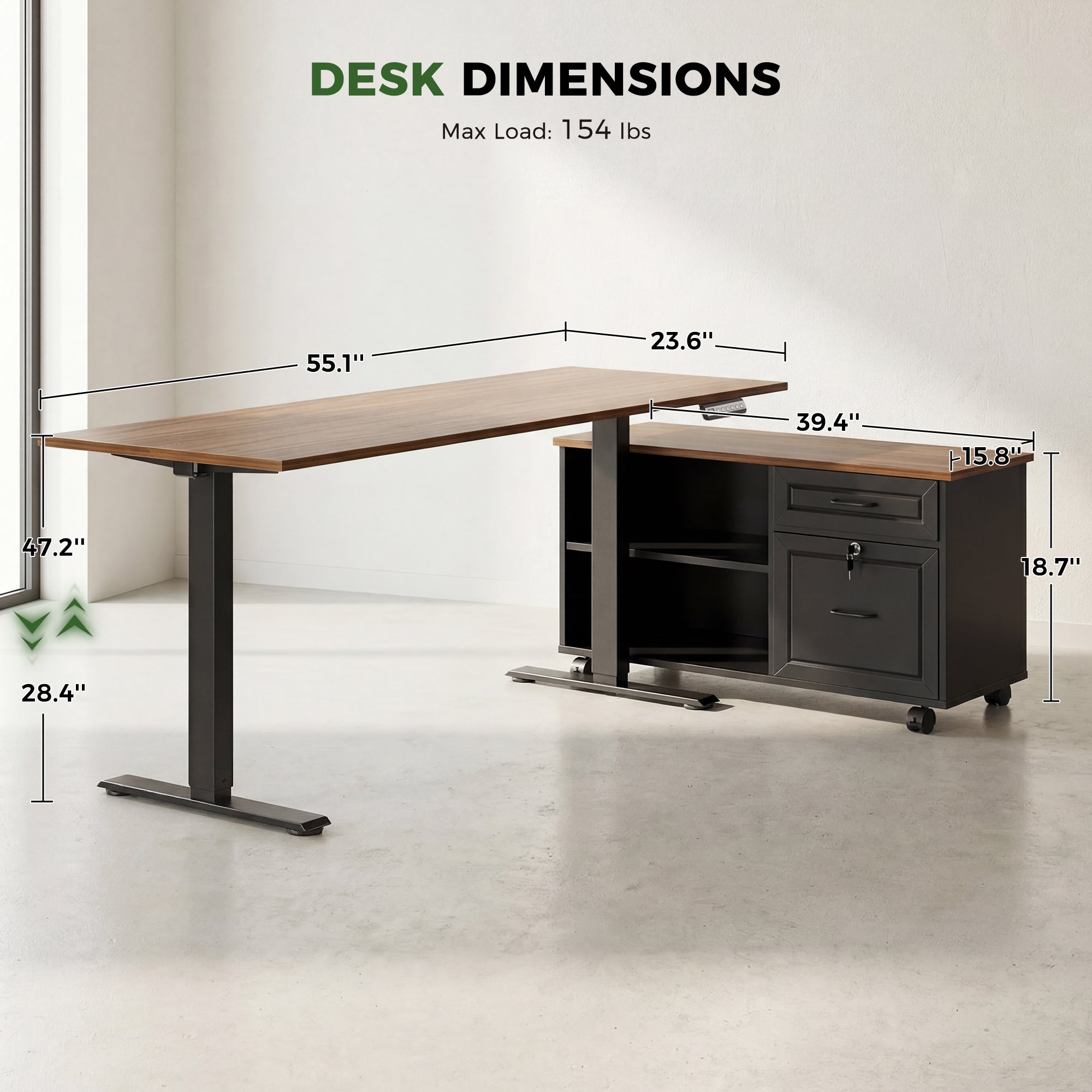
OffiGo example for cabinet-first storage: the OffiGo 55" L-Shaped Height Adjustable Standing Desk with Large Movable Storage Cabinet pairs a 55.1" x 23.6" desktop with a 39.4" long cabinet that is shown as 15.8" wide and 18.7" high on the product imagery. The desk lists an electric height range from 28.4" to 47.2" and shows a max load of 154 lbs on the dimensions image. The product page also describes flexible cabinet placement (left, right, or inline) and a lockable cabinet for document privacy.
Shop: OffiGo 55" L-Shaped Standing Desk with Movable Cabinet
Hybrid Storage Desk Drawers Plus Cabinet
What it covers split daily and archive items
A hybrid approach uses a desk with drawers for daily tools and a side cabinet for paper and bulk. This solves a common failure mode: you buy a standing desk with drawers, then realize paper stacks do not belong in shallow drawers.
A simple split that works for most people:
- Drawers: small daily tools, chargers, adapters, meds, sticky notes.
- File cabinet: active projects, archived folders, printer consumables.
This reduces desktop pileups because you give paper a real home.
How it works drawers for tools cabinet for files
The key is to avoid duplication. If both drawers and file cabinets store the same category, you will lose track of items.
Instead, label by function:
- Drawer 1: writing and marking
- Drawer 2: cables and charging
- Drawer 3: meeting kit (headset, webcam)
- Cabinet: projects by client or quarter
This system supports fast retrieval whether you are seated or standing.
Payoff value reduces desktop pileups long-term
Hybrid storage is usually the best answer for people who want the convenience of a standing desk with drawers but also handle real paper volume. It also supports shared home offices, where each person can own a drawer set while the cabinet holds family paperwork.
OffiGo compact hybrid example: the OffiGo 48" Electric Standing Desk with 3 Wooden Drawers, Monitor Shelf and USB Power Outlets is designed for small spaces while still functioning as a desk with drawers. The product page lists a height range from 29.9" to 46.1" with 3 memory presets, and highlights a built-in power hub with 3 AC outlets and 2 USB ports. The imagery also shows a 47.2" x 21.3" desktop, a 4.7" high monitor shelf, and a 31.6" distance between desk legs, which is useful when you plan leg clearance and footrest placement.
Shop: OffiGo 48" Electric Standing Desk with 3 Wooden Drawers
Cable and Power Storage Planning
What it covers outlets bricks and cable slack
Cable planning is part of storage because cords occupy space and create failure points. In a sit stand desk, cables must travel with the desk without pulling, snagging, or lifting devices.
Two storage mistakes happen often:
- Power bricks are left on the floor, so the cord becomes taut at standing height.
- Cables are stuffed into a drawer, so the drawer becomes a tug point.
Cable management works best when you treat it like a flexible loop system.
How it works route loops for height travel
Use a simple three-step routing model:
- Fixed zone: wall outlet to floor power strip location.
- Transition zone: a slack loop that can extend from seated to standing.
- Moving zone: the final run along the desk frame to your devices.
Keep the transition zone free of drawer slides and sharp edges. If you use file cabinets, keep power bricks in the cabinet and route one clean bundle to the desk.
According to OSHA, support devices for fixed workstations can reduce prolonged standing fatigue and help promote neutral postures. In practice, that means cable slack should also support neutral posture, because a taut cable can pull a monitor, force a reach, or change where you place equipment.
Payoff value fewer snags cleaner sit stand desk
Good cable storage prevents small daily disruptions. It also protects devices because it reduces accidental drops when a cable catches during height adjustment.
If your desk has built-in outlets, you can shorten cable runs. If your desk does not, a side cabinet can serve as the power hub so the desktop stays clean.
L-Shape Workflow Storage Mapping
What it covers primary zone vs secondary zone
An L-shape gives you the chance to separate deep work from support tasks.
A common layout:
- Primary zone: keyboard, mouse, main monitor, writing pad.
- Secondary zone: printer, inbox tray, reference binders, docking station.
The goal is to keep the primary zone as empty as possible. Therefore, you reduce wrist deviation and avoid pushing the keyboard forward.
How it works storage on non-dominant side
Most people mouse with their dominant hand. Put storage on the non-mousing side so the mousing lane stays clear.
Quick rule of thumb:
- Right-handed mouse users: storage left.
- Left-handed mouse users: storage right.
If you use a cabinet, place it under the return so the main typing bay remains open.
Payoff value clearer mousing better task switching
When storage is off the primary lane, you switch between tasks faster. You also keep your elbows closer to your body, which supports neutral shoulder posture.
A final reminder from UCLA Health: standing is not a substitute for exercise, so a sit stand desk should support alternating positions and adding movement rather than locking you into one static posture. UCLA Health notes that standing is not exercise.
Selection Decision Guide
Leg clearance prevents knee impacts
Choose storage based on the space your body needs first.
Use this quick check:
- If you frequently recline, cross legs, or pull close for typing, avoid deep underdesk drawers in the center bay.
- If you sit upright and rarely tuck in, drawers may be fine.
- If you share the desk with different users, a mobile cabinet usually adapts better.
Access frequency daily tools vs archives
Match storage type to how often you touch the item:
- Many times per day: shallow drawers or desktop organizer.
- Once per day: cabinet shelf or top drawer.
- Weekly or monthly: hanging folders in file cabinets.
This keeps your sit stand desk from becoming a paper parking lot.
Reconfiguration moving offices changing layouts
If you expect changes in the next 12 to 24 months (new room, new monitors, new printer), a standing desk with cabinet storage is safer. You can reposition the cabinet and keep the workflow.
If your layout is stable and you want simplicity, a standing desk with drawers can be a clean single-piece solution.
Stability needs weight shift at standing height
At standing height, people lean on desks more. Storage choices can change stability:
- Underdesk drawers add mass but do not widen the stance.
- A side cabinet adds mass and can act as a stabilizing side element if positioned correctly.
Scenario framework table
| Scenario | Primary risk | Better fit | Why it works | Trade-off |
|---|---|---|---|---|
| Small tools only, minimal paper | Desktop clutter | Desk with drawers | Fast access, fewer add-ons | Can reduce legroom |
| Paper-heavy work, client folders | Piles and privacy | Standing desk with cabinet | Real filing volume, lockable options | Needs floor planning |
| Mixed work, devices plus paperwork | Storage mismatch | Hybrid drawers plus file cabinets | Daily tools in drawers, paper in cabinet | More categories to label |
| Frequent moves or room changes | Layout lock-in | Mobile cabinet sidecar | Reposition storage without replacing desk | Extra piece to manage |
Best Practices and Pitfalls
Best Practices
- Keep the center bay open. Treat the space under your main typing position as posture space, not storage. This helps you sit close enough to type without rounding shoulders.
- Label your file flow. Use simple, repeatable folder names (project, client, year) so file cabinets do not become a junk zone. A cabinet system only works if retrieval stays fast.
- Store heavy items low and to the side. Put bulk paper, spare devices, and chargers in the cabinet base or lower shelves. This reduces temptation to stack items above your knees.
- Plan one cable transition loop. Create one slack loop that supports full height travel. Keep it away from drawer slides and sharp corners.
- Use the L shape as lanes. Reserve one wing for production (typing, mousing) and the other for support (printing, reference, storage). Task lanes reduce desk sprawl.
Common Pitfalls to Avoid
- Blocking chair tuck-in with drawers. If your chair cannot slide under the desk, you will sit forward. That posture often increases neck strain during long sessions.
- Overloading one side of the L shape. A heavy printer, stacks of paper, and a cabinet all on one wing can make the secondary zone crowded. Keep one open landing spot for active documents.
- Storing heavy items above knee level. Heavy storage in a top drawer encourages awkward lifting and twisting. Put weight in the cabinet base, not in an underdesk drawer you open while seated.
- Hiding cables inside drawers. Cables catch on drawer contents and pull during height changes. Keep cables in a tray, raceway, or cabinet compartment instead.
- Treating standing as the only goal. Standing too long without support can cause fatigue. Alternate positions and consider supportive options like a footrest or standing mat.
Conclusion
A desk with storage is only useful if it supports posture, reach, and the way your work actually flows. For many people, a standing desk with cabinet storage outperforms a standing desk with drawers because it preserves legroom and scales better for paper and peripherals.
If you want the simplest framework, start with clearance, then access frequency, then cable slack. When those three align, your sit stand desk stays clean in both seated and standing modes.
Official Site: OffiGo
FAQ
Is a standing desk with drawers always better?
No, a standing desk with drawers is not always better because drawers can reduce legroom and change how close you can sit to the keyboard. The best choice depends on your posture habits, especially whether you tuck in close or recline during reading. Drawers also tend to work best for small tools, not for paper-heavy storage. If your work includes frequent folders and documents, file cabinets often keep the desktop clearer.
What size file cabinets work best with a sit stand desk?
A file cabinet works best when its height allows comfortable access without deep bending while you are standing. The cabinet should also fit under an L-shape return or beside the desk without blocking your chair path. Choose a depth that supports hanging folders if you store active projects on paper. If you use a printer, confirm the cabinet top can act as a stable staging surface.
Should file cabinets be on the left or right side?
Place file cabinets on the non-mousing side so your primary movement lane stays open for mouse and keyboard work. This reduces shoulder reach and keeps the main typing bay visually uncluttered. For right-handed mouse users, that usually means cabinet left, and the reverse for left-handed mouse users. If you share the desk, prioritize the side that keeps the chair tuck-in area open.
Do I need both a desk with drawers and file cabinets?
You do not always need both, but many people benefit from a hybrid approach. Use desk drawers for small daily tools and device accessories you touch many times per day. Use file cabinets for paper volume, archived projects, and privacy-sensitive documents. This split prevents the desktop from turning into a paper parking lot.
Why do built-in drawers feel cramped on some sit stand desk setups?
Built-in drawers feel cramped when they occupy the same underdesk space your knees and shins need for natural movement. Even if you fit in a neutral posture, you may hit the drawer when you pull in closer to type or shift during long sessions. Drawer boxes can also restrict where you place footrests and clamp-on accessories. The result is often subtle posture changes that build discomfort over time.
How much cable slack do I need for a height adjustable desk?
You need enough slack for the full travel from your lowest seated height to your highest standing height, plus a small buffer so cords do not become taut. A good method is to create one controlled loop that can extend smoothly without touching drawer slides. Keep power bricks and heavy adapters in a stable location like a cabinet compartment, not dangling under the desktop. After setup, run the desk through its full range once and confirm nothing pulls.
Can a mobile cabinet make a standing desk less stable?
A mobile cabinet usually does not reduce desk stability because it is a separate piece and does not change the desk frame. Instability more often comes from uneven flooring, unbalanced monitor arms, or leaning heavily at maximum height. However, a cabinet can create a trip or bump hazard if it sits in your chair path. Lock the casters when parked, and keep the cabinet aligned to avoid repeated contact.
What is the simplest way to decide between drawers and file cabinets?
Start with leg clearance, because comfort determines whether you will use the sit stand desk consistently. Next, sort your items by access frequency, because daily tools fit drawers while paper volume fits file cabinets. Finally, consider future layout changes, because mobile cabinets adapt better when you move or add equipment. If you answer those three questions clearly, the right desk with storage choice usually becomes obvious.
0 comments