
Understanding Standing Desk Features That Actually Matter
Cramped setups do more than look messy. They slow simple actions like docking a laptop, reaching a notebook, or adjusting a monitor, and that friction adds up over a full workday. The standing desk features that matter most are the ones that make movement easier, improve posture, and keep tools organized without forcing extra furniture into the room. In other words, a good electric standing desk should help you work better, not just rise and lower.
That is why this guide treats standing desk features as a workflow decision, not a style trend. You will see how height adjustment, storage, layout shape, ergonomic accessories, and charging access work together in a modern home office standing desk setup. OffiGo’s desk-centric approach is useful here because its products are built around the idea that your desk should act as the main hub for work, storage, and device access throughout long daily sessions.
What Features Define a High-Performing Standing Desk?
A high-performing desk is not defined by one spec. What matters is how several features work together under your real load: monitors, laptop, charger, notepads, and everything else you reach for repeatedly. Most readers will get the best long-term value from an adjustable-height model because it supports regular posture changes, while fixed-height desks and converters fit narrower situations. Reference guidance also emphasizes that switching positions every 30 to 60 minutes is more practical than standing all day. Arenson Office Furniture makes that point clearly, and it aligns with ergonomic workstation guidance from OSHA.
Height range and adjustment control
This is the first thing to check because every other ergonomic benefit depends on it. A desk should move smoothly enough that you will actually use the sit-stand function instead of leaving it at one height for weeks.
- Electric height adjustment means the desk lifts by motor rather than manual crank.
- Memory presets store preferred sitting and standing heights for one-touch changes.
- Useful range matters more than “adjustable” as a label.
- Control placement should be easy to reach during normal work.
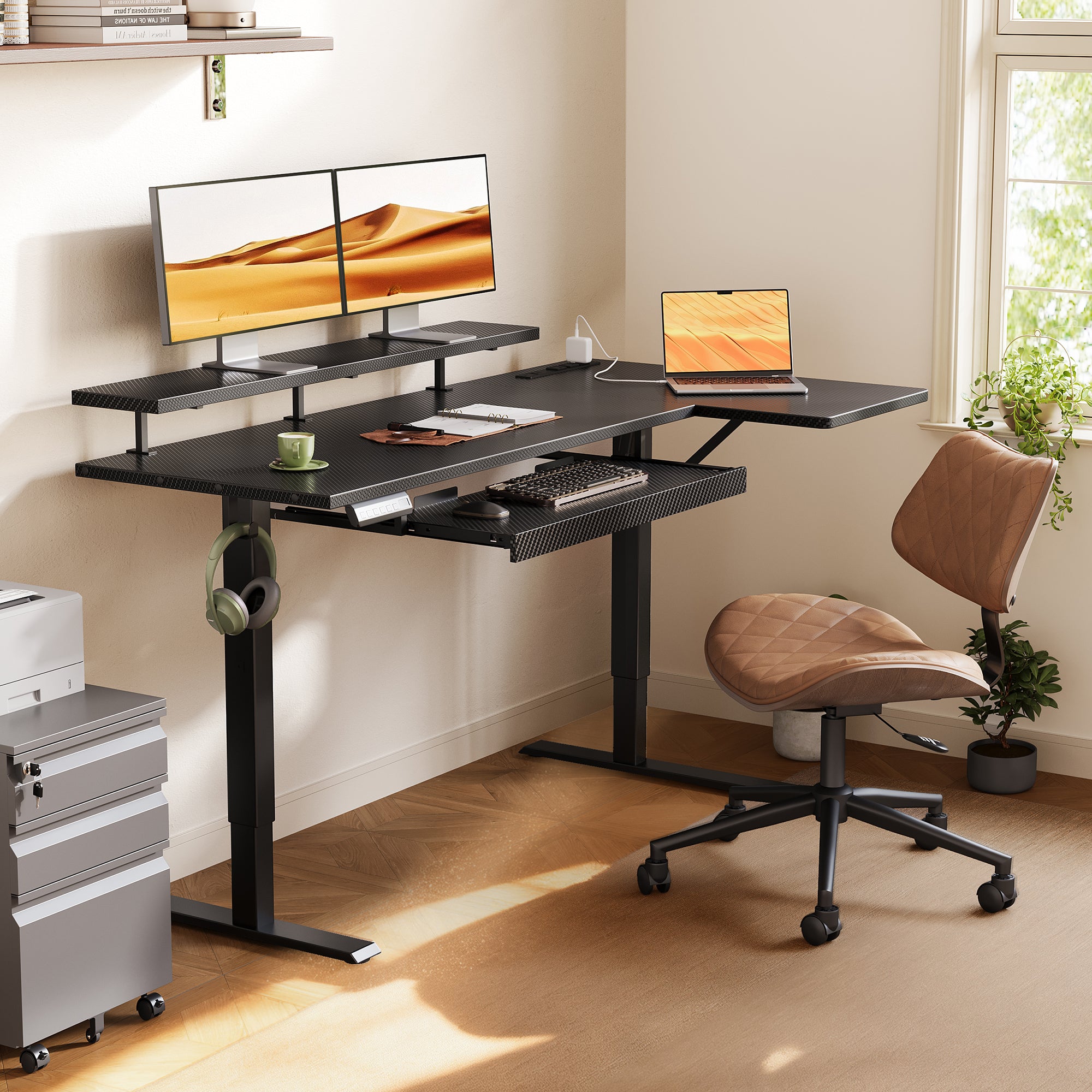
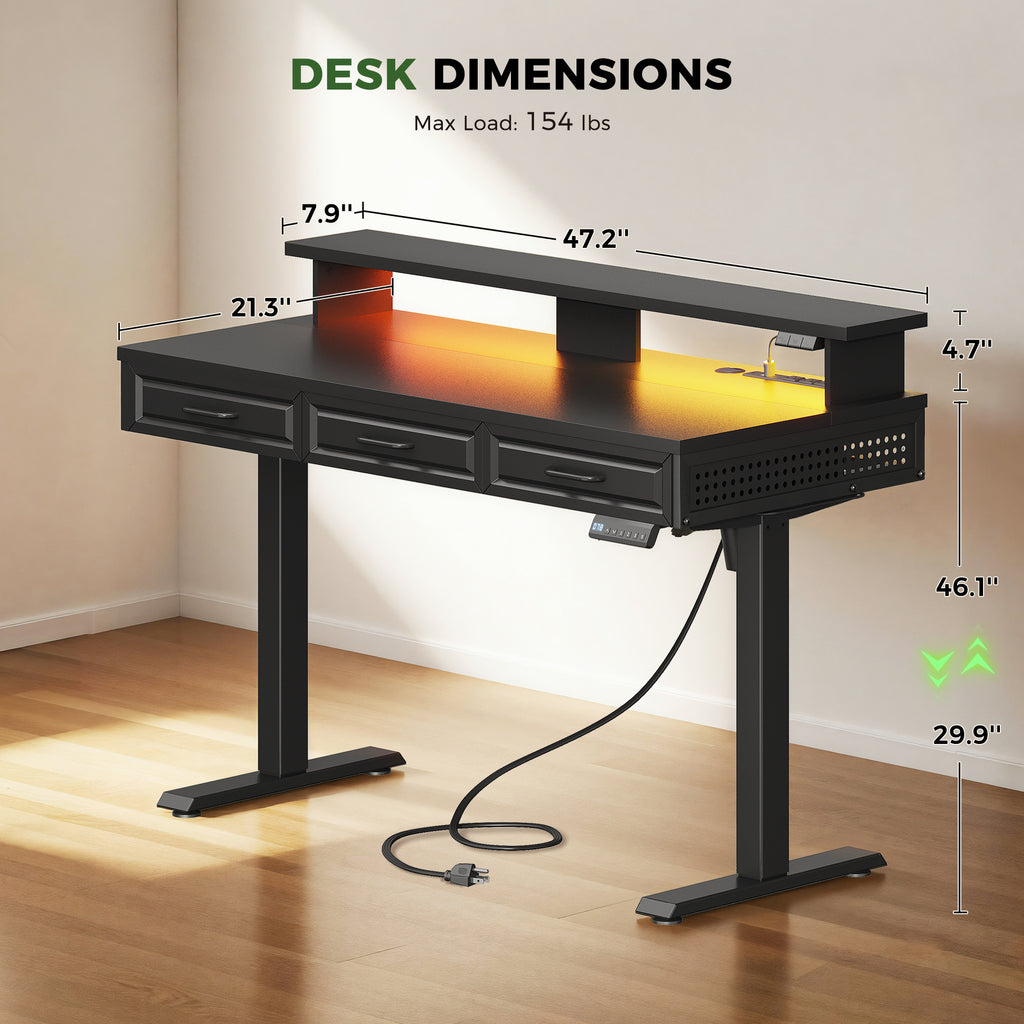
For example, the OffiGo 55" L-Shaped Electric Standing Desk with Keyboard Tray & Monitor Shelf adjusts from 28.4 to 47.2 inches and includes 3 memory presets, while the [OffiGo 48" Electric Standing Desk with 3 Wooden Drawers, Monitor Shelf & USB Power Outlets] adjusts from 29.9 to 46.1 inches with 3 memory presets. Those ranges are broad enough for many home-office users and make repeated transitions much easier.
Stability under real working loads
A desk can feel fine when empty and still wobble when loaded with two monitors, a laptop stand, speakers, and a full drawer. Stability matters because movement at standing height is more noticeable, especially while typing.
What to check:
- Load capacity with actual numbers, not vague claims
- Frame material, especially steel support structure
- Leg spacing and shape support for wider tops
- Accessory weight, including monitor shelves and drawers
The OffiGo 48-inch model is rated for 154 pounds and uses an alloy steel frame with engineered wood surfaces. That matters for people running a dual-monitor plus laptop setup instead of a single lightweight screen. Arenson’s guide also notes that electric frames usually offer better support for heavier multi-monitor setups than simpler alternatives.
Surface shape and usable workspace
Desk size is not just width. The shape changes how many work zones you can create and how easily you can keep key items in reach.
What this means
A straight desk favors compact simplicity. An L-shaped standing desk uses a corner efficiently and creates separate zones for typing and side tasks. A U-shaped standing desk gives you a wraparound layout that can support display work, writing space, and storage reach at the same time.
What to check
- Main desktop depth and width
- Side wing dimensions on L or U models
- Keyboard tray size if included
- Monitor shelf width and height
- Room corner clearance and walking space
The OffiGo 55-inch L-shaped model uses a 39.4 x 21.3 inch main surface with a 31.5 x 15.8 inch side desktop, plus a 25.6 x 11.8 inch keyboard tray and a 39.4 x 7.9 inch monitor shelf. Those numbers tell you much more than “large desktop” ever could.
Storage, charging, and ergonomic support
These are the standing desk features that often decide whether a setup stays clean after the first week. Storage should reduce clutter without blocking legroom or interfering with desk travel. A monitor shelf and keyboard tray should improve body position, not just add layers.
Storage-focused reference content highlights an important point: the best storage is not always the biggest. UPLIFT Desk stresses that mounted storage should keep daily items accessible without taking too much under-desk space, and that storage works best as a system rather than a collection of random add-ons. That logic fits OffiGo’s integrated models well because drawers, shelves, trays, and power hubs are designed into the desk from the start.
How Do You Match Desk Features to the Way You Work?
A desk works best when it matches your routine, not when it checks the most boxes. If you mainly alternate between writing, typing, and video calls, the right control layout and monitor height matter more than extra decorative add-ons. If you handle cables, accessories, and documents all day, then standing desk storage and charging access become much more important.
Build the workflow around movement
Your electric standing desk should make posture changes easy enough that you actually use them. The friction is usually small but real: a slow lift, awkward controls, or a desk height that never feels quite right. Once those barriers are removed, standing becomes a repeatable habit instead of a once-a-day experiment.
A few setup rules make a bigger difference than most people expect:
- Change positions every 30 to 60 minutes rather than standing for hours.
- Keep elbows near your torso at about 90 to 100 degrees while typing, based on OSHA.
- Position the top of the screen at or slightly below eye level; OSHA also notes the monitor should generally sit 15 to 20 degrees below horizontal eye level in normal use through its computer workstation guidance.
- Keep the keyboard and mouse close enough that your shoulders stay relaxed.
This is where an ergonomic standing desk with a monitor shelf and keyboard tray can help. On the OffiGo 55-inch L-shaped model, the raised shelf supports better screen height while the pull-out tray opens more surface area on top. That combination is useful for people who alternate between focused typing and spread-out desk work.
Add features that reduce desktop clutter
Clutter is not only visual. It also increases reach distance, blocks writing space, and makes it harder to change positions cleanly. The most useful standing desk storage keeps high-frequency items close, low-frequency items contained, and cables from spilling across the work surface.
Best fit storage features
- Built-in drawers for notebooks, chargers, pens, and small devices
- Monitor shelves for vertical organization and screen elevation
- Keyboard trays to reclaim top-surface depth
- Built-in power outlets for charging without extra strips
- Cable trays or hidden routing for clean desk travel
The [OffiGo 48" Electric Standing Desk with 3 Wooden Drawers, Monitor Shelf & USB Power Outlets] is a strong example for compact rooms because it combines three wooden drawers, a full monitor shelf, 3 AC outlets, 2 USB ports, LED lighting, and a hidden cable tray in a 47.2 x 21.3 inch footprint. For small home offices, that can replace separate organizers and reduce furniture sprawl fast.
Which Standing Desk Layout Makes the Most Sense?
Desk shape changes your workflow more than many feature lists admit. A straight desk can be perfect if you want a clean, compact setup. An L-shaped standing desk creates a second zone without adding a second table. A U-shaped standing desk works best when your desk has to function as a full command center for screens, accessories, notes, and storage.
Straight desks for compact efficiency
If your room is tight, a straight desk usually gives you the easiest fit and the simplest walking clearance. It is a smart choice for bedrooms, apartments, or shared rooms where every inch matters.
The compact OffiGo 48-inch model is a good fit when you need:
- One or two screens
- Integrated drawer storage
- Charging at the desktop
- A smaller overall footprint
- A clean home office standing desk with fewer pieces around it
L-shaped desks for corner workflows
An L-shaped standing desk is usually the best middle ground between compact size and serious workspace zoning. It helps you separate core typing from side tasks like note-taking, docking devices, or holding a printer.
The OffiGo 55" L-Shaped Electric Standing Desk with Wooden Drawers & Power Outlets is useful if storage is the priority, while the OffiGo 55" L-Shaped Electric Standing Desk with Keyboard Tray & Monitor Shelf is stronger for users who want ergonomic accessories built in from day one. The reversible L layout also makes room planning easier because you can match the corner orientation to the space.
U-shaped desks for multi-zone setups
Some workflows need more than one clear surface. If you switch constantly between screens, paperwork, accessories, and charging, a U-shaped standing desk gives you better zoning than simply buying a wider straight top.
Two OffiGo examples show how this layout can work:
- The OffiGo 55" U-Shaped Electric Standing Desk with Monitor Stand & Keyboard Tray is built for wraparound productivity with built-in power, USB access, LED lighting, a full monitor stand, and a slide-out keyboard tray.
- The OffiGo 55" U-Shaped Electric Standing Desk with Drawers & Power adds 2 drawers, a 21.9 x 11.8 inch keyboard tray, a 55.1 inch upper shelf span, 28.3 to 46.5 inch height range, and 42.9 inches of leg spacing.
| Layout | Best for | Main advantage | Main trade-off |
|---|---|---|---|
| Straight | Small rooms, simple setups | Easy fit and clean footprint | Fewer work zones |
| L-shaped | Corner offices, dual-task setups | Better zoning without huge sprawl | Needs corner planning |
| U-shaped | Multi-monitor, high-access workflows | Wraparound reach and larger work envelope | Takes more room and planning |
Standing Desk Storage, Power, and Ergonomics in Real Home Offices
Real home offices rarely start empty. Most people are trying to improve a room that already has cables, notebooks, chargers, and limited floor space. That is why the best standing desk features are the ones that solve several problems at once.
Small-space setup
A compact room benefits from vertical organization more than raw width. The goal is to keep the floor open while giving every daily item a place.
What usually works best:
- A narrower desktop around 48 inches
- Built-in drawers instead of separate rolling storage
- A monitor shelf to free surface depth
- Built-in power outlets to cut down on power-strip clutter
- Clean cable routing behind the desk
That makes the OffiGo 48-inch model a practical fit for apartments and bedrooms. The three drawers reduce desktop overflow, while the shelf lifts the monitor and frees room underneath for notebooks or a dock.
Multi-monitor productivity zone
If you run two displays, a laptop, and reference materials, zoning matters more than decoration. This is where an L-shaped standing desk or U-shaped standing desk starts to outperform a basic rectangular frame.
A better multi-monitor layout usually includes:
- A primary typing zone centered to your main screen
- A side zone for notes, tablet input, or accessories
- A monitor shelf to keep screens closer to eye level
- A keyboard tray if you need more mouse space on top
- Enough lift capacity for the full setup load
OSHA workstation guidance emphasizes keeping the keyboard platform adjustable enough to maintain arms near the torso and the top of the screen at or below eye level. That is easier to achieve when the desk already includes the right support surfaces instead of forcing you to stack improvised risers.
All-in-one workstation planning
Some users do not want to build a desk system piece by piece. They want the desk to arrive ready to handle work, storage, charging, and organization in one footprint. That is where OffiGo’s positioning around desk-centric work makes sense.
According to the brand’s about page, OffiGo focuses on workspaces where the desk is the primary place for working, storing essentials, and connecting devices throughout the day. In practical terms, that means integrated solutions like drawers, hooks, shelves, keyboard trays, power hubs, and cable management are not extras. They are part of the workflow. For long-hour remote work, that can be more useful than buying a plain frame first and solving every problem later with separate accessories.
Best Practices & Pitfalls
The smartest setup decisions usually happen before you click buy. You want features that solve daily friction, not a desk that looks impressive but creates new layout problems.
Best practices
- Choose features based on workflow first. If you type all day, prioritize monitor position and keyboard access before decorative extras.
- Measure the room before comparing desks. Include wall clearance, chair travel, drawer opening space, and walking paths.
- Check the usable dimensions, not just the headline width. Side wings, shelf depth, and tray size affect real working space.
- Prioritize ergonomic access points. Monitor height, keyboard height, and charging reach all influence comfort more than surface style.
- Think in systems. Storage, power, and cable control work best when planned together rather than added randomly later.
Common pitfalls to avoid
- Do not overbuy unused desk space. A desk that overwhelms the room often creates clutter instead of reducing it.
- Do not ignore storage clearance. Drawers and under-desk accessories should not block legroom or seated movement.
- Do not chase features without purpose. A keyboard tray, extra shelf, or lighting feature only helps if it supports your actual routine.
- Do not assume all built-in ergonomics are automatically correct. You still need to adjust monitor, chair, and desk height to your body.
- Do not treat standing as an all-day posture. More balanced routines come from changing position regularly, not staying upright for hours.
Conclusion
The best standing desk is not the one with the longest feature list. It is the one whose standing desk features actually support your daily movement, posture, storage, and device access without adding new friction. Height adjustment matters, but so do layout shape, monitor position, drawer design, cable control, and charging convenience.
If you use this guide as a feature-based checklist, the right choice becomes much clearer. A compact setup may point you toward a storage-rich straight desk, while a more complex workflow may need an L-shaped standing desk or U-shaped standing desk with stronger zoning. OffiGo’s integrated desk systems are useful examples of how an ergonomic standing desk can combine movement, organization, and power into one practical workstation.
FAQ
What standing desk features matter most for daily use?
The most important standing desk features for daily use are reliable height adjustment, stable construction, ergonomic screen and keyboard positioning, and enough usable surface area for your actual tasks. A good desk should also support regular sit-stand transitions with simple controls and memory presets when possible. Storage and charging matter when they reduce clutter rather than taking away legroom. If you use multiple devices every day, built-in power and organized storage often make a bigger difference than decorative add-ons.
Is an L-shaped standing desk better than a straight desk?
An L-shaped standing desk is better when you need separate work zones, corner efficiency, or extra room for multiple monitors and accessories. A straight desk is usually easier to fit in small rooms and works well for simpler setups with one main task zone. In practical terms, the better option depends on whether your workflow needs segmentation or simplicity. If you often switch between typing, note-taking, and device charging, the L-shape usually gives you more flexibility.
Are built-in drawers useful on a standing desk?
Yes, built-in drawers are useful when they are integrated without compromising leg clearance or desk movement. They help keep notebooks, chargers, pens, and small accessories close at hand, which reduces surface clutter and cuts down on extra storage furniture. For a small home office, that can save both floor space and setup time. The best drawer designs store frequent-use items while leaving enough open space for comfortable seated and standing use.
Do keyboard trays and monitor shelves really improve ergonomics?
Yes, keyboard trays and monitor shelves can improve ergonomics when they help you place your arms and screen at better working heights. A keyboard tray can free top-surface space and make it easier to keep elbows close to the body, while a monitor shelf can raise displays closer to eye level. However, the benefit depends on your body size, chair height, and monitor dimensions. You still need to fine-tune the desk so your elbows stay around 90 to 100 degrees and the screen remains easy to view without neck strain.
How should you evaluate built-in power outlets on a standing desk?
You should evaluate built-in power outlets by looking at port mix, placement, and how they support your daily charging habits. A useful setup often includes a combination of AC outlets and USB ports so you can power a monitor, laptop, phone, or desk light without a separate strip on the floor. The location also matters because ports should stay easy to reach after the desk is fully set up. If the desk is the center of your workflow, built-in power becomes a genuine productivity feature rather than a small convenience.
What is the best standing desk for a small home office?
The best desk for a small home office is usually a compact electric standing desk with integrated storage, clean cable management, and just enough surface area for your essential tools. In many rooms, a 48-inch model with drawers, a monitor shelf, and built-in charging performs better than a larger desk that crowds the space. Look for a footprint that preserves walking clearance and keeps storage vertical rather than spreading outward. A smaller desk works best when every feature has a clear purpose in your workflow.
0 comments